Spotipy: Pip claims to download version 2.4.4 but the files are actually from version 2.0.1
When installing spotipy over pip I didn't get the latest version, so I checked what was wrong.
I uninstalled spotipy and reinstalled it again, specifying that I wanted version 2.4.4. The terminal says 'successfully installed spotipy-2.4.4' but still the init file states that it is in version 2.0.1 and the code is old such that it doesn't support descriptions.
I can't even use pip to update it to the latest version because as far as pip is concerned it has installed version 2.4.4.
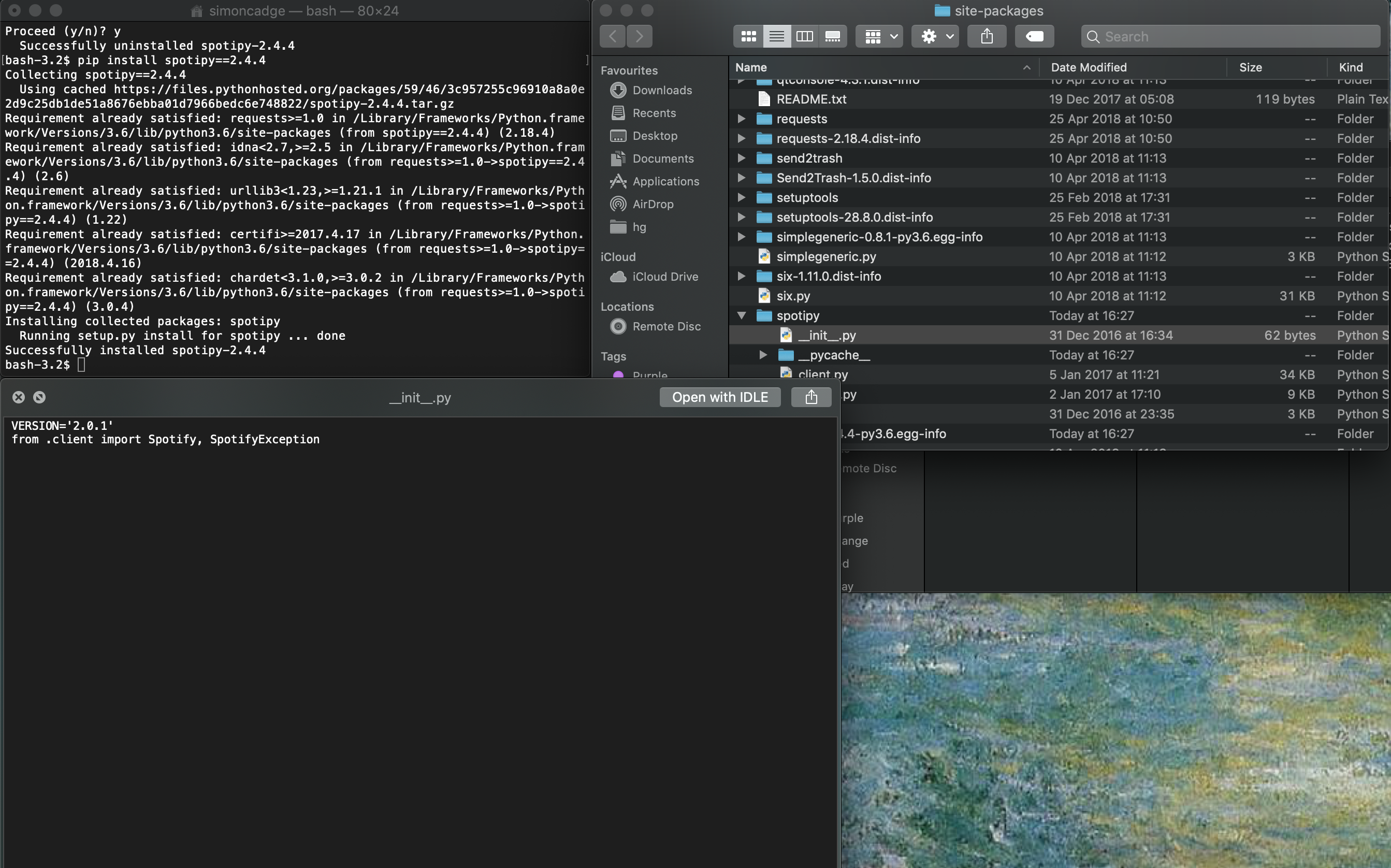
Looking deeper it seems that the init file shows the incorrect version even when I download the correct files from GitHub, but it's still true that the actual code is up to date in the version downloaded from GitHub and is incorrect in the version from pip. For example, the user_playlist_create() function doesn't take a description parameter in the pip version, and the oauth is_token_expired() function has an underscore at the very beginning.
 SimonCadge
All 9 comments
do not install using the pre built package. Instead try this:
pip install git+https://github.com/plamere/spotipy.git --upgrade
 shivasiddharth
on 30 Nov 2018
shivasiddharth
on 30 Nov 2018
It would be a good idea if the maintainers either updated or deprecated the pypi version. This cost me an hour to figure out why my code was failing after migrating it to a newly created virtual environment and it appeared that I had the latest and correct versions installed.
Fortunately I found @shivasiddharth and @SimonCadge's comments to put me on the right track
 txoof
on 15 Dec 2018
txoof
on 15 Dec 2018
The contact information for Paul at PyPi is also out of date. I'll post the message I attempted to send here in hopes that Paul (the currently listed package maintainer) sees it.
If the original package maintainer is no longer willing or able to maintain this package, what is the correct protocol for forking this and deprecating the version at PyPi?
Paul,
First, thanks for the great python module. I'm really enjoying it and terribly glad that someone wrote it so I didn't have to. I really appreciate your work.
There appears to be a conflict with the versions on PyPi and GitHub. The PyPi version is older than it claims to be and caused me much confusion when I tried to migrate my code to a new venv. Would you please consider either updating the PyPi version or removing it all together? I don't mind installing from the github version, but it is was very confusing and difficult to track down the problem when the version numbers appear to match, but the underlying code doesn't.
Thanks again for your help and for all the great work.
txoof
on 15 Dec 2018
So, I've an application that uses spotipy, but since it's out of date at PyPi, how can I set as dependency on setup.py?
Sorry for the dumb question, but I'm kinda of newbie with Python and its env.
 onhernandes
on 26 Dec 2018
onhernandes
on 26 Dec 2018
So, I've an application that uses spotipy, but since it's out of date at PyPi, how can I set as dependency on
setup.py?Sorry for the dumb question, but I'm kinda of newbie with Python and its env.
@onhernandes, I was able to get setup.py working with the following:
    dependency_links=["git+https://[email protected]/plamere/spotipy.git@master#egg=spotipy-2.4.4"],
    ...
    install_requires=["spotipy==2.4.4"],
And in Pipenv's Pipfile:
[packages]
spotipy-2-4-4 = {git = "https://github.com/plamere/spotipy.git"}
 etedor
on 7 Jan 2019
etedor
on 7 Jan 2019
@onhernandes
If you are using pipenv you can use the following:
$ pipenv install git+https://github.com/plamere/spotipy.git#egg=spotipy
txoof
on 10 Jan 2019
@etedor this worked for me.
Thanks everyone =)
onhernandes
on 11 Jan 2019
I also hit this issue today and spent some time before realizing the code in the installed package wasn't the same than what was on github. I agree with @txoof that updating the package on PyPI would be appreciated.
Adding git tags would also be nice, like that we can install a specific version with pip install git+https://github.com/plamere/spotipy.git@$VERSION.
 gesanderson
on 13 Jun 2019
gesanderson
on 13 Jun 2019
Just released 2.5.0 which contains everything from 2.4.4 as well as everything that was merged to master but never released
pip install spotipy --upgrade
 stephanebruckert
on 11 Jan 2020
stephanebruckert
on 11 Jan 2020
Related issues
 gauthamanms
·
3Comments
gauthamanms
·
3Comments
 CMoore97
·
3Comments
CMoore97
·
3Comments
 Jeoffreybauvin
·
4Comments
Jeoffreybauvin
·
4Comments
 sheheryarbutt
·
5Comments
sheheryarbutt
·
5Comments
 Inspectiver
·
4Comments
Inspectiver
·
4Comments
Most helpful comment
do not install using the pre built package. Instead try this:
pip install git+https://github.com/plamere/spotipy.git --upgrade