Spotify-downloader: Perfecting the search
Spot-dl goes haywire for non-mainstream music. It should be possible to implement a search on music.youtube.com with pyselenium instead of using the YouTube search api. This will ensure the correct song is found. To the best of my knowledge the music.youtube-url's can be downloaded just like normal url's.
 MikhailZex
All 62 comments
And sorry for not conforming to the isuue template it doesn't show on the github app (android) as of yet.
I'll be more than happy to write the song search and link retrieval code but i still have no clue as to how to intergrate that bbn into spotdl (you can get how that would be a little intimidating for a newcomer to this githubbusiness). What would you like me to do?
MikhailZex
on 5 Jul 2020
@Mikhail-Zex There used to be an option to use the Youtube API (and thus the "Music" filter) - restoring that should be more practical.
Scraping music.youtube.com is a little bit tricky. And pyselenium is a little bit complicated to use, also - Do you know of any projects that do this already?
 rocketinventor
on 6 Jul 2020
rocketinventor
on 6 Jul 2020
Nope. No other projects that do this. And the music filter just doesn't cut it for the kind of songs i hear. + pyselenium is heavy, not all that complicated.
MikhailZex
on 6 Jul 2020
Im done with the pyselenium yt music search, can i get aome help integrating it with spotdl?
MikhailZex
on 8 Jul 2020
Is this about making it possible to additionally search on music.youtube.com so that one can search for music-only videos?
 ritiek
on 8 Jul 2020
ritiek
on 8 Jul 2020
No, the problem is bigger, a read through #657 kinda helps figure out the issue.
Have serious issues downloading songs using spotdl (#657) because i listen to a fair amount of sountracks and soundtrack remakes and edits which you don't usually find anywhere near the top on YouTube.
For example you cant even find "The beautiful eyes of Rita by Anour Brahem" on a typical YouTube search except as a recording of one of his concerts.
Using YTmusic for search purposes is:
- very accurate, almost 0 error even for the weird unusual music some ppl prefer
- much simpler because you only get songs as results
- also simple cuz you only have to match song name, artist and length to nail down the song down to the album
MikhailZex
on 8 Jul 2020
Sounds good to me. However, I don't want music.youtube.com to replace the
current youtube.com search. I am more interested in adding this as a
separate provider for which people can pass in an additional option if they
want to use music.youtube.com for their downloads.
Also, pyselenium seems too heavy and deviates from the scraping techniques
used in spotdl currently. Any chance this can be implemented using urllib
and beautifulsoup (similar to how youtube.com searches are made)?
On Wed, 8 Jul, 2020, 12:54 PM Mikhail Zex, notifications@github.com wrote:
Had serious issues downloading songs using spotdl (#657
https://github.com/ritiek/spotify-downloader/issues/657) because i
listen to a fair amount of sountracks and soundtrack remakes and edits
which you don't usually find anywhere near the top on YouTube.For example you cant even find "The beautiful eyes of Rita by Anour
Brahem" on a typical YouTube search except as a recording of one of his
concerts.Using YTmusic for search purposes is:
- very accurate, almost 0 error even for the weird unusual music some
ppl prefer- much simpler because you only get songs as results
- also simple cuz you only have to match song name, artist and length
to nail down the song down to the album—
You are receiving this because you commented.
Reply to this email directly, view it on GitHub
https://github.com/ritiek/spotify-downloader/issues/778#issuecomment-655339075,
or unsubscribe
https://github.com/notifications/unsubscribe-auth/AE27U5RMDHYIR524YGZODZ3R2QNKTANCNFSM4OQ373PA
.
ritiek
on 8 Jul 2020
No don't think so, the job is about 45ish lines of code but the guys a google have mucked up the website pretty well. Took me full 4 hours to crack.
The song links load only on interaction --> it's not possible with urllib as far as i know.
About using it as an additional addon, go ahead, I'm still trying to figure out what does what. I was hoping that I could do the selenium part and some one else adds it to spotdl.
MikhailZex
on 8 Jul 2020
Alright. Let me first have a look myself if this is possible with urllib and beautifulsoup.
ritiek
on 8 Jul 2020
Cool. I'll worknover the selenium approach and open a pull req at the soonest.
MikhailZex
on 8 Jul 2020
@Mikhail-Zex I tried a search on youtube.com and music.youtube.com for the song title that you gave above. On YT Music, the _only_ version that showed up was the live one. On the regular YT site, the live one showed up first, but the regular version showed up a few results later. Probably this depends on region and personalization from being signed in.
On the older version of spot-dl, using a YouTube API key, you could set the search to only show results tagged as music (and remove the "lyrics" term from the query). I had similar problems to what you described, but that solved the issue for me. (On the older version of spot-dl, which used youtube-dl as the back-end.) Did you try this before? Did it not work for you?
In regards to what I said before, you are correct. The problem with using a web-driver/selenium is that it adds a lot of bulk to the project - not so much that it is complicated to implement (depending on which packages you use). And, as @ritiek pointed out, it is a completely different method than the one currently in use.
rocketinventor
on 8 Jul 2020
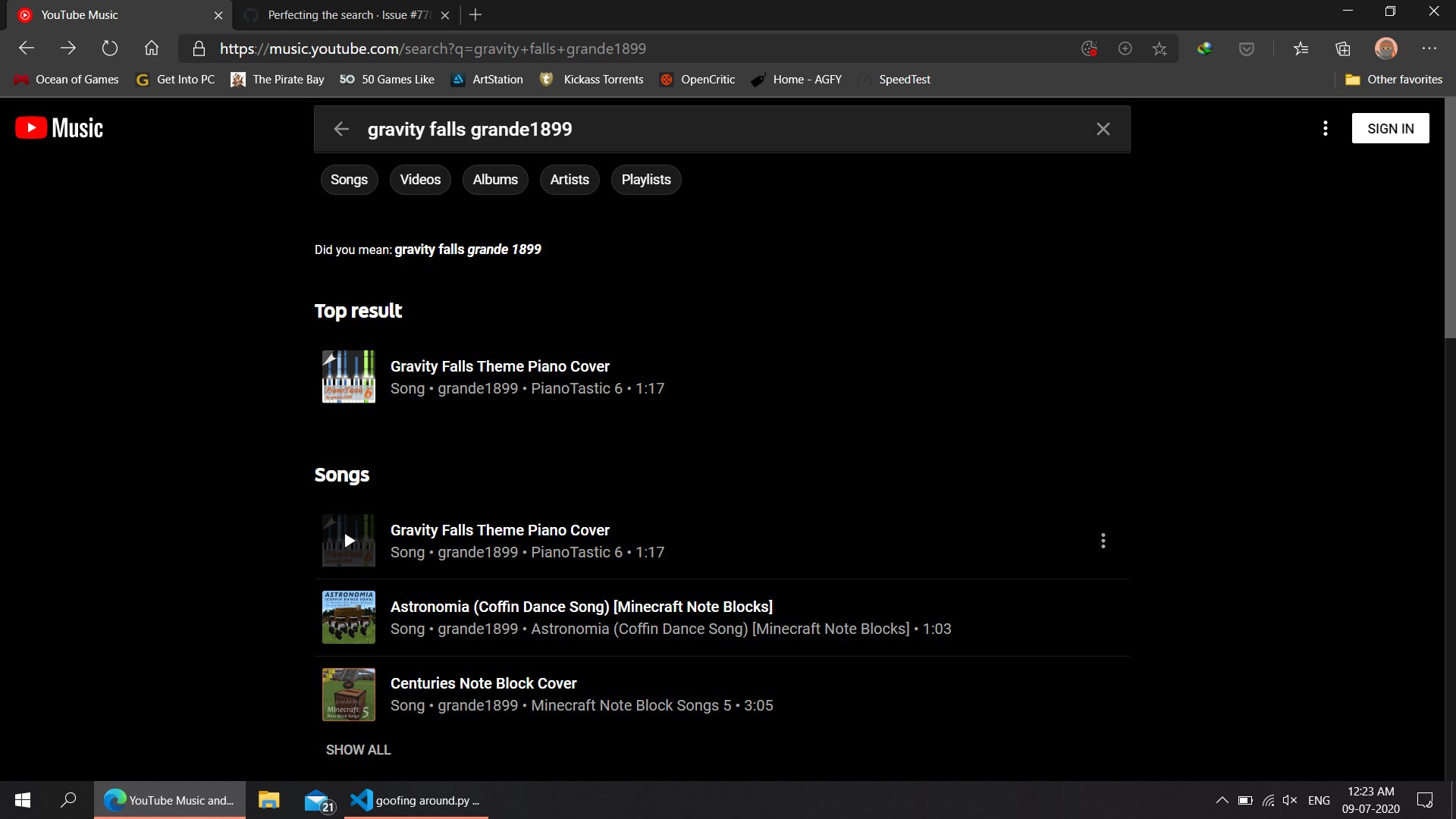
Well, I did try the 'older'version' no luck, 'The beautiful eyes of Rita' is just one of many songs, many other songs like 'grande1988 gravity falls theme' and 'No strings attached SWACQ' usually go wrong on the current and old versions. At least for me ~45% of all songs downloaded we wrong ones.
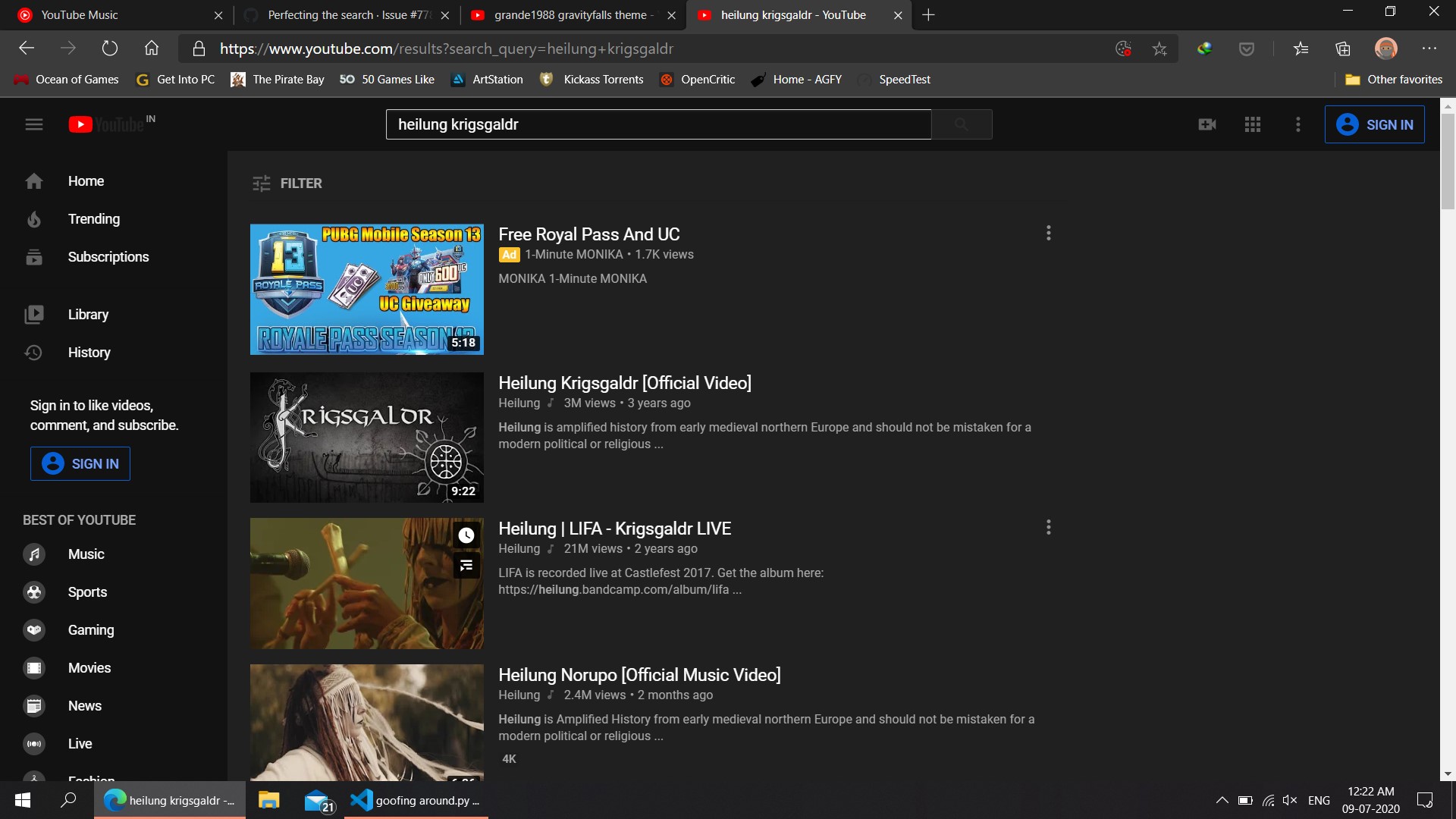
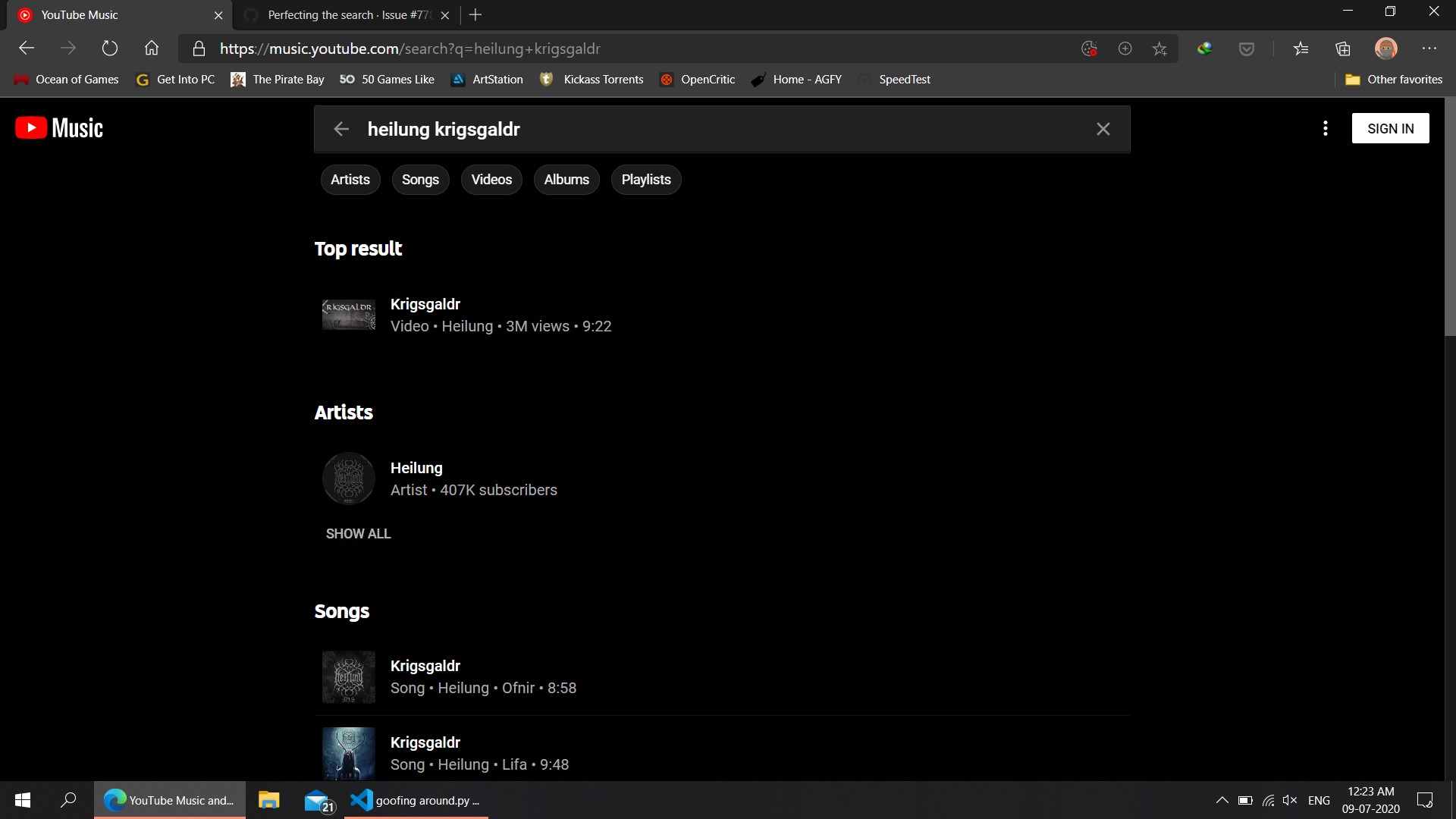
secondly, some songs like Krigsgalder by Heilung have multiple versions that vary quite a bit. Im attaching a few Screenshots below. For gravity falls theme, it is not present on youtube at all.

MikhailZex
on 8 Jul 2020
Oh, and i Did some searching, YouTube doesn't have the regular version or the astounding eyes of rita. They have edits by various people but not the original by Anour Bahem.
MikhailZex
on 8 Jul 2020
@Mikhail-Zex You said before that "~45% of all songs downloaded we[re the] wrong ones". Did you mean that the songs were completely the wrong ones, or just a different version of that same song?
Also, did you try it with these settings (in the config.yml file)?
[...]
music-videos-only: true
search-format: '{artist} - {track_name}'
youtube-api-key: [your_key_here]
[...]
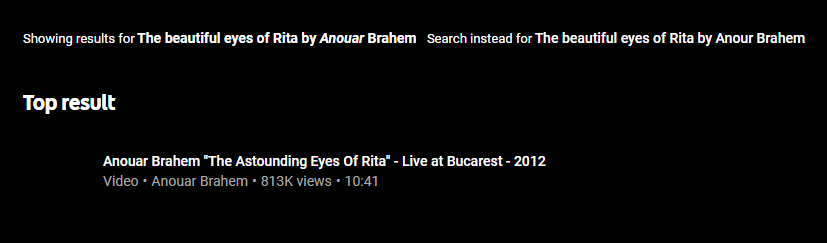
As far as the music video from earlier - Neither of these are the original?


YT Music (Wrong version also):
rocketinventor
on 8 Jul 2020
Roughly ⅔ of those songs were totally off and the rest were different versions.
I just tried the conf.yml file, its better but there are still quite a few mistakes (~25% totally wrong, but there are more songs in toral now, hence fewer errors. Note these are just approximates, last time I had time to count up the errors. )
MikhailZex
on 9 Jul 2020
Selenium/web-driver seems unnecessary. So does beautifulsoup. In my tests, it was possible to get all of the information needed with a simple POST request.
URL: https://music.youtube.com/youtubei/v1/search?alt=json&key=... [redacted]
Method: POST
Header: Referer: https://music.youtube.com
Body: (minimum)
{
  "context": {
    "client": {
      "clientName": "WEB_REMIX",
      "clientVersion": "0.1",
    },
  },
  "query": "[query-goes-here]"
}
The video id is available as plain text within the response JSON (and can almost always be downloaded at the URL: https://www.youtube.com/watch?v= + video-id, like any other video).
The query to get the video id looks something like this:
contents.sectionListRenderer.contents[1].musicShelfRenderer.contents[0].musicResponsiveListItemRenderer.doubleTapCommand.watchEndpoint.videoId
These details are undoubtedly going to change in the future, but for now, implementing this should be trivial.
rocketinventor
on 9 Jul 2020
Much simpler but then you need a YouTube API key which not everyone way be willing to get just for downloading songs.
But i must say, your solution is far far simpler, never thought of it.
MikhailZex
on 9 Jul 2020
Or, you can just use the same one that YT Music uses.
Unless you happen to have an API key with permission to YouTube's internal API's ;)
rocketinventor
on 9 Jul 2020
@ritiek what about the urllib yt music version? Are we even adding this to spotdl?
About done with the selenium molecule, almost all bugs fixed (including thise that popup in weirdass random situations) , tried using the YouTube api (v3 instead of v1) as rocketinventor suggested, still kinda buggy. What do you suggest next?
MikhailZex
on 13 Jul 2020
@Mikhail-Zex Sorry, I got a bit busy with some other stuff at the moment. I'll update you on this in a few days.
ritiek
on 13 Jul 2020
@Mikhail-Zex Were you able to get the YT Music API working? If so, why do you need to use Selenium?
rocketinventor
on 13 Jul 2020
Nope, i was trying to use the youtube api v3, its refusing to work.
MikhailZex
on 19 Jul 2020
Selenium/web-driver seems unnecessary. So does
beautifulsoup. In my tests, it was possible to get all of the information needed with a simplePOSTrequest.URL:
https://music.youtube.com/youtubei/v1/search?alt=json&key=...[redacted]
Method:POST
Header:Referer: https://music.youtube.comBody: (minimum)
{
  "context": {
    "client": {
      "clientName": "WEB_REMIX",
      "clientVersion": "0.1",
    },
  },
  "query": "[query-goes-here]"
}
The video id is available as plain text within the response JSON (and can almost always be downloaded at the URL:
https://www.youtube.com/watch?v=+video-id, like any other video).The query to get the video id looks something like this:
contents.sectionListRenderer.contents[1].musicShelfRenderer.contents[0].musicResponsiveListItemRenderer.doubleTapCommand.watchEndpoint.videoIdThese details are undoubtedly going to change in the future, but for now, implementing this should be trivial.
To me this seems to best option to go forward with. It looks like this API key is delivered in JSON response in the HTML source when accessing music.youtube.com:
{..., "INNERTUBE_API_KEY":"AIzaSyC9XL3ZjWddXya6X74dJoCTL-WEYFDNX30",...}
Could you guys try this out too (preferably in incognito tab), and see whether you are returned this same exact API key as well? If the API key is same then we could hardcode it or something in spotdl to make POST requests for making searches. Though there is a concern that this key could expire after sometime. Anyway, If this key is different for you guys and an alternative would be to instead of hardcoding the API key in spotdl, we could programatically extract this API key from music.youtube.com to use it for making POST requests for performing searches.
ritiek
on 19 Jul 2020
@ritiek I got the same value for the API key - good find about the API key being in the JSON. I think it is hardcoded, but I did not want to put it up here because the YT-Music people would probably not like to see it floating around like that...
The codebase is fairly large... What would be the process (or codepoints) that need to be changed in order to add "YT-Music" as another search provider (similar to how there was an option to use the YT API (or not before)? @Mikhail-Zex Were you able to figure this out?
rocketinventor
on 19 Jul 2020
I did not want to put it up here because the YT-Music people would probably not like to see it floating around like that...
I don't see YT-Music putting any effort to prevent leaking the key the way it is written in plain text in the source. We should be fine hopefully. We could ask users to generate their own YouTube API key but it seems like too much of a hassle to just search on YT Music when their webapp can already do that without a problem.
The codebase is fairly large... What would be the process (or codepoints) that need to be changed in order to add "YT-Music" as another search provider (similar to how there was an option to use the YT API (or not before)? @Mikhail-Zex Were you able to figure this out?
The codebase was structured quite differently before v2.0.0. Also, for some context on why the ability to use API key to make searches removed, see https://github.com/ritiek/spotify-downloader/issues/705#issuecomment-630822192.
If someone is willing to work on this, you need to add YouTube music as a provider in metadata/providers where you'll have to write code to take care of searching and fetching video results from YouTube music. Other stuff should be similar to the usual YouTube, such as parsing YouTube videos from their URLs is already possible with PyTube, so you could just import and re-use the methods present in metadata/providers/youtube.py.
You'll also need to add and call the appropriate internal methods in the MetadataSearch class in metadata_search.py to allow for the ability to also search on YouTube music. You will then have to pass the new parameter indicating to search on YouTube music when creating the MetadataSearch instance in:
https://github.com/ritiek/spotify-downloader/blob/06d0d4ff6f479f9383521762079b0d13ebfef5bd/spotdl/command_line/core.py#L337-L342.
Lastly, you'll need to add a new configuration option on whether to use the usual YouTube or the new YouTube music for searches in config.py and a command-line argument in command_line/arguments.py.
ritiek
on 19 Jul 2020
So there might be a more efficient way to parse the JSON (or maybe I am missing something), but the response JSON seems to be quite messy.
Right now the code looks something like this:
import requests
import json

query = "Beethoven's first"

api_key = [YT_Music_API_key]
url = "https://music.youtube.com/youtubei/v1/search?alt=json&key=" + api_key
headers = {"Referer": "https://music.youtube.com/search"}

body = {
  "context": {
    "client": {
      "clientName": "WEB_REMIX",
      "clientVersion": "0.1",
    },
  },
  "query": query
}

r = requests.post(url,headers=headers,data=json.dumps(body))

print("Status:", r.status_code)
print("Type:", r.headers['content-type'])
print("Text:", r.text[:300] + "...\n")

video_id = r.json()\
["contents"]\
["sectionListRenderer"]\
["contents"]\
[0]\
["musicShelfRenderer"]\
["contents"]\
[0]\
["musicResponsiveListItemRenderer"]\
["overlay"]\
["musicItemThumbnailOverlayRenderer"]\
["content"]\
["musicPlayButtonRenderer"]\
["playNavigationEndpoint"]\
["watchEndpoint"]\
["videoId"]

print("https://www.youtube.com/watch?v=" + video_id)
Output:
Status: 200
Type: application/json; charset=UTF-8

Text: {
  "responseContext": {
    "visitorData": "CgtKY1FSdFhCckt4ayjL9dH4BQ%3D%3D",
    "serviceTrackingParams": [
      {
        "service": "CSI",
        "params": [
          {
            "key": "yt_ad",
            "value": "0"
          },
          {
            "key": "GetSearch_rid",
         ...

https://www.youtube.com/watch?v=_iocfxI4Dvk
Any thoughts on this? Perhaps there is a good library for this function?
rocketinventor
on 19 Jul 2020
Looks messy indeed but if YouTube music is using this internally we'll be fine too I guess.
ritiek
on 19 Jul 2020
_Updated comment for clarity and to add more information..._
~Well, there is another problem that this only works if the first result is actually a video... So "Beethoven's First" works, but "Beethoven" does not... Unless we specify either "Song" or "Video". Even so, if the UI changes, (without smarter code) this will break. My understanding is that the UI here is built around the JSON - changing the JSON would cause the UI to change without causing much upset to the YT-Music UI.~ (See new code in the comment below, which does not have this issue)
I found the following filters, experimentally, during testing: (after URL decoding from %3D to =)
Songs: "params": "Eg-KAQwIARAAGAAgACgAMABqChAKEAUQCRAEEAM="
Videos: "params": "Eg-KAQwIABABGAAgACgAMABqChAEEAoQCRADEAU="
Albums *: params: "Eg-KAQwIABAAGAEgACgAMABqChADEAQQCRAKEAU="
Playlists *: params: "Eg-KAQwIABAAGAAgACgBMABqChADEAQQCRAKEAU="
Artists *: params: "Eg-KAQwIABAAGAAgASgAMABqChAJEAoQAxAFEAQ="
* - Not relevant at this point / does not have videoId tags
Can anyone confirm that they get these same params for "Song" and "Video"? I have a suspicion that they change a lot b/c they are not hardcoded in anywhere.
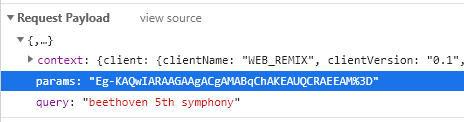
I am not sure where these strings come from - It seems to be some URL-encoded base64 hash of something, but I can't determine where it is coming from... Ideas?
rocketinventor
on 20 Jul 2020
So, actually, I just realized that I can just parse the response as text and take the first result for "videoId" that way.
In other words:
# get the first "videoId" value from the response
video_id = r.text.split('videoId')[1].split('"')[2]
This approach works much more reliably (and uses way less code).
rocketinventor
on 20 Jul 2020
So, actually, I just realized that I can just parse the response as text and take the first result for "videoId" that way.
In other words:
# get the first "videoId" value from the response
video_id = r.text.split('videoId')[1].split('"')[2]
This approach works much more reliably (and uses way less code).
Nice! Let's go with this then!
ritiek
on 20 Jul 2020
Sorry, for the delay, had some terrible network problems. Really nice to see this done.
MikhailZex
on 24 Jul 2020
And if the JSON response is messy, you could run 'eval' on the JSON to convert it to a dict. This can backfire beautifully at times. For those times simplejson is a easy 1 stop solution.
MikhailZex
on 24 Jul 2020
@ritiek switching to youtube music will not work for some geo-restricted countries... Make YouTube Music an option you opt into... There's always VPNs anyways
 brayo-pip
on 25 Jul 2020
brayo-pip
on 25 Jul 2020
Yes, it should be opt-in and the defaults shouldn't be affected.
ritiek
on 25 Jul 2020
@Mikhail-Zex
There isn't anything _wrong_ with the JSON - requests and the built-in JSON library can handle it just fine.
What I meant by "messy" is that the data that we need is often nested 8 - 15 layers deep, and it moves around depending on the exact circumstance. This is not so practical when dealing with it as a dictionary - which is why I am instead processing it as a string.
rocketinventor
on 26 Jul 2020
For anyone who does not have YT-Music in their country, please try the following code (in Python) and let me know what the output is. Make sure that requests is installed before running.
import requests
import json

api_key = 'AIzaSyC9XL3ZjWddXya6X74dJoCTL-WEYFDNX30'
url = 'https://music.youtube.com/youtubei/v1/browse?alt=json&key=' + api_key
headers = {'Referer': 'https://music.youtube.com/search'}


body = {
  'browseId': 'FEmusic_explore',
  'context': {
    'client': {
      'clientName': 'WEB_REMIX',
      'clientVersion': '0.1',
      'gl': 'US'
    }
  }
}

r = requests.post(url, headers=headers, data=json.dumps(body))

try:
    print(r.text.split('"text"')[1].split('"')[1])
except Exception as e:
    print(e)
print('')
print('Status:', r.status_code)
print('Type:', r.headers['content-type'])
print('')
print('Text:', r.text[:500] + '...')
@brayo-pip @ritiek
I was able to write the code to deal with YT-Music (instead of regular YouTube), but I write it to replace the old method. I am not up to writing all the code necessary to add a new "search provider". I can submit a pull-request with a branch "yt-music" (or something like that) that is fully functioning as the default. If anyone wants to take care of separating it into its own "search provider", they can do that.
Either way, it works better, and I think it should be the default - if it is unavailable, we can detect that on the first run (and save it to the config.
rocketinventor
on 26 Jul 2020
I was able to write the code to deal with YT-Music (instead of regular YouTube), but I write it to replace the old method. I am not up to writing all the code necessary to add a new "search provider". I can submit a pull-request with a branch "yt-music" (or something like that) that is fully functioning as the default. If anyone wants to take care of separating it into its own "search provider", they can do that.
Alright, sounds good. Make a PR and someone or me could move from there. Thanks!
Either way, it works better, and I think it should be the default - if it is unavailable, we can detect that on the first run (and save it to the config.
I wouldn't want to set it as defaults without concrete data. Let's make it optional for now and if it seems to me that it being the defaults would be a better idea, I'll consider it!
ritiek
on 28 Jul 2020
For anyone who does not have YT-Music in their country, please try the following code (in Python) and let me know what the output is. Make sure that
requestsis installed before running.import requests import json api_key = 'AIzaSyC9XL3ZjWddXya6X74dJoCTL-WEYFDNX30' url = 'https://music.youtube.com/youtubei/v1/browse?alt=json&key=' + api_key headers = {'Referer': 'https://music.youtube.com/search'} body = { 'browseId': 'FEmusic_explore', 'context': { 'client': { 'clientName': 'WEB_REMIX', 'clientVersion': '0.1', 'gl': 'US' } } } r = requests.post(url, headers=headers, data=json.dumps(body)) try: print(r.text.split('"text"')[1].split('"')[1]) except Exception as e: print(e) print('') print('Status:', r.status_code) print('Type:', r.headers['content-type']) print('') print('Text:', r.text[:500] + '...')@brayo-pip @ritiek
I was able to write the code to deal with YT-Music (instead of regular YouTube), but I write it to replace the old method. I am not up to writing all the code necessary to add a new "search provider". I can submit a pull-request with a branch "yt-music" (or something like that) that is fully functioning as the default. If anyone wants to take care of separating it into its own "search provider", they can do that.Either way, it works better, and I think it should be the default - if it is unavailable, we can detect that on the first run (and save it to the config.
The code doesn't run in Geo-restricted countries... here's the log
Traceback (most recent call last):
  File "/usr/lib/python3/dist-packages/urllib3/connection.py", line 156, in _new_conn
    conn = connection.create_connection(
  File "/usr/lib/python3/dist-packages/urllib3/util/connection.py", line 61, in create_connection
    for res in socket.getaddrinfo(host, port, family, socket.SOCK_STREAM):
  File "/usr/lib/python3.8/socket.py", line 918, in getaddrinfo
    for res in _socket.getaddrinfo(host, port, family, type, proto, flags):
socket.gaierror: [Errno -3] Temporary failure in name resolution

During handling of the above exception, another exception occurred:

Traceback (most recent call last):
  File "/usr/lib/python3/dist-packages/urllib3/connectionpool.py", line 665, in urlopen
    httplib_response = self._make_request(
  File "/usr/lib/python3/dist-packages/urllib3/connectionpool.py", line 376, in _make_request
    self._validate_conn(conn)
  File "/usr/lib/python3/dist-packages/urllib3/connectionpool.py", line 996, in _validate_conn
    conn.connect()
  File "/usr/lib/python3/dist-packages/urllib3/connection.py", line 300, in connect
    conn = self._new_conn()
  File "/usr/lib/python3/dist-packages/urllib3/connection.py", line 168, in _new_conn
    raise NewConnectionError(
urllib3.exceptions.NewConnectionError: <urllib3.connection.VerifiedHTTPSConnection object at 0x7fe09b654370>: Failed to establish a new connection: [Errno -3] Temporary failure in name resolution

During handling of the above exception, another exception occurred:

Traceback (most recent call last):
  File "/usr/lib/python3/dist-packages/requests/adapters.py", line 439, in send
    resp = conn.urlopen(
  File "/usr/lib/python3/dist-packages/urllib3/connectionpool.py", line 719, in urlopen
    retries = retries.increment(
  File "/usr/lib/python3/dist-packages/urllib3/util/retry.py", line 436, in increment
    raise MaxRetryError(_pool, url, error or ResponseError(cause))
urllib3.exceptions.MaxRetryError: HTTPSConnectionPool(host='music.youtube.com', port=443): Max retries exceeded with url: /youtubei/v1/browse?alt=json&key=AIzaSyC9XL3ZjWddXya6X74dJoCTL-WEYFDNX30 (Caused by NewConnectionError('<urllib3.connection.VerifiedHTTPSConnection object at 0x7fe09b654370>: Failed to establish a new connection: [Errno -3] Temporary failure in name resolution'))

During handling of the above exception, another exception occurred:

Traceback (most recent call last):
  File "/home/nillnada/Desktop/trim.py", line 20, in <module>
    r = requests.post(url, headers=headers, data=json.dumps(body))
  File "/usr/lib/python3/dist-packages/requests/api.py", line 116, in post
    return request('post', url, data=data, json=json, **kwargs)
  File "/usr/lib/python3/dist-packages/requests/api.py", line 60, in request
    return session.request(method=method, url=url, **kwargs)
  File "/usr/lib/python3/dist-packages/requests/sessions.py", line 533, in request
    resp = self.send(prep, **send_kwargs)
  File "/usr/lib/python3/dist-packages/requests/sessions.py", line 646, in send
    r = adapter.send(request, **kwargs)
  File "/usr/lib/python3/dist-packages/requests/adapters.py", line 516, in send
    raise ConnectionError(e, request=request)
requests.exceptions.ConnectionError: HTTPSConnectionPool(host='music.youtube.com', port=443): Max retries exceeded with url: /youtubei/v1/browse?alt=json&key=AIzaSyC9XL3ZjWddXya6X74dJoCTL-WEYFDNX30 (Caused by NewConnectionError('<urllib3.connection.VerifiedHTTPSConnection object at 0x7fe09b654370>: Failed to establish a new connection: [Errno -3] Temporary failure in name resolution'))
Ignore the name haha... 'trim' I overwrote an old file
brayo-pip
on 29 Jul 2020
@brayo-pip Hmmm... Seems like an error with the DNS or a local firewall. What happens if you try to go to music.youtube.com on your web browser? Which DNS are you using? Does it work with 8.8.8.8? Have you tried re-running the script at all?
See https://github.com/psf/requests/issues/3677 for more information on the error that you had.
rocketinventor
on 31 Jul 2020
it's not a DNS problem.... I can access music.youtube.com just fine in web browser... It simply displays Youtube Music is not available in your region
brayo-pip
on 31 Jul 2020
@brayo-pip
it's not a DNS problem... I can access music.youtube.com just fine in the web browser... It simply displays Youtube Music is not available in your region
Ok. I am familiar with those python errors, and they mean that python was not able to connect to the internet (perhaps due to a temporary network failure) - nothing to do with my script. If the "Youtube Music is not available in your region" page is able to load in the web-browser, then Python should be able to load that page, too. From what you reported, that was not able to happen for some reason.
You can try the following to prove (or not) my point. I wrapped the networking code here in try/except blocks, so it should for sure work and return _some_ output. If it runs fully, then the code snippet from before should run also. If not, then either spotdl isn't working, either, or there is some other weirdness going on (likely with your current setup).
import urllib.request
import requests

def get_url(url):
    print('\n Using urllib:')
    # direct copy from spotdl code
    try:
        response = urllib.request.urlopen(url)
        print('  Status:', response.getcode())
        print('  Response:', response.read()[:200], '...')
    except Exception as e:
        print('  Failed to load url:', url, 'with urllib.')
        print('  Error:', str(e)[:500])

    print('\n Using requests:')
    try:
        r = requests.get(url)
        print('  Status:', r.status_code)
        print('  Response:', r.text[:200] + '...')
    except Exception as e:
        print('  Failed to load url:', url, 'with requests.')
        print('  Error:', str(e)[:500])

print('URL: YouTube')
get_url('https://youtube.com')

print('\nURL: YouTube Music')
get_url('https://music.youtube.com')
If the code fails after it prints the line: Using requests: then it is an error with that module. I can switch it to use urllib.requests and solve that problem.
If it fails after the line: URL: YouTube Music (but https://music.youtube.com simultaneously works in the browser) then it another issue completely.
rocketinventor
on 2 Aug 2020
sorry for the wait @rocketinventor the code won't exit... no error is displayed tho
brayo-pip
on 6 Aug 2020
What was the output?
rocketinventor
on 7 Aug 2020
it works now... guess it was my connection all along.
URL: YouTube

 Using urllib:
  Status: 200
  Response: b'<!doctype html><html  style="font-size: 10px;font-family: Roboto, Arial, sans-serif;" lang="en-GB" dir="ltr" gl="KE"><head><meta http-equiv="X-UA-Compatible" content="IE=edge" /><meta http-equiv="orig' ...

 Using requests:
  Status: 200
  Response: <!doctype html><html  style="font-size: 10px;font-family: Roboto, Arial, sans-serif;" lang="en-GB" dir="ltr" gl="KE"><head><meta http-equiv="X-UA-Compatible" content="IE=edge" /><meta http-equiv="orig...

URL: YouTube Music

 Using urllib:
  Status: 200
  Response: b'<!DOCTYPE html>\n<html lang="en" geo="ALL">\n  <head>\n    <meta charset="utf-8">\n    <meta content="IE=Edge" http-equiv="X-UA-Compatible">\n    <meta name="viewport" content="width=device-width, initial-' ...

 Using requests:
  Status: 200
  Response: <!DOCTYPE html>
<html lang="en" geo="ALL">
  <head>
    <meta charset="utf-8">
    <meta content="IE=Edge" http-equiv="X-UA-Compatible">
    <meta name="viewport" content="width=device-width, initial-...
lemme rerun the old code and see
brayo-pip
on 7 Aug 2020
The original code works too...
Status: 200
Type: application/json; charset=UTF-8

Text: {
  "responseContext": {
    "visitorData": "CgttOWZzZWZJYndIZyizybT5BQ%3D%3D",
    "serviceTrackingParams": [
      {
        "service": "GFEEDBACK",
        "params": [
          {
            "key": "browse_id",
            "value": "FEmusic_explore"
          },
          {
            "key": "logged_in",
            "value": "0"
          },
          {
            "key": "country-type",
            "value": "B"
          },
          {
            "key": "e",
            "value": "23883113...
@ritiek @rocketinventor You can make youtube Music the default... it works perfectly in all regions
brayo-pip
on 7 Aug 2020
Hey, @rocketinventor / @ritiek I've been working on restructuring/simplifying spot-dl. Most of the work for song search is done. The one thing I'm yet to do is actually implement the search. I'd like you to do that part if your ok with it. There wont be much code writing like in the current spot-dl implementation. If interested, drop a note (or a 👍 on this comment). You'll find the work done so far over here.
All you'll have to do is write a class that implements the 'search provider interface', you can find the interface definition under 'Working Docs/interfaces.md'
MikhailZex
on 20 Aug 2020
I've tried running the code @rocketinventor wrote up, it works for me, but I need to get the complete JSON response to write up a search provider (because of this. I keep get an incomplete JSON response, is there anything I can do about this?
MikhailZex
on 22 Aug 2020
@Mikhail-Zex, I have a few different working implementations that I might be able to share in the near future. I was originally going to commit it to a yt-music branch on a fork of the main project, but I could send it elsewhere, maybe, if that is better.
A few points and questions about using the YT Music "API" (and using it with your new implementation):
- A separate request is needed to get the metadata for
song,title, etc. I have code for this also (which has not been shared yet), but this should really be in theMetadata Searchonly. Also,pytubeis able to get this information when it is downloading the video. Technically, some/most of this information is in the originalJSONresponse, also (removing the need for a second query), but I haven't found a reliable way to parse that out. This means that we are looking up this information 3x as much as we need to. (This is still better than the old YouTube search, though).
Despite @brayo-pip's last comment, I am not convinced that YT-Music works in all regions. (That's my understanding of what
{ "key": "country-type","value": "B"}). It could be, though, that some of the API is still available. More information will need to be gathered about this (such as uploading an updated code snippet for testing). If not, a fallback to the regular YouTube API/website will be needed (also). And we will need to test this each time (unless there is a config for it).Does the
spotifyURIsearch interface need to be implemented in some way, or is that only for Spotify?What did you mean before when you said that you are only getting "an incomplete JSON response"? What are you getting, and what is not there that you were expecting?
Where exactly in your repository would I put the code? In the
Tempdirectory?Google recently announced that they are closing down Play Music and everyone should switch to YTM. We'll have to see if that has any impact on their codebase (and our API calls) in the near future.
I read your
search providerandinterfacedocs, as well as your Package Diagram:- Metadata embedding and encoding cannot happen at the same time. The process needs should be
Encode>>Embed(and not one or the other).
- YT Music should be able to function both as a
metadata providerand as asearch provider. It is not clear in your diagram how this should work (maybe you mentioned it elsewhere). It seems silly, though, if Spotify is being used to find a song (by name), and then it is being matched with YT Music (b/c YT Music can do everything in one step).
- YT Music should be able to function both as a
- Metadata embedding and encoding cannot happen at the same time. The process needs should be
When will your code be ready to publish to the stable branch? Maybe I should update the main branch anyway.
If I am sending you all the code, and you are making all the commits, will I be marked as a "co-author" for those commit(s)?
rocketinventor
on 23 Aug 2020
As to YTMusic as metadata provider and search provider:
- I've already implemented the metadata provider interface, I'm pulling all of the metadata from Spotify. I conceded that many other possible implementations are possible but considering just how extensive Spotify metadata is, that should be enough for now. You can checkout Spotify-api responses for tracks/albums/playlists here.
- Metadata and encoding don't occur simultaneously, the dotted arrows indicate dependencies (I've conformed to UML diagram standards, it's not something commonly in use but I find it a useful overview of the major components and dependencies)
Where to put the code?
- If its messy test code, Put it under ./Hacks
- It its production code that fits in with the code guidelines, put it in ./Temp/Spotdl/providers/defaultProviders.py
About SpotifyURI:
- I'm not completely sure as to what your referring to but what you'll have to do is write up a class that implements all of the methods defined under the Music Search Interface that takes only the predefined args. (This is so that anyone can actually change up the implementation without breaking anything)
- The idea behind Spotify identifying a song by name is to get its URL, the Spotify URL of the song is necessary to grab its metadata and cover art from the Spotify-api. The sole function of a search provider (YTM or YouTube) is to match the Spotify song to a downloadable source accurately(a.k.a Spotify URL --> downloadable URL from wherever)
Stable Branch issues and 'co-author for commit(s)':
- I have entrance exams coming up in 2 weeks (assuming no more covid19 delays) so I may not be able to work on the code everyday (I have been trying though), my primary aim is to get the fresh code up and running asap. Its already been a little over 2 weeks, my guess is that it should be ready by this month end or next month first week.
- I'd like you to commit a working search provider to my fork so that I can actually test the whole working thing and fix any preliminary bugs.
- It'd be nice if you'd commit directly to my branch (IDK if that's possible, new to proper github collab), your definitely getting co-author status. As such, I'm just rewriting @ritiek 's code.
About the incomplete JSON:
```
// This is what I receive,

// JSON response till her is just fine
},
{
    "musicResponsiveListItemFlexColumnRenderer": {
        "text": {
            "runs": [
                    {
                    "text": "3:04"
                    }
            ]
        },
        "displayPriority": "MUSIC_RESPONSIVE_LIST_ITEM_COLUMN_DISPLAY_PRIORITY_HIGH"
    }
}
],
"men
// abrupt end, it obviously has more to be sent
One final note, If you are agreeable to implementing the Music Search Interface, try to match songs based on both song name and song album (along side what ever else you plan to use as matching criteria), you can use the trackDetails class from spotdl.utils.spotifyHelpers to get album name and other details.
MikhailZex
on 23 Aug 2020
Also, if @rocketinventor is correct and YTM cant be used everywhere, we will need a youtube search provider as a fallback, As @ritiek wrote the original YouTube search provider, I'd like to know if you (ritiek) will write the fallback?
P.S. Weird 3rd person English, yes.... I didn't figure how else to phrase the sentence, sry. (⊙_⊙;)
MikhailZex
on 23 Aug 2020
Hi @Mikhail-Zex, I tried to commit to your repository, but I do not have permission to write to it. Please go to the settings page for the repository (https://github.com/Mikhail-Zex/spotify-downloader/settings/access) and click "invite collaborator".
rocketinventor
on 25 Aug 2020
Done, you should have an invite now.
[JUST AN UPDATE] I'm almost done with all the base classes/methods that are required to run spotDL. The downloader needs a bit of work, and then I've to write the optparse stuff.
MikhailZex
on 26 Aug 2020
@rocketinventor, I just ran your code. I get the top 6 links (which is cool), I still haven't looked into the the JSON response though. I think I should inform you that I still am not receiving the complete JSON response, just part of it like before (albeit more than I used to)
Apart from that, I've searched for the most obscure songs I could get my hand on like:
- Aiobahn feat. rionos - ここにいる (I'm Here) (Stephen Walking Remix)
- Petri Alanko, Martti Suosalo -Sankarin Tango
- Sarah Schachner - Assassin's Creed OST
Spot on results every time
MikhailZex
on 26 Aug 2020
@Mikhail-Zex Could you please specify which code is "not receiving the complete JSON response"? The JSON that I am getting does not have any such issues.
The end of it looks like this:
            }
          ],
          "collapsedRowCount": 1,
          "trackingParams": "[tracking-id-redacted]",
          "horizontalScrollable": true
        }
      },
      "trackingParams": "[tracking-id-redacted]"
    }
  },
  "adSafetyReason": {}
}
Try running print(r.text[-300:]) after the line r = requests.post....
It should look similar.
rocketinventor
on 26 Aug 2020
@brayo-pip (& anyone else not in a supported region for YouTube Music)
To clarify:
The code that I posted before (to run) was to see what YT Music looks like in unsupported countries. The assumption was that it would just throw some sort of error code. Therefore, I did not include any code to actually test out the search functionality. The idea was that we could then detect that code ({ "key": "country-type", "value": "B"}, I think), and then redirect the search to regular YouTube.
Seeing the results of that was helpful because it showed that the YT Music results are definitely different (and can probably be detected).
It _is_ possible, though, that we can still get search results (and maybe also metadata) from YTM. (Albeit, perhaps on a more limited selection of songs).
To check, could you please try the code here and see if it works properly? - This is the code that will be used in the next version of spotdl (being co-written with @Mikhail-Zex) and it should run much _faster_ then the current youtube-based code.
The output of the new code (which I just posted) should look something like this:
Status: 200

Matches:
https://www.youtube.com/watch?v=PU1KSRx70cU
https://www.youtube.com/watch?v=oqhH6m4vDN0
https://www.youtube.com/watch?v=lzjih09spXM
https://www.youtube.com/watch?v=ng1PymMfWBw
https://www.youtube.com/watch?v=28-52h758q4
https://www.youtube.com/watch?v=Tj4oxxZWRmk
If so, please comment here the results (and also "@ mention" @rocketinventor, @Mikhail-Zex )
rocketinventor
on 26 Aug 2020
@rocketinventor, this is the response I get, I've added a print(r.text) statement before the VideoId loop, the JSON is incomplete.
{
"adSafetyReason": {},
"contents": {
"sectionListRenderer": {
"contents": [
{
"musicShelfRenderer": {
"contents": [
{
"musicResponsiveListItemRenderer": {
"doubleTapCommand": {
"clickTrackingParams": "CHIQ02gYACITCJCa9-DbuOsCFYYqtwAdI7YLww==",
"watchEndpoint": {
"params": "wAEB",
"playlistId": "RDAMVMFAbS08ZV4YQ",
"videoId": "FAbS08ZV4YQ",
"watchEndpointMusicSupportedConfigs": {
"watchEndpointMusicConfig": {
"musicVideoType": "MUSIC_VIDEO_TYPE_OMV"
}
}
}
},
"flexColumnDisplayStyle": "MUSIC_RESPONSIVE_LIST_ITEM_FLEX_COLUMN_DISPLAY_STYLE_TWO_LINE_STACK",
"flexColumns": [
{
"musicResponsiveListItemFlexColumnRenderer": {
"displayPriority": "MUSIC_RESPONSIVE_LIST_ITEM_COLUMN_DISPLAY_PRIORITY_HIGH",
"text": {
"runs": [
{
"text": "Aiobahn feat. rionos - \u3053\u3053\u306b\u3044\u308b (I'm
Here) (Stephen Walking Remix)"
}
]
}
}
},
{
"musicResponsiveListItemFlexColumnRenderer": {
"displayPriority": "MUSIC_RESPONSIVE_LIST_ITEM_COLUMN_DISPLAY_PRIORITY_HIGH",
"text": {
"runs": [
{
"text": "Video"
}
]
}
}
},
{
"musicResponsiveListItemFlexColumnRenderer": {
"displayPriority": "MUSIC_RESPONSIVE_LIST_ITEM_COLUMN_DISPLAY_PRIORITY_MEDIUM",
"text": {
"runs": [
{
"text": "Stephen Walking"
}
]
}
}
},
{
"musicResponsiveListItemFlexColumnRenderer": {
"displayPriority": "MUSIC_RESPONSIVE_LIST_ITEM_COLUMN_DISPLAY_PRIORITY_MEDIUM",
"text": {
"runs": [
{
"text": "56K views"
}
]
}
}
},
{
"musicResponsiveListItemFlexColumnRenderer": {
"displayPriority": "MUSIC_RESPONSIVE_LIST_ITEM_COLUMN_DISPLAY_PRIORITY_MEDIUM",
"text": {
"runs": [
{
"text": "3:51"
}
]
}
}
}
],
"itemHeight": "MUSIC_RESPONSIVE_LIST_ITEM_HEIGHT_TALL",
"menu": {
"menuRenderer": {
"items": [
{
"toggleMenuServiceItemRenderer": {
"defaultIcon": {
"iconType": "FAVORITE"
},
"defaultServiceEndpoint": {
"clickTrackingParams": "CHcQ-0sYBSITCJCa9-DbuOsCFYYqtwAdI7YLww==",
"modalEndpoint": {
"modal": {
"modalWithTitleAndButtonRenderer": {
"button": {
"buttonRenderer": {
"isDisabled": false,
"navigationEndpoint": {
"clickTrackingParams": "CHgQ8FsiEwiQmvfg27jrAhWGKrcAHSO2C8M=",
"signInEndpoint": {
"hack": true
}
},
"size": "SIZE_DEFAULT",
"style": "STYLE_BLUE_TEXT",
"text": {
"runs": [
{
"text": "Sign in"
}
]
Status: 200
Matches:
https://www.youtube.com/watch?v=FAbS08ZV4YQ
https://www.youtube.com/watch?v=s0Aul4JYcDE
https://www.youtube.com/watch?v=tGTqCyx2ShY
https://www.youtube.com/watch?v=Tuf5kMnL6dY
https://www.youtube.com/watch?v=iqpZt_d9X7I
https://www.youtube.com/watch?v=63jACiwo61c
https://www.youtube.com/watch?v=x3wPHeqVbXA
@Mikhail-Zex It seems that (for whatever reason) your python shell is limiting the output of the text output. The rest of the JSON is for sure _there_, otherwise, the rest of the code wouldn't be able to run. That's why I suggested running: print(r.text[-300:]), which will show the _end_ of the response body that you have.
If you want to inspect the output, you could try adding something like:
with open('yt_music_search.json', 'w') as outfile:
    outfile.write(r.text)
That should give you a nice JSON file (yt_music_search.json) to poke around in.
rocketinventor
on 26 Aug 2020
Hey, @rocketinventor is the YouTubeMusic class the final version or a work in progress?
If it's a work in progress, please to ensure that the final version implements the Music Search Provider Interface. Also, the objects.md is redundant, song/metadata objects implement the interfaces here. Make changes there if required.
MikhailZex
on 27 Aug 2020
It is final enough to be used in production, but I wouldn't call it
the final version, yet. It doesn't quite implement the specs of your
"Music Search Provider Interface".
Also, I don't have the time to work on it any more right now (or
access to Github). Anyway, I noticed the commit that you made
(https://github.com/Mikhail-Zex/spotify-downloader/commit/be44d6de3fbdf9fa7ffb6e958a8f6719e624668c).
I haven't seen the code yet, but it seems like you got the work there
done.
👍
rocketinventor
on 1 Sep 2020
well, i tweaked it a bit to take into consideration length of songs.
The version you tried gave me 8 mistakes in 80 songs, the tweaked version gives 0 mistakes in 80 songs.
MikhailZex
on 1 Sep 2020
Related issues
 jjboy91
·
5Comments
ritiek
·
5Comments
jjboy91
·
5Comments
ritiek
·
5Comments
 iki
·
4Comments
iki
·
4Comments
 marinabar
·
4Comments
marinabar
·
4Comments
 noahball
·
3Comments
noahball
·
3Comments
Most helpful comment
@Mikhail-Zex There used to be an option to use the Youtube API (and thus the "Music" filter) - restoring that should be more practical.
Scraping music.youtube.com is a little bit tricky. And
pyseleniumis a little bit complicated to use, also - Do you know of any projects that do this already?