Spoke: Feature Request: Keyboard Shortcut: "<" and ">" controlled via left + right arrow keys
Problem
repetitive mouse movements = pain + inefficiency
Rx
Keyboard Shortcuts!!
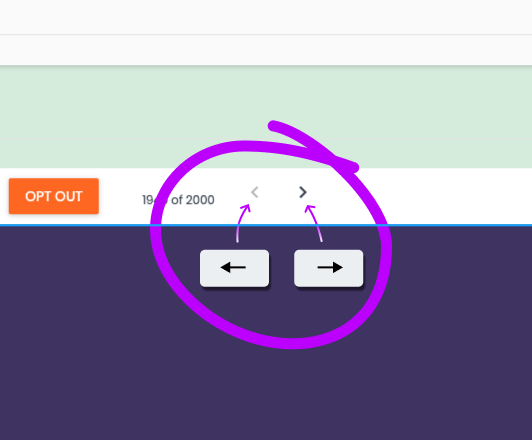
In the responding flow, map the left and right arrow keys to the previous and next arrow buttons.
Scenario
In many flows, responding to people who have replied "Yes" is very time sensitive. Texters will often request a very large assignment, then triage the replies and respond to the "Yes" replies first. Currently, this is done by arrowing through the replies and responding to any "Yes" replies. If the arrow keys were mapped to the previous and next actions it would make this smoother and require less mouse-ing/trackpad-ing.
Keyboard Shortcut Guide
https://www.figma.com/file/OTyLXArAcIKCZNl7Z0Dxc9/Spoke-KeyboardShortcuts?node-id=0%3A1
 arena
arena
All 13 comments
I'd like to take this on if no one else is working on it!
 tom-raley
on 8 Mar 2020
tom-raley
on 8 Mar 2020
I said this in comment of the PR but putting it here as well, to work out details:
I think we should discuss the issue a bit more -- I'm a little concerned for accidental navigation. Some use-cases:
- Right now, this would trigger even if I use the arrow keys while editing a message (or an opt-out message) [this could be fixed with some code work]
- I might accidentally hit left/right when aiming to scroll up/down on the message thread -- currently, if I navigate left/right I lose whatever message/question choice I had been editing, so maybe before we work on this, we should make sure that edit state survives navigation back-and-forth?
 schuyler1d
on 20 May 2020
schuyler1d
on 20 May 2020
Sorry, y'all...I am now working from home full time with a toddler and I don't really have the resources to complete this. I took it on before the whole pandemic thing. Sorry to leave it hanging, I just really don't have the time/energy to focus on it.
 raleytom
on 20 May 2020
raleytom
on 20 May 2020
That makes sense! glad you let us know. There is a WIP PR open for this, but this is available if someone wants to pick up on where the PR leaves off and also address the feedback around accidental navigation
 ibrand
on 20 May 2020
ibrand
on 20 May 2020
I'll be working on this. I hope to submit a PR in the coming days
 Akash-Jairam
on 10 Apr 2021
Akash-Jairam
on 10 Apr 2021
Looks like you are planning to use a combo shortcut instead of the arrow keys -- that seems like a good solution to the arrow key navigation issue that @schuyler1d was concerned about. So glad there is work happening on keyboard shortcuts!! 🙌
arena
on 11 Apr 2021
I made some updates to my PR so mousetrap points to the navigation functions.
It seems like handleNextPageClick() and handlePreviousPageClick() are nested to add functionality to the arrows. @schuyler1d , please correct me if I'm wrong here.
Because of that, it seems like the keybinding would only work if we bind and make the function calls in TableToolbar.jsx
However, TableToolbar is a function-based component so we would need to use Effect Based Hooks which are not available until react version 16.8.
Should we convert TableToolbar to a class-based component? I would appreciated everyone's feedback here.
Akash-Jairam
on 14 Apr 2021
@Akash-Jairam
I don't think TableToolbar is used in the texter interface. I would suggest putting the shortcuts where the other shortcuts are in AssignTexter/Controls.jsx:
https://github.com/MoveOnOrg/Spoke/blob/a6aa0ad7e1bfa3e14ea4e7348d219c75eff296d5/src/components/AssignmentTexter/Controls.jsx#L168-L191
That might not be as elegant as the mousetrap library, but it may work better to avoid capture of e.g. the message textarea.
schuyler1d
on 15 Apr 2021
@schuyler1d, thanks very much for the feedback. I updated the pr to reflect this.
For both Mac and Windows, the shortcuts are "ctrl/control" + ">" and "ctrl/control" + "<".
Do I need to add the keyboard shortcut to any .md files? It would be nice to emphasize that these shortcuts are essentially "ctrl" + "shift" before "," or "." because people might be spamming "ctrl" + "," and wondering why the shortcut isn't working.
Akash-Jairam
on 16 Apr 2021
Would it be possible to use the arrow keys instead of the carrat keys? and then no modifier keys? I know this was originally avoided because someone might be typing in the response field and try to use those to edit text, but aren't the keyboard shortcuts only available when that field is not in focus?
I ask because there are no keyboard shortcuts for the shortcut keys or navigating the "all responses" menu. So needing both hands on the keyboard to navigate back and forth mean switching over to the mouse again to respond. What I was hoping for is a way to rapidly triage replies of a particular type (e.g. all the YES, or all the Opt-Outs) with one hand on the keyboard for navigation and one hand on the mouse for responding.
arena
on 16 Apr 2021
Wouldn't that still be possible if they use the control and shift buttons on the right side of the keyboard that is closer to the carrot keys? It would just require using three fingers and the right hand would still be available to use the mouse.
Akash-Jairam
on 20 Apr 2021
I worry that arrow keys could get caught for text navigation (and also be dangerous if they thought they were moving in the text field and then accidentally change contacts)
schuyler1d
on 5 May 2021
Updated my pr to support Ctrl + "." and Ctrl + "," to make navigation easier
Akash-Jairam
on 5 May 2021
Related issues
 ZevH
·
6Comments
ZevH
·
6Comments
 allisonChilton
·
4Comments
ibrand
·
4Comments
ZevH
·
3Comments
allisonChilton
·
4Comments
ibrand
·
4Comments
ZevH
·
3Comments
 bchrobot
·
4Comments
bchrobot
·
4Comments
Most helpful comment
I'd like to take this on if no one else is working on it!