Splunk-connect-for-kubernetes: [DOCS] Add multiline logging tutorial
What would you like to be added:
Docs covering implementing mutliline logging for Splunk Connect for Kubernetes pods, giving users an example to extend to their configurations.
Why is this needed:
This is one of the more popular requests i get from customers, and our pods don't even ship clean, multiline logs.
It also highlights benefits of using the solution, providing event breaking that solves for Docker single line logging.
By improving our out-of-the-box config, we can share the experiences and pitfalls of trying to implement regex linebreakers
 matthewmodestino
All 31 comments
Proof of Concept configs:
```
https://docs.fluentd.org/configuration/config-file#wildcards-and-expansions
allows us to easily tshoot collector issues. Think "diag"
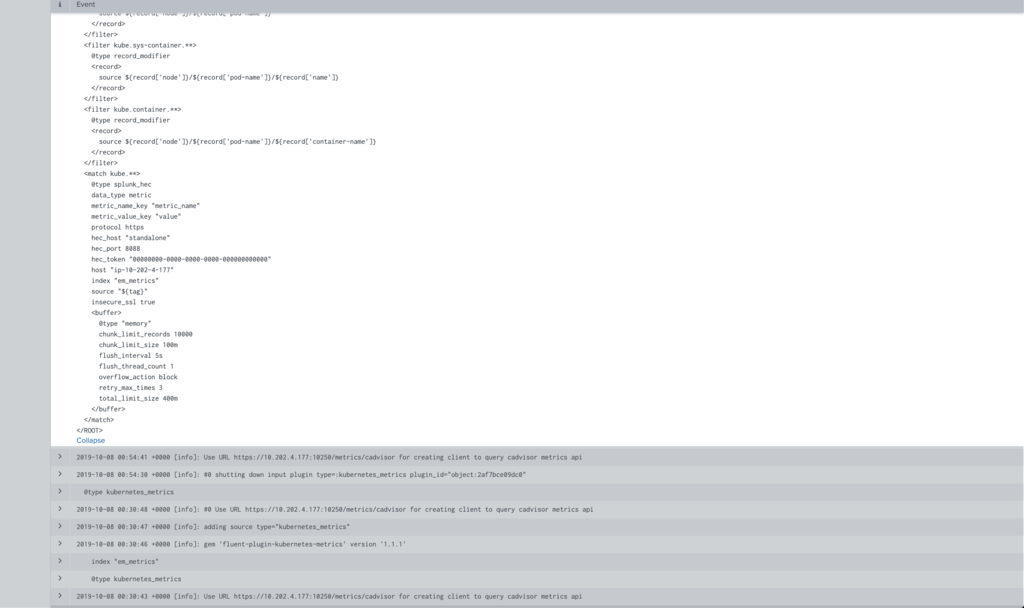
search that reduces suppressed noise and only shows initial trace for devs:
index=em_events sourcetype="kube:container:splunk-fluentd-k8s-metrics" error NOT "suppressed same stacktrace"`
```

Cover how to use rubular to confirm regex is valid, then use built in fluentd stdout filter and output plugins to troubleshoot the pipeline.
https://rubular.com/r/X2T1DAXkgVKMPu
https://docs.fluentd.org/configuration/config-file#introduction-the-life-of-a-fluentd-event
matthewmodestino
on 8 Oct 2019
Needs proper attention to fluentd label/timeout config for concat to account for buffer flush and errors in concat.
matthewmodestino
on 8 Oct 2019
Hi. Is it possible to create filter per namespace or container naming pattern? And then do a multiline regexp start? Different dev teams handle logs on two different approaches. We are just using stdout as logging now.
 pelsebubb
on 15 Oct 2019
pelsebubb
on 15 Oct 2019
@pelsebubb yes absolutely. You can use the fluentd tag to match the namespace, and apply one concat config (which can include regex OR to apply multiple rules) for the linebreakers you need for that particular namespace.
In the example above i matched on the pod-names, but you can actually match on anything in the path to the pod logs, ie. /var/log/containers/pod-name_namespace_container-name_container-id
matthewmodestino
on 25 Oct 2019
Yes, this is a huge pain point for our engineers where java stack traces are not kept together. Was going to look into this solution possibly...
https://stackoverflow.com/questions/57327257/how-to-parse-multiline-java-error-exception-stack-traces-input-in-fluentd-i-sho
 pc-mreeves
on 1 Apr 2020
pc-mreeves
on 1 Apr 2020
its totally doable in connect for kubernetes today. Keep an eye here:
https://github.com/splunk/splunk-connect-for-kubernetes/issues/358#issuecomment-605658409
Let me know if you need a hand to get it going.
matthewmodestino
on 1 Apr 2020
Thanks a lot for the response.
So we are using 1.3.0 and only the splunk-kubernetes-logging chart and I am not quite clear what values and files I need to modify.
E.g. https://github.com/splunk/splunk-connect-for-kubernetes/blob/release/1.3.0/helm-chart/splunk-kubernetes-logging/values.yaml
and https://github.com/splunk/splunk-connect-for-kubernetes/blob/d72982b843c0454a21f23aef1ba2b2f9108691db/helm-chart/splunk-connect-for-kubernetes/charts/splunk-kubernetes-logging/templates/configMap.yaml and/or here: https://github.com/splunk/splunk-connect-for-kubernetes/blob/d72982b843c0454a21f23aef1ba2b2f9108691db/manifests/splunk-kubernetes-logging/configMap.yaml ?
Do I basically need to fork the chart and make these changes?
Also not sure if this comment:
Then moved the concat filter outside the @SPLUNK label in output.conf
refers to changes to our splunks server settings?
Apologies for the newbie questions...
pc-mreeves
on 1 Apr 2020
Needs proper attention to fluentd label/timeout config for concat to account for buffer flush and errors in concat.
https://github.com/splunk/splunk-connect-for-kubernetes/pull/367
PR has been submitted to clean up concat (correct label use and expose separator option)
matthewmodestino
on 19 Apr 2020
@matthewmodestino
I'm trying to follow your example above and I'm confused... I'm not sure where it goes exactly. In your image, well I can't find it in here -
Does it go in the customfilter section?
None of this is very clear.
 jayntguru
on 20 May 2020
jayntguru
on 20 May 2020
Made some progress. Figured out to put this in the values.yml
 mario:
    from:
      pod: mario
    multiline:
        firstline: /^\w[0-1]\d[0-3]\d/
        flushInterval: 5s
    sourcetype: kube:mario
I know it's working because I now have to search for this pod with a different source type.
sourcetype="kube:container:mario"
It's still not combining the logs though. I tried your regex above as well.
jayntguru
on 20 May 2020
it belongs in the helm values file you are using, under the logging sub chart section:
Sample walkthrough of process here:
https://mattymo.io/splunking-ghost/
The jist of it is, update your values.yaml with the multiline settings. I mention some of the new settings for 1.4.1 which are now exposed (separator/flush) for concat.
matthewmodestino
on 20 May 2020
Thanks @matthewmodestino . That's helpful.
What is still missing here is it's not combining logs no matter what regex I use.
Taking a step back, here's some example logs. Is the regex before or after the json strip that's taking place?
{"log":" Metaspace used 22793K, capacity 23391K, committed 23552K, reserved 1071104K\n","stream":"stdout","time":"2020-05-20T00:56:41.856211272Z"}
{"log":" class space used 2290K, capacity 2547K, committed 2560K, reserved 1048576K\n","stream":"stdout","time":"2020-05-20T00:56:41.856219689Z"}
{"log":"\n","stream":"stdout","time":"2020-05-20T00:56:41.856228048Z"}
Either way I even tried a regex of /^ which should match anything, and it's still not combining the lines of the logs, so I must have something else going wrong here.
edit - I'm not sure if this is the right issue or location to walk through this, if you want me to create a new one or move discussion elsewhere just let me know.
jayntguru
on 20 May 2020
regex is only on the log key.
matthewmodestino
on 21 May 2020
Any ideas on why it's not combining the logs then?
jayntguru
on 21 May 2020
My guess is the filter is not matching...
Can you post your configmap?
matthewmodestino
on 21 May 2020
The filter seems to be working because it's changing the source type.
(mario is the one in question)
jayntguru
on 21 May 2020
the rule doesn’t look good..
<filter tail.containers.var.log.containers.mario*mario*.log>
        @type concat
        key log
        timeout_label @SPLUNK
        stream_identity_key stream
        multiline_start_regexp ^
        flush_interval 2s
        separator ""
        use_first_timestamp true
      </filter>
can i see your values.yaml
matthewmodestino
on 21 May 2020
The regexp in the configmap is me trying to get it match anything at all.
I have tried this -
firstline: /^\w[0-1]\d[0-3]\d/
And this -
firstline: /^\d{4}-\d{2}-\d{2}\s\d{2}:\d{2}:\d{2}\s+\d{4}/
jayntguru
on 21 May 2020
lets chat. need to see what you are doing..
matthewmodestino
on 21 May 2020
@jayntguru did you get this working? I'm having the exact same issue. Testing with SCK 1.4.1.
In values.yaml:
    mytest:
      from:
        pod: mytest
      multiline:
        firstline: /^\d{4}-\d{1,2}-\d{1,2}/
      sourcetype: kube:container:mytest
Also seeing an extra backslash in the pod log, not sure if this is an issue (the configmap doesn't have the extra backslash) i.e.:
    <filter tail.containers.var.log.containers.mytest*mytest*.log>
      @type concat
      key "log"
      timeout_label "@SPLUNK"
      stream_identity_key "stream"
      multiline_start_regexp "/^\\d{4}-\\d{1,2}-\\d{1,2}/"
      flush_interval 5s
      separator ""
      use_first_timestamp true
    </filter>
 kallanseto
on 1 Jun 2020
kallanseto
on 1 Jun 2020
please test your logic on rubular.com
Can you please share a sample log from the start of the container's life to ensure you capture all possible formats? just extract some representative mulitline events
matthewmodestino
on 1 Jun 2020
@jayntguru did you get this working? I'm having the exact same issue. Testing with SCK 1.4.1.
I was able to get it working with Matt's help. Basically what I needed to understand is that any lines you want combined needed to match the regex. In our case that required an or '|' in the regex, because we were looking for regular events and then we wanted to combine as well as stack traces which start out different.
One other thing is that it's matching on the log line with the json stripped. For us we're using rancher and what we did was download a sample pod log, pasted that into the rubular website, and then worked out the regex from there. Once we understood that it was pretty simple.
jayntguru
on 1 Jun 2020
@jayntguru did you get this working? I'm having the exact same issue. Testing with SCK 1.4.1.
In values.yaml:
    mytest:
      from:
        pod: mytest
      multiline:
        firstline: /^\d{4}-\d{1,2}-\d{1,2}/
      sourcetype: kube:container:mytest
Also seeing an extra backslash in the pod log, not sure if this is an issue (the configmap doesn't have the extra backslash) i.e.:
    <filter tail.containers.var.log.containers.mytest*mytest*.log>
      @type concat
      key "log"
      timeout_label "@SPLUNK"
      stream_identity_key "stream"
      multiline_start_regexp "/^\\d{4}-\\d{1,2}-\\d{1,2}/"
      flush_interval 5s
      separator ""
      use_first_timestamp true
    </filter>
I found the match pattern wasn't matching the name of the container log file. The name of the log file is :
/var/log/containers/mytest-1.0.0-snapshot-463820-1-wfgtd_my-ns_mytest-62dad3508e0815cf8e9d05ca12297663e27643aa84f47e305595e522c9516093.log
I manually edited the configMap, changing:
<filter tail.containers.var.log.containers.mytest*mytest*.log>
to:
<filter **mytest**>
Then restarting the logging pods the events are now coming through with the multiple lines combined into a single log event as expected.
Not sure of the settings I would set values.yaml to get this result or if it is possible. Is there an issue with how the filter is getting rendered from values.yaml?
Earlier on in https://github.com/splunk/splunk-connect-for-kubernetes/issues/255#issuecomment-546429680 it was asked if a filter could be created by namespace match. I understand how this is specified in fluent.conf/configmap, but how would you specify it in the helm values.yaml?
kallanseto
on 2 Jun 2020
Nice work!
Editting the configmap is what I do in my dev to ensure I get the rules right and can use the full scope of concat, as we do not expose all things in the helm chart...for reasons....
https://github.com/fluent-plugins-nursery/fluent-plugin-concat#configuration
The spec for the settings for values.yaml are here:
My personal demo copy is here:
https://mattymo.io/code/mattymo/splunk_toronto_usergroup_may_2020/-/blob/master/README.md#deploy-splunk-connect-for-kubernetes
let me know if that walkthrough is helpful to paint the picture on how to add to values.yaml
Namespace match can be set in the tag in fluentd, which is what pod and container_name values render into as well. For namespace level, you would have to use customFilters probably
matthewmodestino
on 2 Jun 2020
Thanks @matthewmodestino,
I have been able to set this at a namespace level in values.yaml as follows:
  logs:
    myawesomenamespace*:
      from:
        pod: "*"
      multiline:
        firstline: /\d{4}-\d{1,2}-\d{1,2} \d{1,2}:\d{1,2}:\d{1,2}.\d{3}/
It gets the result I want but feels a bit of a hack, so will look into the customFilters. Thanks.
kallanseto
on 4 Jun 2020
can you check how it rendered in the logging configmap?
matthewmodestino
on 4 Jun 2020
This is how it appears in the rendered configmap:
      <filter tail.containers.var.log.containers.**myawesomenamespace**.log>
        @type concat
        key log
        timeout_label @SPLUNK
        stream_identity_key stream
        multiline_start_regexp /\d{4}-\d{1,2}-\d{1,2} \d{1,2}:\d{1,2}:\d{1,2}.\d{3}/
        flush_interval 5s
        separator ""
        use_first_timestamp true
      </filter>
I would be careful with this!
please review:
https://docs.fluentd.org/configuration/config-file#how-match-patterns-work
Then check the source field of your logs in Splunk to make sure the regex is explicit.
When trying to match a namepace the filter should look like:
filter tail.containers.var.log.containers.*_myawesomenamespace_*.log>
Maybe we should open an enhancement to ass “namespace” to the log config stanza in values.yaml...
matthewmodestino
on 4 Jun 2020
Maybe we should open an enhancement to ass “namespace” to the log config stanza in values.yaml...
Yes definitely. That's something we planned to open up a feature request for.
Can we do something like this?
logs:
    _myawesomenamespace_*:
      from:
        pod: "*"
      multiline:
        firstline: /\d{4}-\d{1,2}-\d{1,2} \d{1,2}:\d{1,2}:\d{1,2}.\d{3}/
@jayntguru did you get this working? I'm having the exact same issue. Testing with SCK 1.4.1.
I was able to get it working with Matt's help. Basically what I needed to understand is that any lines you want combined needed to match the regex. In our case that required an or '|' in the regex, because we were looking for regular events and then we wanted to combine as well as stack traces which start out different.
One other thing is that it's matching on the log line with the json stripped. For us we're using rancher and what we did was download a sample pod log, pasted that into the rubular website, and then worked out the regex from there. Once we understood that it was pretty simple.
@jayntguru - Ugh... You never mentioned the part about the intermediate match. (But PROPS for helping us get this working). So this leads to a question. We have a Loooong message for one user as we are implementing, However, it's a JSON array of "latitude" and "longitude". So if I am understanding the flow of how this should work:
1) Start at Timestamp (Primary match)
2) Match on secondary matches (Pipe delimited)
3) End before next Timestamp
Then if every line has "latitude" in it, could I not do something like:
^
I can't test that until I get a PR in that @jayntguru would literally have to approve, so I thought I'd ask here. :)
It’s the limitation of the Fluentd container and this may be another issue, but this should get us closer.
Thanks for all your help also to @matthewmodestino!
 skirven4
on 6 Jun 2020
skirven4
on 6 Jun 2020
Maybe we should open an enhancement to ass “namespace” to the log config stanza in values.yaml...
Yes definitely. That's something we planned to open up a feature request for.
Can we do something like this?
logs:
    _myawesomenamespace_*:
      from:
        pod: "*"
      multiline:
        firstline: /\d{4}-\d{1,2}-\d{1,2} \d{1,2}:\d{1,2}:\d{1,2}.\d{3}/
@jayntguru that did appear in practice to work with my “cbma” work from today.
skirven4
on 6 Jun 2020
Related issues
 MarkPare
·
3Comments
MarkPare
·
3Comments
 aakashbhalla1
·
6Comments
aakashbhalla1
·
6Comments
 lindsjan
·
7Comments
lindsjan
·
7Comments
 bearmoo-repo
·
6Comments
bearmoo-repo
·
6Comments
 sayeedc
·
4Comments
sayeedc
·
4Comments