Spksrc: When trying to install getting error package missing python
when trying to install packages that relay on python i get an error that the python package is missing.
i have tried to install the synology package and the package for synocommunity.
thank you.
adi
 adispi
All 32 comments
I have the same problem updating SABnzbd to the latest synocommunity release on a DS918+. Python 2.7.14-17 is already installed.
 davidmahon2
on 9 May 2018
davidmahon2
on 9 May 2018
Same issue with DS918+. I have Python 2.7.14.18.
 sibyy
on 11 May 2018
sibyy
on 11 May 2018
Please precise what package is concerned and where you got it from, either online repository or from #3138
 ymartin59
on 12 May 2018
ymartin59
on 12 May 2018
I got it from 3138.
It's actually: python_x64-6.1_2.7.14-18.spk
Thanks
sibyy
on 12 May 2018
i am using the synocommunity repository.
i have tried sabnbzd 2.3.3-34
and mylar 20160119-4
on DS918+
adispi
on 12 May 2018
Same issue here although I'm just starting to investigate. I can't remember exactly where I got the packages I have now from but they usually update fine. I had to manually install python/sab and a few others on my DS918+.
DSM 6.1.6-15266 Update 1
Sabnzbd 2.3.2-34 (Dev: Safihre)
Python 2.7.14-17 (Dev: Safihre)
Everything works great it's just that nagging alert that makes me want to update. Will investigate further and report back if I figure anything out.
 justchil
on 13 May 2018
justchil
on 13 May 2018
Tried to install SABnzb 2.3.3-34 from synocommunity repo on my DS918+, results in report "python package missing".
Python 3.5.2-6 by Diaoul is installed and running. Python 3.5.1-0108 by Synology Inc. as well.
 madmorgul
on 13 May 2018
madmorgul
on 13 May 2018
I was able to install manually and everything appears to be working fine on my DS918+.
Installed:
python_x64-6.1_2.7.14-18.spk
sabnzbd_x64-6.1_2.3.3-34.spk
justchil
on 13 May 2018
Does anybody has any luck with on DS218+?
python_x64-6.1_2.7.14-18.spk
couchpotatoserver_noarch-all_20180228-7.spk
Manually I'm still getting the same error
 RoketteS
on 17 May 2018
RoketteS
on 17 May 2018
Since upgrading my NAS from the DS215j to the DS718+, I haven’t been able to get CP running either. Complains about Python missing even though it is installed. I also manually installed the package @RoketteS mentioned.
 raspberrycoulis
on 17 May 2018
raspberrycoulis
on 17 May 2018
I am having the same problem. Brand new DS918+ successfully installed and running Python3 v3.5.2-6 which I installed from synoCommunity packages, if I try to install:
-CouchPotato v20180513-7
-SABnzbd v2.3.3-34
-SickBeard Custom v20151220-4
Also tried installing above packages unsuccessfully after successfully uninstalling Python 3 above and installing and running python_x64-6.1_2.7.14-18.spk from https://github.com/Safihre/spksrc/releases/
 dallisjcjc
on 18 May 2018
dallisjcjc
on 18 May 2018
When a package complains about "python", you have to install Python 2.7: https://synocommunity.com/package/python
ymartin59
on 19 May 2018
Yes we know. Look at what @RoketteS and I said:
python_x64-6.1_2.7.14-18.spk
Also, there’s no option to install Python 2.7 from the community repo on the DS718+ so I’ve had to manually do it by downloading the above from here. Still doesn’t work.
raspberrycoulis
on 19 May 2018
@adispi Can we consider this issue as solved? If so please close.
ymartin59
on 19 May 2018
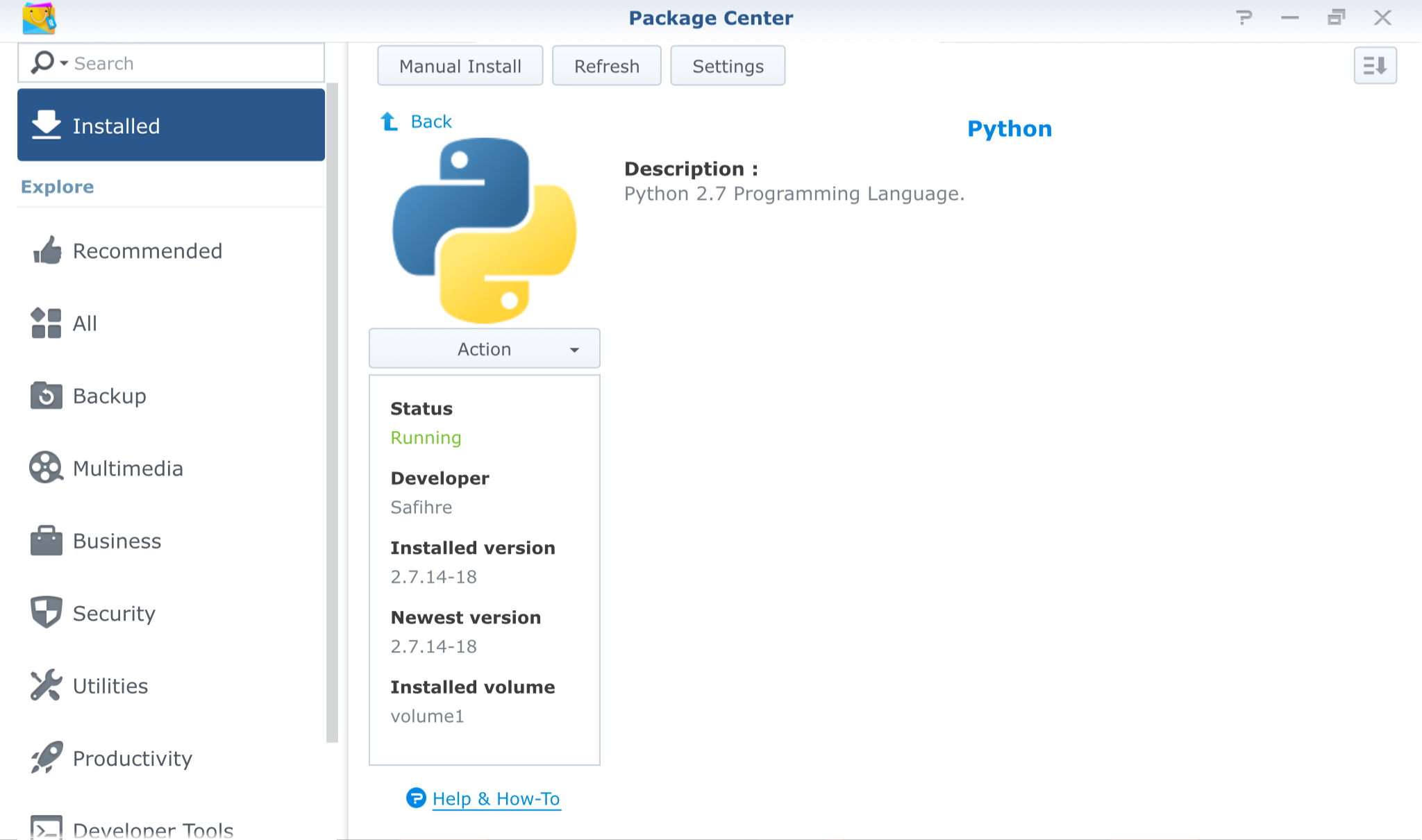
How can this be solved when multiple people are reporting that, even though Python 2.7 is installed, packages (including CouchPotato) complain it’s not and won’t start?
Here’s a screenshot of my packages to show that we have installed the correct version of Python:
raspberrycoulis
on 19 May 2018
It is my belief that it can only be resolved when the package name "python" will be added to the repository....
adispi
on 19 May 2018
To voice everyone else here, the issue is that officially Python 2.7 is not available for Apollolake (e.g. DS918+). Most of us got Python installed from thread #3138.
But now the updates to SABnzbd and CouchPotato are looking for a different/official version of Python I guess?
As suggested just above, python need to be officially added to the repository for Apollolake.
Thanks
sibyy
on 19 May 2018
@adispi OK so may you please detail me a specific failure with a package name and version, DSM architecture or model, and error logs from /var/packages/xxx/target/var/log/ to have at least a clue why service does not start even when python package is present. Please also mention python package version. (in fact details requested in issue creation template you decided to discard...)
ymartin59
on 20 May 2018
New Python 2.7 package version is not ready to be published... there are troubles with ARM architectures. And I guess no reason why beta/test package version may fail to start published application (yet - please provide service startup logs)...
ymartin59
on 20 May 2018
Model: DS918+
CPU Intel Celron J3455
DSM Version: DSM 6.1.6-15266 update 1
packackes: Mylar 20180228-4 + 20180519-5, SABnzbd 2.3.3-34, couchpotato 20180513-7, beets 1.4.3-1, headphones 20180228-7 + 20151012-7, lazylibrarian 20180228-4 + 20140611-4
error:
the following packages are missing in package server. please contact the synology support team for help.
python.
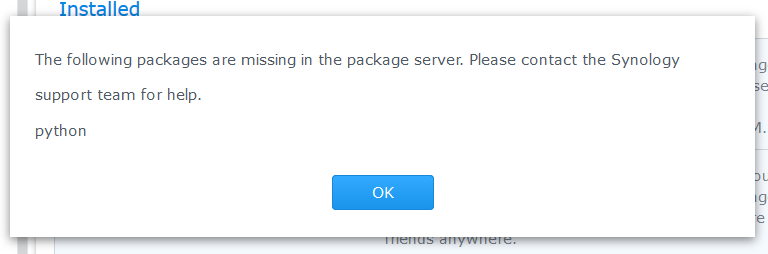
there is no folder created for the failed install under /var/package, therefore there is no log file
because of that, and the error not being specific, i do not know the python package version.
however, i do believe it to be 2.7.14-18 and higher.
thank you.
adi.
adispi
on 20 May 2018
Model: DS218+
CPU: INTEL Celeron J3355
DSM Version: DSM 6.1.6-15266 Update 1
packages: couchpotato 20180513-7
Same error as @adispi
log file
error.log
: (see attachments)
/var/packages/couchpotatoserver/target/var/logs
Python used is from here: python_x64-6.1_2.7.14-18.spk
RoketteS
on 20 May 2018
Do you also want the CouchPotato.log file?
RoketteS
on 20 May 2018
About CouchPotato log, root cause is that service port is already in use by either another instance of CouchPotato or another service:
server.listen(config['port'], config['host'])
error: [Errno 98] Address already in use
So from my point of view, nothing related to python availability.
Have you installed couchpotatoserver-custom at the same time?
ymartin59
on 21 May 2018
So, I’ve just tried something here. I have two NAS drives now, the DS215j and the DS718+. I’m using the 718+ for my main tasks and the 215j as a backup NAS. Basically I upgraded from the 215j to the 718+ and found the issue with CP complaining about the missing Python package when migrating my settings.
However, I’ve just tried installing CP on my 215j and it “failed to install” but when I looked at the logs located at /var/packages/couchpotatoserver/target/var/logs I noticed it appeared to be running so I tried accessing it in the browser and it is indeed running. Odd.
However, I’m still getting the missing Python issue on my 718+ despite manually installing it via the .spk file mentioned several times in here.
Not sure if this helps or not but I wanted to share in case.
raspberrycoulis
on 21 May 2018
@ymartin59 ok i will look at the cullprit used port with nestat or is there a fast way to uninstall custom and normal and do a clean install?
RoketteS
on 22 May 2018
@ymartin59 as I already thought is had nothing to do with interference from -custom and the standard couchpotato.
1) Did a clean uninstall and it worked
2) Install coach potato from the .spk and it worked
Still the update is pending after installation and selecting the update will warn that python is not installed.
RoketteS
on 22 May 2018
I have tested a mixed installation on x64 xpenology: after couchpotato asking for lacking python, I installed it manually from #3138 and then couchpotato accepts to install and run.
My hypothesis is that DSM checks availability from online repository instead of locally installed packages.
I cannot publish a more recent version for only apollolake, it will mask previous version to other architectures.
The only relevant thing to do is to fix ARM support for Python 2.7.14 so that it can be published
ymartin59
on 27 May 2018
May you please test again to install Python from #3138 and test latest CouchPotato after switching Package Center Settings "Trust Level" to "Any publisher".
ymartin59
on 27 May 2018
@ymartin59 I downloaded the latest 6.1 packed, did a manual install on my NAS and so I assumed it updated the current package. Then tried to update the two existing packaged, couchpotato and SAB but still get the same error message saying python is missing.
Tried the above trust level
 remirr
on 28 May 2018
remirr
on 28 May 2018
I have just published Python 2.7.14 - should fix your install/upgrade troubles
ymartin59
on 28 May 2018
Well, it fixed it partially. Python is indeed now visible to the other packages, so I updated Mylar...
...which now fails to start: "Failed to run package service"
It worked fine before,
 Drakuhl
on 31 May 2018
Drakuhl
on 31 May 2018
@Drakuhl Try to re-install Mylar package... its python environment has probably to be rebuilt from new wheels. If still failing to start, submit a new issue with package logs.
ymartin59
on 31 May 2018
Related issues
 R1skNt
·
6Comments
R1skNt
·
6Comments
 zhuchun
·
7Comments
zhuchun
·
7Comments
 kraades
·
6Comments
kraades
·
6Comments
 th0ma7
·
5Comments
th0ma7
·
5Comments
 Mickroz
·
3Comments
Mickroz
·
3Comments
Most helpful comment
To voice everyone else here, the issue is that officially Python 2.7 is not available for Apollolake (e.g. DS918+). Most of us got Python installed from thread #3138.
But now the updates to SABnzbd and CouchPotato are looking for a different/official version of Python I guess?
As suggested just above, python need to be officially added to the repository for Apollolake.
Thanks