Spectacle: "Next/Prev Display" actions moving wrong direction with three displays
If a window is on display 1 and I use the "Next Display" keyboard shortcut (or from selecting from the menu icon), the window moves to display 3. Pressing "Next Display" will move it to screen 2, then 1 again. I would expect it to move from 1 to 2 to 3 then 1 again. "Prev Display" has the reverse behavior.
System
MacBook Pro (Retina 15' Mid 2014)
OSX 10.10.1 Yosemite
Setup
Arrangement screenshot: http://grab.by/CSMu
1st display: MBP laptop
2nd display: BENQ G2320HDB
3rd display: ASUS VH242H
 trevordunn
All 24 comments
+1
 bchapman
on 11 Dec 2014
bchapman
on 11 Dec 2014
+1
Just switched the key bindings for now
 bradymwilliams
on 5 Jan 2015
bradymwilliams
on 5 Jan 2015
+1
 Bunk
on 27 Feb 2015
Bunk
on 27 Feb 2015
+1
I am impacted by this also. Here is my screen layout:

 urda
on 2 Mar 2015
urda
on 2 Mar 2015
+1
 codekiln
on 15 Jun 2015
codekiln
on 15 Jun 2015
-1
I think this has to do with arrangement because for me this works as expected. Going from left to right or right to left depending on what i press. Maybe a bug with how OS X enumerates displays? You don't really want to switch from display 1 to display 2, you want to switch to "the next display to the right".
 kokarn
on 15 Jun 2015
kokarn
on 15 Jun 2015
I'm inclined to close this since it really is hard to determine which display to consider the next display. Spectacle used to simply rely on the order of displays provided by OS X. This proved to be problematic for other reasons so I decided to try out a stable sort on the collection of displays. The hope being that despite being in an unexpected order at least each display would be in a consistent order.
 eczarny
on 25 Sep 2015
eczarny
on 25 Sep 2015
Just to add some noise, could you allow self-definition of order?
 IanSaunders
on 22 Oct 2015
IanSaunders
on 22 Oct 2015
That could simplify things. Just need to think it through a bit more.
eczarny
on 23 Oct 2015
A workaround if you have 2 or 3 screens is just to change the config for "next" and "previous". By default right is next and left is previous, but there's no reason you can't swap them. :)
 apryce
on 18 Apr 2016
apryce
on 18 Apr 2016
When having 2-3 screens, this is something, i believe, you can get used to. I have 5, and "Next Display" is pretty much useless for me.
Could there be a way to manually define order of the displays, if guessing is hard to implement?
 TheStalwart
on 10 May 2016
TheStalwart
on 10 May 2016
+1
 william00179
on 17 Jun 2016
william00179
on 17 Jun 2016
I can confirm this is still a bug for me on 3 displays. Pressing the shortcut for Next Display moves the current window to the previous display and vice-versa.
 dbkaplun
on 5 Jul 2016
dbkaplun
on 5 Jul 2016
I can confirm this is a bug for me as well.
 joshkremer
on 30 Aug 2016
joshkremer
on 30 Aug 2016
I confirm this is an issue for me as well and I fixed it by putting the menu bar on the middle screen.
My arrangement from left to right is,
Mac | Display 1 | Display 2.
The bug was occurring when the menu bar was on the Mac (left-most screen).
Yesterday, my set up was (L to R):
Display 1 | Mac | Display 2
..._but_ the menu bar was on the middle display (Mac).
I know this may not help those that are using more than 3 displays (machine + 2 externals) but hopefully it'll help those with the same setup.
This is a picture of my solution:

It was breaking when it was like this:

 ghost
on 15 Sep 2016
ghost
on 15 Sep 2016
That's awesome, I can confirm that moving the menu to the middle fixes my
setup (also 3 monitors).
On Thu, Sep 15, 2016 at 3:25 PM, ja-ns [email protected] wrote:
I confirm this is an issue for me as well and I fixed it by putting the
menu bar on the middle screen.
My arrangement from left to right is,Mac | Display 1 | Display 2.
The bug was occurring when the menu bar was on the Mac (left-most screen).
Yesterday, my set up was (L to R):
Display 1 | Mac | Display 2
..._but_ the menu bar was on the middle display (Mac).
I know this may not help those that are using more than 3 displays
(machine + 2 externals) but hopefully it'll help those with the same setup.This is a picture of my solution:
[image: image]
https://cloud.githubusercontent.com/assets/20581786/18564139/e3b05d74-7b4f-11e6-94d8-222f383d0673.pngIt was breaking when it was like this:
[image: image]
https://cloud.githubusercontent.com/assets/20581786/18564210/289b3562-7b50-11e6-8272-804253af0459.png—
You are receiving this because you commented.
Reply to this email directly, view it on GitHub
https://github.com/eczarny/spectacle/issues/298#issuecomment-247426776,
or mute the thread
https://github.com/notifications/unsubscribe-auth/AAhh06IKxXwa-dzgUeCBTvvUJDd811_qks5qqZuqgaJpZM4DFoA4
.
Juan Mendes
 juanmendes
on 16 Sep 2016
juanmendes
on 16 Sep 2016
I can also confirm that this problem was resolved by moving the "bar" to the middle monitor.

joshkremer
on 15 Dec 2016
Closing this out since there is a relatively simple workaround. I likely won't dedicate more time to addressing this issue.
eczarny
on 19 Dec 2016
What @joshkremer suggests only works for 3 monitor setups. I have menubar on the middle of my 5 screens, and next/previous action doesn't work as expected
TheStalwart
on 19 Dec 2016
+1. This is still a bug for those of us with more than 3 displays. Manual reordering or a better solution is still needed. Thanks!
 creativecag
on 25 Sep 2017
creativecag
on 25 Sep 2017
+1
 seanmcmills
on 18 Apr 2019
seanmcmills
on 18 Apr 2019
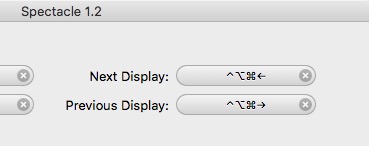
In Spectacles preferences, I swapped the Next Display and Previous Display hotkeys, as these are all I use. This should work for 3+ monitors as well.
seanmcmills
on 18 Apr 2019
Moving the menu bar is not a good workaround for changing display order since it has other side-effects, like changing where the Dock is displayed, changing where windows open when applications start up, changing where new document windows appear, and changing where dialog boxes appear.
The primary purpose of the menu bar selector is to specify the "primary" display where all those things happen. It is not to change the display ordering.
As it happens, my middle display is in portrait and I don't want it to be my primary display - my Dock icons would become too small and my application windows would open too narrow by default. I want my primary display to be my right-hand display, which is in landscape.
 jmsgwd
on 22 Jun 2019
jmsgwd
on 22 Jun 2019
^ Agreed, that is not a good workaround. I don't want to change my primary display, I just want to change the ordering of monitors that Spectacle uses from left to right
 chris-jansson
on 17 Dec 2019
chris-jansson
on 17 Dec 2019
Related issues
 zdkroot
·
6Comments
zdkroot
·
6Comments
 geoHeil
·
8Comments
geoHeil
·
8Comments
 Andrew-Chapman
·
3Comments
eczarny
·
8Comments
Andrew-Chapman
·
3Comments
eczarny
·
8Comments
 joshua-barnett
·
7Comments
joshua-barnett
·
7Comments
Most helpful comment
I confirm this is an issue for me as well and I fixed it by putting the menu bar on the middle screen.
My arrangement from left to right is,
The bug was occurring when the menu bar was on the Mac (left-most screen).
Yesterday, my set up was (L to R):
..._but_ the menu bar was on the middle display (Mac).
I know this may not help those that are using more than 3 displays (machine + 2 externals) but hopefully it'll help those with the same setup.
This is a picture of my solution:

It was breaking when it was like this:
