Spectacle: Center and resize a window to custom dimensions
Hi!
First - thanks for your work!
It would be great if you can implement a feature:
I am using a monitor with a high resolution and i resize all my windows to about 75% width of the whole screen - then I still can see all my icons on the right.
It would be great if you can add this as a feature to your software: send window to center and resize window to costum width and height!
Thanks a lot,
matt
 ghost
ghost
All 31 comments
+1
Something like:
Cmd + Ctrl + 1  = 25% screen width
Cmd + Ctrl + 2  = 50% screen width
Cmd + Ctrl + 3  = 75% screen width

Cmd + Ctrl + Shift + 1  = 25% screen height
Cmd + Ctrl + Shift + 2  = 50% screen height
Cmd + Ctrl + Shift + 3  = 75% screen height
 fabriziogiordano
on 28 Feb 2012
fabriziogiordano
on 28 Feb 2012
+1
 bradpants
on 7 Jul 2012
bradpants
on 7 Jul 2012
+1, thirds would be especially nice.
 chelmertz
on 7 Aug 2012
chelmertz
on 7 Aug 2012
I would love this. SizeUp (http://www.irradiatedsoftware.com/sizeup/) has the ability to set the calculation for what percent of the screen you want the window to take up. For me, I tend to set it at top 75% and bottom 25%. So, things like terminal only take up 25% of the window instead of 50%. Personally, I think that's a great way to handle it.
Here is a video explaining how it works: http://www.youtube.com/watch?feature=player_embedded&v=m2CNv9dqVQ4#!t=2m12s
 jhubert
on 1 Sep 2012
jhubert
on 1 Sep 2012
Some inspiration can be found in Winsplit Revolution for Windows Vista and 7. With this tool you can specify a custom set of window placements/sizes, through which you can cycle using keyboard shortcuts.
For instance, if you press opt+cmd+right the window first goes on the right half of the screen, if you press it again the window goes to the right third of the screen, and if you press it once more it goes on the right 2/3's of the screen.
This gives much more flexible window placing options, which is useful if you have a lot of screen real estate.
 Sakartu
on 31 Oct 2012
Sakartu
on 31 Oct 2012
+1
 exalted
on 4 Nov 2012
exalted
on 4 Nov 2012
would love this! +1
 timkelty
on 14 Jan 2013
timkelty
on 14 Jan 2013
+1
Additionally, I would like to capture the absolute size and position of a foreground window and then use those values for the centering. Furthermore, it should ignore the Dock in those calculations. Every window management app I have tried doesn't, which means as my Dock shrinks and grows, the centering is different.
 michaelpmaley
on 7 Mar 2013
michaelpmaley
on 7 Mar 2013
+1
 kanetann
on 1 Aug 2013
kanetann
on 1 Aug 2013
+1
I would like the windows to take the full height of the screen when divided. In my mac I am getting about 75% of the height.
I'm also a fan of winsplit revolution
 ronaldocpontes
on 30 Aug 2013
ronaldocpontes
on 30 Aug 2013
+1
This is what keeps SizeUp on my work machine and Spectacles on my personal machine. I'd eat the random popups about donating that SizeUp has before switching my work machine to an app without this. Helps keep my OCD sanity.
I love your app! Please include this little gem. Donation promised upon implementation!!
 mattsnowky
on 14 Nov 2013
mattsnowky
on 14 Nov 2013
+1
I miss this feature of the SizeUp very much. It is very handy.
Most of the time when I am working with Finder/terminal/Notes window, I either snap it to the left half or right half. However, when I open the window next time, it remembers the last position, width and height so it takes either the left half or right half space. It gets very annoying to resize it manually with the mouse as there is no quick way to "reset" the window's size back to the normal.
 ilovecoffee
on 23 Jan 2014
ilovecoffee
on 23 Jan 2014
+1 I love this feature in SizeUp also .
 kevindente
on 5 Mar 2015
kevindente
on 5 Mar 2015
+1
I'm surprised this hasn't been implemented yet and is not requested more often. Spectacle seems very useful but this is the only feature I continuously keep wishing for.
@eczarny any idea when to expect this?
 kangax
on 2 Aug 2015
kangax
on 2 Aug 2015
+1
Seriously, how is this not done already?
This is the one thing stopping so many users from using spectacle. I'd rather pay the $14 for SizeUp and Cinch just to have this one feature.
 spartanatreyu
on 7 Sep 2015
spartanatreyu
on 7 Sep 2015
No plans yet. I work on this app in my spare time and have no intentions to go feature-to-feature with other apps.
If it's worth $14 dollars for a feature like this then spend it on the app that fits your need.
 eczarny
on 7 Sep 2015
eczarny
on 7 Sep 2015
+1
I'm now using Spectacle, but this is the one feature I miss most from other apps.
ghost
on 18 Sep 2015
Couldn't wait haha, had a look inside and found a way to sort of center the window at a set size.
Just fullscreen then hit the make smaller shortcut, play around with the value below to get somewhere you feel comfortable with
https://github.com/eczarny/spectacle/issues/114#issuecomment-143968651
spartanatreyu
on 29 Sep 2015
@eczarny I don't think "feature by feature" is reasonable, but this _one particular_ feature is one that is sorely missed. I personally have a SizeUp license but wanted to use this since it was open source, but this one feature (or lack thereof) is what makes me want to switch back.
 jfelchner
on 18 Oct 2015
jfelchner
on 18 Oct 2015
@eczarny This feature would give Spectacle a permanent place in my osX toolchain and would gain my advocacy as as strong window management solution. It would be useful to be able to define a window's width or perhaps disable resizing on snapping.
 sorter
on 3 Feb 2016
sorter
on 3 Feb 2016
+1 this would be great!
 rootwork
on 10 Jun 2016
rootwork
on 10 Jun 2016
Any update on this? I would also like to propose an option to just keep the current window size when moving, this is why I still use Moom because I don't always want to resize. Check out these window settings in Moom:
Move & Zoom
Move
Move to Edge/Corner
Move to Other Display
Center
Resize
Grow
Shrink
Zoom to Full Screen
Revert to Original dimensions
Come on Santa bring us a present :)
ghost
on 12 Dec 2016
Since this still isn't done I'm posting this here as a replacement for spectacle, sizeup and cinch.
I made a script for Hammerspoon (open source) to recreate Window's window management on a Mac with a minute of setup.
Just download hammerspoon, set it to autorun on startup, open the config and paste the contents of this gist in:
https://gist.github.com/spartanatreyu/850788a0441e1c5565668a35ed9a1dfc
Save the config file, reload hammerspoon and you're up and going.
Drag windows to the sides or the corners to dock them and/or use keyboard shortcuts. Control + Option (the _two_ bottom left keys ) + Arrow for half the screen, maximise and center or Control + Option + Command (the _three_ bottom left keys ) + Arrow for corner of the screen.
Settings are in the top of the config file if you want to toggle keyboard or mouse only, mouse to window sensitivity as well as animation timing.
The config file also has comments everywhere so feel free to change or expand upon any shortcuts or window management style you want.
spartanatreyu
on 21 Dec 2016
Just discovered this tool and I've ditched SizeUp to switch to Spectacle. Kudos (donation on its way 😄 ). I do miss this centreing feature, but maybe for MVP, you can just build a key command to centre a window with a default margin % (like 75%). Add configuration later.
 stevevrporter
on 24 Jan 2017
stevevrporter
on 24 Jan 2017
I too would like this to be added!
 mirshko
on 23 Feb 2017
mirshko
on 23 Feb 2017
👍
 seefeld
on 29 Apr 2017
seefeld
on 29 Apr 2017
+1
 ArvidBaa
on 5 Jun 2017
ArvidBaa
on 5 Jun 2017
Sizeup does it like:
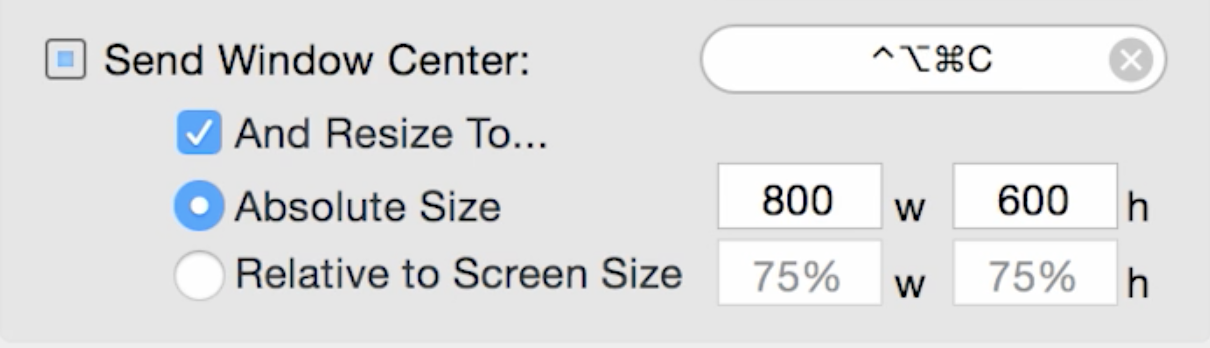
Would love to see this. Imo the one missing feature
 dimitrieh
on 16 Sep 2017
dimitrieh
on 16 Sep 2017
on a note to get this somewhere, this might help: https://github.com/shadanan/spectacle/commit/15cbdb5f9faf8a92e6f698461e003ee3560e817d
found it in one of the forks from @shadanan
dimitrieh
on 16 Sep 2017
How can I automatically set the Position of a Window, when openeing an App?
 Tom012
on 31 Dec 2017
Tom012
on 31 Dec 2017
+1
 o6uoq
on 23 Apr 2019
o6uoq
on 23 Apr 2019
Related issues
 vancetran
·
5Comments
dimitrieh
·
4Comments
vancetran
·
5Comments
dimitrieh
·
4Comments
 jshado1
·
3Comments
jshado1
·
3Comments
 zdkroot
·
6Comments
zdkroot
·
6Comments
 alvarosevilla95
·
7Comments
alvarosevilla95
·
7Comments
Most helpful comment
Sizeup does it like:
Would love to see this. Imo the one missing feature