Specflow: System.Exception - Unit test Provider already set
SpecFlow Version:
- [x] 3.1
- [ ] 3.0
- [ ] 2.4
- [ ] 2.3
- [ ] 2.2
- [ ] 2.1
- [ ] 2.0
- [ ] 1.9
Used Test Runner
- [ ] SpecFlow+Runner
- [x] MSTest
- [ ] NUnit
- [ ] Xunit
Version number: 3.1.74
Project Format of the SpecFlow project
- [x] Classic project format using
packages.config - [ ] Classic project format using
<PackageReference>tags - [ ] Sdk-style project format
.feature.cs files are generated using
- [x]
SpecFlow.Tools.MsBuild.GenerationNuGet package - [ ]
SpecFlowSingleFileGeneratorcustom tool
Visual Studio Version
- [x] VS 2019
- [ ] VS 2017
- [ ] VS 2015
Enable SpecFlowSingleFileGenerator Custom Tool option in Visual Studio extension settings
- [ ] Enabled
- [x] Disabled
Are the latest Visual Studio updates installed?
- [x] Yes
- [ ] No, I use Visual Studio version
<Major>.<Minor>.<Patch>
.NET Framework:
- [x] >= .NET 4.5
- [ ] before .NET 4.5
- [ ] .NET Core 2.0
- [ ] .NET Core 2.1
- [ ] .NET Core 2.2
- [ ] .NET Core 3.0
Test Execution Method:
- [x] Visual Studio Test Explorer
- [ ] TFS/VSTS/Azure DevOps – Task – PLEASE SPECIFY THE NAME OF THE TASK
- [ ] Command line – PLEASE SPECIFY THE FULL COMMAND LINE
<SpecFlow> Section in app.config or content of specflow.json
<?xml version="1.0" encoding="utf-8"?>
<configuration>
  <runtime>
    <assemblyBinding xmlns="urn:schemas-microsoft-com:asm.v1">
      <configSections>
        <section name="specFlow" type="TechTalk.SpecFlow.Configuration.ConfigurationSectionHandler, TechTalk.SpecFlow" />
      </configSections>
      <specflow>
        <unitTestProvider name="MSTest" />
      </specflow>
      <dependentAssembly>
        <assemblyIdentity name="System.ValueTuple" publicKeyToken="cc7b13ffcd2ddd51" culture="neutral" />
        <bindingRedirect oldVersion="0.0.0.0-4.0.3.0" newVersion="4.0.3.0" />
      </dependentAssembly>
      <dependentAssembly>
        <assemblyIdentity name="TechTalk.SpecFlow" publicKeyToken="0778194805d6db41" culture="neutral" />
        <bindingRedirect oldVersion="0.0.0.0-3.1.0.0" newVersion="3.1.0.0" />
      </dependentAssembly>
      <dependentAssembly>
        <assemblyIdentity name="Google.Protobuf" publicKeyToken="a7d26565bac4d604" culture="neutral" />
        <bindingRedirect oldVersion="0.0.0.0-3.7.0.0" newVersion="3.7.0.0" />
      </dependentAssembly>
    </assemblyBinding>
  </runtime>
</configuration>
See below packages.config:
Repro Project
Issue Description
My tests are all visible in the Test Explorer panel. However, when I right-click on a test and run it, I get no errors but no browser loads and there is no test result. All I see is 'Test run finished in 139 ms: 0 Total tests - 0 Passed, 0 Failed, 0 Skipped.
Steps to Reproduce
Right click on a test and select Run
 ashsingh1212
All 11 comments
I was missing a nuget package which is why nothing was actually running. However, now when I try to run a test, I keep getting the error: 'System.Exception: Unit test Provider already set.' The exception is occurring in MSTest.AssemblyHook.cs.
To add some context to what I did before the error was occurring, the test runner was Specflow.SpecRun but I wanted to change the test runner to MSTest to allow me to associate with a test case in Azure DevOps. I therefore, removed all links to Specflow.SpecRun in the hope it would resolve my problem.
ashsingh1212
on 23 Dec 2019
So this may not be the most ideal solution but I created a new project within the same solution, installed the same nuget packages and copied all the files/folders across to the new project. I removed the previous project, cleaned solution and re-built. Tests appear in the Test Explorer and also run successfully too.
I'll keep this open in case there is a fix required for the above.
ashsingh1212
on 23 Dec 2019
You get this error when you have more than one of these packages installed:
- SpecRun.Runner
- SpecFlow.xUnit
- SpecFlow.MsTest
- SpecFlow.NUnit
See https://specflow.org/2019/updating-to-specflow-3/ - Updating SpecFlow
 SabotageAndi
on 10 Jan 2020
SabotageAndi
on 10 Jan 2020
I am receiving this error. I Have the following 4 related nuget packages installed.
- SpecFlow (3.1.78)
- SpecFlow.Tools.MsBuild.Generation (3.1.78)
- SpecFlow.xUnit (3.1.78)
- SpecRun.SpecFlow (3.1.44)
specflow.json contains the following
"bindingCulture":
{
"language" :"en-us"
},
"language":
{
"feature": "en-us"
}
Lastly, I have removed the itemgroup from .csproj
 captainkout
on 23 Jan 2020
captainkout
on 23 Jan 2020
remove either 3. or 4. and the error goes away
 BasHamer
on 23 Jan 2020
BasHamer
on 23 Jan 2020
The corresponding section in the documentation is here.
You can only have 1 unit test provider, which is configured based on the package you installed. So make sure to only install one of them! In this case, you have both SpecFlow+ Runner (SpecRun.SpecFlow) and xUnit packages installed. As Bas says, you need to remove one of them.
 Stephen-Mc
on 24 Jan 2020
Stephen-Mc
on 24 Jan 2020
Thanks guys. Much appreciated.
From the getting started page (https://specflow.org/getting-started/) when it says replace "SpecFlow+ Runner" with your test provider. You must replace both SpecRun.SpecFlow andalso SpecRun.Runner.
captainkout
on 24 Jan 2020
I'm having the same problem but I'm pretty sure I got it set up right..
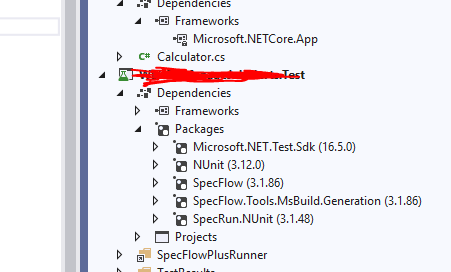
My tests just get skipped
 p2635
on 26 Feb 2020
p2635
on 26 Feb 2020
@p2635 I see a SpecFlowPlusRunner in your project, but you don't have the NuGet package added.
I assume you had it in the past and changed to NUnit. Probably some files were left in our OutputDirectory (bin\debug). Try to delete it and build again and run the scenarios.
If you still have the error, please open a new issue. Thanks
SabotageAndi
on 26 Feb 2020
@SabotageAndi , Thanks Andi. I do have the package added so I am really confused. I opened a new issue anyway #1897
p2635
on 26 Feb 2020
This thread has been automatically locked since there has not been any recent activity after it was closed. Please open a new issue for related bugs.
![github-actions[bot] picture](https://avatars.githubusercontent.com/in/15368?v=4&s=40) github-actions[bot]
on 25 Jan 2021
github-actions[bot]
on 25 Jan 2021
Related issues
 zplan
·
4Comments
zplan
·
4Comments
 amarzi
·
5Comments
amarzi
·
5Comments
 omarpiani
·
7Comments
omarpiani
·
7Comments
 gasparnagy
·
4Comments
gasparnagy
·
4Comments
 timvandenhof
·
6Comments
timvandenhof
·
6Comments
Most helpful comment
remove either 3. or 4. and the error goes away