Specflow: Cannot regenerate feature files after upgrade: "Could not find CodeBehindGenerator binary" --
I recently upgraded the SpecFlow extension in VS 2017, after which time feature file regeneration appeared to break. I completely uninstall & reinstalled the extension in VS to confirm.
Whenever regenerating feature files, all the *.feature.cs files contain the following text:
Could not find CodeBehindGenerator binary at location c:users[MyUsername]\appdata\local\microsoft\visualstudio\15.0_a1f73ac9\extensions\wqhrssma.rrn\TechTalk.SpecFlow.VisualStudio.CodeBehindGenerator.exe.
In this folder, the .exe file in the reference appears not to exist, though a DLL file by the same name does:
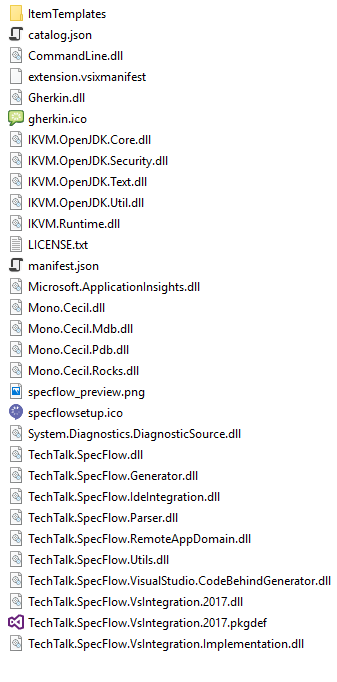
SpecFlow Extension Version:
2019.0.2.58269 (attempted via update & also uninstall/reinstall)
SpecFlow Version:
- [ ] 3.0
- [x] 2.4 (2.4.1)
- [ ] 2.3
- [ ] 2.2
- [ ] 2.1
- [ ] 2.0
- [ ] 1.9
Used Test Runner
- [ ] SpecFlow+Runner
- [ ] MSTest
- [x] NUnit (via ReSharper, but this is codegen, nothing to do with runner)
- [ ] Xunit
Version number:
Visual Studio Version
- [x] VS 2017 (15.9.6)
- [ ] VS 2015
- [ ] VS 2013
Are the latest Visual Studio updates installed?
- [ ] Yes
- [x] No (I have 15.9.6, 15.9.10 appears to be available)
.NET Framework:
- [x] >= .NET 4.5
- [ ] before .NET 4.5
- [ ] .NET Core 2.0
- [ ] .NET Core 2.1
- [ ] .NET Core 2.2
- [ ] .NET Core 3.0
Test Execution Method:
- [ ] Visual Studio Test Explorer
- [ ] TFS/VSTS/Azure DevOps – Task – PLEASE SPECIFY THE NAME OF THE TASK
- [ ] Command line – PLEASE SPECIFY THE FULL COMMAND LINE
- [x] ReSharper test runner (again, this appears to have nothing to do with execution).
<SpecFlow> Section in app.config
  <specFlow>
    <!-- For additional details on SpecFlow configuration options see http://go.specflow.org/doc-config -->
  <plugins>
      <add name="SpecFlow.Autofac" type="Runtime" />
    </plugins><!-- For additional details on SpecFlow configuration options see http://go.specflow.org/doc-config --></specFlow>
Repro Project
Issue Description
See top of ticket (wanted to place this first)
Steps to Reproduce
 SeanKilleen
All 56 comments
I am currently in the process of upgrading my Visual Studio to v15.9.10 to ensure that it is not a variable in the process.
Also FYI, we use SpecFlow.Autofac Nuget package, latest stable (v1.1.0)
SeanKilleen
on 28 Mar 2019
From the screenshot it looks like there is a packaging problem.
I will have a look at it tomorrow.
I would suggest to use the MSBuild integration.
 SabotageAndi
on 28 Mar 2019
SabotageAndi
on 28 Mar 2019
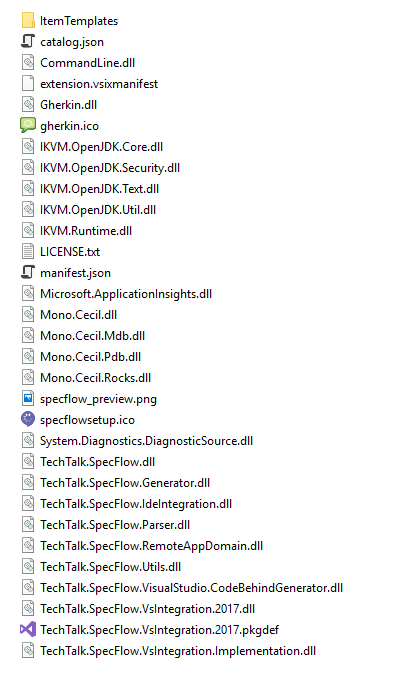
Hey, I am also seeing this issue. Attached is a screenshot of the same folder, missing the same .exe file.
 NikoYanez
on 28 Mar 2019
NikoYanez
on 28 Mar 2019
Hi all, looks like I'm in the same boat. No .exe but a dll of the same name. I just updated my VS to 15.9.10 this morning.
 brychart
on 28 Mar 2019
brychart
on 28 Mar 2019
A few notes:
- Yep, confirmed this remains broken for me after upgrade to VS 2017 v15.9.10.
- Weirdly enough, I don't see this release on an official release channel (e.g. in GitHub) so I wasn't sure if the release was intentional. Per @SabotageAndi, I think the release was at least intentional -- just might have had an issue with packaging.
FYI, everyone who updates the SpecFlow extension at this point (automatically or otherwise) will render their feature.cs files unusable until a fix is pushed.
Are there any downgrade options in this case?
SeanKilleen
on 28 Mar 2019
I m in the same boat!
 alan50
on 28 Mar 2019
alan50
on 28 Mar 2019
same here.
 whywhy36
on 28 Mar 2019
whywhy36
on 28 Mar 2019
Same but I have fix it with the MSBuild integration.
https://specflow.org/2019/updating-to-specflow-3/ (Updating SpecFlow, Steps 6-8).
 nuzolx
on 28 Mar 2019
nuzolx
on 28 Mar 2019
This is also affecting the Visual Studio 2015 extension.
 dandamann
on 29 Mar 2019
dandamann
on 29 Mar 2019
@SeanKilleen Release was intentionally for the SpecFlow 3 Release.
When we migrated to the new sdk-project format, we forgot to set the output type to exe. No idea how we and the users of the preview extension (more than 100 people) didn't found this.
Sorry for the inconvenience.
When the build https://dev.azure.com/specflow/SpecFlow/_build/results?buildId=287 and release is finished, I will upload it to the marketplace.
SabotageAndi
on 29 Mar 2019
Might be me, but I still have this issue, even after update.
 HoofdletterD
on 29 Mar 2019
HoofdletterD
on 29 Mar 2019
@HoofdletterD I didn't upload the extension yet as I found another issue.
SabotageAndi
on 29 Mar 2019
@HoofdletterD I didn't upload the extension yet as I found another issue.
Ah ok, thanks for the update. The issue has status "closed" now, but I recon that was a bit too early then.
HoofdletterD
on 29 Mar 2019
The commit closed the issue automatically.
SabotageAndi
on 29 Mar 2019
Extension is now updated!
SabotageAndi
on 29 Mar 2019
I will let this issue open until I get feedback from you guys that the problem is now solved.
So please give it.
SabotageAndi
on 29 Mar 2019
after update specflow I still has problem that CodeBehindGenerator is not at location.
 MateuszZajac90
on 29 Mar 2019
MateuszZajac90
on 29 Mar 2019
@MateuszZajac90 which version of the extension do you have installed? It should be 2019.0.6.*
SabotageAndi
on 29 Mar 2019
And if you use SpecFlow 3, you have to use the MSBuild Generation.
SabotageAndi
on 29 Mar 2019
Nuget package shows that I am on latest version 3.0.188 but still having problem after updating this morning as well.
 jakepens71
on 29 Mar 2019
jakepens71
on 29 Mar 2019
@SabotageAndi
I have:
VisualStudio: 2017
SpecFlow: 3.0.188
Gherkin: 6.0.0
No I'm during install MSBuild Generation
MateuszZajac90
on 29 Mar 2019
@jakepens71
This is fixed in the VS Extension, not in the NuGet package.
You have to update the extension and restart VS.
SabotageAndi
on 29 Mar 2019
@SabotageAndi I think that is missing the dependency of Newtonsoft in the Nuget package version: 3.0.188
 Jorge-Moreira
on 29 Mar 2019
Jorge-Moreira
on 29 Mar 2019
@Jorge-Moreira We don't use Json.NET anymore in SpecFlow. We changed it to Utf8Json.
SabotageAndi
on 29 Mar 2019
Screenshot from extension window:
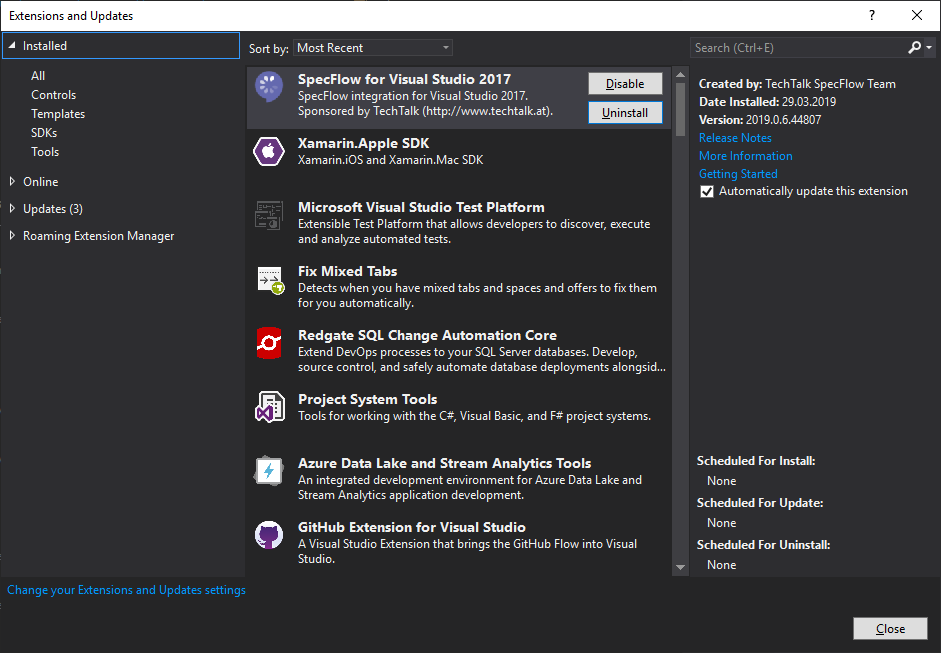
The fixed version is 2019.0.6.44807 or higher.
SabotageAndi
on 29 Mar 2019
@SabotageAndi so, any idea why I'm getting this error:
We could not find a data exchange file at the path System.IO.FileNotFoundException: Could not load file or assembly 'Newtonsoft.Json, Version=9.0.0.0, Culture=neutral, PublicKeyToken=30ad4fe6b2a6aeed' or one of its dependencies. The system cannot find the file specified.

Please open an issue at https://github.com/techtalk/SpecFlow/issues/
Complete output:
System.IO.FileNotFoundException: Could not load file or assembly 'Newtonsoft.Json, Version=9.0.0.0, Culture=neutral, PublicKeyToken=30ad4fe6b2a6aeed' or one of its dependencies. The system cannot find the file specified.
File name: 'Newtonsoft.Json, Version=9.0.0.0, Culture=neutral, PublicKeyToken=30ad4fe6b2a6aeed'
   at TechTalk.SpecFlow.VisualStudio.CodeBehindGenerator.Actions.GenerateTestFileAction.DeserializeFeatureFileInput(GenerateTestFileParameters opts)
   at TechTalk.SpecFlow.VisualStudio.CodeBehindGenerator.Actions.GenerateTestFileAction.GenerateTestFile(GenerateTestFileParameters opts)
I installed version 2019.0.7.57549 with extention
But I am getting error below.
We could not find a data exchange file at the path System.IO.FileNotFoundException: Could not load file or assembly 'Newtonsoft.Json, Version=9.0.0.0, Culture=neutral, PublicKeyToken=30ad4fe6b2a6aeed' or one of its dependencies. The system cannot find the file specified.
Please open an issue at https://github.com/techtalk/SpecFlow/issues/
Complete output:
System.IO.FileNotFoundException: Could not load file or assembly 'Newtonsoft.Json, Version=9.0.0.0, Culture=neutral, PublicKeyToken=30ad4fe6b2a6aeed' or one of its dependencies. The system cannot find the file specified.
File name: 'Newtonsoft.Json, Version=9.0.0.0, Culture=neutral, PublicKeyToken=30ad4fe6b2a6aeed'
at TechTalk.SpecFlow.VisualStudio.CodeBehindGenerator.Actions.GenerateTestFileAction.DeserializeFeatureFileInput(GenerateTestFileParameters opts)
at TechTalk.SpecFlow.VisualStudio.CodeBehindGenerator.Actions.GenerateTestFileAction.GenerateTestFile(GenerateTestFileParameters opts)
WRN: Assembly binding logging is turned OFF.
To enable assembly bind failure logging, set the registry value [HKLM\Software\Microsoft\Fusion!EnableLog] (DWORD) to 1.
Note: There is some performance penalty associated with assembly bind failure logging.
To turn this feature off, remove the registry value [HKLM\Software\Microsoft\Fusion!EnableLog].
Command: c:users[USERNAME]\appdata\local\microsoft\visualstudio\15.0_8c4109da\extensions\ypfe3pa4.52t\TechTalk.SpecFlow.VisualStudio.CodeBehindGenerator.exe
Parameters: GenerateTestFile --featurefile C:\Users\serkacur\AppData\Local\Temp\tmp380B.tmp --outputdirectory C:\Users\serkacur\AppData\Local\Temp --projectsettingsfile C:\Users[USERNAME]\AppData\Local\Temp\tmp37FB.tmp
Working Directory:
 serkancura
on 29 Mar 2019
serkancura
on 29 Mar 2019
In the VS Extension we still use Json.NET.
It is missing in the VSIX. No idea what loads the assembly on my machine, that I don't get this issue. Give me some minutes and then there will be a new version on the preview gallery.
SabotageAndi
on 29 Mar 2019
Screenshot from extension window:
The fixed version is 2019.0.6.44807 or higher.
Checked, and still get the same errors as before
HoofdletterD
on 29 Mar 2019
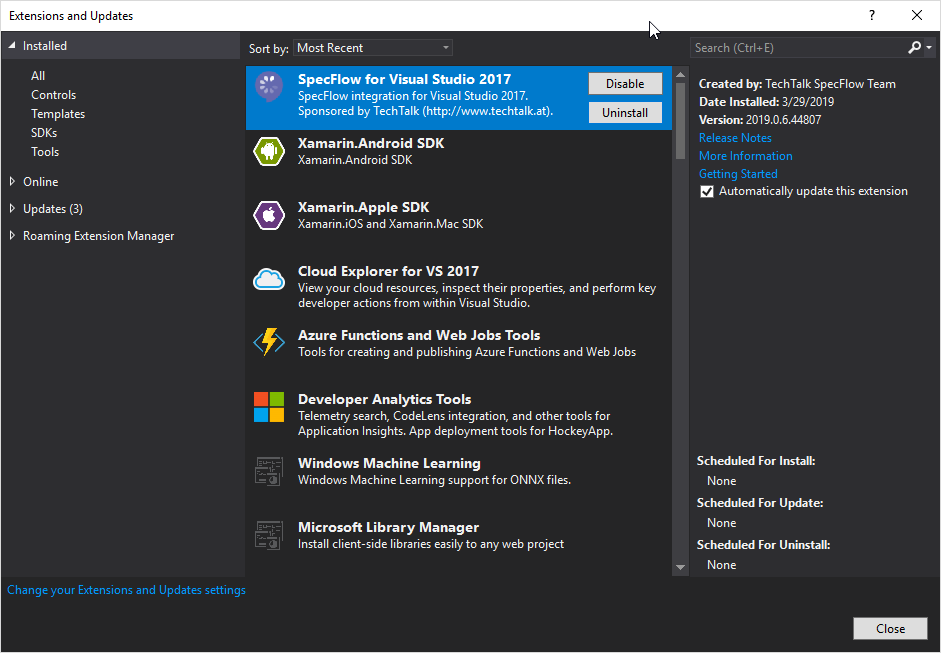
@SabotageAndi - I upgraded the extension to 2019.0.6.44807 but still seeing the same issue:
Could not find CodeBehindGenerator binary at location C:\USERS\JSHAY\APPDATA\LOCAL\MICROSOFT\VISUALSTUDIO\15.0_FB271A49\EXTENSIONS\AHC4OJGY.S01\TechTalk.SpecFlow.VisualStudio.CodeBehindGenerator.exe.
Please open an issue at https://github.com/techtalk/SpecFlow/issues/
jakepens71
on 29 Mar 2019
It helps. Now it's working and issue was fixed in my case.
What I did:(maybe it will be helpful for someone)
- Update Visual Studio to version
- In Extension and Updates I update specflow for VS 2017 to version 2019.0.6
- In Nuget packet I update specflow to version: latest stable.
- Remove using sourcetree all changes contain this errors.
- Restart Visual Studio.
- Rebuild project.
- Create something in project and save changes. Without this ISSUE :)
I'm pretty sure that update extension will be enough.
MateuszZajac90
on 29 Mar 2019
@SabotageAndi - I upgraded the extension to
2019.0.6.44807but still seeing the same issue:
Could not find CodeBehindGenerator binary at location C:\USERS\JSHAY\APPDATA\LOCAL\MICROSOFT\VISUALSTUDIO\15.0_FB271A49\EXTENSIONS\AHC4OJGY.S01\TechTalk.SpecFlow.VisualStudio.CodeBehindGenerator.exe. Please open an issue at https://github.com/techtalk/SpecFlow/issues/
Try to uninstall and install it again. It fixed my issue.
Jorge-Moreira
on 29 Mar 2019
I can't even uninstall it. Could not find file "x/y/z/LICENSE.txt", allthough it's there...
HoofdletterD
on 29 Mar 2019
@SabotageAndi - I upgraded the extension to
2019.0.6.44807but still seeing the same issue:
Could not find CodeBehindGenerator binary at location C:\USERS\JSHAY\APPDATA\LOCAL\MICROSOFT\VISUALSTUDIO\15.0_FB271A49\EXTENSIONS\AHC4OJGY.S01\TechTalk.SpecFlow.VisualStudio.CodeBehindGenerator.exe. Please open an issue at https://github.com/techtalk/SpecFlow/issues/
Try to uninstall and install it again. It fixed my issue.
Did it, and still have the issue
 sebbas32
on 29 Mar 2019
sebbas32
on 29 Mar 2019
@sebbas32 could you check the folder if it is really not there?
SabotageAndi
on 29 Mar 2019
@sebbas32 could you check the folder if it is really not there?
I see a file LICENSE.txt in the folder, so I recon the uninstaller should see atleast _something_.
HoofdletterD
on 29 Mar 2019
@serkancura
On the MyGet Preview Gallery is now a 2019.0.8.3301 version. It includes the Newtonsoft.Json assembly.
Could you try it out if it solves your problem?
SabotageAndi
on 29 Mar 2019
@sebbas32 could you check the folder if it is really not there?
Just checked, and is not there.
Edit: Going to restart my laptop, do a clean up, and reinstall again....
sebbas32
on 29 Mar 2019
@sebbas32 could you check the folder if it is really not there?
Just checked, and is not there.
Edit: Going to restart my laptop, do a clean up, and reinstall again....
I had the same problem after updating.
What you're getting it's the previous error.
Try to delete that error content from that feature.cs file, save it, change anything in the feature file associated to that .cs and build again
For me it's working right now
Hope it helps
 FabioPereira1010
on 29 Mar 2019
FabioPereira1010
on 29 Mar 2019
@FabioPereira1010 good point. Thanks for it. You have to regenerate the code-behind file by saving the feature file. The error doesn't go away automatically.
SabotageAndi
on 29 Mar 2019
@SabotageAndi so, any idea why I'm getting this error:
We could not find a data exchange file at the path System.IO.FileNotFoundException: Could not load file or assembly 'Newtonsoft.Json, Version=9.0.0.0, Culture=neutral, PublicKeyToken=30ad4fe6b2a6aeed' or one of its dependencies. The system cannot find the file specified.

Please open an issue at https://github.com/techtalk/SpecFlow/issues/
Complete output:
System.IO.FileNotFoundException: Could not load file or assembly 'Newtonsoft.Json, Version=9.0.0.0, Culture=neutral, PublicKeyToken=30ad4fe6b2a6aeed' or one of its dependencies. The system cannot find the file specified.
File name: 'Newtonsoft.Json, Version=9.0.0.0, Culture=neutral, PublicKeyToken=30ad4fe6b2a6aeed'
   at TechTalk.SpecFlow.VisualStudio.CodeBehindGenerator.Actions.GenerateTestFileAction.DeserializeFeatureFileInput(GenerateTestFileParameters opts)
   at TechTalk.SpecFlow.VisualStudio.CodeBehindGenerator.Actions.GenerateTestFileAction.GenerateTestFile(GenerateTestFileParameters opts)
The latest release works if you manually copy the Newtonsoft.Json 9 DLL into the extension folder.
https://github.com/JamesNK/Newtonsoft.Json/releases/tag/9.0.1
 kevinboss
on 29 Mar 2019
kevinboss
on 29 Mar 2019
@sebbas32 could you check the folder if it is really not there?
Just checked, and is not there.
Edit: Going to restart my laptop, do a clean up, and reinstall again....I had the same problem after updating.
What you're getting it's the previous error.
Try to delete that error content from that feature.cs file, save it, change anything in the feature file associated to that .cs and build again
For me it's working right now
Hope it helps
@FabioPereira1010 thank you very much! that solved my issue. Now its working again
And thank you @SabotageAndi for your help as well.
sebbas32
on 29 Mar 2019
@kevinboss The version on the preview Gallery has already the dll included. I have not uploaded it yet to the marketplace, because I got no response from @serkancura yet.
SabotageAndi
on 29 Mar 2019
Sorry for late, It fixed for me.
Version: 2019.0.8.3301
Thanks @SabotageAndi
serkancura
on 29 Mar 2019
Hi @SabotageAndi: This is definitely an issue after updating to VS 2017 15.9.10 version. I definitely have did not update "SpecFlow for Visual Studio 2017" extension prior to upgrading VS. Did not have this issue prior to upgrade. So after upgrade to 15.9.10 I was not able to generate the code behind as described above. After I un-installed the older "SpecFlow for Visual Studio 2017" extension version 0.4.X and then installed 2019.0.6.44804 the generation worked fine. However, the feature file is not mapping to my step definitions. I have cleaned binaries and also removed local temp specflow step cache files prior to rebuilding and regenerating code behind. I still cannot map my feature file to the step definitions. I am using .NET Framework 4.6.2/SpecFlow 2.4.1/VS Extension 2019.0.6.44804. How do I get to 2019.0.83301 extension. Can't see it.
 sdekosky
on 29 Mar 2019
sdekosky
on 29 Mar 2019
Thanks FabioPereira1010 for the hint. In addition- one could use "Regenerate Feature Files" while right clicking project name in solution explorer. No need to mess with feature files or generated code at all.
 nafanialt
on 29 Mar 2019
nafanialt
on 29 Mar 2019
I've got the latest version (2019.0.6.44807) [I'm running on VS 2017) and was able to rebuild the feature.cs files (unfortunately it added an extra blank line at the end of each which made VS/TFS think there are changes that needed to be checked in). However, now when I bring up the feature file all the steps are showing up in 'purple' indicating that they are not (properly) linked to the steps! I tried the instructions (found somewhere here) about closing Visual Studio and clearing up the specflow cache file in my %TEMP% directory and restarting VS but that still didn't work.
Is this another bug?
 johns397
on 29 Mar 2019
johns397
on 29 Mar 2019
Hi @SabotageAndi: Please direct me to SpecFlow for Visual Studio Extension version 2019.0.83301 in the MyGet Preview Gallery. We this fix the above issue described by me and johns397 above?
sdekosky
on 29 Mar 2019
Hey all, just to recap here since I'm away from a PC where I can test this:
✅ It sounds like the issue I originally reported was resolved
⚠️ ✅ It sounds like another issue around missing Newtonsoft.Json has been found & fixed
⚠️ It sounds like there may be another bug around the extension picking up on mappings after regenerating step files.
My suggestion is that we close this issue and create separate issues for those symptoms so that they can be dealt with on separate threads to avoid confusing things here.
Therefore, closing this issue with my original report.
SeanKilleen
on 29 Mar 2019
Hi @SabotageAndi: This is definitely an issue after updating to VS 2017 15.9.10 version. I definitely have did not update "SpecFlow for Visual Studio 2017" extension prior to upgrading VS. Did not have this issue prior to upgrade. So after upgrade to 15.9.10 I was not able to generate the code behind as described above. After I un-installed the older "SpecFlow for Visual Studio 2017" extension version 0.4.X and then installed 2019.0.6.44804 the generation worked fine. However, the feature file is not mapping to my step definitions. I have cleaned binaries and also removed local temp specflow step cache files prior to rebuilding and regenerating code behind. I still cannot map my feature file to the step definitions. I am using .NET Framework 4.6.2/SpecFlow 2.4.1/VS Extension 2019.0.6.44804. How do I get to 2019.0.83301 extension. Can't see it.
Same here, I can't see the version in the marketplace
Jorge-Moreira
on 29 Mar 2019
@Jorge-Moreira It wasn't till 2 min ago in the marketplace. It was only on our MyGet Preview (see https://specflow.org/2018/specflow-3-public-preview-now-available/ - Installing the Preview Visual Studio Extension). The extension is currently in verifying phase on the marketplace. In probably 5 - 10 mins you will get it in VS.
SabotageAndi
on 29 Mar 2019
@SabotageAndi: Does the above version work for SpecFlow 2.4.1? I'm not using SpecFlow 3 yet.
sdekosky
on 29 Mar 2019
@sdekosky Yes. The Extension works for SpecFlow >= 2.3.2.
SabotageAndi
on 29 Mar 2019
@SabotageAndi: Thank you for the update! It works when generating step definitions local to the feature file project. Still does not work when referencing step definitions from a remote project assembly in App.config This was working prior to these updates. Did anything change when referencing app.config assembly? VERSIONS: Visual Studio 15.9.10/.NET 4.7.1/SpecFlow 2.4.1/SpecFlow for Visual Studio 2017 Extension 2019.0.83301/MSTEST 1.4.0. ----- Notes: Removed SpecFlow step Cache in %TEMP%/ Clean Rebuild of Feature File Projects/Removed previous code behind files and regenerated successfully/ still does not work.
sdekosky
on 29 Mar 2019
@sdekosky Please open a new issue for that.
SabotageAndi
on 29 Mar 2019
I locked the issue, because the problem is solved. Please open new issues if needed. Thanks!
SabotageAndi
on 29 Mar 2019
Related issues
 xuanzhaopeng
·
7Comments
xuanzhaopeng
·
7Comments
 gittadesushil
·
3Comments
gittadesushil
·
3Comments
 omarpiani
·
7Comments
omarpiani
·
7Comments
 PriyaSolanke286
·
5Comments
PriyaSolanke286
·
5Comments
 GoFightNguyen
·
4Comments
GoFightNguyen
·
4Comments
Most helpful comment
Hey all, just to recap here since I'm away from a PC where I can test this:
✅ It sounds like the issue I originally reported was resolved
⚠️ ✅ It sounds like another issue around missing Newtonsoft.Json has been found & fixed
⚠️ It sounds like there may be another bug around the extension picking up on mappings after regenerating step files.
My suggestion is that we close this issue and create separate issues for those symptoms so that they can be dealt with on separate threads to avoid confusing things here.
Therefore, closing this issue with my original report.