SpecFlow html report folder path is being doubled up
SpecFlow Version:
- [x] 2.3
- [ ] 2.2
- [ ] 2.1
- [ ] 2.0
- [ ] 1.9
Used Test Runner
- [x] SpecFlow+Runner
- [ ] MSTest
- [ ] NUnit
- [ ] Xunit
Version number:
Visual Studio Version
- [x] VS 2017
- [ ] VS 2015
- [ ] VS 2013
Are the latest Visual Studio updates installed?
- [x] Yes
- [ ] No
.NET Framework:
- [x] >= .NET 4
- [ ] before .NET 4
Test Execution Method:
- [x] Visual Studio Test Explorer
- [ ] TFS/VSTS – Task – PLEASE SPECIFY THE NAME OF THE TASK
- [ ] Command line – PLEASE SPECIFY THE FULL COMMAND LINE
<SpecFlow> Section in app.config
<specFlow>
    <!-- For additional details on SpecFlow configuration options see http://go.specflow.org/doc-config -->
    <!-- use unit test provider SpecRun+NUnit or SpecRun+MsTest for being able to execute the tests with SpecRun and another provider -->
    <unitTestProvider name="SpecRun" />
    <plugins>
      <add name="SpecRun" />
    </plugins>
  </specFlow>
Repro Project
Issue Description
Hi, Updated to the latest version of SpecFlow & SpecRunner and am finding that the folder location for the html report is being "doubled up" when it is saved when running tests from Test Explorer:
_C:\Users\XXXX\Source\Workspaces\Automation Framework\src\02 Dev\TestResults\C\Users\XXXX\Source\Workspaces\Automation Framework\src\02 Dev\TestResults_
Also see attachment:

Steps to Reproduce
 realfaisalk
All 13 comments
There is a workaround for this.
Define the report in the Report section of the srProfile (http://specflow.org/plus/documentation/Report/). This will generate the report at the correct location.
 SabotageAndi
on 4 Jul 2018
SabotageAndi
on 4 Jul 2018
Do I have to specify a report template?
realfaisalk
on 5 Jul 2018
Yes. You can find them in the SpecRun.Runner nuget package folder (see http://specflow.org/plus/documentation/Reports/ - Report Templates)
SabotageAndi
on 5 Jul 2018
Thanks
realfaisalk
on 5 Jul 2018
Hi @realfaisalk, did that solve the issue for you? It's not resolving it for me.
 eliezercazares
on 13 Aug 2018
eliezercazares
on 13 Aug 2018
@eliezercazares Yes it does work if you add a template to your project e.g.
<Report>
    <Template name="SupportFiles\CucumberJson.cshtml" outputName="CucumberReport1.html" />
  </Report>

However, I do get an error if i add the property copyAlsoToBaseFolder="true"

realfaisalk
on 14 Aug 2018
Forgot to say thanks realfaisalk, this was implemented succesfully. probably you already solved the copytobasefolder error. I didnt have it. thank you, that works!
eliezercazares
on 22 Oct 2018
Yes, this issue should be fixed in SpecFlow+ Runner >= 1.8
SabotageAndi
on 23 Oct 2018
@SabotageAndi - Can confirm that this works in SpecFlow+ Runner v1.8.2, but have just noticed that I can see the _Deafult.srprofile_ file in VS Solution Explorer twice?
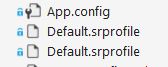
I have other projects that I have not upgraded to v1.8 and the srprofile is not showing twice?
VS has been upgraded to v15.8.6
Doesn't seem to be causing me issues, so not a major problem
realfaisalk
on 23 Oct 2018
I think we "introduced" the bug with a patch version of 1.7. So if you are using something before, you don't have it.
SabotageAndi
on 25 Oct 2018
@SabotageAndi I'm also seeing all .srprofiles displays twice in solution explorer,
Is it fixed?
 Elangopalakrishnan
on 23 Jan 2019
Elangopalakrishnan
on 23 Jan 2019
@Elangopalakrishnan not yet, but it's only a display error. The file is there only one time.
SabotageAndi
on 24 Jan 2019
This thread has been automatically locked since there has not been any recent activity after it was closed. Please open a new issue for related bugs.
![lock[bot] picture](https://avatars.githubusercontent.com/in/6672?v=4&s=40) lock[bot]
on 8 Jul 2019
lock[bot]
on 8 Jul 2019
Related issues
 samholder
·
7Comments
samholder
·
7Comments
 GoFightNguyen
·
4Comments
GoFightNguyen
·
4Comments
 PriyaSolanke286
·
5Comments
PriyaSolanke286
·
5Comments
 xuanzhaopeng
·
7Comments
xuanzhaopeng
·
7Comments
 NorekZ
·
4Comments
NorekZ
·
4Comments
Most helpful comment
Forgot to say thanks realfaisalk, this was implemented succesfully. probably you already solved the copytobasefolder error. I didnt have it. thank you, that works!