Specflow: Open SpecFlow test from Text Explorer goes to the feature class file not the feature file
SpecFlow Version:
- [x ] 2.2
- [ ] 2.1
- [ ] 2.0
- [ ] 1.9
Used Test Runner
- [ ] SpecFlow+Runner
- [ ] MSTest
- [x ] NUnit
- [ ] Xunit
Version number: 3.9.0
Visual Studio Version
- [ x] VS 2017
- [ ] VS 2015
- [ ] VS 2013
Are the latest Visual Studio updates installed?
- [x ] Yes
- [ ] No
.NET Framework:
- [ x] >= .NET 4
- [ ] before .NET 4
Test Execution Method:
- [x ] Visual Studio Test Explorer
- [ ] TFS/VSTS – Task – PLEASE SPECIFY THE NAME OF THE TASK
- [ ] Command line – PLEASE SPECIFY THE FULL COMMAND LINE
<SpecFlow> Section in app.config
<specFlow>
    <!-- For additional details on SpecFlow configuration options see http://go.specflow.org/doc-config -->
    <unitTestProvider name="NUnit" />
  </specFlow>
Repro Project
Issue Description
When I double click (or press F12) on a SpecFlow test within Test Explorer, it used to take me to the test within a .feature file, however it has now started taking me to the class file (.feature.cs), is there a setting or something I could have accidentally set?
I've seen people talk about a similar issue when using Re-Sharper, but I am not using Re-Sharper.
I have deleted all of the SpecFlow related files in my temp directory, I know that's usually the fix for when steps aren't mapping properly so thought i'd give it a go
project packages installed; SpecFlow v2.2.1 (latest as of writing) SpecFlow.NUnit v2.2.1 (Latest as of writing)
Im using the latest version of VS2017 Extension: SpecFlow for Visual Studio 2017 v2017.1.6 (latest as of writing)
EDIT: Now on VS2017 v15.5.2 problem still happening. Was originally on v15.5.1 when this started happening, update has not changed anything
Here is the original StackOverflow issue I created. https://stackoverflow.com/questions/47771828/open-specflow-test-from-text-explorer-goes-to-the-feature-class-file-not-the-fea
Steps to Reproduce
- Write SpecFlow tests
- Build the solution
- Go to Test explorer
- Double click on a scenario
 ghost
ghost
All 40 comments
Myself and at least one of my colleagues are experiencing the same issue since updating to Visual Studio 15.5.2 this week.
We use Xunit rather than Nunit, and I have the Extension SpecFlow for Visual Studio 2017.1.10 installed, but all other details are the same.
 0shi
on 19 Dec 2017
0shi
on 19 Dec 2017
Same here. Issue began when I updated to 15.5.2 last week. We use NUnit.
 QAGal2
on 2 Jan 2018
QAGal2
on 2 Jan 2018
We got also the issue. We use VS 2017 / MSTest / Test Execution Method: Visual Studio Test Explorer
 MatthiasTrust
on 3 Jan 2018
MatthiasTrust
on 3 Jan 2018
I had a look at this at a test project with different test runners (it is here: https://github.com/SabotageAndi/SpecFlow.Example.AllTestRunners).
It has MSTest V1, NUnit2, NUnit3, XUnit2 and SpecFlow+Runner and I tested this with VS2017 15.5.2.
MSTest, NUnit2 and SpecFlow+Runner are working.
NUnit3 and XUnit2 are not working.
From my work on SpecFlow+Runner I know, that the test adapter are responsible to send VSTest, where the test is located (Microsoft.VisualStudio.TestPlatform.ObjectModel.TestCase.CodeFilePath and Microsoft.VisualStudio.TestPlatform.ObjectModel.TestCase.LineNumber).
So I think something changed in the NUnit and XUnit Test Adapter. But I am not sure, if it really worked before the Visual Studio update. I think I saw this behavior already in earlier versions of Visual Studio and NUnit3/XUnit2.
@gasparnagy Any input to this from you?
 SabotageAndi
on 9 Jan 2018
SabotageAndi
on 9 Jan 2018
The only change the day specflow began having issues with VS to .Feature was the VS 2017 upgrade. Here are my package.config files https://www.screencast.com/t/WnvUFWnF But the bad behavior has affected all specflow solutions on the windows pc that was upgraded. Other machines which I did not do VS upgrade on (because of the bad behavior seen) still work ok. One other symptom also seen is now when I stop a specflow nunit test while in debugger, the test runner will not 'reset' the test to active. This forces me to restart VS or allow a failed test to complete using 'Continue' past any breakpoint or failure point. It seems it points to a communication issue and/or file type mapping. The filetype .feature does not seen to have a filetype mapping to VS2017, but it does exist for VS2015. Have any of my issues also been experienced by SpecFlow+ users which have 'enhanced' VS integration ?
QAGal2
on 9 Jan 2018
I'm having the same issue with Nunit3. haven't tried other adapters yet though.
 firstchild78
on 12 Jan 2018
firstchild78
on 12 Jan 2018
Any news on this, anyone had a chance to look into it? I'm still getting the issue and its starting to get annoying. Thanks.
ghost
on 24 Jan 2018
@sirk1989 I am not aware that somebody is looking into this.
As in my comment (https://github.com/techtalk/SpecFlow/issues/990#issuecomment-356262853) said, I still think it is something in the test adapters of XUnit and NUnit.
SabotageAndi
on 24 Jan 2018
Are you talking about the nunit test adaptor installed to visual studio or the nunit framework installed to the solution. the problematic solution is using nunit 3.9.0, but i have recently inherited another solution that is currently on nunit2.6.4 that is allowing me to go straight to tests from test explorer as is expected, i'm a little reluctant to update that at the moment
ghost
on 24 Jan 2018
The test adapter of NUnit and XUnit can be installed via Visual Studio extension or NuGet package.
It's the same code, but a different form of distribution.
I personally only use the test adapter from the NuGet packages, so that I can have different versions in my projects.
If you have the adapter only installed by Visual studio Extension, your projects have all to be using the same version.
As it works with NUnit 2 and not anymore with NUnit3, I would say, the adapter send now different data to Visual Studio. AFAIR the code we generate for NUnit 2 or NUnit 3 is except the attributes the same.
SabotageAndi
on 24 Jan 2018
@gasparnagy Do you have any memories about this behavior in the past?
SabotageAndi
on 24 Jan 2018
Just to add my experience to the mix in case its helpful.
Visual Studio 2015 14.0.25431.01 Update 3
NUnit ~> 2.6.4
JetBrains ReSharper Ultimate 2016.3.2 Build 107.0.20170126.120331
- When I double click a PASSED unit test in ReSharper Unit Test Session window, I am brought to the *.feature.cs file
- When I double click a FAILED unit test in ReSharper Unit Test Session window, I am brought to the *.feature file
- When I double click ANY unit test in the ReSharper Unit Test Explorer window, I am brought to the *.feature.cs file
 BillHughesCoder
on 24 Jan 2018
BillHughesCoder
on 24 Jan 2018
@SabotageAndi No. I agree that it must be related to the xUnit/NUnit test adapter.
What we do is that we set #line 123 "MyFeature.feature" pragmas in the generated tests, so it should be easy to make a repro without SpecFlow that we could submit to NUnit/xUnit projects.
 gasparnagy
on 25 Jan 2018
gasparnagy
on 25 Jan 2018
from nunit issue thread #441 This workaround works for me... until we get an actual fix:
Tools -> Extensions and updates , "Disable Extensions for Test Explorer"
QAGal2
on 30 Jan 2018
I am experiencing this problem with MSTest
 smarshie
on 1 Feb 2018
smarshie
on 1 Feb 2018
If you have this issue you may want to also follow/report on this Visual Studio thread
https://developercommunity.visualstudio.com/content/problem/158160/unable-to-fetch-source-information-for-test-method.html
QAGal2
on 1 Feb 2018
This is related to the new Real Time Test Discovery feature. See https://blogs.msdn.microsoft.com/dotnet/2017/10/30/real-time-test-discovery/ . There has been changes to both NUnit3, XUnit and MSTest2 to enable this feature. The other mentioned adapters, like NUnit2 has not been changed, and is therefore not affected. The feature should have been disabled by default, but seems to interact somehow. As stated in the links given above, the workaround is to disable the VSIX "Dotnet Extensions for Test Explorer". Disabling this does not affect anything negatively, the Test Explorer works as it always has. When the feature is finished, it should improve the test discovery phase, at least when you have a lot of tests.
 OsirisTerje
on 2 Feb 2018
OsirisTerje
on 2 Feb 2018
Workaround fixed the issue that I was having with Nunit3. Thanks!
firstchild78
on 8 Feb 2018
@OsirisTerje Thank you Sir, worked like a charm, it was a big headache!
 ProgrammingSoft
on 27 Feb 2018
ProgrammingSoft
on 27 Feb 2018
As the issue is in Visual Studio and not SpecFlow and there is a workaround, I am closing this issue.
SabotageAndi
on 27 Feb 2018
VS2017 15.6 fixed this issue. But for my team, it required a fresh reinstall of vs2017 and then reapply of Specflow for VS2017 extension.
QAGal2
on 6 Mar 2018
@SabotageAndi Tried this workaround and the issue persists (Dotnet Extensions for Test Explorer > Disable).
Using MSTest V2 and VS15.6.2 Specflow 2.3.1
Any other workarounds?
Regards
 ardz
on 19 Mar 2018
ardz
on 19 Mar 2018
@ardz No, I am not aware of any other work around. You could try to disable the real time unit testing, that was added with Visual Studio 2017 15.6.
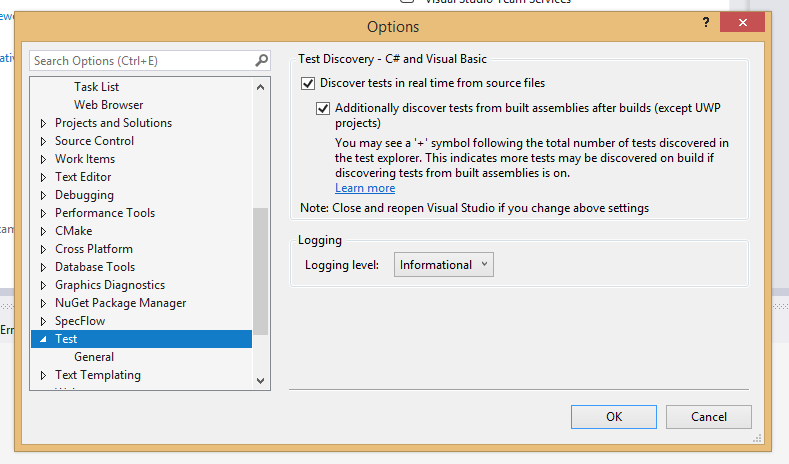
It's the first checkbox in the above options dialog.
SabotageAndi
on 19 Mar 2018
@ardz I don't mean to patronise, but you did close down and reopen visual studio after removing that extension?
ghost
on 19 Mar 2018
@sirk1989 I did yeah, no offence taken don't worry.
@SabotageAndi Thanks that seems to have done the trick!
ardz
on 19 Mar 2018
@ardz Cool. Then the problem is in the real time test discovery. Could you report this at the Developer community for Visual Studio: https://developercommunity.visualstudio.com/spaces/8/index.html.
SabotageAndi
on 19 Mar 2018
@SabotageAndi no worries will do
ardz
on 19 Mar 2018
Still no joy for me :-(
Visual Studio 15.7
ReSharper 2017.3.3
Realtime test discovery unchecked.
Dotnet Extensions for Test Explorer disabled.
Problem still exists.
Double clicking a test case in ReSharper Unit Tests frustratingly brings me to the code behind file.
BillHughesCoder
on 20 Mar 2018
@BillHughesCoder This issue is about the test explorer in Visual Studio.
AFAIK jumping in R# Unit Test window to the scenario did never work and will probably only work with a custom R# extension for SpecFlow.
SabotageAndi
on 20 Mar 2018
@SabotageAndi The workaround works on MSTest and VS 2017. Thanks!
 bluehenry
on 11 Apr 2018
bluehenry
on 11 Apr 2018
I use MSTest and VS 2017.
In my case, if I use NuGet package MSTest.TestFramework and MSTest.TesetAdapter, this issue happens.
But if I use reference Microsoft.VisualStudio.QualityTools.UnitTestFramework, it works fine.
bluehenry
on 18 Apr 2018
Still happens to me.
In Visual Studio Test Runner. not navigating to the .feature files
No workaround helped
Realtime test discovery unchecked.
Dotnet Extensions for Test Explorer disabled.
I'm using NUnit 3
VS 2017 v15.7.1
NUnit 3 Adapter latest 3.10.0.0
@gasparnagy @SabotageAndi
Can you help with it please? I considering going back to use VS2015 because of this issue
 LirazShay
on 16 May 2018
LirazShay
on 16 May 2018
@LirazShay we can't do here anything. As written multiple times, the issue is in Visual Studio and their NUnit test discoverer.
See: https://github.com/nunit/nunit3-vs-adapter/issues/441#issuecomment-388487216
We have an open issue internally tracking this so hopefully we would get to it soon.
If you need this working, consider switching to SpecFlow+Runner. There we are doing the discovery correct and are jumping to the correct files.
SabotageAndi
on 16 May 2018
I've opened a bug about this issue in VisualStudio developer community.
https://developercommunity.visualstudio.com/content/problem/267390/text-explorer-specflow-tests-goes-to-the-feature-c.html
I've been told:
We are currently prioritizing problems that are impacting a broad set of our customers, so we may not be able to investigate this one immediately
Everyone that this issue is important to him - please up-vote or add a comment here so that VS team will understand that many users are affected by this issue
LirazShay
on 5 Jun 2018
Good news!!!
We've been told here that VS team have fixed the problem in an upcoming 15.8 preview 4 release.
Thanks for everyone who helped with it!!!
Thanks you for helping us build a better Visual Studio!
LirazShay
on 4 Jul 2018
VS2017 15.8 Preview 4 is released and contains the fix for this issue: https://docs.microsoft.com/en-us/visualstudio/releasenotes/vs2017-preview-relnotes#--visual-studio-2017-version-158-preview-4-
If you are able to, please test it and give Feedback to Microsoft if it isn't working.
SabotageAndi
on 11 Jul 2018
@SabotageAndi
Problem solved in the 15.8 preview 4 release
Thanks!
LirazShay
on 12 Jul 2018
This issue is fixed and could be closed?
 304NotModified
on 13 Apr 2020
304NotModified
on 13 Apr 2020
I am ok with closing it.
It is works ok in VS2019 16.5.3, SpecFlow 3.0.225, Nunit 3.12.0, NUnit3TestAdapter 3.15.1.
and it also works in VS2017 15.9.20
QAGal2
on 13 Apr 2020
This thread has been automatically locked since there has not been any recent activity after it was closed. Please open a new issue for related bugs.
![github-actions[bot] picture](https://avatars.githubusercontent.com/in/15368?v=4&s=40) github-actions[bot]
on 25 Jan 2021
github-actions[bot]
on 25 Jan 2021
Related issues
 gittadesushil
·
3Comments
gittadesushil
·
3Comments
 adiljs
·
5Comments
adiljs
·
5Comments
 amarzi
·
5Comments
amarzi
·
5Comments
 PriyaSolanke286
·
5Comments
PriyaSolanke286
·
5Comments
 samholder
·
7Comments
samholder
·
7Comments
Most helpful comment
I've opened a bug about this issue in VisualStudio developer community.
https://developercommunity.visualstudio.com/content/problem/267390/text-explorer-specflow-tests-goes-to-the-feature-c.html
I've been told:
Everyone that this issue is important to him - please up-vote or add a comment here so that VS team will understand that many users are affected by this issue