Specflow: Specflow plugin failure for Visual Studio 2017
Hello,
Just downloaded the specflow for visual studio 2017 to install in VS 2017 professional (15.3.1)
When I try to load the spec flow project it gives an error which asks me to look at the activitylog.xml file
The activitylog.xml file had the following error
1.EnsureInitialized()
 at TechTalk.SpecFlow.VsIntegration.LanguageService.ProjectScopeFactory.<.ctor>b__9_2(Project project)
 at TechTalk.SpecFlow.VsIntegration.Utils.SynchronizedResultCache3.GetOrCreate(TSource source)
at TechTalk.SpecFlow.VsIntegration.LanguageService.ProjectScopeFactory.GetProjectScope(Project project)
at TechTalk.SpecFlow.VsIntegration.LanguageService.GherkinLanguageServiceFactory.CreateLanguageService(ITextBuffer textBuffer)
at TechTalk.SpecFlow.VsIntegration.LanguageService.GherkinLanguageServiceFactory.<>c__DisplayClass7_0.<GetLanguageService>b__0()
at TechTalk.SpecFlow.VsIntegration.LanguageService.GherkinBufferServiceManager.<>c__DisplayClass1_01.<GetOrCreate>b__0()
 at Microsoft.VisualStudio.Utilities.PropertyCollection.GetOrCreateSingletonProperty[T](Object key, Func1 creator)
at TechTalk.SpecFlow.VsIntegration.LanguageService.GherkinBufferServiceManager.GetOrCreateTService
--- End of stack trace from previous location where exception was thrown ---
at Microsoft.VisualStudio.Telemetry.WindowsErrorReporting.WatsonReport.GetClrWatsonExceptionInfo(Exception exceptionObject)
Any idea why this is happening and what should I do to fix this? This results in feature file not generating the corresponding steps. Neither the context menu works in the feature file; rendering the entire IDE useless for specflow tests.
Thanks
 girirajanprabu
All 13 comments
Launching the IDE as an administrator gets rid of this issue; however the context menu still doesn't render the much needed items.
girirajanprabu
on 23 Aug 2017
What kind of project is your testing project?
Is it still a .NET Framework project in the old format or already in the new csproj?
 SabotageAndi
on 23 Aug 2017
SabotageAndi
on 23 Aug 2017
Do you get in also in the example projects?
They are here: https://github.com/techtalk/SpecFlow.Plus.Examples
SabotageAndi
on 23 Aug 2017
Thanks for the message. I am just trying to create a class library with some feature files which will be consumed by my MS Tests.
To do this, I installed the Spec Flow Plugin for Visual Studio 2017. The installation went fine without any issues.
I created a new class library in .net framework 4.5.2 and from the template I tried to add a new specflow feature file. This is the first point of encountering that error.
I closed my IDE and restarted it. Opening this project / solution threw the same error.
My context menu just has the below options
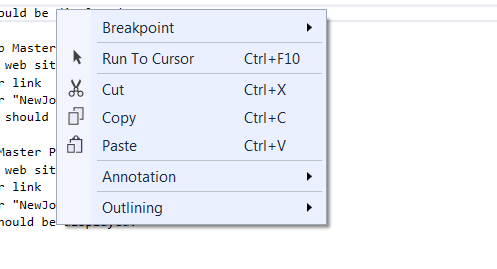
Uninstalling the plugin gets rid of the issue; but can't do much with these options.
girirajanprabu
on 23 Aug 2017
Ran into same issue on reinstalling this version of Specflow Integration for Visual 2017. For me it happened when I opened a feature file. VS2017 version 15.3.1 Stack trace shown in Activity.xml was:
System.NullReferenceException: Object reference not set to an instance of an object. at TechTalk.SpecFlow.VsIntegration.LanguageService.ProjectScopeFactory.<.ctor>b__9_0() at TechTalk.SpecFlow.VsIntegration.Utils.SynchInitializedInstance1.EnsureInitialized() at TechTalk.SpecFlow.VsIntegration.LanguageService.ProjectScopeFactory.<.ctor>b__9_2(Project project) at TechTalk.SpecFlow.VsIntegration.Utils.SynchronizedResultCache3.GetOrCreate(TSource source) at TechTalk.SpecFlow.VsIntegration.LanguageService.ProjectScopeFactory.GetProjectScope(Project project) at TechTalk.SpecFlow.VsIntegration.LanguageService.GherkinLanguageServiceFactory.CreateLanguageService(ITextBuffer textBuffer) at TechTalk.SpecFlow.VsIntegration.LanguageService.GherkinLanguageServiceFactory.<>c__DisplayClass7_0.1.<GetOrCreate>b__0() at Microsoft.VisualStudio.Utilities.PropertyCollection.GetOrCreateSingletonProperty[T](Object key, Func1 creator) at TechTalk.SpecFlow.VsIntegration.LanguageService.GherkinBufferServiceManager.GetOrCreateTService --- End of stack trace from previous location where exception was thrown --- at Microsoft.VisualStudio.Telemetry.WindowsErrorReporting.WatsonReport.GetClrWatsonExceptionInfo(Exception exceptionObject)
 erapopor
on 23 Aug 2017
erapopor
on 23 Aug 2017
Hi,
I am getting the same error. I have Visual Studio Version 15.3.3 and SpecFlow Version 2017.1.6.
Our test project (.NET 4.5.2) with SpecFlow has been used for a number of years without any problems. We have many feature files which are updated from time to time. The problem started occuring right after I reinstalled the Visual Studio (to the same version as before and where SpecFlow was ok) and installed the SpecFlow extension. It has not worked since.
It has been some time since last entry, is this issue getting a solution soon?
 psoszynski
on 5 Sep 2017
psoszynski
on 5 Sep 2017
@psoszynski Sorry, but I am not aware that anybody is working on a fix.
Without a project to reproduce the error, we (as in SpecFlow team) has not a really chance to fix this fast.
Could you try to debug it yourself?
The sources are here: https://github.com/techtalk/SpecFlow.VisualStudio
- open the SpecFlow.VisualStudio.2017.sln
- starting will launch a experiment instance of VS2017
- open your solution and try to reproduce the issue
- fix it ;-)
- send a PR with the fix ;-)
SabotageAndi
on 5 Sep 2017
Thanks, but when I am in the experimental instance og VS2017 so this error deos not happen and SpecFlow works just as expected with all the colorings and bindings. But when I start again in the normal version of VS2017 then SpecFlow is not working and I get the error message as above. Unfortunatelly, I do not have time right now to investigate it more.
psoszynski
on 6 Sep 2017
This is now working in Visual Studio 2017 build 15.3.5. The issue can be closed.
erapopor
on 23 Oct 2017
I am having issue with VS2017 Specflow code behind generation.
#error Generation error: Loading this assembly would produce a different grant set from other instances. (Exception from HRESULT: 0x80131401)
 SakeBhargava
on 8 Feb 2018
SakeBhargava
on 8 Feb 2018
Received the same issue today with:
- SpecFlow 2017.1.12
- Visual Studio 15.5.7
A workaround that was mentioned on this issue that also seems to work for me was to start Visual Studio via the "Run as Administrator" option.
I'm not blocked in my work but wanted to leave that information if anyone wants to dive deeper. (sorry for my laziness)
 iloabn
on 27 Feb 2018
iloabn
on 27 Feb 2018
same here, I open a specific ticket for this here https://github.com/techtalk/SpecFlow/issues/1054
 omarpiani
on 28 Feb 2018
omarpiani
on 28 Feb 2018
This thread has been automatically locked since there has not been any recent activity after it was closed. Please open a new issue for related bugs.
![lock[bot] picture](https://avatars.githubusercontent.com/in/6672?v=4&s=40) lock[bot]
on 9 Jul 2019
lock[bot]
on 9 Jul 2019
Related issues
 zplan
·
4Comments
zplan
·
4Comments
 PriyaSolanke286
·
5Comments
PriyaSolanke286
·
5Comments
 NorekZ
·
4Comments
NorekZ
·
4Comments
 jlbeard84
·
4Comments
jlbeard84
·
4Comments
 xDazedx
·
7Comments
xDazedx
·
7Comments
Most helpful comment
I am having issue with VS2017 Specflow code behind generation.
#error Generation error: Loading this assembly would produce a different grant set from other instances. (Exception from HRESULT: 0x80131401)