Specflow: Generate Step Definition context menu option missing VS2013
I'm using VS2013, "Generate Step Definition” context menu option is also missing for me. I have added nuget packages for "Specflow" and "SpecFlow.MsTest". I've also added the Specflow Visual Studio Extension. I was able to select AddNew ItemSpecflow Feature File and my project compiles ok. The app.config looks ok, just has the defaults with MSTest set for UnitTestProvider name.
If I right-click the Scenario file, I am able to select "Run SepcFlow Scenarios" then copy the skeleton step definition from the exception message. However, life would be easier with the context menu option to generate step definitions.
Where did I go wrong?

 RobBowman
All 15 comments
Right click in the file editor, to get the menu entry:

 SabotageAndi
on 19 Jul 2016
SabotageAndi
on 19 Jul 2016
Ahh, easy when you know how! Thanks
RobBowman
on 19 Jul 2016
Can't find "generate Step Definiton" after right click on my feature file.
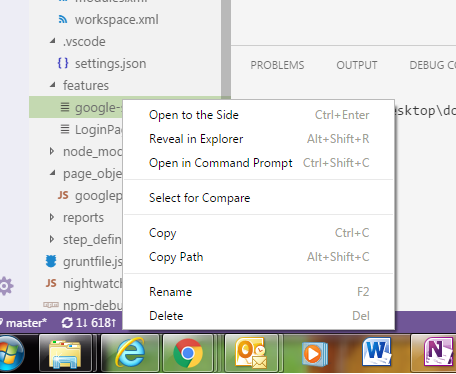
 pushkalaP
on 28 Dec 2017
pushkalaP
on 28 Dec 2017
tried in the file too.
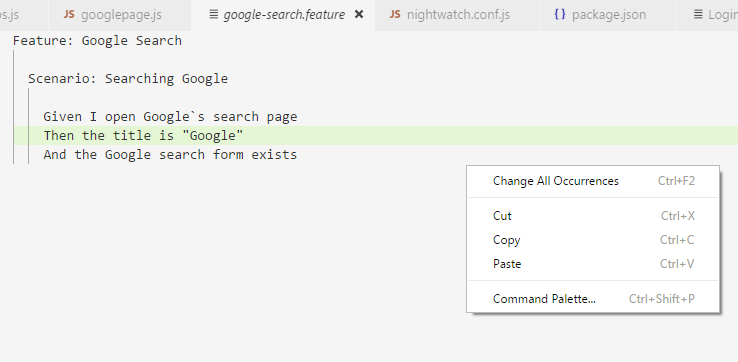
pushkalaP
on 28 Dec 2017
Is this issue still open? I see the same behaviour in VS 2017.
 amoghsarpotdar
on 17 Aug 2018
amoghsarpotdar
on 17 Aug 2018
Have you isntalled the VS extension?
 Stephen-Mc
on 17 Aug 2018
Stephen-Mc
on 17 Aug 2018
@Stephen-Mc
I ran into this same issue, and it required explicitly referencing the TechTalk.SpecFlow DLL, which wasn't auto-referenced by installing the NuGet package, nor with the Extension.
Edit: To be clear, I had to explicitly reference:
C:\Users\%UserProfile%\.nuget\packages\specflow\2.4.0\lib\net45\TechTalk.SpecFlow.dll
in my project in order for the context menu option to show up. This is with the VS extension installed, and SpecFlow NuGet package installed (as well as SpecFlow.NUnit, SpecFlow.XUnit, and SpecRun.Runner nuget packages installed)
 Cpcrook
on 5 Sep 2018
Cpcrook
on 5 Sep 2018
This is an issue still. have got all the packages installed and still do not get the "Generate Step definition" menu context appearing.
TechTalk.SpecFlow.dll missing file reference is causing the issue. It is causing compilation issue as well.
This is such a waste of time.
 joshuakaling
on 27 Sep 2018
joshuakaling
on 27 Sep 2018
@joshuakaling see my post above yours.
Add the DLL explicitly, then edit the ref in your project file manually to utilize an MSBuild macro to the global nuget package cache. IIRC it's something like $(nugetRoot) or $(packageRoot)
Cpcrook
on 27 Sep 2018
@Cpcrook, Thank you. However, it is very weird to manually search and locate the TechTalk.SpecFlow.dll from the local cache.
joshuakaling
on 28 Sep 2018
@joshuakaling Please open a new issue with all requested informations, so we can reproduce the issue.
This issue is about VS 2013 and not VS2017.
SabotageAndi
on 1 Oct 2018
@SabotageAndi the issue for which I described the solution was actually with VS2017, not 2013.
@joshuakaling Agreed. That behavior is something I've not seen before with any other package or extension.
Cpcrook
on 1 Oct 2018
@Cpcrook yes, this "fixes" it. But why wasn't the reference there. That's the question. You shouldn't need to do this.
SabotageAndi
on 1 Oct 2018
Totally agree, @SabotageAndi, just making it clear that is isn't isolated to VS2013.
Cpcrook
on 1 Oct 2018
This thread has been automatically locked since there has not been any recent activity after it was closed. Please open a new issue for related bugs.
![lock[bot] picture](https://avatars.githubusercontent.com/in/6672?v=4&s=40) lock[bot]
on 9 Jul 2019
lock[bot]
on 9 Jul 2019
Related issues
 xDazedx
·
7Comments
xDazedx
·
7Comments
 adiljs
·
5Comments
adiljs
·
5Comments
 timvandenhof
·
6Comments
timvandenhof
·
6Comments
 amarzi
·
5Comments
amarzi
·
5Comments
 zplan
·
4Comments
zplan
·
4Comments
Most helpful comment
Right click in the file editor, to get the menu entry:
