Spark: [BUG]: Orphaned DotnetBackend thread and .NET process when job cancelled in Databricks
Describe the bug
If a Spark.NET job is run in Databricks and that run is cancelled through Databricks, the .NET process will continue to run after Databricks has considered the job cancelled. The happens with the DotnetBackend thread.
This means that the job will continue to run normally, but Databricks will lose track of its existence.
To Reproduce
Steps to reproduce the behavior:
- Create a simple .NET application with an infinite loop
public static void Main(string[] args)
{
    while (true)
    {
        Console.WriteLine($"[{DateTime.Now.ToString("o")}] Spark.NET job still running.");
        Task.Delay(TimeSpan.FromSeconds(5)).GetAwaiter().GetResult();
    }
}
- Submit job to an existing Databricks cluster configured for Spark.NET
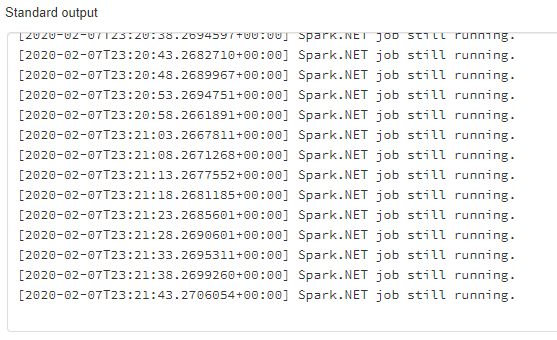
- Check the Databricks cluster's stdout log to verify it's running
- Navigate to the Databricks job that you submitted and cancel the run
- Wait for cancellation to finish
- Check the cluster's stdout log again. Refreshing will show new messages forever.
This doesn't illustrate DotnetBackend continuing to run, but a normal Spark job would continue to succeed. I also have confirmation of the thread being orphaned below.
Expected behavior
Cancelling the Databricks job also kills the .NET process and the DotnetBackend thread.
Screenshots

Desktop (please complete the following information):
- OS: Windows 10
- Browser: Edge Chromium
- Version: 79.0.309.71 (Official build) (64-bit)
Additional context
The orphaning of both the .NET process and the DotnetBackend thread can be confirmed with the help of a Databricks Notebook attached to the respective cluster.
To confirm the process is running after cancellation (if not checking console output), replacing placeholder with a partial or full name of the running .NET assembly:
%sh ps aux | grep 'placeholder'
To confirm the DotnetBackend thread is running, replacing pid with the process ID of the parent java process:
The appropriate java pid can be found with %sh pstree -p and finding the nearest parent java process of the pstree command.
%sh jstack -l pid
The output from jstack will be the running threads in the process. If you search the output text for dotnet, you'll see DotnetBackend is still running.
You can contrast it if you run jstack while the job is running, where you'll find additionally find the running DotnetRunner waiting on the call to UNIXProcess.waitFor().
Cancelling the job will cancel the execution of DotnetRunner by throwing an exception. logError will be called in the catch, and the SparkUserAppException will be thrown just after, orphaning the thread and process.
Here are some attached outputs from jstack. I started on a fresh cluster for comparison.
1.before-run.txt
2.while-running.txt
3.after-cancel.txt
 tylorhl
All 4 comments
I can make the fix and create the PR for this bug on Monday.
tylorhl
on 8 Feb 2020
@tylorhl, Thanks for your question! I was just wondering how did you come across with this issue (are you testing any scenarios)?
 elvaliuliuliu
on 8 Feb 2020
elvaliuliuliu
on 8 Feb 2020
@elvaliuliuliu A teammate of mine noticed odd behavior as if our jobs were still running despite no jobs actually running anymore. At some point, he had noticed that there were logs in Databricks's stdout log from our jobs that were still being produced. I looked into it from there and found out the details 🙂
tylorhl
on 8 Feb 2020
fixed by #424
 imback82
on 12 Feb 2020
imback82
on 12 Feb 2020
Related issues
 francisco-ltech
·
9Comments
francisco-ltech
·
9Comments
 thrajput
·
4Comments
thrajput
·
4Comments
 oefe
·
4Comments
oefe
·
4Comments
 WhitWaldo
·
6Comments
WhitWaldo
·
6Comments
 voltcode
·
6Comments
voltcode
·
6Comments
Most helpful comment
@elvaliuliuliu A teammate of mine noticed odd behavior as if our jobs were still running despite no jobs actually running anymore. At some point, he had noticed that there were logs in Databricks's stdout log from our jobs that were still being produced. I looked into it from there and found out the details 🙂