Spacy: GPU processing doesn't work - spaCy 2.1.3
I just wanted to report that GPU processing still doesn't work.
Steps To Reproduce
On Windows 10 machine
- create new anaconda environment using python 3.6
- open anaconda terminal and activate the new environment
- pip install spacy with gpu support using the following command (since I have CUDA 9.0 installed I used the following)
pip install -U spacy[cuda90]
- install one of the English language models (for training NER)
python -m spacy download en_core_web_sm
My conda environment now has the following packages
(spacy) D:\temp>conda list
# packages in environment at D:\Anaconda\envs\spacy:
#
# Name                    Version                   Build  Channel
blis                      0.2.4                     <pip>
certifi                   2019.3.9                 py36_0    anaconda
chardet                   3.0.4                     <pip>
cupy-cuda90               6.0.0rc1                  <pip>
cymem                     2.0.2                     <pip>
en-core-web-sm            2.1.0                     <pip>
fastrlock                 0.4                       <pip>
idna                      2.8                       <pip>
jsonschema                2.6.0                     <pip>
murmurhash                1.0.2                     <pip>
numpy                     1.16.2                    <pip>
pip                       19.0.3                   py36_0    anaconda
plac                      0.9.6                     <pip>
preshed                   2.0.1                     <pip>
python                    3.6.8                h9f7ef89_7    anaconda
requests                  2.21.0                    <pip>
setuptools                40.8.0                   py36_0    anaconda
six                       1.12.0                    <pip>
spacy                     2.1.3                     <pip>
sqlite                    3.27.2               he774522_0    anaconda
srsly                     0.0.5                     <pip>
thinc                     7.0.4                     <pip>
thinc-gpu-ops             0.0.4                     <pip>
tqdm                      4.31.1                    <pip>
urllib3                   1.24.1                    <pip>
vc                        14.1                 h21ff451_3    anaconda
vs2015_runtime            15.5.2                        3    anaconda
wasabi                    0.2.1                     <pip>
wheel                     0.33.1                   py36_0    anaconda
wincertstore              0.2              py36h7fe50ca_0    anaconda
- Run the training script
python test.py -m en_core_web_sm -o d:\temp\models
- Get the following error
(spacy) D:\temp>python test.py -m en_core_web_sm -o d:\temp\models
Loaded model 'en_core_web_sm'
Traceback (most recent call last):
  File "test.py", line 97, in <module>
    plac.call(main)
  File "D:\Anaconda\envs\spacy\lib\site-packages\plac_core.py", line 328, in call
    cmd, result = parser.consume(arglist)
  File "D:\Anaconda\envs\spacy\lib\site-packages\plac_core.py", line 207, in consume
    return cmd, self.func(*(args + varargs + extraopts), **kwargs)
  File "test.py", line 70, in main
    losses=losses)
  File "D:\Anaconda\envs\spacy\lib\site-packages\spacy\language.py", line 452, in update
    proc.update(docs, golds, sgd=get_grads, losses=losses, **kwargs)
  File "nn_parser.pyx", line 418, in spacy.syntax.nn_parser.Parser.update
  File "_parser_model.pyx", line 214, in spacy.syntax._parser_model.ParserModel.begin_update
  File "_parser_model.pyx", line 262, in spacy.syntax._parser_model.ParserStepModel.__init__
  File "D:\Anaconda\envs\spacy\lib\site-packages\thinc\neural\_classes\feed_forward.py", line 46, in begin_update
    X, inc_layer_grad = layer.begin_update(X, drop=drop)
  File "D:\Anaconda\envs\spacy\lib\site-packages\thinc\api.py", line 264, in begin_update
    X, bp_layer = layer.begin_update(layer.ops.flatten(seqs_in, pad=pad), drop=drop)
  File "D:\Anaconda\envs\spacy\lib\site-packages\thinc\neural\_classes\feed_forward.py", line 46, in begin_update
    X, inc_layer_grad = layer.begin_update(X, drop=drop)
  File "D:\Anaconda\envs\spacy\lib\site-packages\thinc\api.py", line 348, in uniqued_fwd
    Y_uniq, bp_Y_uniq = layer.begin_update(X_uniq, drop=drop)
  File "D:\Anaconda\envs\spacy\lib\site-packages\thinc\neural\_classes\feed_forward.py", line 46, in begin_update
    X, inc_layer_grad = layer.begin_update(X, drop=drop)
  File "D:\Anaconda\envs\spacy\lib\site-packages\thinc\api.py", line 132, in begin_update
    values = [fwd(X, *a, **k) for fwd in forward]
  File "D:\Anaconda\envs\spacy\lib\site-packages\thinc\api.py", line 132, in <listcomp>
    values = [fwd(X, *a, **k) for fwd in forward]
  File "D:\Anaconda\envs\spacy\lib\site-packages\thinc\api.py", line 225, in wrap
    output = func(*args, **kwargs)
  File "D:\Anaconda\envs\spacy\lib\site-packages\thinc\api.py", line 132, in begin_update
    values = [fwd(X, *a, **k) for fwd in forward]
  File "D:\Anaconda\envs\spacy\lib\site-packages\thinc\api.py", line 132, in <listcomp>
    values = [fwd(X, *a, **k) for fwd in forward]
  File "D:\Anaconda\envs\spacy\lib\site-packages\thinc\api.py", line 225, in wrap
    output = func(*args, **kwargs)
  File "D:\Anaconda\envs\spacy\lib\site-packages\thinc\api.py", line 132, in begin_update
    values = [fwd(X, *a, **k) for fwd in forward]
  File "D:\Anaconda\envs\spacy\lib\site-packages\thinc\api.py", line 132, in <listcomp>
    values = [fwd(X, *a, **k) for fwd in forward]
  File "D:\Anaconda\envs\spacy\lib\site-packages\thinc\api.py", line 225, in wrap
    output = func(*args, **kwargs)
  File "D:\Anaconda\envs\spacy\lib\site-packages\thinc\neural\_classes\hash_embed.py", line 55, in begin_update
    keys = self.ops.hash(ids, self.seed) % self.nV
  File "ops.pyx", line 917, in thinc.neural.ops.CupyOps.hash
AttributeError: module 'thinc_gpu_ops' has no attribute 'hash'
My training script is as follows
#!/usr/bin/env python
# coding: utf8
"""Example of training spaCy's named entity recognizer, starting off with an
existing model or a blank model.

For more details, see the documentation:
* Training: https://spacy.io/usage/training
* NER: https://spacy.io/usage/linguistic-features#named-entities

Compatible with: spaCy v2.0.0+
"""
from __future__ import unicode_literals, print_function

import plac
import random
from pathlib import Path
import spacy
from spacy.util import minibatch, compounding

result_gpu = spacy.require_gpu()
print("require_gpu(): ", result_gpu)

# training data
# unable to provide my own data for privacy reasons, so add your own data here
TRAIN_DATA =


@plac.annotations(
    model=("Model name. Defaults to blank 'en' model.", "option", "m", str),
    output_dir=("Optional output directory", "option", "o", Path),
    n_iter=("Number of training iterations", "option", "n", int))
def main(model=None, output_dir=None, n_iter=100):
    """Load the model, set up the pipeline and train the entity recognizer."""
    if model is not None:
        nlp = spacy.load(model)  # load existing spaCy model
        print("Loaded model '%s'" % model)
    else:
        nlp = spacy.blank('en')  # create blank Language class
        print("Created blank 'en' model")

    # create the built-in pipeline components and add them to the pipeline
    # nlp.create_pipe works for built-ins that are registered with spaCy
    if 'ner' not in nlp.pipe_names:
        ner = nlp.create_pipe('ner')
        nlp.add_pipe(ner, last=True)
    # otherwise, get it so we can add labels
    else:
        ner = nlp.get_pipe('ner')

    # add labels
    for _, annotations in TRAIN_DATA:
        for ent in annotations.get('entities'):
            ner.add_label(ent[2])

    # get names of other pipes to disable them during training
    other_pipes = [pipe for pipe in nlp.pipe_names if pipe != 'ner']
    with nlp.disable_pipes(*other_pipes):  # only train NER
        optimizer = nlp.begin_training()
        for itn in range(n_iter):
            random.shuffle(TRAIN_DATA)
            losses = {}
            # batch up the examples using spaCy's minibatch
            batches = minibatch(TRAIN_DATA, size=compounding(4., 32., 1.001))
            for batch in batches:
                texts, annotations = zip(*batch)
                nlp.update(
                    texts,  # batch of texts
                    annotations,  # batch of annotations
                    drop=0.5,  # dropout - make it harder to memorise data
                    sgd=optimizer,  # callable to update weights
                    losses=losses)
            print('Losses', losses)

    # test the trained model
    for text, _ in TRAIN_DATA:
        doc = nlp(text)
        print('Entities', [(ent.text, ent.label_) for ent in doc.ents])
        print('Tokens', [(t.text, t.ent_type_, t.ent_iob) for t in doc])

    # save model to output directory
    if output_dir is not None:
        output_dir = Path(output_dir)
        if not output_dir.exists():
            output_dir.mkdir()
        nlp.to_disk(output_dir)
        print("Saved model to", output_dir)

        # test the saved model
        print("Loading from", output_dir)
        nlp2 = spacy.load(output_dir)
        for text, _ in TRAIN_DATA:
            doc = nlp2(text)
            print('Entities', [(ent.text, ent.label_) for ent in doc.ents])
            print('Tokens', [(t.text, t.ent_type_, t.ent_iob) for t in doc])


if __name__ == '__main__':
    plac.call(main)
 erotavlas
All 10 comments
You specify 2.1.3; does that mean that it does work for spaCy 2.0.x?
 BramVanroy
on 9 Apr 2019
BramVanroy
on 9 Apr 2019
I don't know if there is a version 2.0.x where GPU processing works. I was originally using 2.0.18 and I know it never worked for me when using that version.
erotavlas
on 9 Apr 2019
@erotavlas The error means that the thinc_gpu_ops package hasn't been compiled correctly. Ultimately this comes down to things being harder on Windows. If possible you might consider using the Windows Subsystem for Linux. You'll probably find most of your data science work becomes easier.
In order to get this working on Windows, you'll need:
a) Install a compiler to match your Python installation.
b) Configure your PATH variable so that it can find the shared library and the compiler executable.
c) Install cupy
d) Check that cupy works correctly
e) Install the thinc_gpu_ops library, and check that it compiles correctly.
 honnibal
on 16 Apr 2019
honnibal
on 16 Apr 2019
If possible you might consider using the Windows Subsystem for Linux.
The subsystem is very cool, but doesn't support access to the gpu (yet?). See here.
 fotisj
on 23 Apr 2019
fotisj
on 23 Apr 2019
I have a similar issue with the quoted snippet on Ubuntu 18.04 with CUDA 10. The rest of my GPU tools work well (PyTorch, TensorFlow, etc.).
 devforfu
on 6 May 2019
devforfu
on 6 May 2019
I checked my site-packages folder and in the thinc-gpu-ops folder I have the following files only
D:\Anaconda\envs\spacy2.1\Lib\site-packages\thinc_gpu_ops
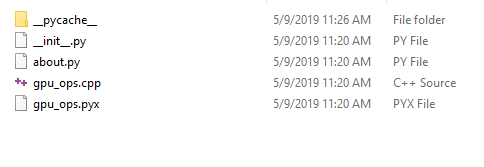
Does this mean I'm missing something?
My python version is
(spacy2.1) D:\>python --version
Python 3.6.8 :: Anaconda, Inc.
EDIT:
I was able to run the setup.py of thinc_gpu_ops but I've encountered an error I do not know how to resolve. My results are here
https://github.com/explosion/thinc/issues/92#issuecomment-492793476
erotavlas
on 9 May 2019
Hello, has there been any further progress on this? I hit a wall on the compilation of thinc_gpu_ops and was wondering if anyone knows how to resolve it https://github.com/explosion/thinc/issues/92#issuecomment-492793476
erotavlas
on 17 May 2019
I get the same problem with cupy-101 on Arch with spaCy 2.1.8:
- spaCy version: 2.1.8
- Platform: Linux-5.2.8-arch1-1-ARCH-x86_64-with-arch
- Python version: 3.7.4
  File "site-packages/thinc/neural/_classes/hash_embed.py", line 59, in begin_update
    keys = self.ops.hash(ids, self.seed) % self.nV
  File "ops.pyx", line 967, in thinc.neural.ops.CupyOps.hash
AttributeError: module 'thinc_gpu_ops' has no attribute 'hash'
 Tpt
on 13 Aug 2019
Tpt
on 13 Aug 2019
PR https://github.com/explosion/thinc/pull/117 has removed thinc_gpu_ops from the install requirements, making it more straightforward to use Windows + GPU. Further, another PR https://github.com/explosion/thinc/pull/149 fixed recent issues for Windows + GPU. Advice is to either install the master branch of thinc from source, or wait for the next release. Please feel free to open a new issue if you still run into issues after that !
 svlandeg
on 3 Jan 2020
svlandeg
on 3 Jan 2020
This thread has been automatically locked since there has not been any recent activity after it was closed. Please open a new issue for related bugs.
![lock[bot] picture](https://avatars1.githubusercontent.com/in/6672?v=4&s=40) lock[bot]
on 2 Feb 2020
lock[bot]
on 2 Feb 2020
Related issues
 smartinsightsfromdata
·
3Comments
smartinsightsfromdata
·
3Comments
 notnami
·
3Comments
notnami
·
3Comments
 TropComplique
·
3Comments
TropComplique
·
3Comments
 ank-26
·
3Comments
ank-26
·
3Comments
 ines
·
3Comments
ines
·
3Comments
Most helpful comment
The subsystem is very cool, but doesn't support access to the gpu (yet?). See here.