Spacy: displacy NER example from jupyter notebook not working
I'm using the code from the website to run a web server:
import spacy
from spacy import displacy

text = """But Google is starting from behind. The company made a late push
into hardware, and Apple’s Siri, available on iPhones, and Amazon’s Alexa
software, which runs on its Echo and Dot devices, have clear leads in
consumer adoption."""

nlp = spacy.load('en_core_web_lg')
doc = nlp(text)
displacy.serve(doc, style='ent')
My jupyter notebooks states
    Serving on port 5000...
    Using the 'ent' visualizer
So I assume the code is running properly.
Yet when I try to reach localhost/5000 or http://127.0.0.1/5000, my firefox says:
Unable to connect
Firefox can’t establish a connection to the server at 127.0.0.1.
The site could be temporarily unavailable or too busy. Try again in a few moments.
If you are unable to load any pages, check your computer’s network connection.
If your computer or network is protected by a firewall or proxy, make sure that Firefox is permitted to access the Web.
I have run multiple flask apps from this machine where I was always able to start a web service.
My Environment
- spaCy version: 2.0.11
- Python version: 3.5.5
- Models: en_core_web_lg
- Platform: Windows-10-10.0.14393-SP0
Edit: it does not work with both, a jupyter notebook as well as a standard .py script.
 NiklasDL
All 5 comments
@NiklasDL Can you try http://127.0.0.1:5000 instead of http://127.0.0.1/5000 as 5000 is the port number where displacy is serving.
 chandan2495
on 14 Aug 2018
chandan2495
on 14 Aug 2018
If you're already in a Jupyter Notebook, you're already running a web server – so there shouldn't usually be a need to run displacy.serve. Instead, you can run displacy.render and set jupyter=True. This will call into the IPython methods and render the output in a cell, like this:
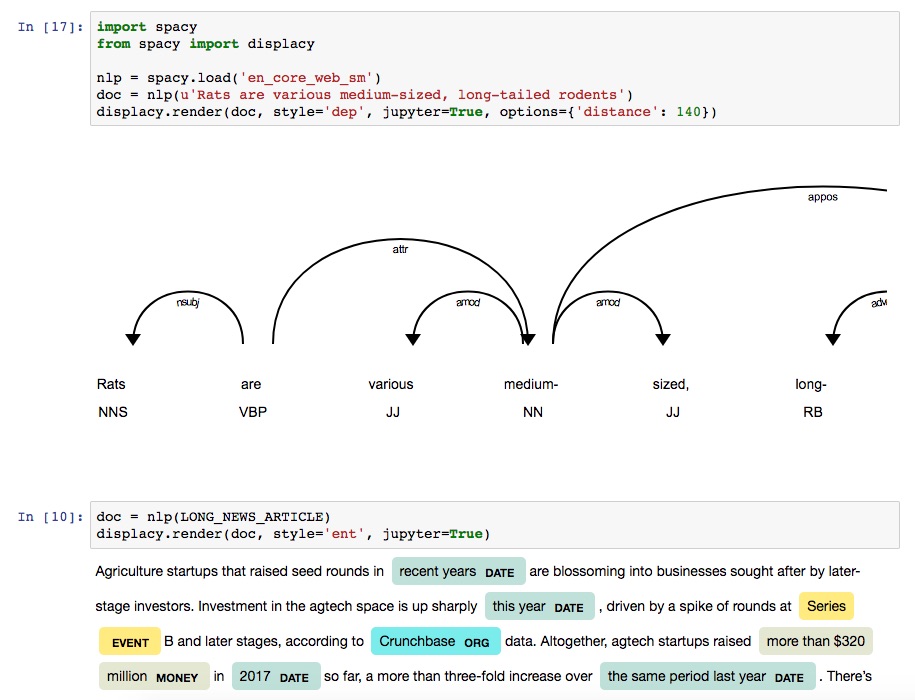
You can find more details on this in the "Visualizers" section in the docs:
https://spacy.io/usage/visualizers#jupyter
If it doesn't serve within a regular Python script, this might point to a configuration issue. displaCy doesn't do anything sophisticated, it just outputs the HTML and serves it via a wsgiref.simple_server. You can find the implementation here. So if you prefer, you can probably get the same thing running super quickly with Flask, too.
 ines
on 14 Aug 2018
ines
on 14 Aug 2018
Meh, thank you both for your response. The problem was Indeed attributed to the „/„ instead of the „:“. I don‘t know why I was not able to figure this out on my own.. guess it‘s the heat 😰
NiklasDL
on 14 Aug 2018
No worries, I can totally relate!
ines
on 14 Aug 2018
This thread has been automatically locked since there has not been any recent activity after it was closed. Please open a new issue for related bugs.
![lock[bot] picture](https://avatars1.githubusercontent.com/in/6672?v=4&s=40) lock[bot]
on 13 Sep 2018
lock[bot]
on 13 Sep 2018
Related issues
 TropComplique
·
3Comments
TropComplique
·
3Comments
 prashant334
·
3Comments
prashant334
·
3Comments
 bebelbop
·
3Comments
bebelbop
·
3Comments
 ahalterman
·
3Comments
ahalterman
·
3Comments
 ank-26
·
3Comments
ank-26
·
3Comments