Spacevim: Custom SPC mapping not working
Expected behavior, english is required
I should be able to add a custom key to the
call SpaceVim#custom#SPC('nmap', ['m', 'j'], ':m .+1<CR>==', 'move line down', 1)
call SpaceVim#custom#SPC('nmap', ['m', 'k'], ':m .-2<CR>==', 'move line up', 1)
I have tried changing the last parameter to a 0, but that doesn't seem to effect anything.
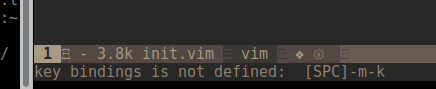
This doesn't work for some reason. It says:
key bindings is not defined: [SPC]-m-j[k]
The reproduce ways from Vim starting (Required!)
Not sure what your asking. I put this in my init#before() bootstrap function (which I know is being called as several other keys I have mapped do work (complete with discoverability)) and then I restart neovim and the shortcut doesn't do anything and the menu for
Debug info
Please press SPC h I, debug info will be put into clipboard, then paste all content below.
Expected behavior, english is recommend
Environment Information
- OS: linux
- vim version: -
- neovim version: 0.4.0
- SpaceVim version: 1.2.0-dev
- SpaceVim status:
On branch master
Your branch is up-to-date with 'origin/master'.
nothing to commit, working tree clean
The reproduce ways from Vim starting (Required!)
Output of the :SPDebugInfo!
SpaceVim debug information
SpaceVim options :
auto_disable_touchpad = 1
autocomplete_method = 'neocomplcache'
autocomplete_parens = 1
bootstrap_after = 'init#after'
bootstrap_before = 'init#before'
buffer_index_type = 4
checkinstall = 1
colorscheme = 'gruvbox'
colorscheme_bg = 'dark'
colorscheme_default = 'desert'
commandline_prompt = '➭'
custom_color_palette = []
custom_plugins = []
debug_level = 1
default_indent = 2
disabled_plugins = []
enable_ale = 1
enable_bepo_layout = 0
enable_cursorcolumn = 0
enable_cursorline = 1
enable_debug = 0
enable_googlesuggest = 0
enable_guicolors = 1
enable_insert_leader = 1
enable_javacomplete2_py = 0
enable_key_frequency = 0
enable_language_specific_leader = 1
enable_neocomplcache = 0
enable_neomake = 1
enable_os_fileformat_icon = 0
enable_powerline_fonts = 1
enable_statusline_bfpath = 0
enable_statusline_mode = 0
enable_statusline_tag = 1
enable_tabline_filetype_icon = 1
enable_tabline_ft_icon = 0
enable_vimfiler_filetypeicon = 0
enable_vimfiler_gitstatus = 0
enable_vimfiler_welcome = 1
enable_ycm = 0
error_symbol = '✖'
expand_tab = 1
filemanager = 'vimfiler'
filetree_direction = 'right'
filetype_icons = {}
force_global_config = 0
gitcommit_issue_icon = ''
gitcommit_pr_icon = ''
github_username = ''
guifont = ''
hiddenfileinfo = 1
home_files_number = 6
hosts_url = 'https://raw.githubusercontent.com/racaljk/hosts/master/hosts'
info_symbol = 'ⓘ'
keep_server_alive = 1
language = ''
leader_guide_default_group_name = ''
leader_guide_flatten = 1
leader_guide_hspace = 5
leader_guide_max_size = 0
leader_guide_position = 'botright'
leader_guide_run_map_on_popup = 1
leader_guide_sort_horizontal = 0
leader_guide_submode_mappings = {'<C-C>': 'win_close'}
leader_guide_vertical = 0
lint_on_save = 1
lint_on_the_fly = 0
max_column = 120
plugin_bundle_dir = '/home/jhessin/.cache/vimfiles/'
plugin_manager = 'dein'
plugin_manager_processes = 16
plugin_name = 'vim-jsdoc'
project_rooter_automatically = 1
project_rooter_patterns = ['.git/', '_darcs/', '.hg/', '.bzr/', '.svn/', '.SpaceVim.d/', '.clang']
realtime_leader_guide = 1
relativenumber = 1
search_tools = ['rg', 'ag', 'pt', 'ack', 'grep', 'findstr']
sidebar_direction = ''
sidebar_width = 30
simple_mode = 0
smartcloseignoreft = ['tagbar', 'vimfiler', 'defx', 'SpaceVimRunner', 'SpaceVimREPL', 'SpaceVimQuickFix', 'HelpDescribe', 'VebuggerShell', 'VebuggerTerminal', 'SpaceVimTabsManager']
smartcloseignorewin = ['__Tagbar__', 'vimfiler:default']
snippet_engine = 'neosnippet'
src_root = 'E:\sources\'
statusline_inactive_separator = 'arrow'
statusline_iseparator = 'nil'
statusline_left_sections = ['winnr', 'filename', 'major mode', 'syntax checking', 'minor mode lighters']
statusline_right_sections = ['fileformat', 'cursorpos', 'percentage']
statusline_separator = 'arrow'
statusline_unicode_symbols = 1
terminal_cursor_shape = 2
update_retry_cnt = 3
version = '1.2.0-dev'
vim_help_language = 'en'
vimcompatible = 0
warning_symbol = '⚠'
wildignore = '*/tmp/*,*.so,*.swp,*.zip,*.class,tags,*.jpg,*.ttf,*.TTF,*.png,*/target/*,.git,.svn,.hg,.DS_Store,*.svg'
windows_index_type = 3
windows_leader = 's'
windows_smartclose = 'q'
SpaceVim layers :
[[layers]]
  name="autocomplete"
  auto-completion-return-key-behavior='complete'
  auto-completion-tab-key-behavior='smart'
[[layers]]
  name="checkers"
[[layers]]
  name="format"
[[layers]]
  name="edit"
[[layers]]
  name="ui"
[[layers]]
  name="core"
[[layers]]
  name="core#banner"
[[layers]]
  name="core#statusline"
[[layers]]
  name="core#tabline"
[[layers]]
  name="shell"
  default_position='bottom'
[[layers]]
  name="lang#c"
[[layers]]
  name="lang#rust"
  recommended-style=1
[[layers]]
  name="lang#vim"
[[layers]]
  name="lang#sh"
[[layers]]
  name="lang#typescript"
[[layers]]
  name="-l"
SpaceVim Health checking :
SpaceVim clipboard support check report:
Checking +clipboard:
SUCCEED!
SpaceVim environment check report:
Current progpath: nvim(/tmp/.mount_vim82SJvW/usr/bin/nvim)
version: 800
OS: linux
SpaceVim lua support check report:
Checking +lua:
Failed : Known issue, neovim do not support lua now.
SpaceVim python support check report:
Checking +python3:
SUCCEED!
Checking +python:
SUCCEED!
SpaceVim runtime log :
[ SpaceVim ] : logger file  does not exists, only log for current process will be shown!
[ SpaceVim ] [19:51:36] [ Info ] Startup with no argv, current dir is used: ~/.SpaceVim.d
[ SpaceVim ] [19:51:36] [ Info ] Can not find project local config, start to loadding global config
[ SpaceVim ] [19:51:36] [ Info ] start to apply config [glob]
[ SpaceVim ] [19:51:36] [ Error ] failed to call bootstrap_before function: init#before
[ SpaceVim ] [19:51:36] [ Error ]        exception: Vim(call):E118: Too many arguments for function: SpaceVim#custom#SPC
[ SpaceVim ] [19:51:36] [ Error ]        throwpoint: function SpaceVim#custom#load[34]..<SNR>25_load_glob_conf[9]..SpaceVim#custom#apply[31]..init#before, line 20
[ SpaceVim ] [19:51:36] [ Info ] SpaceVim server startup at:/tmp/spacevim_nvim_server
[ SpaceVim ] [19:51:36] [ Info ] Start to find root for:
[ SpaceVim ] [19:51:36] [ Info ]         (.git/):/home/jhessin/.SpaceVim.d/.git/
[ SpaceVim ] [19:51:36] [ Info ] change to root:/home/jhessin/.SpaceVim.d
[ SpaceVim ] [19:51:36] [ Info ] try to open SpaceVim welcome page
[ SpaceVim ] [19:51:36] [ Info ] change to root:/home/jhessin/.SpaceVim.d
[ SpaceVim ] [19:51:45] [ Info ] Start to find root for: /home/jhessin/.SpaceVim.d/autoload/init.vim
[ SpaceVim ] [19:51:45] [ Info ]         (.git/):/home/jhessin/.SpaceVim.d/.git/
[ SpaceVim ] [19:51:45] [ Info ] change to root:/home/jhessin/.SpaceVim.d
[ SpaceVim ] [20:01:24] [ Warn ]  [ plug manager ] All of the plugins are already installed.
[ SpaceVim ] [20:01:46] [ Info ] Start to find root for:
[ SpaceVim ] [20:01:46] [ Info ]         (.git/):/home/jhessin/.SpaceVim.d/.git/
[ SpaceVim ] [20:01:46] [ Info ] change to root:/home/jhessin/.SpaceVim.d
[ SpaceVim ] [20:03:05] [ Info ] change to root:/home/jhessin/.SpaceVim.d
[ SpaceVim ] [20:04:09] [ Info ] Start to find root for: /home/jhessin/.SpaceVim.d/vimfiler:default
[ SpaceVim ] [20:04:09] [ Info ]         (.git/):/home/jhessin/.SpaceVim.d/.git/
[ SpaceVim ] [20:04:09] [ Info ] change to root:/home/jhessin/.SpaceVim.d
[ SpaceVim ] [20:04:09] [ Info ] change to root:/home/jhessin/.SpaceVim.d
[ SpaceVim ] [20:04:10] [ Info ] change to root:/home/jhessin/.SpaceVim.d
[ SpaceVim ] [20:07:23] [ Info ] Start to find root for: /home/jhessin/.SpaceVim.d/SpaceVimLayers
[ SpaceVim ] [20:07:23] [ Info ]         (.git/):/home/jhessin/.SpaceVim.d/.git/
[ SpaceVim ] [20:07:23] [ Info ] change to root:/home/jhessin/.SpaceVim.d
[ SpaceVim ] [20:12:25] [ Info ] change to root:/home/jhessin/.SpaceVim.d
[ SpaceVim ] [20:18:43] [ Info ] Start to find root for: /tmp/nvimdfyilS/1/issue_report.md
[ SpaceVim ] [20:18:43] [ Info ] change to root:/home/jhessin/.SpaceVim.d
Screenshots
If you have any screenshots for this issue please upload here. BTW you can use https://asciinema.org/ for recording video in terminal.
Screenshots
This is what I expect (after adding a different binding)

 jhessin
All 7 comments
Hi @jhessin , have you tried the example code in https://spacevim.org/documentation/#bootstrap-functions ?
I mean create a file ~/.SpaceVim.d/autoload/myspacevim.vim with the following contents:
function! myspacevim#before() abort
call SpaceVim#custom#SPCGroupName(['o'], '+Custom')
call SpaceVim#custom#SPC('nnoremap', ['o', 't'], 'echom 1', 'echomessage 1', 1)
endfunction
Meanwhile, set bootstrap_before = "myspacevim#before" in [options] section in your ~/.SpaceVim.d/init.toml file
Reopen nvim, you should see group o +Custom when you press SPC key.
Message 1 should also be printed when you press SPC o t
If you can run the example above successfully, then I think custom mapping is working in your environment.
 yang-ling
on 23 Jun 2019
yang-ling
on 23 Jun 2019
How to translate the following map using SpaceVim commands:
~
nnoremap
~
I already used
~
call SpaceVim#custom#SPCGroupName(['='], '+Formats')
call SpaceVim#custom#SPC('nnoremap', ['=', '='], 'gg=G``', 'format-the-buffer', 1)
~
but it doesn't work.
 c02y
on 21 Aug 2019
c02y
on 21 Aug 2019
@c02y Just put `nnoremap
My bootstrap function is myspacevim#before() so it would be:
function! myspacevim#before() abort
nnoremap <Leader>== gg=G``
endfunction
I'm sorry, it doesn't work
it says:
~
key bindings is not defined: [SPC]--=
~
And I got a few other bindings under <Leader>= not just <Leader>==, so I need description for them.
How can use solution like or any other solution?
~
call SpaceVim#custom#SPCGroupName(['='], '+Formats')
call SpaceVim#custom#SPC('nnoremap', ['=', '='], 'gg=G``', 'format-the-buffer', 1)
~
c02y
on 22 Aug 2019
@c02y I am a little confused. Do you want keybinding with leader key, like <Leader>== or keybinding with space key?
Keybinding with leader key
If you want keybinding with leader key, just put nnoremap <Leader>== gg=G`` into bootstrap function, like I said in my previous post.
The whole configuration should be:
In ~/.SpaceVim.d/init.toml :
[options]
    ...
    bootstrap_before = "myspacevim#before"
    ...
...
In ~/.SpaceVim.d/autoload/myspacevim.vim :
function! myspacevim#before() abort
    ...
    nnoremap <Leader>== gg=G``
    ...
endfunction

" vim: foldmethod=marker nospell
The default leader key is \ , if you press \ + = + = , it should work.
At least it works in my environment, please see screenshots:
When I press \ :

and then press = :

at last press = again, the whole buffer is formatted:

Keybinding with space key
If you want keybinding with space key, configuration in ~/.SpaceVim.d/init.toml is the same.
In ~/.SpaceVim.d/autoload/myspacevim.vim :
function! myspacevim#before() abort
...
call SpaceVim#custom#SPCGroupName(['='], '+Formats')
call SpaceVim#custom#SPC('nnoremap', ['=', '='], 'gg=G``', 'format-the-buffer', 0)
...
endfunction

" vim: foldmethod=marker nospell
Please note, the 5th parameter of SpaceVim#custom#SPC is changed to 0 from 1 , because gg=G`` is not vim command, but key sequences.
It works in my environment. Please see screenshots below:
When I press SPC :

and then press = :

at last press = again, the whole buffer is formatted:

yang-ling
on 23 Aug 2019
Thank you for your explanation.
Now I get it, I should use 0 instead 1 in SpaceVim#custom#SPC, weird thing is I did not find the usage or example of this part(0 or 1) in documentation before posting this issue.
I came from Spacemacs and space-vim, I thought SPC is the <Leader key, if the default <Leder> is \, what is SPC?
c02y
on 23 Aug 2019
@c02y Leader key is a concept of vim, please see vim's help document.
:h <Leader> and :h <LocalLeader>
SPC is, well, just space key. Spacemacs users it to open menu. It is the most frequently used key in Spacemacs, and that's why its name is Spacemacs.
Spacevim is inspired by Spacemacs, so SPC is a special key of Spacevim, but not VIM.
VIM's default leader key is \, and you can change it to any other key by let mapleader="somekey" or let maplocalleader="somekey"
Of course you can set SPC as Leader key, but it is not recommended to do so if you use Spacevim, for obvious reason.
yang-ling
on 26 Aug 2019
Related issues
 Lobosque
·
3Comments
Lobosque
·
3Comments
 everettjf
·
5Comments
everettjf
·
5Comments
 onerciller
·
5Comments
onerciller
·
5Comments
 wsdjeg
·
3Comments
wsdjeg
·
3Comments
 teemola
·
5Comments
teemola
·
5Comments
Most helpful comment
@c02y I am a little confused. Do you want keybinding with leader key, like
<Leader>==or keybinding with space key?Keybinding with leader key
If you want keybinding with leader key, just put
nnoremap <Leader>== gg=G``into bootstrap function, like I said in my previous post.The whole configuration should be:
In
~/.SpaceVim.d/init.toml:In
~/.SpaceVim.d/autoload/myspacevim.vim:The default leader key is \ , if you press \ + = + = , it should work.
At least it works in my environment, please see screenshots:
When I press \ :
and then press = :
at last press = again, the whole buffer is formatted:
Keybinding with space key
If you want keybinding with space key, configuration in
~/.SpaceVim.d/init.tomlis the same.In
~/.SpaceVim.d/autoload/myspacevim.vim:Please note, the 5th parameter of
SpaceVim#custom#SPCis changed to 0 from 1 , becausegg=G``is not vim command, but key sequences.It works in my environment. Please see screenshots below:
When I press SPC :
and then press = :
at last press = again, the whole buffer is formatted: