SpaceVim cannot complete the Python third-party library
1. 问题描述
我是MacOS系统,通过官网提供的方式安装了SpaceVim并且只添加了对应Python的模块支持, 但是在使用的过程中发现通过pip安装的第三方库无法自动提供补全的情况。我这里是配合pyenv一起使用的,用于提供Python的虚拟环境。不知道大家是否遇到过这种情况,知道的话,麻烦回答下,感谢。
2. 安装过程
- 安装方式
# 已经自动安装了git和curl工具

# 安装neovim
$ brew install neovim

# 安装相关依赖
$ brew install readline xz

# 通过官网提供的安装脚本安装SpaceVim
$ curl -sLf https://spacevim.org/cn/install.sh | bash

# 安装结束后,初次打开nvim自动下载并安装插件,没有报错信息
- 修改配置 - ~/.SpaceVim.d/init.toml
$ cat ~/.SpaceVim.d/init.toml
#=============================================================================
# dark_powered.toml --- dark powered configuration example for SpaceVim
# Copyright (c) 2016-2017 Wang Shidong & Contributors
# Author: Wang Shidong < wsdjeg at 163.com >
# URL: https://spacevim.org
# License: GPLv3
#=============================================================================

# All SpaceVim option below [option] section
[options]
    # set spacevim theme. by default colorscheme layer is not loaded,
    # if you want to use more colorscheme, please load the colorscheme
    # layer
    colorscheme = "gruvbox"
    background = "dark"
    # Disable guicolors in basic mode, many terminal do not support 24bit
    # true colors
    enable_guicolors = true
    # Disable statusline separator, if you want to use other value, please
    # install nerd fonts
    statusline_separator = "arrow"
    statusline_inactive_separator = "arrow"
    buffer_index_type = 4
    enable_tabline_filetype_icon = true
    enable_statusline_display_mode = false

# Enable autocomplete layer
[[layers]]
name = "autocomplete"
auto-completion-return-key-behavior = "complete"
auto-completion-tab-key-behavior = "smart"

[[layers]]
name = "shell"
default_position = "top"
default_height = 30

[[layers]]
name = "checkers"
enable_neomake = true
enable_ale = false
lint_on_the_fly = false
show_cursor_error = true

[[layers]]
name = "lang#python"
- 修改配置 - ~/.SpaceVim/init.vim
$ cat ~/.SpaceVim/init.vim
"=============================================================================
" init.vim --- Entry file for neovim
" Copyright (c) 2016-2017 Wang Shidong & Contributors
" Author: Wang Shidong < wsdjeg at 163.com >
" URL: https://spacevim.org
" License: GPLv3
"=============================================================================

execute 'source' fnamemodify(expand('<sfile>'), ':h').'/config/main.vim'

let g:python_host_prog = '/Users/Escape/.pyenv/versions/py2/bin/python'
let g:python3_host_prog = '/Users/Escape/.pyenv/versions/py3/bin/python'
- 安装Python补全依赖
$ pip install flake8 yapf autoflake isort
$ pip install neovim ipython requests
3. 环境信息
- neovim
$ brew info neovim
neovim: stable 0.3.1 (bottled), HEAD
Ambitious Vim-fork focused on extensibility and agility
https://neovim.io/
/usr/local/Cellar/neovim/0.3.1 (1,379 files, 18.4MB) *
  Poured from bottle on 2018-09-11 at 10:36:48
From: https://github.com/Homebrew/homebrew-core/blob/master/Formula/neovim.rb
==> Dependencies
Build: cmake ✔, luarocks ✘, [email protected] ✘, pkg-config ✔
Required: gettext ✔, jemalloc ✔, libtermkey ✔, libuv ✔, libvterm ✔, luajit ✔, msgpack ✔, unibilium ✔
==> Options
--HEAD
    Install HEAD version
==> Analytics
install: 11156 (30d), 30657 (90d), 130227 (365d)
install_on_request: 10699 (30d), 29099 (90d), 117262 (365d)
build_error: 46 (30d)
- neovim - checkhealth
  1 health#nvim#check
  2 ========================================================================
  3 ## Configuration
  4   - OK: no issues found
  5
  6 ## Performance
  7   - OK: Build type: Release
  8
  9 ## Remote Plugins
 10   - OK: Up to date
 11
 12 ## terminal
 13   - INFO: key_backspace (kbs) terminfo entry: key_backspace=^H
 14   - INFO: key_dc (kdch1) terminfo entry: key_dc=\E[3~
 15   - INFO: $TERM_PROGRAM='iTerm.app'
 16   - INFO: $COLORTERM='truecolor'
 17
 18 health#provider#check
 19 ========================================================================
 20 ## Clipboard (optional)
 21   - OK: Clipboard tool found: pbcopy
 22
 23 ## Python 2 provider (optional)
 24   - INFO: pyenv: /Users/Escape/.pyenv/libexec/pyenv
 25   - INFO: pyenv root: /Users/Escape/.pyenv
 26   - INFO: Using: g:python_host_prog = "/Users/Escape/.pyenv/versions/py2/bin/python"
 27   - WARNING: $VIRTUAL_ENV exists but appears to be inactive. This could lead to unexpected results.
 28   ┊ - ADVICE:
 29   ┊ ┊ - If you are using Zsh, see: http://vi.stackexchange.com/a/7654
 30   - INFO: Executable: /Users/Escape/.pyenv/versions/py2/bin/python
 31   - INFO: Python2 version: 2.7.15
 32   - INFO: python-neovim version: 0.2.6
 33   - OK: Latest python-neovim is installed: 0.2.6
 34
 35 ## Python 3 provider (optional)
 36   - INFO: pyenv: /Users/Escape/.pyenv/libexec/pyenv
 37   - INFO: pyenv root: /Users/Escape/.pyenv
 38   - INFO: Using: g:python3_host_prog = "/Users/Escape/.pyenv/versions/py3/bin/python"
 39   - WARNING: $VIRTUAL_ENV exists but appears to be inactive. This could lead to unexpected results.
 40   ┊ - ADVICE:
 41   ┊ ┊ - If you are using Zsh, see: http://vi.stackexchange.com/a/7654
 42   - INFO: Executable: /Users/Escape/.pyenv/versions/py3/bin/python
 43   - INFO: Python3 version: 3.7.0
 44   - INFO: python-neovim version: 0.2.6
 45   - OK: Latest python-neovim is installed: 0.2.6
 46 ## Ruby provider (optional)
 47   - INFO: Ruby: ruby 2.5.1p57 (2018-03-29 revision 63029) [x86_64-darwin17]
 48   - WARNING: `neovim-ruby-host` not found.
 49   ┊ - ADVICE:
 50   ┊ ┊ - Run `gem install neovim` to ensure the neovim RubyGem is installed.
 51   ┊ ┊ - Run `gem environment` to ensure the gem bin directory is in $PATH.
 52   ┊ ┊ - If you are using rvm/rbenv/chruby, try "rehashing".
 53   ┊ ┊ - See :help ┊g:ruby_host_prog┊ for non-standard gem installations.
 54
 55 ## Node.js provider (optional)
 56   - INFO: Node.js: v10.10.0
 57   - INFO: Neovim node.js host: /usr/local/lib/node_modules/neovim/bin/cli.js
 58   - OK: Latest "neovim" npm/yarn package is installed: 4.2.1
- pyenv
$ pyenv doctor
Cloning /Users/Escape/.pyenv/plugins/pyenv-doctor/bin/.....
Installing python-pyenv-doctor...
python-build: use readline from homebrew
Installed python-pyenv-doctor to /var/folders/sn/m7kd_3bn21x7qlbz87rk8whh0000gn/T/pyenv-doctor.20180916225825.88420/prefix

Congratulations! You are ready to build pythons!
- PATH
$ echo $PATH
/Users/Escape/.pyenv/plugins/pyenv-virtualenv/shims:/Users/Escape/.pyenv/shims:/Users/Escape/.pyenv/bin:/Users/Escape/.pyenv/plugins/pyenv-virtualenv/shims:/Users/Escape/.pyenv/shims:/Users/Escape/.pyenv/bin:/usr/local/bin:/usr/bin:/bin:/usr/sbin:/sbin:/Applications/Wireshark.app/Contents/MacOS
- SpaceVim plugin
Updated. Elapsed time: 12.697220 sec.
  1 [==================================================]
  2
  3 - CompleteParameter.vim: Updating done.
  4 - clever-f.vim: Updating done.
  5 - context_filetype.vim: Updating done.
  6 - dein.vim: Updating done.
  7 - delimitMate: Updating done.
  8 - deol.nvim: Updating done.
  9 - deoplete-jedi: Updating done.
 10 - deoplete.nvim: Updating done.
 11 - echodoc.vim: Updating done.
 12 - editorconfig-vim: Updating done.
 13 - gruvbox: Updating done.
 14 - indentLine: Updating done.
 15 - jedi-vim: Updating done.
 16 - neco-look: Updating done.
 17 - neco-syntax: Updating done.
 18 - neoformat: Updating done.
 19 - neoinclude.vim: Updating done.
 20 - neomake: Updating done.
 21 - neopairs.vim: Updating done.
 22 - neosnippet-snippets: Updating done.
 23 - neosnippet.vim: Updating done.
 24 - nerdcommenter: Updating done.
 25 - open-browser.vim: Updating done.
 26 - tabular: Updating done.
 27 - tagbar: Updating done.
 28 - tagbar-makefile.vim: Updating done.
 29 - tagbar-proto.vim: Updating done.
 30 - unite.vim: Updating done.
 31 - vim-better-whitespace: Updating done.
 32 - vim-choosewin: Updating done.
 33 - vim-easymotion: Updating done.
 34 - vim-easyoperator-line: Updating done.
 35 - vim-emoji: Updating done.
 36 - vim-expand-region: Updating done.
 37 - vim-grepper: Updating done.
 38 - vim-jplus: Updating done.
 39 - vim-matchup: Updating done.
 40 - vim-multiple-cursors: Updating done.
 41 - vim-projectionist: Updating done.
 42 - vim-pydocstring: Updating done.
 43 - vim-python-pep8-indent: Updating done.
 44 - vim-repeat: Updating done.
 45 - vim-snippets: Updating done.
 46 - vim-startify: Updating done.
 47 - vim-surround: Updating done.
 48 - vim-textobj-entire: Updating done.
 49 - vim-textobj-indent: Updating done.
 50 - vim-textobj-line: Updating done.
 51 - vim-textobj-user: Updating done.
 52 - vimfiler.vim: Updating done.
 53 - vimproc.vim: Building done.
 54 - vimshell.vim: Updating done.
 55 - wildfire.vim: Updating done.
 56 - SpaceVim: Updating done.
- python - sys.path
['/Users/Escape/MissSun/MorePractise',
'/Users/Escape/.pyenv/versions/3.7.0/lib/python37.zip',
'/Users/Escape/.pyenv/versions/3.7.0/lib/python3.7',
'/Users/Escape/.pyenv/versions/3.7.0/lib/python3.7/lib-dynload',
'/Users/Escape/.pyenv/versions/py3/lib/python3.7/site-packages']
$ ls /Users/Escape/.pyenv/versions/py3/lib/python3.7/site-packages
IPython                          decorator.py                     jedi-0.12.1.dist-info            pip-18.0.dist-info               setuptools-39.0.1.dist-info
Pygments-2.2.0.dist-info         easy_install.py                  mccabe-0.6.1.dist-info           pkg_resources                    simplegeneric-0.8.1.dist-info
__pycache__                      flake8                           mccabe.py                        prompt_toolkit                   simplegeneric.py
appnope                          flake8-3.5.0.dist-info           msgpack                          prompt_toolkit-1.0.15.dist-info  six-1.11.0.dist-info
appnope-0.1.0.dist-info          greenlet-0.4.15-py3.7.egg-info   msgpack-0.5.6.dist-info          ptyprocess                       six.py
autoflake-1.2.dist-info          greenlet.cpython-37m-darwin.so   neovim                           ptyprocess-0.6.0.dist-info       traitlets
autoflake.py                     idna                             neovim-0.2.6.dist-info           pycodestyle-2.3.1.dist-info      traitlets-4.3.2.dist-info
backcall                         idna-2.7.dist-info               parso                            pycodestyle.py                   urllib3
backcall-0.1.0.dist-info         ipython-6.5.0.dist-info          parso-0.3.1.dist-info            pyflakes                         urllib3-1.23.dist-info
certifi                          ipython_genutils                 pexpect                          pyflakes-1.6.0.dist-info         wcwidth
certifi-2018.8.24.dist-info      ipython_genutils-0.2.0.dist-info pexpect-4.6.0.dist-info          pygments                         wcwidth-0.1.7.dist-info
chardet                          isort                            pickleshare-0.7.4.dist-info      requests                         yapf
chardet-3.0.4.dist-info          isort-4.3.4.dist-info            pickleshare.py                   requests-2.19.1.dist-info        yapf-0.24.0.dist-info
decorator-4.3.0.dist-info        jedi                             pip                              setuptools                       yapftests
$ pip list                                                                                                                                  Escape@EscapeLife
Package          Version
---------------- ---------
appnope          0.1.0
autoflake        1.2
backcall         0.1.0
certifi          2018.8.24
chardet          3.0.4
decorator        4.3.0
flake8           3.5.0
greenlet         0.4.15
idna             2.7
ipython          6.5.0
ipython-genutils 0.2.0
isort            4.3.4
jedi             0.12.1
mccabe           0.6.1
msgpack          0.5.6
neovim           0.2.6
parso            0.3.1
pexpect          4.6.0
pickleshare      0.7.4
pip              18.0
prompt-toolkit   1.0.15
ptyprocess       0.6.0
pycodestyle      2.3.1
pyflakes         1.6.0
Pygments         2.2.0
requests         2.19.1
setuptools       39.0.1
simplegeneric    0.8.1
six              1.11.0
traitlets        4.3.2
urllib3          1.23
wcwidth          0.1.7
yapf             0.24.0
 EscapeLife
All 9 comments
you should not change anything in ~/.SpaceVim, if you want to add vim script, you can use bootstrap function. and if you want to set python prog for neovim, you can use evn, which can be seen on https://spacevim.org/faq/
 wsdjeg
on 17 Sep 2018
wsdjeg
on 17 Sep 2018
and it works well for me:
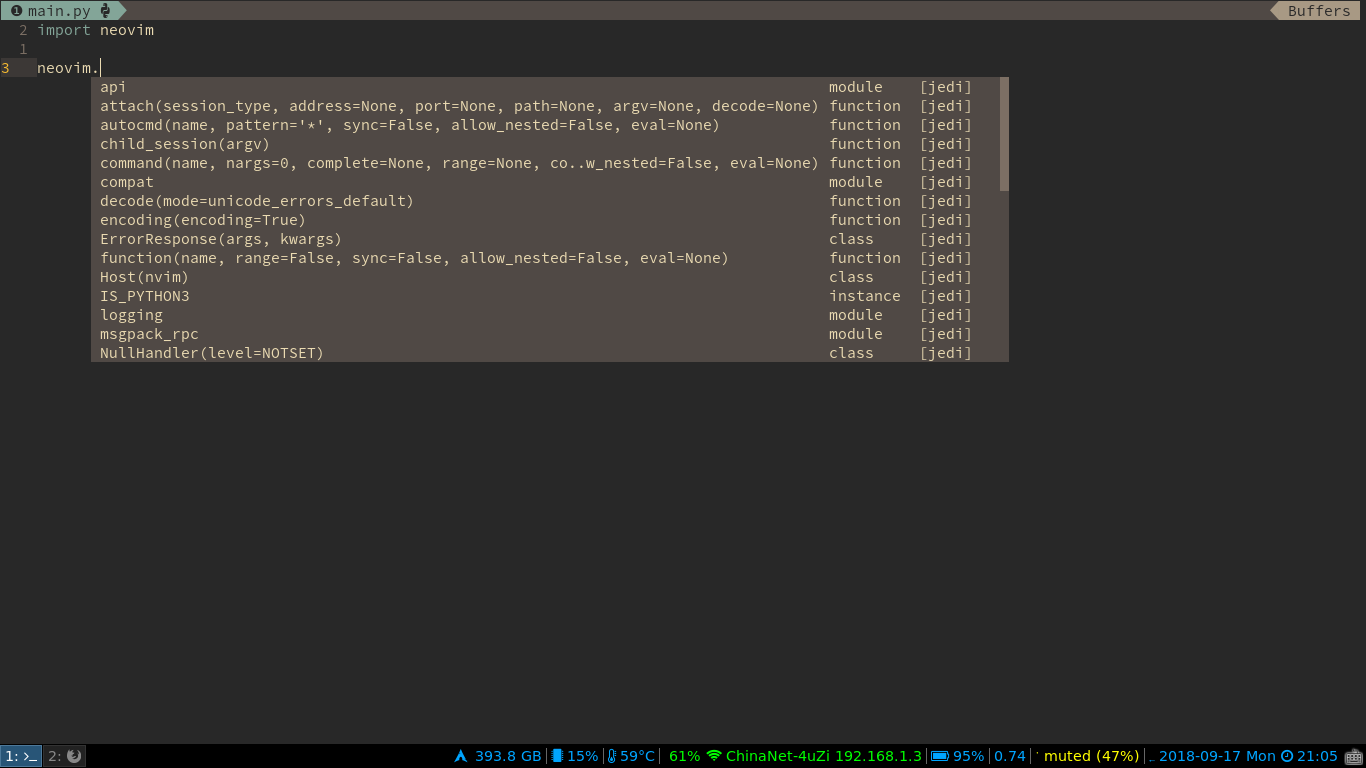
wsdjeg
on 17 Sep 2018
@wsdjeg 谢谢大佬的回复,但是还是没有解决掉。Issue我先开着,后续我找到方法了,补充进来,之后关闭。
EscapeLife
on 28 Sep 2018
and it works well for me:
你这个状态栏挺丰富啊,怎么手册里没有写有这些选项啊?
 ssfjhh
on 3 Oct 2018
ssfjhh
on 3 Oct 2018
@ssfjhh 你也是用的Pyenv管理Python版本吗?我是结合的时候,没办法使用。wsdjeg用的arch+i3,你也试试看。
EscapeLife
on 4 Oct 2018
@ssfjhh 你也是用的
Pyenv管理Python版本吗?我是结合的时候,没办法使用。wsdjeg用的arch+i3,你也试试看。
我只是个业余爱好者,只用Python3,所以用不上Pyenv。也没有机会用linux。
话说issue里是要求用英文留言的。
ssfjhh
on 4 Oct 2018
@wsdjeg @ssfjhh 最后以一种变相的方式解决了不能补全的问题,虽然比较傻,但是至少可以使用。具体方式就是在系统中安装 python3 版本,之后通过 pip3 install 安装对应的插件,最后在创建的 pyenv 的虚拟环境中使用。
EscapeLife
on 7 Oct 2018
I finally found out why I couldn't use Pyenv in SpaceVim now.
- Remove all third-party libraries for Pyenv configuration and python in system.
- Switch to the root user and install the Python2.7.10 version in system of the pip tools.
- Authorizations to system users (eg: escape) to the Python version in system of third-party extension package site-packages.
- Then you can happily use Pyenv to create virtual environments at SpaceVim.
```bash
system python version site-packages path
/Library/Python/2.7 » ll
drwxr-xr-x 42 escape wheel 1.3K Jan 23 17:42 site-packages
````
EscapeLife
on 23 Jan 2019
Thanks for your tips!
From: Escapenotifications@github.com
Date: 2019-01-23 21:29
To: SpaceVim/SpaceVimSpaceVim@noreply.github.com
CC: Wang Shidongwsdjeg@outlook.com; Mentionmention@noreply.github.com
Subject: Re: [SpaceVim/SpaceVim] SpaceVim cannot complete the Python third-party library (#2175)
I finally found out why I couldn't use Pyenv in SpaceVim now.
- Remove all third-party libraries for Pyenv configuration and python in system.
- Switch to the root user and install the Python2.7.10 version in system of the pip tools.
- Authorizations to system users (eg: escape) to the Python version in system of third-party extension package site-packages.
- Then you can happily use Pyenv to create virtual environments at SpaceVim.
system python version site-packages path
/Library/Python/2.7 » ll
drwxr-xr-x 42 escape wheel 1.3K Jan 23 17:42 site-packages
—
You are receiving this because you were mentioned.
Reply to this email directly, view it on GitHubhttps://github.com/SpaceVim/SpaceVim/issues/2175#issuecomment-456801317, or mute the threadhttps://github.com/notifications/unsubscribe-auth/AMiJkk23IUmVHC9if5ayzst2fgJXt12tks5vGGOrgaJpZM4Wq5AN.
wsdjeg
on 23 Jan 2019
Related issues
 zeroasterisk
·
4Comments
zeroasterisk
·
4Comments
 Lobosque
·
3Comments
Lobosque
·
3Comments
 rivalak
·
3Comments
wsdjeg
·
3Comments
rivalak
·
3Comments
wsdjeg
·
3Comments
 shabegom
·
3Comments
shabegom
·
3Comments
Most helpful comment
I finally found out why I couldn't use Pyenv in SpaceVim now.
```bash
system python version site-packages path
/Library/Python/2.7 » ll
drwxr-xr-x 42 escape wheel 1.3K Jan 23 17:42 site-packages
````