Spacevim: Open netrw when using vimr open folder
Expected behavior
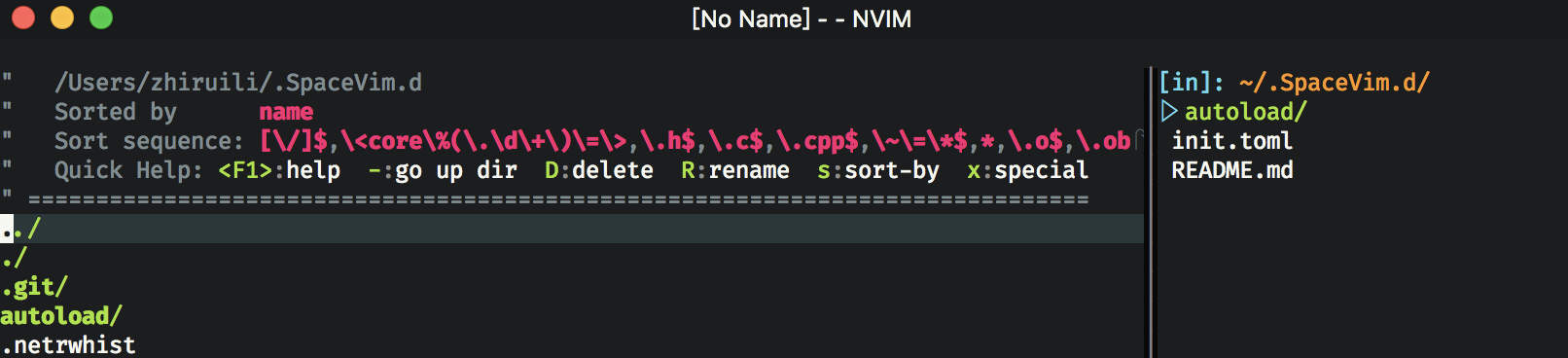
When using nvim open folder under command line, such as vim ., it will create a new buffer. The left hand side of the main view is an empty buffer, the right hand side of the main view is file list produced by vimfiles.
But when using VimR(https://github.com/qvacua/vimr) open an folder, such as vimr ., the left hand side of the main view is filled by netrw.
Is there any way to prevent VimR open netrw?
The reproduce ways from Vim starting (Required!)
Use VimR open any folder.
Debug info
SpaceVim layers:

- VersionControl:       not loaded          https://spacevim.org/layers/VersionControl
+ autocomplete:             loaded          https://spacevim.org/layers/autocomplete
- chat:                 not loaded          https://spacevim.org/layers/chat
+ checkers:                 loaded          https://spacevim.org/layers/checkers
- chinese:              not loaded          https://spacevim.org/layers/chinese
+ colorscheme:              loaded          https://spacevim.org/layers/colorscheme
+ core/banner:              loaded          no exists
+ core/statusline:          loaded          no exists
+ core/tabline:             loaded          no exists
+ core:                     loaded          no exists
- cscope:               not loaded          https://spacevim.org/layers/cscope
- ctrlp:                not loaded          https://spacevim.org/layers/ctrlp
- debug:                not loaded          https://spacevim.org/layers/debug
+ denite:                   loaded          https://spacevim.org/layers/denite
+ edit:                     loaded          no exists
- exprfold:             not loaded          no exists
- floobits:             not loaded          https://spacevim.org/layers/floobits
+ format:                   loaded          no exists
- fzf:                  not loaded          https://spacevim.org/layers/fzf
- games:                not loaded          no exists
- git:                  not loaded          https://spacevim.org/layers/git
- github:               not loaded          https://spacevim.org/layers/github
- incsearch:            not loaded          no exists
- indentmove:           not loaded          no exists
- japanese:             not loaded          no exists
- lang/WebAssembly:     not loaded          https://spacevim.org/layers/lang/WebAssembly
- lang/agda:            not loaded          https://spacevim.org/layers/lang/agda
- lang/autohotkey:      not loaded          https://spacevim.org/layers/lang/autohotkey
+ lang/c:                   loaded          https://spacevim.org/layers/lang/c
- lang/clojure:         not loaded          no exists
- lang/crystal:         not loaded          no exists
- lang/csharp:          not loaded          https://spacevim.org/layers/lang/csharp
- lang/dart:            not loaded          https://spacevim.org/layers/lang/dart
- lang/dockerfile:      not loaded          https://spacevim.org/layers/lang/dockerfile
- lang/elixir:          not loaded          https://spacevim.org/layers/lang/elixir
+ lang/go:                  loaded          https://spacevim.org/layers/lang/go
+ lang/haskell:             loaded          https://spacevim.org/layers/lang/haskell
- lang/html:            not loaded          https://spacevim.org/layers/lang/html
- lang/java:            not loaded          https://spacevim.org/layers/lang/java
- lang/javascript:      not loaded          https://spacevim.org/layers/lang/javascript
- lang/json:            not loaded          no exists
- lang/julia:           not loaded          https://spacevim.org/layers/lang/julia
- lang/kotlin:          not loaded          https://spacevim.org/layers/lang/kotlin
- lang/lisp:            not loaded          https://spacevim.org/layers/lang/lisp
- lang/lua:             not loaded          https://spacevim.org/layers/lang/lua
- lang/markdown:        not loaded          https://spacevim.org/layers/lang/markdown
- lang/nim:             not loaded          https://spacevim.org/layers/lang/nim
- lang/ocaml:           not loaded          https://spacevim.org/layers/lang/ocaml
- lang/perl:            not loaded          https://spacevim.org/layers/lang/perl
- lang/php:             not loaded          https://spacevim.org/layers/lang/php
- lang/pony:            not loaded          no exists
- lang/ps1:             not loaded          no exists
- lang/puppet:          not loaded          no exists
- lang/purescript:      not loaded          https://spacevim.org/layers/lang/purescript
+ lang/python:              loaded          https://spacevim.org/layers/lang/python
- lang/r:               not loaded          no exists
- lang/ruby:            not loaded          https://spacevim.org/layers/lang/ruby
- lang/rust:            not loaded          https://spacevim.org/layers/lang/rust
- lang/scala:           not loaded          no exists
+ lang/sh:                  loaded          https://spacevim.org/layers/lang/sh
- lang/solidity:        not loaded          no exists
- lang/swift:           not loaded          https://spacevim.org/layers/lang/swift
- lang/swig:            not loaded          no exists
- lang/toml:            not loaded          no exists
- lang/typescript:      not loaded          https://spacevim.org/layers/lang/typescript
- lang/vim:             not loaded          https://spacevim.org/layers/lang/vim
- lang/xml:             not loaded          no exists
- lang:                 not loaded          no exists
- leaderf:              not loaded          https://spacevim.org/layers/leaderf
- lsp:                  not loaded          no exists
- mail:                 not loaded          no exists
- operator:             not loaded          no exists
- org:                  not loaded          no exists
+ shell:                    loaded          https://spacevim.org/layers/shell
- sudo:                 not loaded          https://spacevim.org/layers/sudo
- tags:                 not loaded          https://spacevim.org/layers/tags
- tmux:                 not loaded          https://spacevim.org/layers/tmux
- tools/dash:           not loaded          https://spacevim.org/layers/tools/dash
- tools/screensaver:    not loaded          no exists
- tools:                not loaded          https://spacevim.org/layers/tools
+ ui:                       loaded          https://spacevim.org/layers/ui
- unite:                not loaded          https://spacevim.org/layers/unite
- vim:                  not loaded          no exists
Screenshots
Under command line

Using VimR
 ZhiruiLi
All 13 comments
sorry, I do not use vimr, but I think this should be a issue with vimr itself, BTW, in SpaceVim, you can disable netrw via let g:loaded_netrwPlugin = 1. just put it into bootstrap function.
 wsdjeg
on 4 Sep 2018
wsdjeg
on 4 Sep 2018
Thanks for help. This solution can prevent VimR from loading the netrw plugin, but now the main view is filled by 2 vimfiler list.
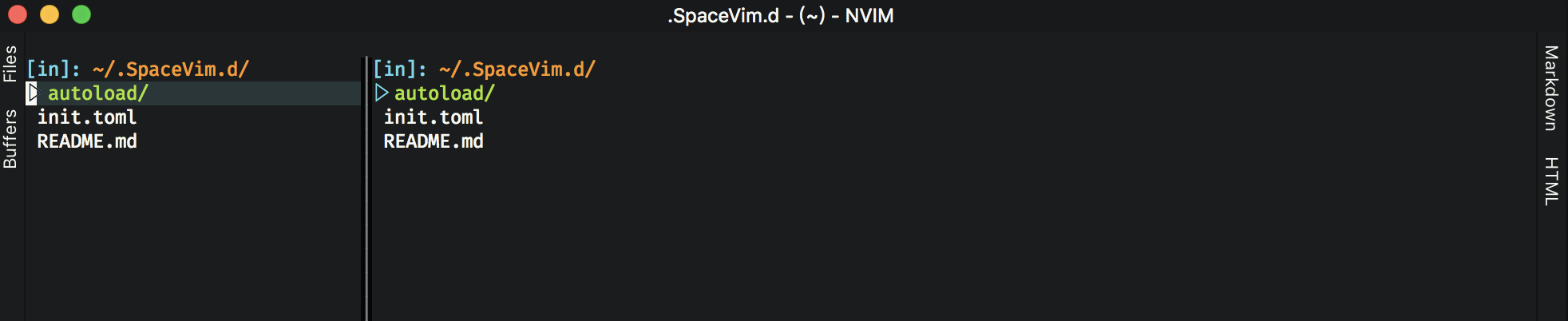
When I open a file in vimfiler, the main view becomes strange, the buffer is very narrow:

The only way I found to solve this is to set enable_vimfiler_welcome to false, but I still want to show the file list when startup. Is there some way to do that?
ZhiruiLi
on 4 Sep 2018
more log is needed, I will add log for startup, that should help to find what this issue is. now I can not test it.
wsdjeg
on 4 Sep 2018
Thanks
ZhiruiLi
on 4 Sep 2018
@ZhiruiLi I start a new PR, please test it, and post the spacevim log via SPC h L
wsdjeg
on 4 Sep 2018
SpaceVim runtime log :
[ SpaceVim ] : logger file  does not exists, only log for current process will be shown!
[ SpaceVim ] [21:13:57] [ Info ] Can not find project local config, start to loadding global config
[ SpaceVim ] [21:13:57] [ Info ] SpaceVim server startup at:/tmp/spacevim_nvim_server
[ SpaceVim ] [21:13:57] [ Info ] Find project root('.git/',''):/Users/zhiruili/.SpaceVim.d/.git/
[ SpaceVim ] [21:13:57] [ Info ] change to root:/Users/zhiruili/.SpaceVim.d
[ SpaceVim ] [21:13:57] [ Info ] change to root:/Users/zhiruili/.SpaceVim.d
[ SpaceVim ] [21:13:58] [ Info ] Find project root('.git/','/Users/zhiruili/.SpaceVim.d/'):/Users/zhiruili/.SpaceVim.d/.git/
[ SpaceVim ] [21:13:58] [ Info ] change to root:/Users/zhiruili/.SpaceVim.d
@ZhiruiLi I can not see startup log, do you checkout my pr? you need to swich to that branch.
cd ~/.SpaceVim
git remote add wsdjeg https://github.com/wsdjeg/SpaceVim.git
git fetch wsdjeg
git checkout wsdjeg/startup_log
Oh, I was misunderstood, now I have switched to that branch. Can you see the log now?
SpaceVim runtime log :
[ SpaceVim ] : logger file  does not exists, only log for current process will be shown!
[ SpaceVim ] [21:24:02] [ Info ] SpaceVim startup status is: [1, '/Users/zhiruili/.SpaceVim.d']
[ SpaceVim ] [21:24:02] [ Info ] Can not find project local config, start to loadding global config
[ SpaceVim ] [21:24:02] [ Info ] SpaceVim server startup at:/tmp/spacevim_nvim_server
[ SpaceVim ] [21:24:02] [ Info ] Find project root('.git/',''):/Users/zhiruili/.SpaceVim.d/.git/
[ SpaceVim ] [21:24:02] [ Info ] change to root:/Users/zhiruili/.SpaceVim.d
[ SpaceVim ] [21:24:02] [ Info ] try to open SpaceVim welcome page
[ SpaceVim ] [21:24:02] [ Info ] change to root:/Users/zhiruili/.SpaceVim.d
[ SpaceVim ] [21:24:03] [ Info ] Find project root('.git/','/Users/zhiruili/.SpaceVim.d/'):/Users/zhiruili/.SpaceVim.d/.git/
[ SpaceVim ] [21:24:03] [ Info ] change to root:/Users/zhiruili/.SpaceVim.d
how did you open vimr? vimr .?
wsdjeg
on 4 Sep 2018
Just type vimr . and press return in command line. You still can't see the log?
SpaceVim runtime log :
[ SpaceVim ] : logger file  does not exists, only log for current process will be shown!
[ SpaceVim ] [21:32:24] [ Info ] SpaceVim startup status is: [1, '/Users/zhiruili/.SpaceVim.d']
[ SpaceVim ] [21:32:24] [ Info ] Can not find project local config, start to loadding global config
[ SpaceVim ] [21:32:25] [ Info ] Find project root('.git/',''):/Users/zhiruili/.SpaceVim.d/.git/
[ SpaceVim ] [21:32:25] [ Info ] change to root:/Users/zhiruili/.SpaceVim.d
[ SpaceVim ] [21:32:25] [ Info ] try to open SpaceVim welcome page
[ SpaceVim ] [21:32:25] [ Info ] change to root:/Users/zhiruili/.SpaceVim.d
[ SpaceVim ] [21:32:25] [ Info ] Find project root('.git/','/Users/zhiruili/.SpaceVim.d/'):/Users/zhiruili/.SpaceVim.d/.git/
[ SpaceVim ] [21:32:25] [ Info ] change to root:/Users/zhiruili/.SpaceVim.d
sorry, I can not reproduce it in vim, and my log is :
SpaceVim runtime log :
[ SpaceVim ] : logger file  does not exists, only log for current process will be shown!
[ SpaceVim ] [21:26:07] [ Info ] SpaceVim startup status is: [1, '/home/wsdjeg/SpaceVim/SpaceVim']
[ SpaceVim ] [21:26:07] [ Info ] force loadding global config >>>
[ SpaceVim ] [21:26:07] [ Info ] myspacevim#before called
[ SpaceVim ] [21:26:07] [ Info ] SpaceVim server startup at:/tmp/spacevim_nvim_server
[ SpaceVim ] [21:26:08] [ Info ] Find project root('.git/','/home/wsdjeg/SpaceVim/SpaceVim/'):/home/wsdjeg/SpaceVim/SpaceVim/.git/
[ SpaceVim ] [21:26:08] [ Info ] change to root:/home/wsdjeg/SpaceVim/SpaceVim
[ SpaceVim ] [21:26:08] [ Info ] try to open SpaceVim welcome page
[ SpaceVim ] [21:26:08] [ Info ] Find project root('.git/',''):/home/wsdjeg/SpaceVim/SpaceVim/.git/
[ SpaceVim ] [21:26:08] [ Info ] change to root:/home/wsdjeg/SpaceVim/SpaceVim
Well……Thanks, I just turn off the vimfiler's welcome screen.
ZhiruiLi
on 4 Sep 2018
ok, I am sorry.
wsdjeg
on 4 Sep 2018
Related issues
wsdjeg
·
3Comments
 teemola
·
5Comments
teemola
·
5Comments
 everettjf
·
5Comments
everettjf
·
5Comments
 jetm
·
5Comments
jetm
·
5Comments
 fmind
·
3Comments
fmind
·
3Comments
Most helpful comment
ok, I am sorry.