How can I force Spacevim to display the double quotes within JSON files? If I enter by command it works - until I save. I want it permanent. Currently I tried to load this via bootstrap_after into the init.toml. Nothing happens.
# .SpaceVim.d/autoload/myspacevim.vim
func! myspacevim#after() abort
  let g:vim_json_syntax_conceal = 0
endf
# /.SpaceVim.d/init.toml
[options]
    ...
    bootstrap_after = "myspacevim#after"
I don't know what else to do because somehow nothing happens. And JSON doesn't look particularly pretty either.
 gisu
gisu
All 6 comments
It seems Conceal feature issue in SpaceVim, there are more than one plugins use Conceal, and we should merged options of all these plugins.
 wsdjeg
on 12 Aug 2018
wsdjeg
on 12 Aug 2018
I can not reproduce this issue, here is my config:
#=============================================================================
# init.vim --- My SpaceVim config
# Copyright (c) 2016-2017 Wang Shidong & Contributors
# Author: Wang Shidong < wsdjeg at 163.com >
# URL: https://spacevim.org
#=============================================================================
# SpaceVim options {{{
[options]
default_indent = 4
enable_debug = 1
bootstrap_before = "TestFoo"
enable_ale = 0
# filemanager = "nerdtree"
# enable_ycm = 1
# snippet_engine = "ultisnips"
line_on_the_fly = 0
enable_statusline_mode = true
realtime_leader_guide = 1
enable_tabline_filetype_icon = 1
enable_os_fileformat_icon = 1
buffer_index_type = 0
statusline_separator = 'arrow'
github_username = 'wsdjeg'
auto_disable_touchpad = 0
colorscheme = 'gruvbox'
guifont = 'DejaVu Sans Mono for Powerline 9'
enable_tabline_filetype_icon = true
bootstrap_before = "myspacevim#before"
search_tools = ["ag", "rg", "pt", "ack", "grep"]
# }}}
# SpaceVim layer config {{{
[[layers]]
name = 'fzf'
[[layers]]
name = 'tmux'
[[layers]]
name = 'lang#tmux'
[[layers]]
name = 'lang#nim'
[[layers]]
name = 'lang#julia'
[[layers]]
name = 'incsearch'
[[layers]]
name = 'floobits'
[[layers]]
name = 'github'
[[layers]]
name = 'git'
[[layers]]
name = 'VersionControl'
[[layers]]
name = 'lang#go'
[[layers]]
name = 'lang#json'
[[layers]]
name = 'lang#agda'
[[layers]]
name = 'lang#perl'
[[layers]]
name = 'lang#java'
[[layers]]
name = 'lang#c'
[[layers]]
name = 'chat'
[[layers]]
name = 'tags'
[[layers]]
name = 'lang#toml'
[[layers]]
name = 'lang#lua'
[[layers]]
name = 'lang#php'
[[layers]]
name = 'lang#sh'
[[layers]]
name = 'lang#python'
[[layers]]
name = 'tools'
[[layers]]
name = 'lang#vim'
[[layers]]
name = 'lang#typescript'
[[layers]]
name = 'colorscheme'
[[layers]]
name = 'core#statusline'
enable = true
[[layers]]
name = 'core#tabline'
enable = true
[[layers]]
name = 'debug'
[[layers]]
name = 'autocomplete'
auto-completion-return-key-behavior = "smart"
auto-completion-tab-key-behavior = "smart"
[[layers]]
name = 'lang#markdown'
enableWcwidth = 1
listItemIndent = 1
[[layers]]
name = 'shell'
default_position = 'top'
default_height = 30
[[layers]]
name = 'lsp'
filetypes = [
'javascript',
'sh'
]
[layers.override_cmd]
rust = ['rustup', 'run', 'nightly', 'rls']
# }}}
# custom plugins {{{
[[custom_plugins]]
name = 'lilydjwg/colorizer'
merged = 0
on_cmd = ['ColorHighlight']
[[custom_plugins]]
name = 'kien/tabman.vim'
merged = 0
[[custom_plugins]]
name = 'tweekmonster/startuptime.vim'
merged = 0
# }}}
function! myspacevim#before() abort
call SpaceVim#logger#info('myspacevim#before called')
let g:spacevim_disabled_plugins = ['vim-nim']
set rtp+=~/SpaceVim/SpaceVim/build/vader
set rtp+=~/SpaceVim/vim-nim
let g:vim_json_syntax_conceal = 0
let g:delimitMate_expand_cr = 1
call add(g:spacevim_project_rooter_patterns, 'package.json')
endfunction
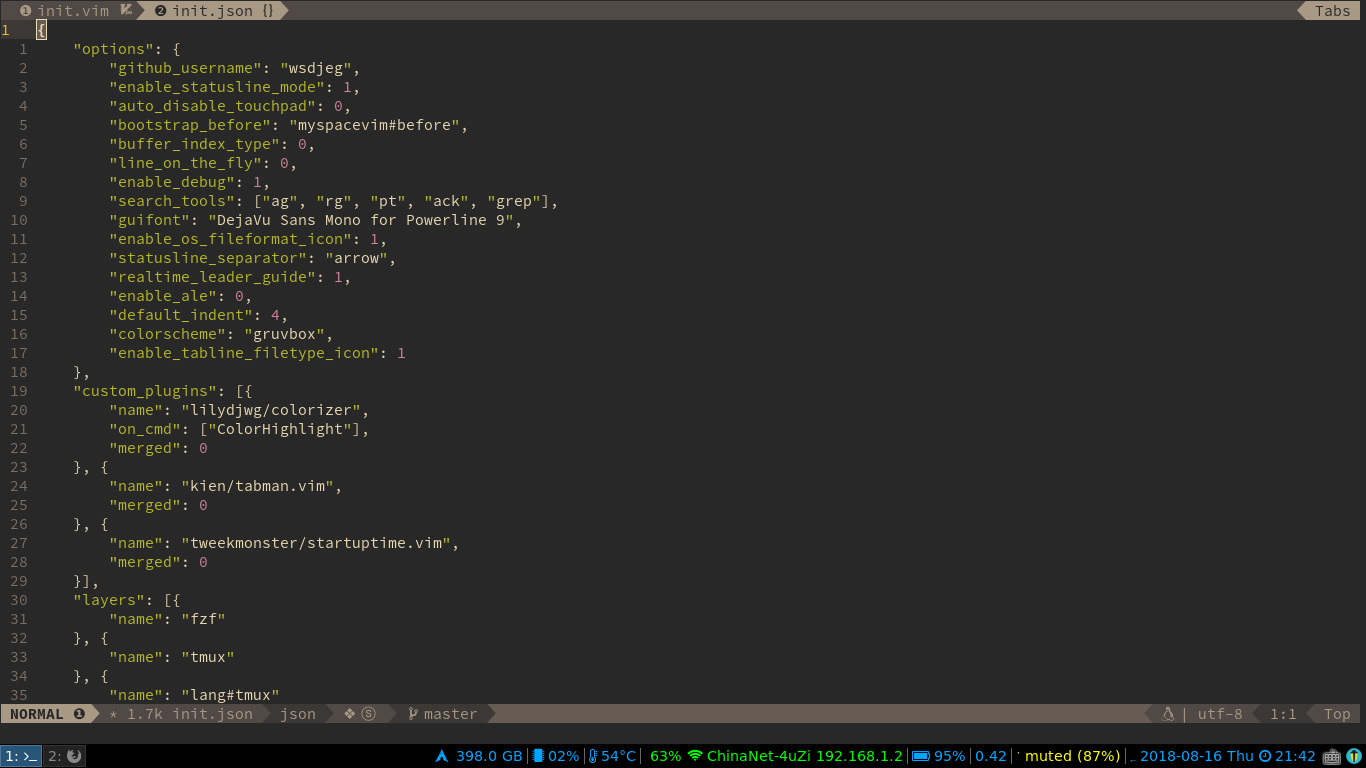
wsdjeg
on 16 Aug 2018
Check this :verbose set conceallevel? concealcursor? to see which plugin acts behavior. For me it is plugin indentLine, and here is my config:
func! myself#after() abort
    let g:indentLine_setConceal = 0
endf
and it works for me.
 upeoe
on 31 Aug 2018
upeoe
on 31 Aug 2018
Thanks @upeoe. You got me on the right track, but shouldn't it be myself#before()? After putting it in the bootstrap_after it didn't take any effect, but with bootstrap_before it works as expected.
 tad-lispy
on 24 Apr 2019
tad-lispy
on 24 Apr 2019
I see the same behavior as @lzrski, it works with #before, but not with #after, but @upeoe hint was giving the right direction! Thanks!
 roberteinhaus
on 29 Apr 2019
roberteinhaus
on 29 Apr 2019
Check this
:verbose set conceallevel? concealcursor?to see which plugin acts behavior. For me it is pluginindentLine, and here is my config:func! myself#after() abort let g:indentLine_setConceal = 0 endfand it works for me.
It works with bootstrap_before.
 cnsit
on 6 Nov 2019
cnsit
on 6 Nov 2019
Related issues
 everettjf
·
5Comments
everettjf
·
5Comments
 teemola
·
5Comments
teemola
·
5Comments
 eperfect
·
4Comments
wsdjeg
·
3Comments
eperfect
·
4Comments
wsdjeg
·
3Comments
 Lobosque
·
3Comments
Lobosque
·
3Comments
Most helpful comment
Check this
:verbose set conceallevel? concealcursor?to see which plugin acts behavior. For me it is pluginindentLine, and here is my config:and it works for me.