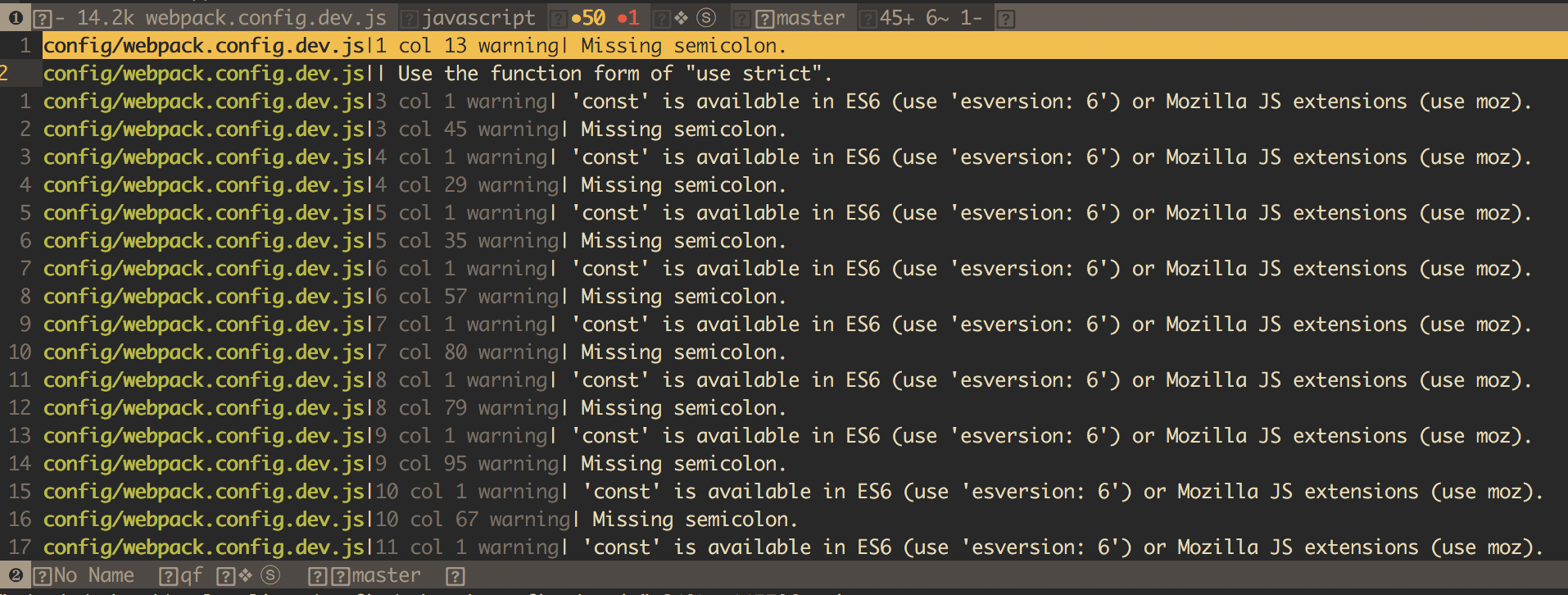
Spacevim: ES6 project, how to fix jshint: use 'esversion: 6'?
All 7 comments
you need to add a .jshintrc file yourself, I think this file is part of your project, and it should not be changeable in spacevim.
 wsdjeg
on 17 Jan 2018
wsdjeg
on 17 Jan 2018
I will look into jshint, if I find the cli tool support argv for enable esversion 6, I will add this feature.
wsdjeg
on 17 Jan 2018
wsdjeg
on 17 Jan 2018
also you can read https://github.com/AtomLinter/linter-jshint/issues/237#issuecomment-199836393
wsdjeg
on 17 Jan 2018
👍2
@wsdjeg OK, Thank you.
 codesve
on 18 Jan 2018
codesve
on 18 Jan 2018
In windows
open VS Code then press ctrl+shift+p together > command palellet will appear > open user settings>search jshint> click on jshint:options > "jshint.options": { "esversion": 6, }
 rahulsharma991
on 17 Apr 2020
rahulsharma991
on 17 Apr 2020
👍13
🎉8
👎2
This doesn't help @rahulsharma991 . I am writing a userscript, not a bomb. Please explain this in neater terms WITHOUT Visual Studio, thank you.
 idontknoiw
on 6 Nov 2020
idontknoiw
on 6 Nov 2020
Was this page helpful?
0 / 5 - 0 ratings
Related issues
 rivalak
·
3Comments
rivalak
·
3Comments
 onerciller
·
5Comments
onerciller
·
5Comments
 linwaytin
·
4Comments
linwaytin
·
4Comments
 eperfect
·
4Comments
eperfect
·
4Comments
 teemola
·
5Comments
teemola
·
5Comments
Most helpful comment
In windows
open VS Code then press ctrl+shift+p together > command palellet will appear > open user settings>search jshint> click on jshint:options > "jshint.options": { "esversion": 6, }