Spaceship-prompt: Kubernetes context info is not showing up
Kubernetes context info is not showing up
Kubernetes context info should show up like below

Environment
Spaceship version: 3.11.2
Zsh version: 5.4.2
Zsh framework: oh-my-zsh
Zsh plugin manager:
Terminal emulator: ubuntu terminal
Operating system: Linux
Screenshot
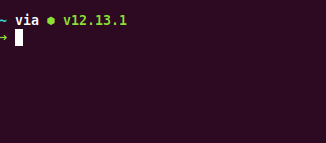
Possible solution
Going back to commit c047e3f is fixing.
 mounikakella
All 4 comments
Please run echo $SPACESHIP_KUBECTL_SHOW, is it true ?
BTW, now kubectl section is not showing up by default, you need enable it explicitly.
Or refer to docs
 Runrioter
on 27 Feb 2020
Runrioter
on 27 Feb 2020
Thanks. Worked after exporting $SPACESHIP_KUBECTL_SHOW to true.
mounikakella
on 2 Mar 2020
There are inconsistencies in the documentation of kubectl / kubecontext - I am having the same problems, but until I found this ticket, I was checking SPACESHIP_KUBECONTEXT_SHOW (which is true) and I was seeing kubectl and kubecontext in SPACESHIP_PROMPT_ORDER docs (kubecontext in TROUBESHOOTING, kubectl locally)
Hopefully this helps somebody trying to figure this stuff out...
Part of the confusion is the 2 parts of KUBECTL, version and context. If you have expiring tokens and a server that just ignores expired connections, you need to enable KUBECTL, disable the kubectl version.
Just enabling SPACESHIP_KUBECTL_SHOW=true didn't work for me, the prompt just would hang because the server (teleport) was just ignoring the request for version.
This ultimately works for me:
SPACESHIP_KUBECTL_SHOW=true
SPACESHIP_KUBECTL_VERSION_SHOW=false
SPACESHIP_KUBECONTEXT_SHOW=true
 redbeard0x0a
on 15 Apr 2020
redbeard0x0a
on 15 Apr 2020
Please note that also in SPACESHIP_PROMPT_ORDER the element kubecontext must be changed to kubectl
 dennybiasiolli
on 1 Jul 2020
dennybiasiolli
on 1 Jul 2020
Related issues
 MatthiasJ
·
4Comments
MatthiasJ
·
4Comments
 AlecRust
·
3Comments
AlecRust
·
3Comments
 ChadTaljaardt
·
4Comments
ChadTaljaardt
·
4Comments
 xhaythemx
·
3Comments
xhaythemx
·
3Comments
 gabrielpedepera
·
3Comments
gabrielpedepera
·
3Comments
Most helpful comment
There are inconsistencies in the documentation of kubectl / kubecontext - I am having the same problems, but until I found this ticket, I was checking SPACESHIP_KUBECONTEXT_SHOW (which is true) and I was seeing kubectl and kubecontext in SPACESHIP_PROMPT_ORDER docs (kubecontext in TROUBESHOOTING, kubectl locally)
Hopefully this helps somebody trying to figure this stuff out...
Part of the confusion is the 2 parts of KUBECTL, version and context. If you have expiring tokens and a server that just ignores expired connections, you need to enable KUBECTL, disable the kubectl version.
Just enabling SPACESHIP_KUBECTL_SHOW=true didn't work for me, the prompt just would hang because the server (teleport) was just ignoring the request for version.
This ultimately works for me: