Spaceship-prompt: Bar theme
Hello guys! Thank you for great work! You're awesome!
Could you please help me to implement my zsh theme with spaceship?

My questions are:
- I already research the api and options and found no techniques to create background along the all line space. Am I right that I should create fully custom code like
spaceship.zsh?
As you see on the screen the bar going on the first line and it means that
RPROMPTis not the solution. Also because if I want to copy the command and terminal output to someone I don't want to show the environment. It's custom again?Finally I print sections as "pills". I've tried to repeat it in spaceship as
PREFIXbutBGhasn't affected section text and affects only prefix text.I've tried to change
SPACESHIP_CHAR_SYMBOLfor arrow to classic$_LIBERTY(#/$) but no effect. Could you please give me an example.
Please advise. It will be great if I could rebuild my theme from zsh-theme to spaceship-theme with many sections.
Thanks!
 anki-code
All 24 comments
@denysdovhan @maximbaz may be I can do it easily with https://github.com/starship/starship?
anki-code
on 23 Sep 2019
@anki-code Your prompt looks cool and unusual. Can you share the source code for it? It'd like to create a powerlevel10k config that replicates it.
 romkatv
on 23 Sep 2019
romkatv
on 23 Sep 2019
@romkatv yep, my theme has several cool features in my opinion:
- It looks not like Christmas tree. Most of omz themes looks like 🎄 💈 Christmas garland and frustrate attention. Console is for write commands and get output, not for color juggling 🖥
- It has three attention aspects by priority: first - command and path, second - output, third - pills/sections 👓
- It has a bar along all space and it is a great separator ⬛️
- Command start has color intensity and fixed position. It's great for reading and typing 💚
- The pills/sections placed to right but not in PROMPT and it allows you to secure copy the command and output without environmental disclosure 🔒
This is key features which spaceship hasn't and all omz themes haven't them too. But my theme hasn't so many pills/sections.
You can find bar theme here - https://github.com/anki-code/zsh-bar-theme
anki-code
on 23 Sep 2019
@anki-code This Powerlevel10k config replicates Bar: https://gist.github.com/romkatv/7f48d0deae7a3449f34a4870feaba0f5. I'm not sure I've got all the colors right but they are easy to change by editing the config.
romkatv
on 23 Sep 2019
@romkatv wow! It works and sooooooooo fast! You rock man! 🥇 I'm going to try powerlevel10k for everyday usage. The colors is ok! 🎉
@denysdovhan @maximbaz feel free to reopen this issue if you want to suggest your solution.
anki-code
on 23 Sep 2019
@romkatv Will you add the bar theme to the main powerlevel10k repo? (I've send you invite to https://keybase.io/ and probably we can talk there). Also you could use bar background as an option for p10k configure in section "Prompt Connection".
anki-code
on 23 Sep 2019
Will you add the bar theme to the main powerlevel10k repo?
Since my goal was to replicate your prompt exactly, I've disabled many great features that that p10k users have come to expect. There is nothing wrong with using p10k-bar.zsh config but it's not clearing the bar for first-class support.
(I've send you invite to https://keybase.io/ and probably we can talk there.
If you have questions, feel free to open an issue on GitHub or email me. The former is very much preferred.
Also you could use bar background as an option for
p10k configurein section "Prompt Connection".
Yep, this is already on my todo list. It's not too difficult to implement but it's still some work.
P.S.
My apologies to Spaceship devs for hijacking this issue.
romkatv
on 23 Sep 2019
Yep, this is already on my todo list
Great! I think if you add background as an option I will try to use your original solution because you already have right right prompt ) So I try to tune colors to grey scale now (If you can help me with advice how did it fast it will be cool)
My apologies to Spaceship devs for hijacking this issue.
I think it's ok because the next generation of spaceship is starship afaik. Starship can concurese with p10k on speed, don't relax :)
anki-code
on 23 Sep 2019
I think it's ok because the next generation of
spaceshipisstarshipafaik.
It's inspired by spaceship but it's not affiliated. It's done by a different group of people.
Starship can concurese with p10k on speed, don't relax :)
Not yet and probably not soon. Right now Starship is not even uniformly faster than Spaceship. Spaceship is slow but still usable in a medium-sized git repository. Starship isn't. Starship also took an early shortcut that will cripple it in the long run. Everything else being equal, it's better if your prompt is formatted by your shell rather than by a compiled binary because it gives you so much customization freedom. Starship made the wrong trade off so it'll stay one-size-fits all.
Note that Powerlevel10k is already so fast that you cannot perceive its latency. This means that any prompt that wants to be better cannot earn the love of users by being _faster_ than Powerlevel10k. There's just no perceptible difference between 1ms and 10ms when it comes to prompt latency. So you have to offer something other than performance. Things like flexible styling, or ease of configuration. Starship, due to its choice of technology, cannot offer either, and it's also much slower. They might pivot to something useful but at this point I'm not seeing value. I admit they have good marketing, so they can earn a large number of users even with an inferior product.
romkatv
on 23 Sep 2019
Interesting thread! 🙂
The pills/sections placed to right but not in PROMPT and it allows you to secure copy the command and output without environmental disclosure 🔒
@anki-code could you explain what you mean by this?
 maximbaz
on 23 Sep 2019
maximbaz
on 23 Sep 2019
@maximbaz I mean that when you have the text in RPROMPT on the same line as command then if you want to copy the command with output you'll copy the environment from right side RPROMPT too. So to remove RPROMPTed text you should do 2 actions (copy cmd, copy output) or edit the text after copying.
anki-code
on 23 Sep 2019
But what if you want to copy several commands with their output?
The usual solution is to use transient_rprompt. This options makes right prompt appear only on the last prompt but not on the previous prompts. However, Bar prompt doesn't respect transient_rprompt. Powerlevel10k does.
romkatv
on 23 Sep 2019
@anki-code
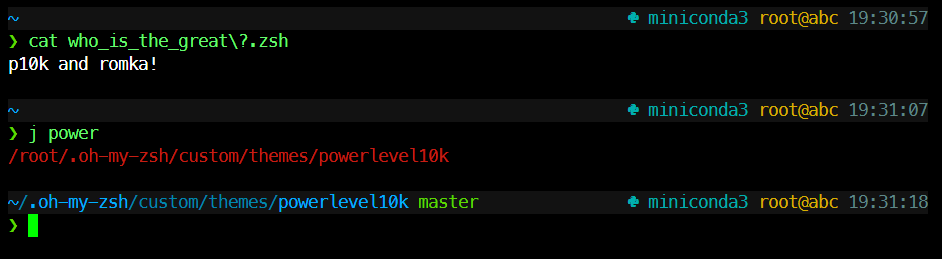
I think if you add background as an option I will try to use your original solution because you already have right right prompt ) So I try to tune colors to grey scale now (If you can help me with advice how did it fast it will be cool)
You can do this now, it's pretty easy. Set these options at the end of your ~/.zshrc after sourcing ~/.p10k.zsh.
# Grey prompt background.
POWERLEVEL9K_BACKGROUND=234
# Except for the prompt symbol, which should have no background.
POWERLEVEL9K_PROMPT_CHAR_BACKGROUND=
# Fill the gap between left and right prompt with grey spaces.
POWERLEVEL9K_MULTILINE_FIRST_PROMPT_GAP_BACKGROUND=234
@romkatv very nice!
anki-code
on 23 Sep 2019
@romkatv My final minimal tuning of p10k:
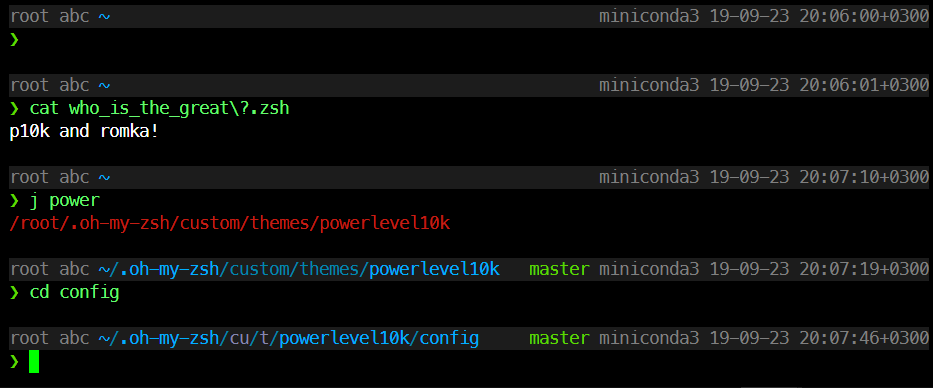
POWERLEVEL9K_VISUAL_IDENTIFIER_EXPANSION=
POWERLEVEL9K_LEFT_PROMPT_ELEMENTS=(user host dir newline prompt_char)
POWERLEVEL9K_RIGHT_PROMPT_ELEMENTS=(vcs command_execution_time background_jobs virtualenv anaconda pyenv nodenv nvm nodeenv rbenv rvm kubecontext terraform nordvpn ranger time newline)
POWERLEVEL9K_TIME_FORMAT='%D{%y-%m-%d %H:%M:%S%z}'
POWERLEVEL9K_BACKGROUND=234
POWERLEVEL9K_PROMPT_CHAR_BACKGROUND=
POWERLEVEL9K_MULTILINE_FIRST_PROMPT_GAP_BACKGROUND=234
POWERLEVEL9K_USER_FOREGROUND=244
POWERLEVEL9K_HOST_FOREGROUND=244
POWERLEVEL9K_ANACONDA_FOREGROUND=244
POWERLEVEL9K_VCS_FOREGROUND=244
POWERLEVEL9K_TIME_FOREGROUND=244
zle_highlight=( default:fg=green,bold )
Thanks!
anki-code
on 23 Sep 2019
Last thought about options is to ability to hide default values in sections:
- hide git "master" when repo has no changes
- hide conda "base"/"miniconda3"
anki-code
on 23 Sep 2019
@anki-code It's usually easier to edit ~/.p10k.zsh rather than override parameters after the fact.
You might prefer to use context instead of user and host. To have your preferred styling, replace the existing POWERLEVEL9K_CONTEXT_* parameters with this:
typeset -g POWERLEVEL9K_CONTEXT_FOREGROUND=244
hide conda "base"/"miniconda3"
This should do it:
typeset -g POWERLEVEL9K_ANACONDA_CONTENT_EXPANSION='${P9K_CONTENT:#(base|miniconda3)}'
The master thing is similar but somewhat more verbose.
romkatv
on 23 Sep 2019
You might prefer to use context
I just want to avoid @ in the middle position to reduce visual noise. So the cause I used user and host.
CONTENT_EXPANSION
New 🐇 from the 🎩! Thanks @romkatv !
anki-code
on 23 Sep 2019
Just to give some credit to spaceship folks and encourage the further development of both projects...
Note that Powerlevel10k is already so fast that you cannot perceive its latency. This means that any prompt that wants to be better cannot earn the love of users by being faster than Powerlevel10k.
As we explored in https://github.com/romkatv/powerlevel10k/issues/234, there are different aspects of what can be considered "fast", and as of now spaceship (the async version) still wins the love of users (at least my love) by providing a very fast startup time 😜
At the same time I must agree with @romkatv on the fact that starship (the rust project) has made a very serious design flaw of ignoring the benefits of parallel and asynchronous sections rendering, in the current form it is bound to be the slowest of all and win the love of users by different means.
maximbaz
on 24 Sep 2019
@maximbaz
spaceship (the async version) still wins the love of users
Let's try to win my love :) How I can implement Bar theme in spaceship? :)
the async version
How I can try it?
anki-code
on 24 Sep 2019
How I can implement Bar theme in spaceship? :)
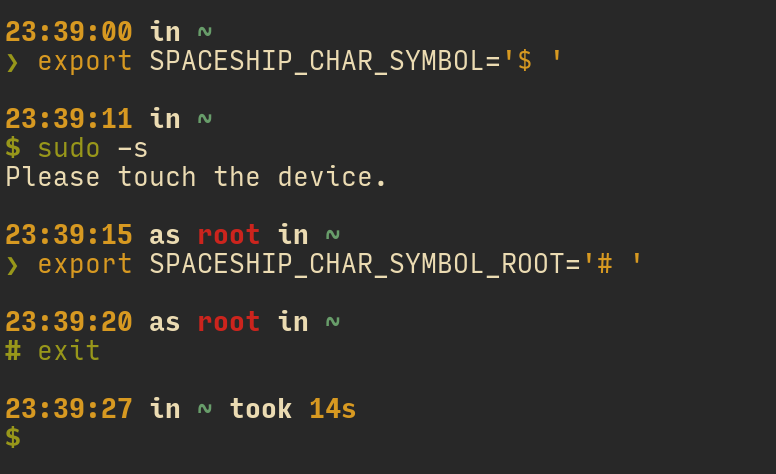
Unfortunately I don't know good answers to your questions about background color for a full-sized line, as well avoiding RPROMPT (maybe @denysdovhan or @salmanulfarzy could give you a hint), but changing char symbol works well for me:
the async version
How I can try it?
It seems the approach implemented in https://github.com/denysdovhan/spaceship-prompt/pull/697 has the highest chances of being merged (so if you want to give spaceship a shot, I recommend you trying code from that PR and leaving feedback over there on how it went), but I personally use my own fork with a much more simple and naive implementation of async prompt.
maximbaz
on 24 Sep 2019
@maximbaz thanks! Could you please tell me a few words about your terminal above? What is the theme/font/app/plugins?
anki-code
on 25 Sep 2019
kitty terminal with gruvbox color scheme and Input Mono Narrow font, for more details feel free to explore my dotfiles 😉
maximbaz
on 25 Sep 2019
As we explored in romkatv/powerlevel10k#234, there are different aspects of what can be considered "fast", and as of now spaceship (the async version) still wins the love of users (at least my love) by providing a very fast startup time
Status update: Powerlevel10k has joined the honorable company of fast-to-load themes. When you start zsh that loads Powerlevel10k with default settings, it takes 29ms for prompt to appear. For a ridiculously bloated prompt it takes 40ms.

Note that prompt appears in its complete and final form and displays up-to-date information.
For the curious, there is extra information in https://github.com/romkatv/powerlevel10k/issues/234.
romkatv
on 4 Oct 2019
Related issues
 doole
·
4Comments
doole
·
4Comments
 JounQin
·
3Comments
JounQin
·
3Comments
 jwhipp
·
3Comments
jwhipp
·
3Comments
 MatthiasJ
·
4Comments
MatthiasJ
·
4Comments
 janjur
·
3Comments
janjur
·
3Comments
Most helpful comment
@anki-code This Powerlevel10k config replicates Bar: https://gist.github.com/romkatv/7f48d0deae7a3449f34a4870feaba0f5. I'm not sure I've got all the colors right but they are easy to change by editing the config.