Spaceship-prompt: SPACESHIP_NODE_SHOW isn't working as expected
Current behavior
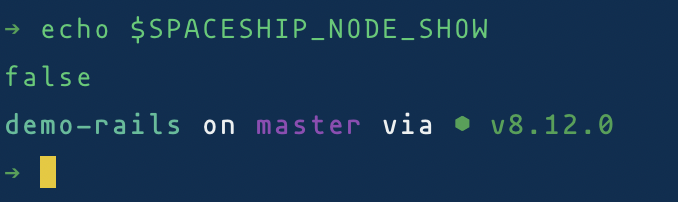
I set SPACESHIP_NODE_SHOW="false" but still I can see the node version on the current path.
Expected behavior
I don't want to see node version.
Relevant Zsh configuration (.zshrc)
[[ -s "$HOME/.rvm/scripts/rvm" ]] && source "$HOME/.rvm/scripts/rvm" # Load RVM into a shell session *as a function*

export NVM_DIR="$HOME/.nvm"
[ -s "$NVM_DIR/nvm.sh" ] && \. "$NVM_DIR/nvm.sh"  # This loads nvm
[ -s "$NVM_DIR/bash_completion" ] && \. "$NVM_DIR/bash_completion"

# dotnetcore env setting
export ASPNETCORE_ENVIRONMENT=Development
# If you come from bash you might have to change your $PATH.
# export PATH=$HOME/bin:/usr/local/bin:$PATH

# Path to your oh-my-zsh installation.
export ZSH=/Users/ender/.oh-my-zsh

# Set name of the theme to load. Optionally, if you set this to "random"
# it'll load a random theme each time that oh-my-zsh is loaded.
# See https://github.com/robbyrussell/oh-my-zsh/wiki/Themes
ZSH_THEME="spaceship"

SPACESHIP_RUBY_SHOW="false"
SPACESHIP_NODE_SHOW="false"

# Uncomment the following line to use case-sensitive completion.
# CASE_SENSITIVE="true"

# Uncomment the following line to use hyphen-insensitive completion. Case
# sensitive completion must be off. _ and - will be interchangeable.
# HYPHEN_INSENSITIVE="true"

# Uncomment the following line to disable bi-weekly auto-update checks.
# DISABLE_AUTO_UPDATE="true"

# Uncomment the following line to change how often to auto-update (in days).
# export UPDATE_ZSH_DAYS=13

# Uncomment the following line to disable colors in ls.
# DISABLE_LS_COLORS="true"

# Uncomment the following line to disable auto-setting terminal title.
DISABLE_AUTO_TITLE="true"

# Uncomment the following line to enable command auto-correction.
ENABLE_CORRECTION="true"

# Uncomment the following line to display red dots whilst waiting for completion.
# COMPLETION_WAITING_DOTS="true"

# Uncomment the following line if you want to disable marking untracked files
# under VCS as dirty. This makes repository status check for large repositories
# much, much faster.
# DISABLE_UNTRACKED_FILES_DIRTY="true"

# Uncomment the following line if you want to change the command execution time
# stamp shown in the history command output.
# The optional three formats: "mm/dd/yyyy"|"dd.mm.yyyy"|"yyyy-mm-dd"
# HIST_STAMPS="mm/dd/yyyy"

# Would you like to use another custom folder than $ZSH/custom?
# ZSH_CUSTOM=/path/to/new-custom-folder

# Which plugins would you like to load? (plugins can be found in ~/.oh-my-zsh/plugins/*)
# Custom plugins may be added to ~/.oh-my-zsh/custom/plugins/
# Example format: plugins=(rails git textmate ruby lighthouse)
# Add wisely, as too many plugins slow down shell startup.
plugins=(git)
plugins=(zsh-autosuggestions)

source $ZSH/oh-my-zsh.sh

# User configuration

# export MANPATH="/usr/local/man:$MANPATH"

# You may need to manually set your language environment
# export LANG=en_US.UTF-8

# Preferred editor for local and remote sessions
# if [[ -n $SSH_CONNECTION ]]; then
#   export EDITOR='vim'
# else
#   export EDITOR='mvim'
# fi

# Compilation flags
# export ARCHFLAGS="-arch x86_64"

# ssh
export SSH_KEY_PATH="~/.ssh/id_rsa"

# Set personal aliases, overriding those provided by oh-my-zsh libs,
# plugins, and themes. Aliases can be placed here, though oh-my-zsh
# users are encouraged to define aliases within the ZSH_CUSTOM folder.
# For a full list of active aliases, run `alias`.
#

alias zshconfig="s ~/.zshrc"
alias proj="cd /Users/ender/Projects"
alias lp="cd /Users/ender/Projects/luca-pacioli/"
alias dv="cd /Users/ender/Projects/da-vinci"
alias bl="cd /Users/ender/Projects/billing"
alias srv="cd /Users/ender/Projects/server"
alias rs="rails server"
alias es="ember server"
alias rc="rails console"
alias g='guard -c'
alias rr='rake routes'
alias rrg='rake routes | grep'
alias gitx='open -a GitX .'
alias sq='bundle exec sidekiq -C config/sidekiq.yml'

# Load Parasut's projects' keys
source ~/.parasut_keys

function precmd () {
  window_title="\033]0;${PWD##*/}\007"
  echo -ne "$window_title"
}
Environment
Spaceship version: 3.7.1
Zsh version: zsh 5.3 (x86_64-apple-darwin18.0)
Zsh framework: oh-my-zsh
Zsh plugin manager: None
Terminal emulator: iTerm
Operating system: macOS
Screenshot
 enderahmetyurt
All 7 comments
use false not "false"
 Runrioter
on 13 Jan 2019
Runrioter
on 13 Jan 2019
@Runrioter I've tried both the values on my machine. And both are working as expected.
 RajendrasinhParmar
on 13 Jan 2019
RajendrasinhParmar
on 13 Jan 2019
@Runrioter why Ruby works?
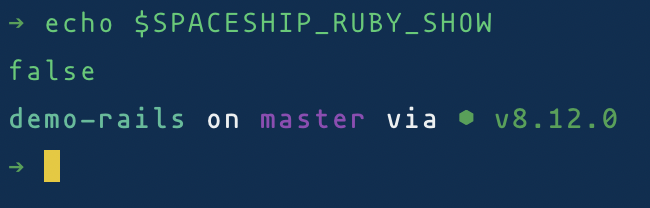
I set Ruby to"false" it works. Why doesn't node work? Btw I set false before I asked. It didn't solve the problem.
enderahmetyurt
on 13 Jan 2019
@enderahmetyurt
Did you modify source code without reloading script ?
Update spaceship-prompt to the latest version and reload exec -l $SHELL
Runrioter
on 14 Jan 2019
I cloned this repo and create a symlink. I did these steps https://github.com/denysdovhan/spaceship-prompt#oh-my-zsh How can I update?
enderahmetyurt
on 14 Jan 2019
cd into the root dir of this repo and git pull origin master
Runrioter
on 14 Jan 2019
solved thank you @Runrioter
enderahmetyurt
on 15 Jan 2019
Related issues
 tbekaert
·
3Comments
tbekaert
·
3Comments
 janjur
·
3Comments
janjur
·
3Comments
 martincartledge
·
4Comments
martincartledge
·
4Comments
 olets
·
3Comments
olets
·
3Comments
 nfischer
·
3Comments
nfischer
·
3Comments
Most helpful comment
cdinto the root dir of this repo andgit pull origin master