Spaceship-prompt: BUG: zsh-autocomplete overwrites prompt and previous terminal output
Current behavior
Here's a video showing what happens when using zsh-autocomplete with spaceship- prompt. I've never observed this behavior with any other prompt.
https://www.dropbox.com/s/kaoapprse378ci1/spaceship-bug.mov?dl=0
Expected behavior
The autocomplete suggestions should be shown under the prompt, as opposed to overwriting them.
Relevant Zsh configuration (.zshrc)
# .zshrc
# Author: Aaron Lichtman

export ZSH=/Users/alichtman/.oh-my-zsh
export GOPATH="$GOPATH:$HOME/go"
export GOBIN="$GOPATH/bin"

ZSH_THEME="spaceship"
# ZSH_THEME="agnoster"
# ZSH_THEME="bullet-train"
# ZSH_THEME="hyperzsh"
# ZSH_THEME="wezm"
# ZSH_THEME="kolo"

###
# Spaceship config
###

SPACESHIP_TIME_SHOW=false
SPACESHIP_DIR_TRUNC_PREFIX=""
SPACESHIP_DIR_COLOR="yellow"
SPACESHIP_GIT_BRANCH_COLOR="cyan"
SPACESHIP_CHAR_SYMBOL="➜ "

ZSH_AUTOSUGGEST_HIGHLIGHT_STYLE='fg=10'

# Uncomment the following line to use hyphen-insensitive completion. Case
# sensitive completion must be off. _ and - will be interchangeable.
HYPHEN_INSENSITIVE="true"

# Display red dots whilst waiting for completion.
COMPLETION_WAITING_DOTS="true"

# Uncomment the following line if you want to disable marking untracked files
# under VCS as dirty. This makes repository status check for large repositories
# much, much faster.
# DISABLE_UNTRACKED_FILES_DIRTY="true"

# Which plugins would you like to load? (plugins can be found in ~/.oh-my-zsh/plugins/*)
# Custom plugins may be added to ~/.oh-my-zsh/custom/plugins/
# Example format: plugins=(rails git textmate ruby lighthouse)
# Add wisely, as too many plugins slow down shell startup.
plugins=(
  git
  zsh-autosuggestions
  zsh-syntax-highlighting
)

source $ZSH/oh-my-zsh.sh

# Autojump
[ -f /usr/local/etc/profile.d/autojump.sh ] && . /usr/local/etc/profile.d/autojump.sh

# thefuck integration.
eval $(thefuck --alias)

# Add RVM to PATH for scripting. Make sure this is the last PATH variable change.
export PATH="$PATH:$HOME/.rvm/bin"
export PATH="$PATH:/usr/local/bin"

# Clean up prompt
prompt_context() {}

# pip zsh completion start
function _pip_completion {
  local words cword
  read -Ac words
  read -cn cword
  reply=( $( COMP_WORDS="$words[*]" \
             COMP_CWORD=$(( cword-1 )) \
             PIP_AUTO_COMPLETE=1 $words[1] ) )
}
compctl -K _pip_completion pip
# pip zsh completion end

# Alias rm to trash
if [ -f /usr/local/bin/trash ]; then alias rm="/usr/local/bin/trash"; fi
source /usr/local/share/zsh-syntax-highlighting/zsh-syntax-highlighting.zsh
Environment
Spaceship version: 3.7.0
Zsh version: zsh 5.3 (x86_64-apple-darwin17.0)
Zsh framework: oh-my-zsh
Zsh plugin manager: None
Terminal emulator: Terminal.app on MacOS
Operating system: macOS
Video
https://www.dropbox.com/s/kaoapprse378ci1/spaceship-bug.mov?dl=0
 alichtman
All 15 comments
I fixed this behavior by adding two lines to my .zshrc file.
SPACESHIP_PROMPT_ADD_NEWLINE=false
SPACESHIP_PROMPT_SEPARATE_LINE=false
Maybe we should add some warnings to the docs that the newline after each command and having the prompt split onto two lines both cause tab autocompletion to not behave properly. Everything works, it just messes up old output in the terminal. I'm not sure if this bug can be fixed from within spaceship, or if this is a zsh bug.
alichtman
on 1 Nov 2018
Thank you for the report and demo @alichtman, I'm not sure this is behavior is consistent. For instance I use zsh-autosuggestions with spaceship, But haven't had this issue yet. Also autosuggestions have issue with several themes, We'll surely look into it if this can be fixed from spaceship.
 salmanulfarzy
on 1 Nov 2018
salmanulfarzy
on 1 Nov 2018
@alichtman It would be helpful if you could post the screen cap into this thread. So uses won't have to visit external domain and to make sure it won't become unavailable in future.
salmanulfarzy
on 1 Nov 2018
So, apparently .mov isn't an accepted filetype by GitHub. The video is currently being hosted on my personal Dropbox, so I'm not worried about it being unavailable in the future. When I have time, I'll convert it into a .gif, but until then this is the best I can do.
alichtman
on 1 Nov 2018
FWIW I also use zsh-autosuggestions with spaceship and I've never seen this issue.
 maximbaz
on 1 Nov 2018
maximbaz
on 1 Nov 2018
@maximbaz What's your setup like? Can you post your .zshrc and terminal env info?
alichtman
on 1 Nov 2018
Our setups are pretty different, so I'm not sure it will be helpful (especially now that I'm using my own fork of spaceship). But in any case, if you are curious, here's my .zshrc and .zsh directory.
My best guess is that your zsh version is old, and that would be the cause of the issue.
spaceship version: my own fork
zsh: 5.6.2
zsh framework: prezto
zsh plugin manager: antigen
terminal: kitty
OS: Arch Linux
maximbaz
on 1 Nov 2018
I use autosuggestions as well and don't have any problems either.
@alichtman do you have any other plugins installed besides?
 denysdovhan
on 2 Nov 2018
denysdovhan
on 2 Nov 2018
@maximbaz I've updated to 5.6.2 and still have the same issue.
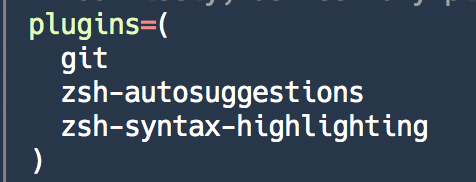
@denysdovhan Here's the rest of my plugins:
alichtman
on 3 Nov 2018
After upgrading to Zsh 5.6.2, Make sure to set it as default and verify with $ZSH_VERSION. We're sorry about the issue, But there isn't much we can do until we can reliably reproduce this.
salmanulfarzy
on 4 Nov 2018
I completely understand. I'll do some more debugging as I have time (as soon as midterms are over), but I have a workable solution for now.
Can we leave this open? I'll update it as I figure out what's going on, and detail how to fix it for other people that run into this problem.
alichtman
on 4 Nov 2018
Make sure to set it as default and verify with $ZSH_VERSION
This may be the issue...
I ran $echo $ZSH_VERSION and got 5.3 but when I run zsh --version, I get zsh 5.6.2 (x86_64-apple-darwin17.7.0).
Make sure to set it as default
How should I do this?
alichtman
on 4 Nov 2018
Brew installed Zsh would be available in PATH but won't be configured as default.
How should I do this?
chsh -s (which zsh)
More information at oh-my-zsh/wiki/Installing-ZSH#install-and-set-up-zsh-as-default
salmanulfarzy
on 4 Nov 2018
I figured out that zsh at /bin/zsh was being not used, and /usr/local/bin/zsh was where homebrew installed it. I set the shell path to be this:

And everything works now. Thanks for the help, everyone.
alichtman
on 4 Nov 2018
This isn't an issue with spaceship-prompt but figuring out how to fix the issue took some digging. The fix mentioned above did not help. Disabling COMPLETION_WAITING_DOTS did the trick. See https://github.com/robbyrussell/oh-my-zsh/issues/5765
 sudo-suhas
on 4 Nov 2019
sudo-suhas
on 4 Nov 2019
Related issues
 vburojevic
·
3Comments
vburojevic
·
3Comments
 JounQin
·
3Comments
JounQin
·
3Comments
 doole
·
4Comments
doole
·
4Comments
 xhaythemx
·
3Comments
xhaythemx
·
3Comments
 martincartledge
·
4Comments
martincartledge
·
4Comments
Most helpful comment
Thank you for the report and demo @alichtman, I'm not sure this is behavior is consistent. For instance I use
zsh-autosuggestionswithspaceship, But haven't had this issue yet. Alsoautosuggestionshave issue with several themes, We'll surely look into it if this can be fixed fromspaceship.