Spaceship-prompt: No colors when listing files and folder
Issue
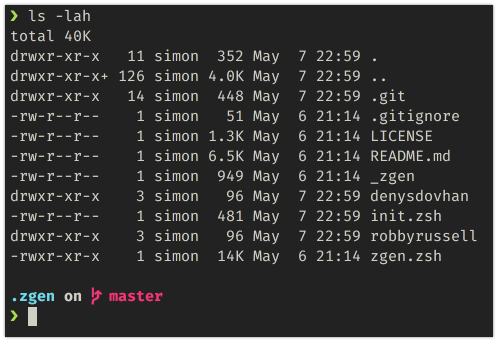
I was playing around with zgen with different themes and settings, and then I switched back to spaceship theme. Before the switch the folders were bold and had a different color when listing them, now when I list them they all look white and thin - making it harder to know which files are folders.
Before I was installing the theme using oh-my-zsh and now I install using zgen. Although I'm pretty sure I had it installed with zgen _with_ proper listing formatting and coloring.
I've checked my iTerm2 settings and it allows bold fonts to be rendered (as seen in the screenshot in the .zgen on master).
Questions:
1) Is this even a responsibility of spacesip-prompt? I can't tell from the screenshots if folders are thick with different color by default.
2) What could be wrong? I've tried re-installing, disabling everything else and whatever else comes to mind.
Any suggestion is much appreciated.
Screenshot
Environment
Spaceship version: 3.4.1
Zsh version: 5.5.1
Zsh framework: oh-my-zsh
Zsh plugin manager: zgen
Terminal emulator: iTerm2
Operating system: macOS
Relevant .zshrc
zgen oh-my-zsh
zgen load denysdovhan/spaceship-prompt spaceship
zgen save
 simeg
simeg
>All comments
After doing some digging I found out this problem has absolutely nothing to do with this theme (as suspected)! It's most likely oh-my-zsh, read more about it here. Thanks for the work on this theme.
simeg
on 7 May 2018
Related issues
 gabrielpedepera
·
3Comments
gabrielpedepera
·
3Comments
 nfischer
·
3Comments
nfischer
·
3Comments
 AlecRust
·
3Comments
AlecRust
·
3Comments
 olets
·
3Comments
olets
·
3Comments
 vburojevic
·
3Comments
vburojevic
·
3Comments
Most helpful comment
After doing some digging I found out this problem has absolutely nothing to do with this theme (as suspected)! It's most likely
oh-my-zsh, read more about it here. Thanks for the work on this theme.