Sp-starter-kit: Exception while invoking endpoint
Category
- [x] Bug
Describe the bug
When provisioning my sharepoint starter kit v2 on my demo tenant [Sharepoint Online] I received the error Apply-PnPTenantTemplate : Exception while invoking endpoint https://login.microsoftonline.com/ca67dfff-ffff-ffff-ffff-fffffffffdfb/oauth2/token'
I put some 'f' in the hexadecimal code, because i don`t know if it is confidential
Expected or Desired Behavior
Expected deploy sharepoint pnp to my environment just like a comunity demo
Observed Behavior

Steps to Reproduce
After instaled the correct version version of PnP Powerhsell Module, and in the pnp provisioning folder
1 - Connect-PnPOnline https://**.sharepoint.com/
2 - Apply-PnPTenantTemplate -Path .starterkit.pnp -Parameters @{"PORTALURL"="/sites/demov2portal03"; "MARKETINGALIAS"="demoV2marketing03"; "HRALIAS"="demov2hr03"}
Environment Details (Development & Target environment)
- Starter kit version: v2
- OS: Windows 10
- Target Environment: SharePoint Online
- Framework: Node.js v12
- Browser(s): Chrome v83
- Additional details: The user is a Global Admin of the the tenant, is the account that I create this demo tenant
 ikaroamorim
All 16 comments
Thank you for reporting this issue. We will be triaging your incoming issue as soon as possible.
![msftbot[bot] picture](https://avatars.githubusercontent.com/in/26612?v=4&s=40) msftbot[bot]
on 26 Jun 2020
msftbot[bot]
on 26 Jun 2020
We have been seeing problems installing the kit with the latest versions of PnP PS versions, i.e. 3.22.2006.2. I suggest removing all versions of SharePointPnPPowerShellOnline on your workstation, then installing April 2020 release as a test (3.20.2004.0) i.e.
Install-Module -Name "SharePointPnPPowerShellOnline" -RequiredVersion 3.20.2004.0
 eoverfield
on 26 Jun 2020
eoverfield
on 26 Jun 2020
eoverfield, thank you,but I still have the problem, I'll send another pic:

ikaroamorim
on 27 Jun 2020
@eoverfield thanks for sharing that workaround. I was running into the same invoking endpoint exception on a Developer program tenant. Reverting back to the April 2020 release of PnP PowerShell worked in my case.
 expiscornovus
on 29 Jun 2020
expiscornovus
on 29 Jun 2020
Have identified that you first need to run the following in PowerShell to get a token.
Connect-PnPOnline -Url https://_tenant_-admin.sharepoint.com/ -PnPO365ManagementShell
Follow onscreen directions to obtain a token. Note the timeout is reasonably short so have any required credentials at hand.
Then needed to reconnect on the root tenancy URL or you will get an object ref not set error
Connect-PnPOnline -Url https://_tenant_.sharepoint.com
Then
Apply-PnPTenantTemplate -Path ".starterkit.pnp" -Parameters @{"PORTALURL"="/sites/StarterKit-Portal"; "MARKETINGALIAS"="StarterKit-Marketing"; "HRALIAS"="StarterKit-PeopleCulture" }
After that it was all good.
 CrackerboxOnline
on 2 Jul 2020
CrackerboxOnline
on 2 Jul 2020
@CrackerboxOnline when you reconnect to connect-pnponline -url https://tenant.sharepoint.com, were you not asked to provide credentials again? Did you use -CurrentCredentials ?
eoverfield
on 6 Jul 2020
Hi Eric,
Come to think of it I don't think I was (but cannot be sure) and I definitely didn't use the -CurrentCredentials flag.
Cheers,
Dave Gerrard
e: [email protected] | m: 0417 296 560
From: Eric Overfield notifications@github.com
Sent: Tuesday, 7 July 2020 7:26 AM
To: pnp/sp-starter-kit sp-starter-kit@noreply.github.com
Cc: Dave Gerrard dave@crackerbox.com.au; Mention mention@noreply.github.com
Subject: Re: [pnp/sp-starter-kit] Exception while invoking endpoint (#410)
@CrackerboxOnlinehttps://github.com/CrackerboxOnline when you reconnect to connect-pnponline -url https://tenant.sharepoint.com, were you not asked to provide credentials again? Did you use -CurrentCredentials ?
—
You are receiving this because you were mentioned.
Reply to this email directly, view it on GitHubhttps://github.com/pnp/sp-starter-kit/issues/410#issuecomment-654485615, or unsubscribehttps://github.com/notifications/unsubscribe-auth/AFJCNRIAC2QKG2SD64FPKN3R2JCBBANCNFSM4OIZXP7A.
CrackerboxOnline
on 7 Jul 2020
@CrackerboxOnline thanks for helping me. I used the flag -PnPO365ManagementShell, and folowed the steps in browser.
I think the steps gone further, but at the end I faced a error again. Is there a verbose parameter to see in more details? Is possible that error is caused by a previous attempt?
Following I'll send the error and the sites deployed:

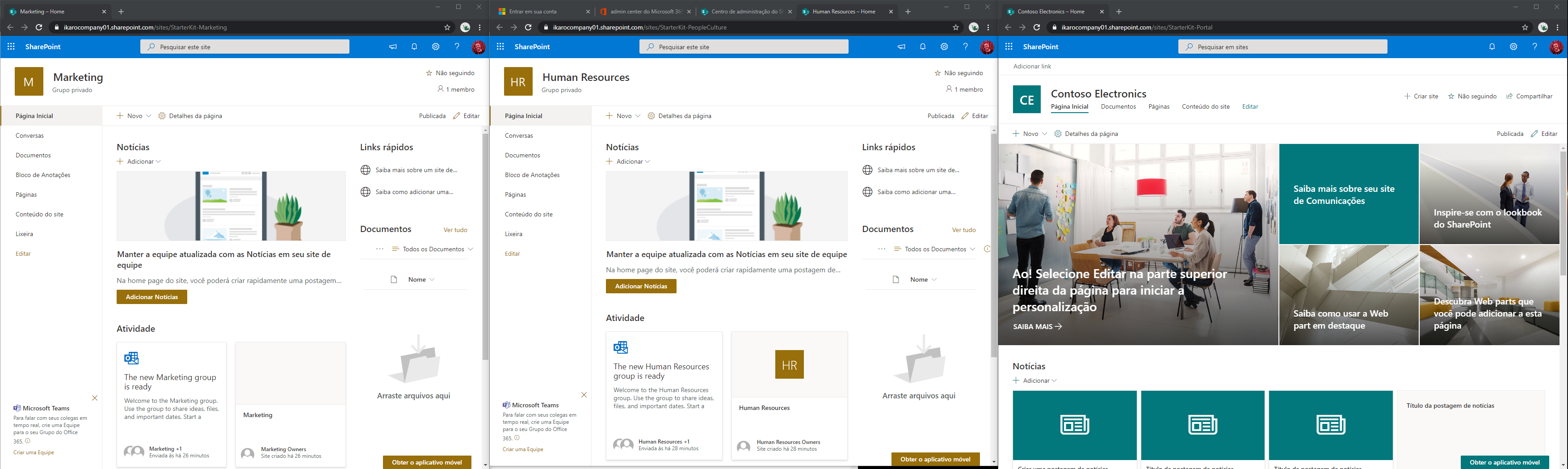
How can I check if there is something deployed?
ikaroamorim
on 10 Jul 2020
@ikaroamorim you have gotten farther than I with the -PnPO365ManagementShell parameter. We currently do not have a tool to validate what was and wasn't installed. you can run the following command before running the apply commandlet.
Set-PnPTraceLog -On -Level Debug
that could help determine where the failure is occuring.
eoverfield
on 10 Jul 2020
Hi Eric,
It might be a good idea to add a step to the general instructions to advise people to always include the Set-PnPTraceLog command before deploying a PnP solution/template to the general instructions to assist debugging.
Get Outlook for Androidhttps://aka.ms/ghei36
From: Eric Overfield notifications@github.com
Sent: Saturday, July 11, 2020 4:42:02 AM
To: pnp/sp-starter-kit sp-starter-kit@noreply.github.com
Cc: Dave Gerrard dave@crackerbox.com.au; Mention mention@noreply.github.com
Subject: Re: [pnp/sp-starter-kit] Exception while invoking endpoint (#410)
@ikaroamorimhttps://github.com/ikaroamorim you have gotten farther than I with the -PnPO365ManagementShell parameter. We currently do not have a tool to validate what was and wasn't installed. you can run the following command before running the apply commandlet.
Set-PnPTraceLog -On -Level Debug
that could help determine where the failure is occuring.
—
You are receiving this because you were mentioned.
Reply to this email directly, view it on GitHubhttps://github.com/pnp/sp-starter-kit/issues/410#issuecomment-656845384, or unsubscribehttps://github.com/notifications/unsubscribe-auth/AFJCNRJJNMYSUMVHIDZBUYDR25RYFANCNFSM4OIZXP7A.
CrackerboxOnline
on 11 Jul 2020
I was able to install everything successfully following suggested steps
Install-Module -Name "SharePointPnPPowerShellOnline" -RequiredVersion 3.20.2004.0
Connect-PnPOnline -Url https://tenant-admin.sharepoint.com/ -PnPO365ManagementShell
Connect-PnPOnline -Url https://tenant.sharepoint.com
Change to the provisioning folder found in this solution's root and execute the following command (using your own tenant url and the prefix of your choosing):
Apply-PnPTenantTemplate -Path .starterkit.pnp
 sinhakislay
on 11 Jul 2020
sinhakislay
on 11 Jul 2020
@sinhakislay interesting, that is great to know the management shell is working as expected for some.
The account you used to login is set to use MFA? And when you executed the second connent-pnponline to just your tenant.sp.com url, were you asked to login again?
eoverfield
on 11 Jul 2020
@eoverfield no it is not set for MFA and for second connect PnP as well user id password was asked.
sinhakislay
on 12 Jul 2020
Thanks @sinhakislay, that helps confirm that without MFA, the provisioning is continuing as expected. MFA is still causing provisioning issues that appears related to PnP Provisioning, and not the kit in particular.
eoverfield
on 13 Jul 2020
Uff, finally I get it installed with these commands:
- Uninstall-Module -Name "SharePointPnPPowerShellOnline" -AllVersions
and then follow the steps suggested by @sinhakislay
- Install-Module -Name "SharePointPnPPowerShellOnline" -RequiredVersion 3.20.2004.0
- Connect-PnPOnline -Url https://tenant-admin.sharepoint.com/ -PnPO365ManagementShell
- Connect-PnPOnline -Url https://tenant.sharepoint.com
- Change to the provisioning folder found in this solution's root and execute the following command
- Apply-PnPTenantTemplate -Path .starterkit.pnp

 ischiele
on 23 Jul 2020
ischiele
on 23 Jul 2020
As the root of this issue is related to MFA accounts, Im going to link this issue to https://github.com/pnp/sp-starter-kit/issues/413 and close this issue for now.
eoverfield
on 31 Jul 2020
Related issues
 dmitryrogozhny
·
7Comments
dmitryrogozhny
·
7Comments
 quantrpeter
·
5Comments
quantrpeter
·
5Comments
 karigeir
·
5Comments
karigeir
·
5Comments
 ShowMeTheGita
·
7Comments
ShowMeTheGita
·
7Comments
 tchagan
·
4Comments
tchagan
·
4Comments
Most helpful comment
Have identified that you first need to run the following in PowerShell to get a token.
Connect-PnPOnline -Url https://_tenant_-admin.sharepoint.com/ -PnPO365ManagementShell
Follow onscreen directions to obtain a token. Note the timeout is reasonably short so have any required credentials at hand.
Then needed to reconnect on the root tenancy URL or you will get an object ref not set error
Connect-PnPOnline -Url https://_tenant_.sharepoint.com
Then
Apply-PnPTenantTemplate -Path ".starterkit.pnp" -Parameters @{"PORTALURL"="/sites/StarterKit-Portal"; "MARKETINGALIAS"="StarterKit-Marketing"; "HRALIAS"="StarterKit-PeopleCulture" }
After that it was all good.