Sp-dev-fx-webparts: List Form web part TypeError: Cannot read property 'map' of undefined [React List form]
Sample (Issues for lookup columns in the list form)
react-list-form (https://github.com/pnp/sp-dev-fx-webparts/tree/master/samples/react-list-form)
Authors
@cubidobusinesssolutions
@moersoy
Harsha Vardhini (@Harshagracy )
Ryan Schouten (@sharepointknight )
Expected or Desired Behavior
Forms should shows with New/Display/Edit for any sharepoint online list and work but this list wepart works for parent list but not work flow child list where you have taken the lookup fields. It should work with the list which has lookup column available
Observed Behavior
It should work with the list which has lookup column available but it does not worked at all , Its give error on the form like "List Form web part TypeError: Cannot read property 'map' of undefined" or sometime does not shows the form on the sharepoint page when we select any list at the time of configuration
Steps to Reproduce
Steps to reproduce the behavior:
- Go to '...' Click to the sharepoint online site > Edit the page > Select the List form reach SPFX list form webpart > add it on the page ? then click to configure the webpart with sharepoint list as New item add for any sharepoint list which has lookup columns avaialbles.
- Click on '....' Then moment you select the list in dropdown its shows error
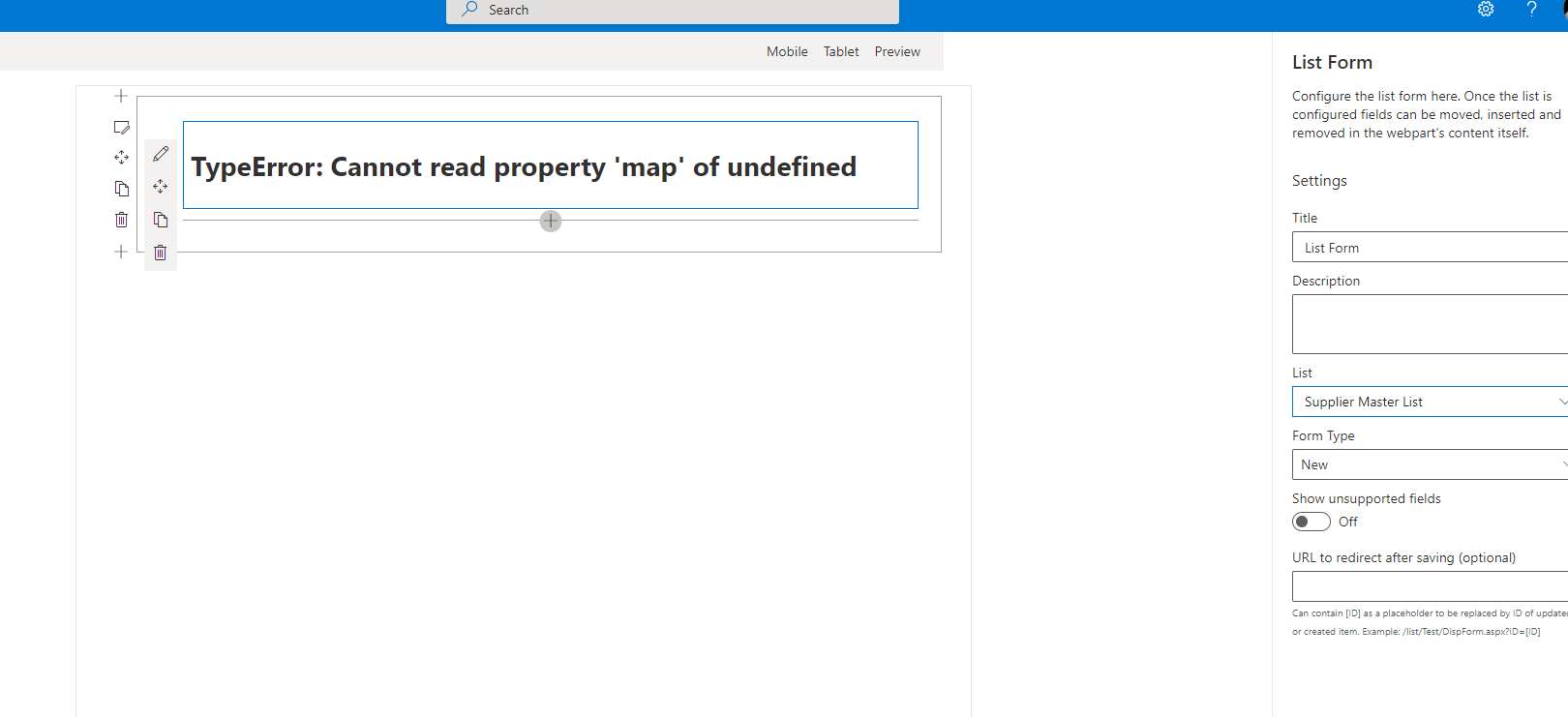
- Scroll down to '....' Error has been captured on Chrome browser as well as via VS code tool.
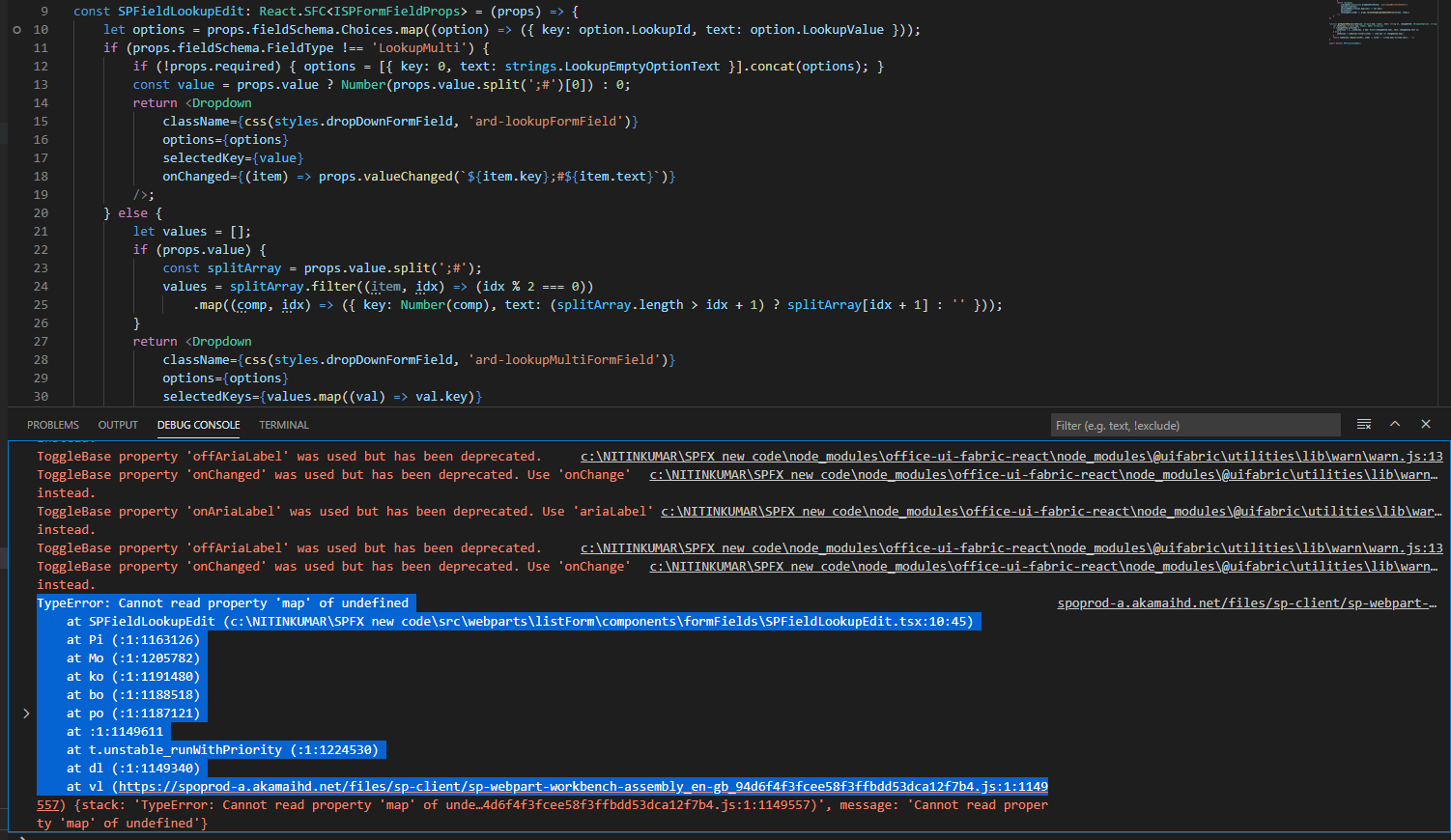
- See error > Screen shot has attached for errots

Environment Details (Development & Target environment)
- OS: [e.g. Windows 10 |
- Target Environment: | SharePoint Online]
- Framework: Node.js v10.16.3]
- Browser(s): [e.g. Chrome v79 |
- Tooling: [e.g. VS Code
- Additional details: *NA
Additional context
It was working before November 2020 without any issues for lookup column list and form was working fine but from the December its has started showing issues as mentioned in the title of the post.
It will be great if you sort out this issues as soon as possible for me , @wobba Federico , @LauraKokkarinen
 ntinykumar
All 12 comments
Thank you for reporting this issue. We will be triaging your incoming issue as soon as possible.
![msftbot[bot] picture](https://avatars2.githubusercontent.com/in/26612?v=4&s=40) msftbot[bot]
on 9 Dec 2020
msftbot[bot]
on 9 Dec 2020
I have checked it on different different enviroment with different different Sharepoint list with look up columns . I have updated npm packaged and re-deployed the Reach-List-Form in sharepoint online enviroment but the issues is same. Its only working for the list which does not have look up columns. It should be work to list which having look up columns like it was working previously before November month. Your help will be appreciated.
ntinykumar
on 9 Dec 2020
I was using the React-List-Form version 1.0.3.0 and it had issue of List Form web part TypeError: Cannot read property 'map' of undefined for the sharepoint list which has the loop up column from another list which is text and one more field which is calculated text fields.
Now I have downloaded and updated the solution form the git hub React-List-Form version 1.0.4.0 and deployed on the same sharepoint online enviroment and this time erros are different. Now Cannot read property 'map' of undefined error has gone but another error populated with "TypeError: Cannot read property 'indexOf' of undefined"

Also another problem in the React-List-Form version 1.0.4.0 is that it shows the lookup column in the form and the form has no issues for laoding but the has issues loading the all items in the dropdown lookup column in the form. It does not retrive all the items of lookup column.
ntinykumar
on 10 Dec 2020
@ntinykumar it looks like this web part is one of many that were affected when the RenderListDataAsAsStream API -- which returns list data for rendering, including lookups -- seemingly changed without notice on the Microsoft side.
To be fair, the API was undocumented and therefore not intended to be called by 3rd-party solutions, but many people -- including me -- used it liberally because it was the most efficient way to get that data.
If anyone is interested in coming up with an alternative to using RenderListDataAsStream that is supported, we'd love your help here.
 hugoabernier
on 10 Dec 2020
hugoabernier
on 10 Dec 2020
@hugoabernier , I really really appreciated your response on the issues which I have been raised.
So basically my next question would be here that even if we create our own spfx form [including dropdown to populated from lookup list data with all items] to submit the data in sharepoint list which having the lookup column would not work at the moment to get the RenderListDataAsStream data into the dropdown ?
*Issues Note
1) Reach List form would only populate dropdown items from the look up column which is the Title of the another list (Only limited data is populated not straming of items happening [first 100 items only])
2) Reach List form is not populate dropdown items from the look up column which is the other fields apart from the Title of the another list (Dropdown shows None)
3) Reach List form is not populate dropdown items from the look up column which is the calculated text fields the another list (Dropdown shows None)
4) Reach List form is not populate dropdown items from the look up column which is the calculated text fields the Site Columns*
**I would appreciate if below mentioned experts or all contributers to put some lights and achieive what we required.
@sharepointknight
@cubidobusinesssolutions
@moersoy**
ntinykumar
on 10 Dec 2020
@ntinykumar
I tested the webpart with a simple lookup-field ('Department') and it works as suspected. Is there something special with the list ('TestChild2') you're trying to show?
@hugoabernier _api/web/GetList(@listUrl)/RenderListDataAsStream seems to work
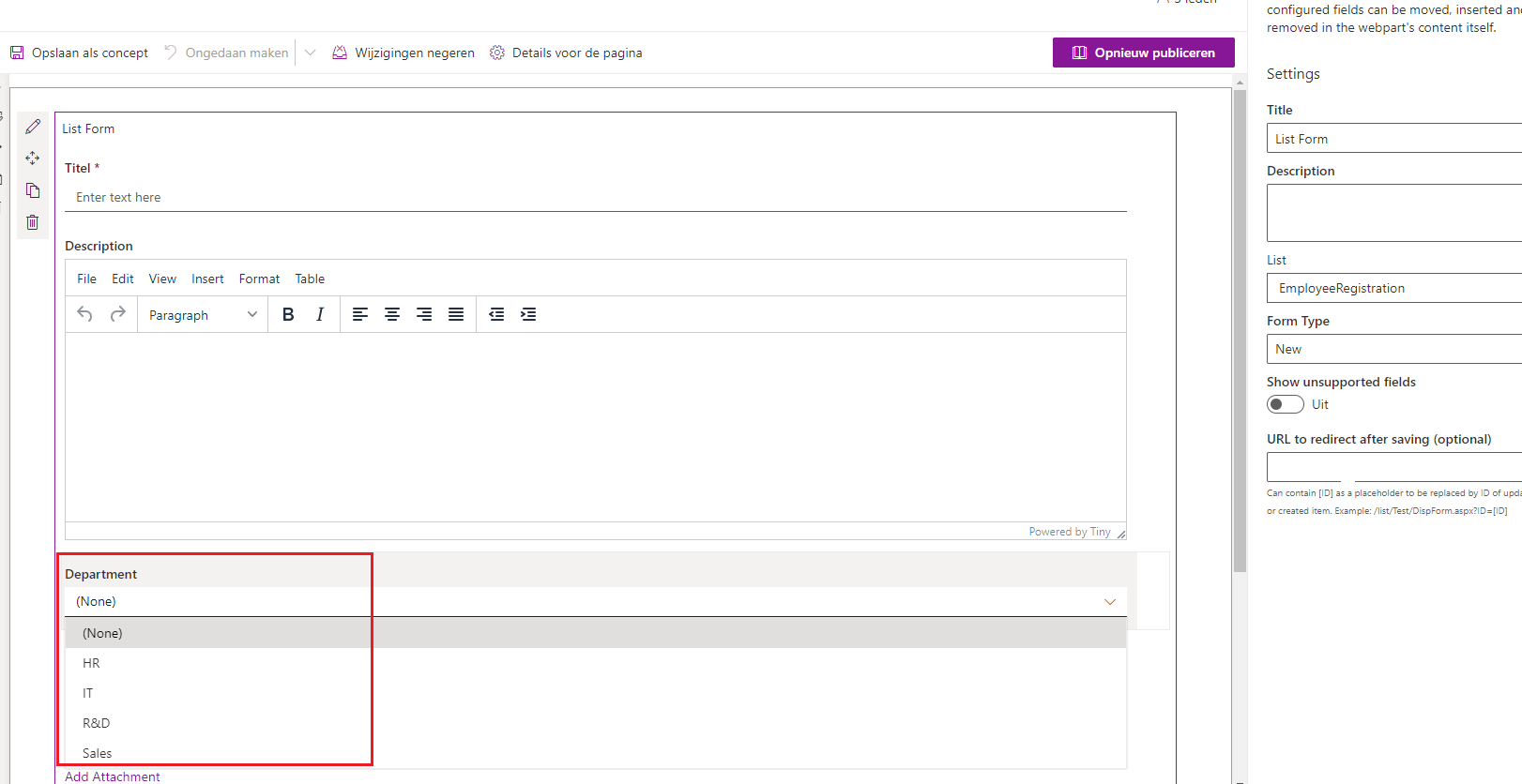
 Abderahman88
on 11 Dec 2020
Abderahman88
on 11 Dec 2020
@Abderahman88 ,
Thanks you so much for your respose. I have tested the React-List-Form webpart having version 1.0.4.0 with all scenarios and here is scenarios and issues noted below for more understanding.
1) List A with columns Title (String), Department (String) , Department02 (Calculated column) content more than 100 items.
2) List B with columns Title (String) , DepartmentLC ( Lookup column "Department" from List A ), Department02LC ( Lookup column "Department02" from List A )
Now from above senario issues are listed below when you access the the List B from the React-List-Form >>>>
1) DepartmentLC dropdown in the React-List-Form only load 100 items
2) Department02LC dropdow in the React-List-Form load None
3) Error sometime TypeError: Cannot read property 'indexOf' of undefined
I would appreciate if below mentioned experts or all contributers to put some lights and achieive what we required.
@sharepointknight
@cubidobusinesssolutions
@moersoy
@Abderahman88
ntinykumar
on 11 Dec 2020
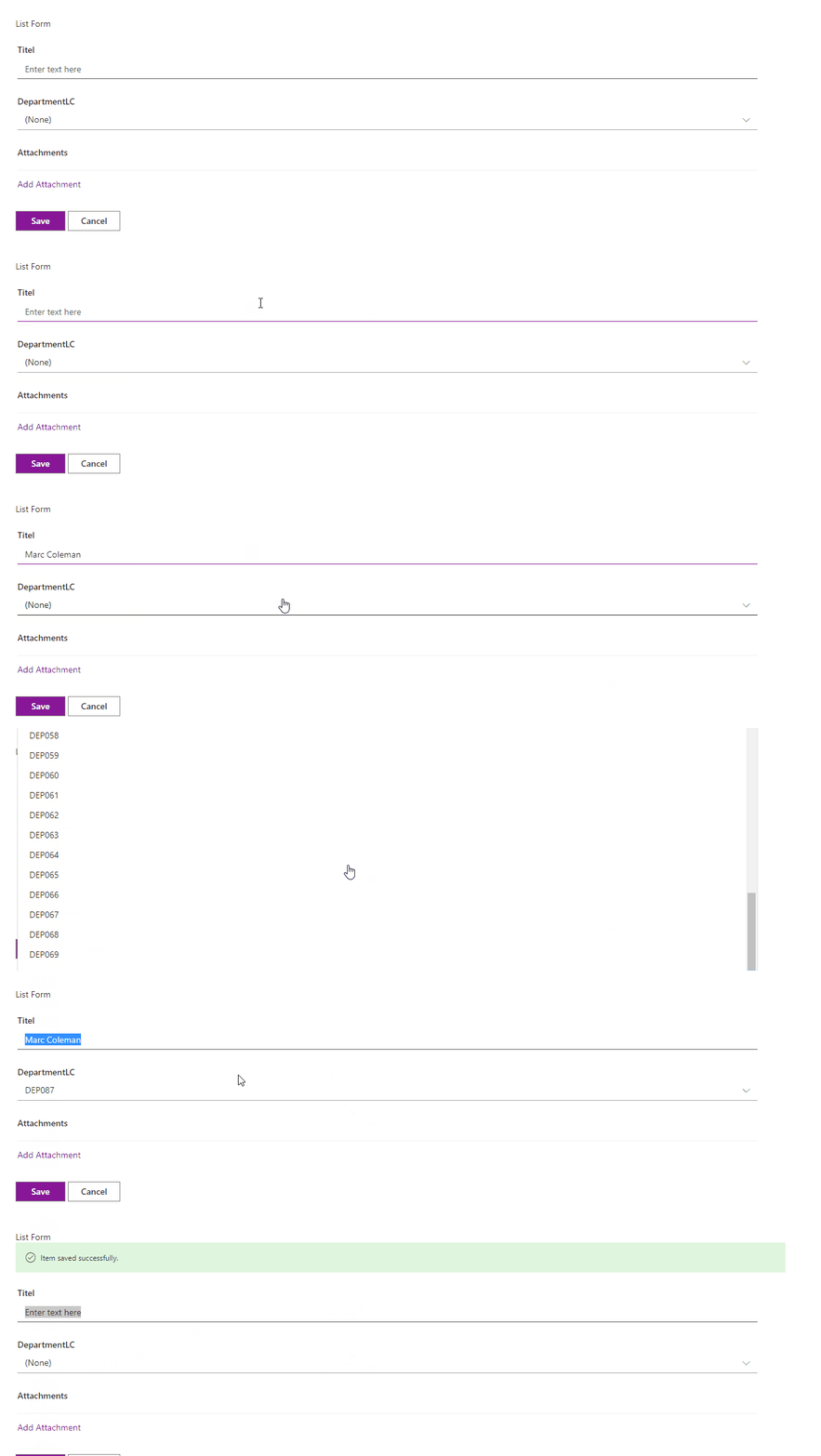
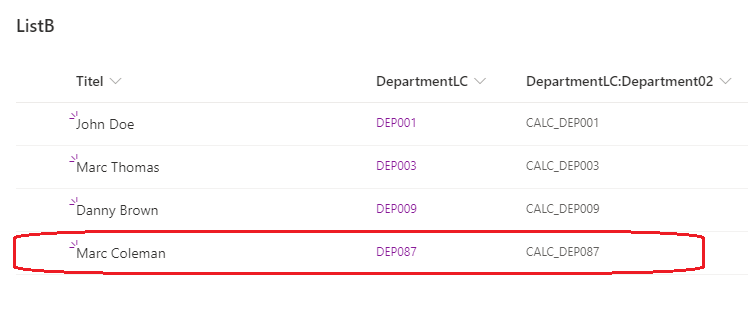
@ntinykumar I've recreated your scenario. But I don't know why you need the lookup 'Department02LC' in list B.
Because the calculated info can be retrieved from lookup 'DepartmentLC'. For the limit of 100 items, I will make a PR.
Lists
List A contains 106 items.
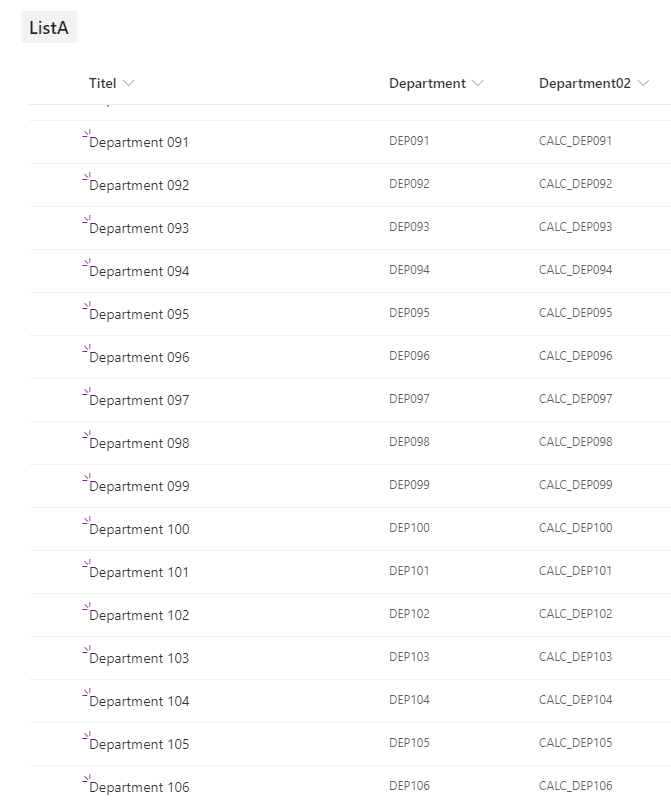
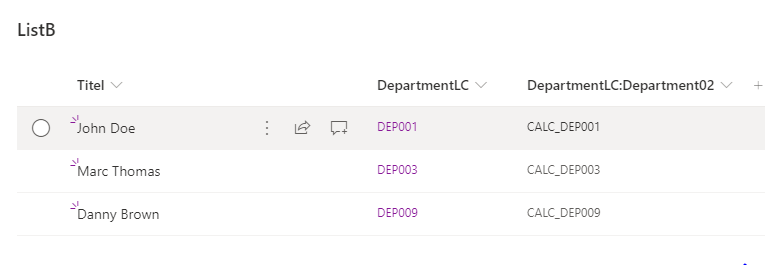
Create an item
Abderahman88
on 11 Dec 2020
@Abderahman88 , I am really thank you that you have put effort for re-creation of the issues.
Then how can we load or get the items after 100s in DepartmentLC column ? As you are making PR , does that mean you gonna upgrade the solution to get more than 100s or streaming of all items in the DepartmentLC ? This would be really great if you meant so.
Department02LC is just the sample name of the column in ListB taken for understanding but column Department02 in ListA need to be have it as calculated column in ListA. This calculated column could have some different bussines logic to have items in it based on some other columns in the ListA. So basically lookup column Department02LC from ListB does not shows any values from the column Department02 from ListA. Practically its just column and can be accessible using React-List-Form.
However at the moment DepartmentLC should fetch all items more than 100s seemlessely in dropdown would be very required and essential feature for everyone else in-order to use React-List-Form.
Many Thanks,
ntinykumar
on 11 Dec 2020
@ntinykumar In the latest version, you can load more than 100 items in the dropdown.
For the second question, do you need to select a different calculated value in List B? (see screenshot)
- DepartmentLC:Department02 = original calculated value in List A for that department
- Department02LC = random calculated value from List A
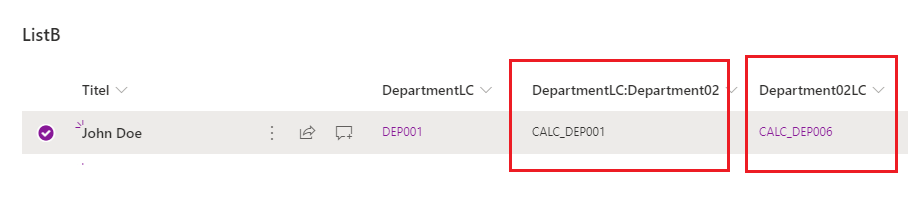
I agree, choosing a random calculated value gives you an empty dropdown.
Abderahman88
on 12 Dec 2020
@ntinykumar I hope that you were able to resolve this issue with the updated sample and instructions from @Abderahman88.
I'll go ahead and close this issue. If you need any more help with this, please don't hesitate to open another issue so we can continue to help.
hugoabernier
on 13 Dec 2020
@hugoabernier : Thanks for everything, Does the new version supporting loading more than 100 items out of the box of or do I need to work for it to get ? I will re-download new version and will check again.
ntinykumar
on 14 Dec 2020
Related issues
 floriemoulin
·
4Comments
floriemoulin
·
4Comments
 Abiman194
·
4Comments
Abiman194
·
4Comments
 sivanu137
·
4Comments
sivanu137
·
4Comments
 joshburns49
·
3Comments
joshburns49
·
3Comments
 ChristianSaldivar
·
3Comments
ChristianSaldivar
·
3Comments
Most helpful comment
@ntinykumar I've recreated your scenario. But I don't know why you need the lookup 'Department02LC' in list B.
Because the calculated info can be retrieved from lookup 'DepartmentLC'. For the limit of 100 items, I will make a PR.
Lists
List A contains 106 items.


Create an item