Sp-dev-fx-webparts: react-script-editor doest not display in the menu
Hello team, I have deployed the web part react-script-editor to our tenant for testing but I can not see it in the web part selection. First, I have tried to deploy it individually I added it to to store and then to the communication site. I could see it in the site content but I could not add it to the page. Second, I tried to change the json and automatically deploy it to the tenant anywhere and same issue. Do you have any idea what I am doing wrong?
https://github.com/pnp/sp-dev-fx-webparts/tree/master/samples/react-script-editor


 MirasManica
All 6 comments
Thank you for reporting this issue. We will be triaging your incoming issue as soon as possible.
![msftbot[bot] picture](https://avatars2.githubusercontent.com/in/26612?v=4&s=40) msftbot[bot]
on 19 Oct 2020
msftbot[bot]
on 19 Oct 2020
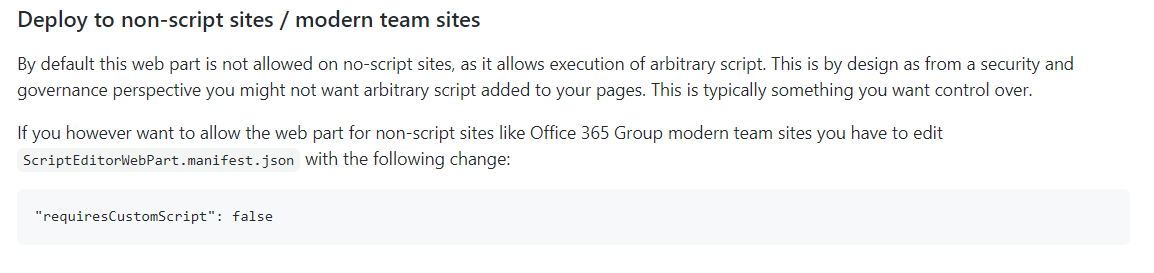
Have you tried changing "ScriptEditorWebPart.manifest.json" ? (react-script-editor docs)
 Abderahman88
on 19 Oct 2020
Abderahman88
on 19 Oct 2020
Yes, I have also tried to change this attribute and without success. Does it work on your side? If it works generally I will try it again. I am just not sure if is it just on my side or general issue.
MirasManica
on 20 Oct 2020
I installed the app with no issues on a communication site.
_Steps_
- set "requiresCustomScript" to false
- gulp bundle --ship / gulp package-solution --ship
- install app in tenant app catalog
- install react-script-editor on communication site
_Result_

_Possible solution_
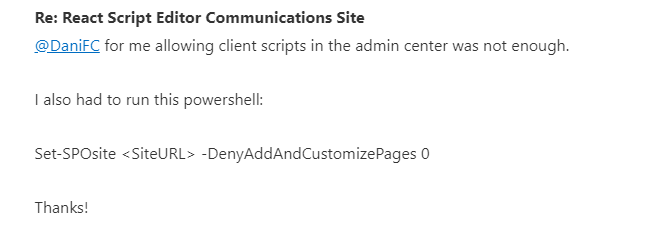
I found that some people had the same issue as you. They resolved it by applying some PowerShell. (see https://www.youtube.com/watch?v=Fz3NeLLKrpE - 10:30)
Abderahman88
on 20 Oct 2020
Thank you for your help and time, it works! :)
MirasManica
on 21 Oct 2020
Great tool...but I wish the paragraph at https://github.com/pnp/sp-dev-fx-webparts/tree/master/samples/react-script-editor#deploy-to-non-script-sites--modern-team-sites said something like 'The webpart may not be available in the webpart selection menu on page insertion if "requiresCustomScript" is "true".'
Also, note the misspelling of "available" in the following paragraph, https://github.com/pnp/sp-dev-fx-webparts/tree/master/samples/react-script-editor#deploy-tenant-wide.
 FoundryFounder
on 18 Nov 2020
FoundryFounder
on 18 Nov 2020
Related issues
 floriemoulin
·
4Comments
floriemoulin
·
4Comments
 joshburns49
·
3Comments
joshburns49
·
3Comments
 MaxDaxDax
·
4Comments
MaxDaxDax
·
4Comments
 ChristianSaldivar
·
3Comments
ChristianSaldivar
·
3Comments
 Brentless
·
5Comments
Brentless
·
5Comments
Most helpful comment
I installed the app with no issues on a communication site.
_Steps_
_Result_

_Possible solution_
I found that some people had the same issue as you. They resolved it by applying some PowerShell. (see https://www.youtube.com/watch?v=Fz3NeLLKrpE - 10:30)