Sp-dev-fx-webparts: React-pages-hierarchy, Parent Page Property is missing
React-pages-hierarchy
@petkir
Hi Peter, just tried using your Pages Hierarchy webpart. I've got a use case in which the webpart would come in handy.
However after installing the webpart, and adding it on a page, I'm getting the message 'Parent Page Property is missing'. It advises to open the page as Site owner. You can probably guess: I'm a site owner... (and also owner of the page library).
I then manually added the Parent Page column the the Site Pages library (lookup column named 'Parent Page' -> Title). Unfortunatelly that also didnt do the trick. The webpart keeps saying: 'Parent Page Property is missing'.
Any tips?
With kind regards,
eldoro
 eldoro80
All 10 comments
Thank you for reporting this issue. We will be triaging your incoming issue as soon as possible.
![msftbot[bot] picture](https://avatars2.githubusercontent.com/in/26612?v=4&s=40) msftbot[bot]
on 6 Jul 2020
msftbot[bot]
on 6 Jul 2020
Hi @eldoro80 the authors of this sample is @bogeorge. Hopefully, he can help you.
At a quick look at his source you can try to add the lookup with the initial name 'ParentPage' and then change the Field to the Name 'Parent Page'.
greets ;)
 petkir
on 6 Jul 2020
petkir
on 6 Jul 2020
Hey @eldoro80, @petkir is correct. The code is trying to get "ParentPage" by internal name or title. So if you've created it manually, it should be created with no spaces first but should be able to be renamed.
Regarding why that column wasn't added in the first place. As long as you have the specific permision "ManageLists" on Site Pages you should have enough permissions. Since you added a column manually, I suspect you are good there.
The logic to add the site column is invoked when you click the "Configure" button in the web part after adding it to a page and not just as soon as you add it to a page. If you don't see the Configure button let me know. It may be that I have a bug that shows the error about missing the parent page before I show the Configure options.
 bogeorge
on 7 Jul 2020
bogeorge
on 7 Jul 2020
Hi @bogeorge and @petkir , thanks for responding so quickly.
I've changed te column internal name to Parentpage, but still not working. See screenshots.
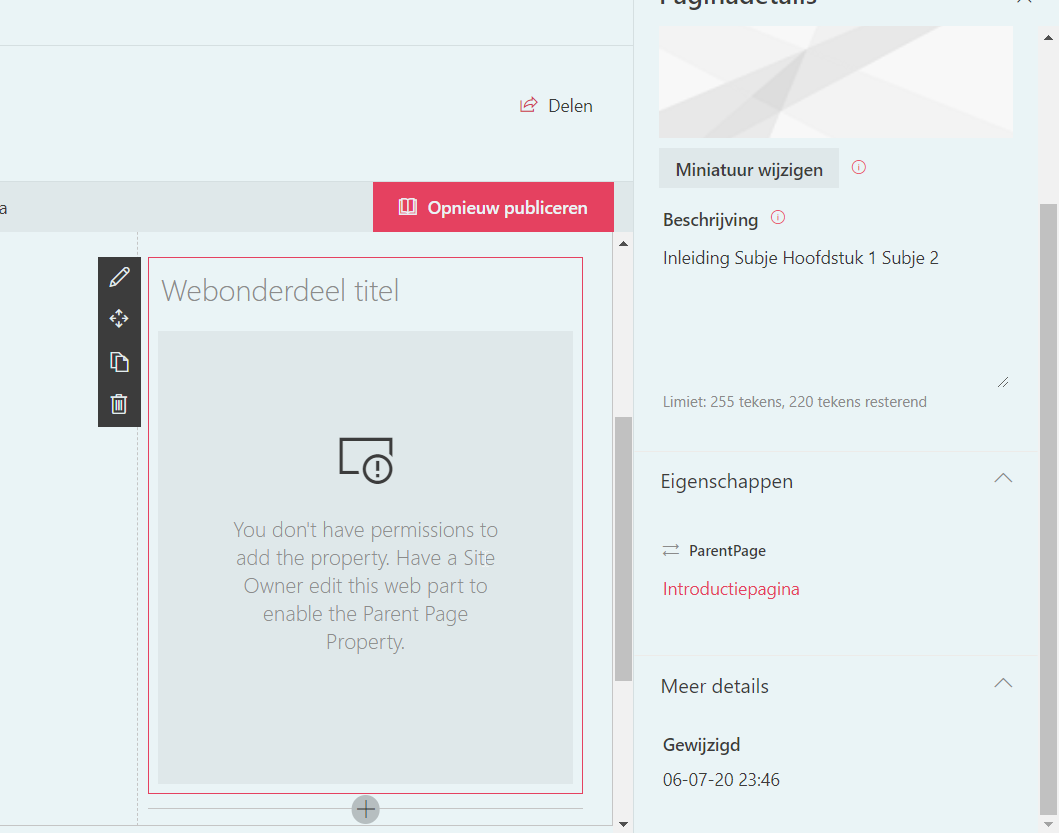
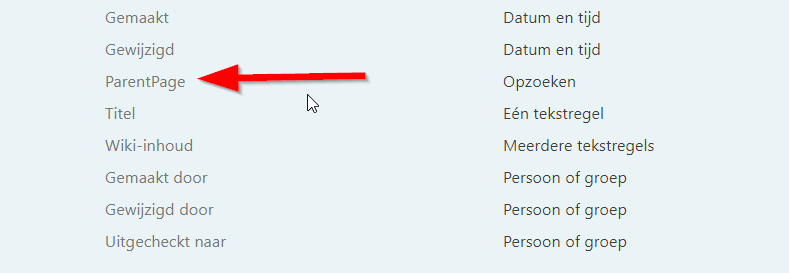
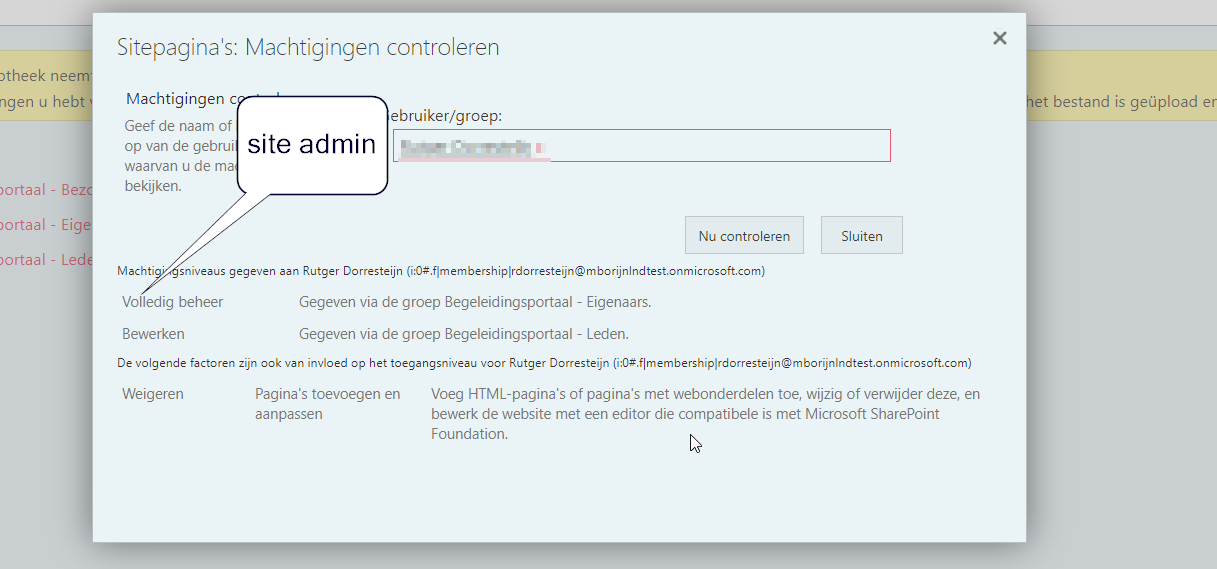
I'm also not seeing the 'configure button'. Thanks for you help!
eldoro80
on 7 Jul 2020
@eldoro80 So this is the first time this web part has been used on a non english site and I never tested it there.
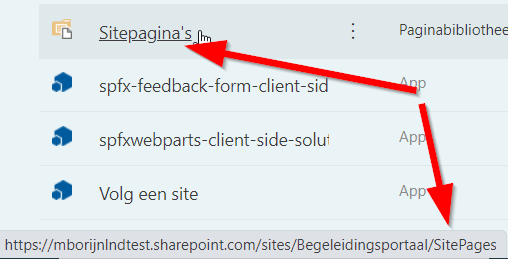
What I'm wondering is how I'm getting the Site Pages list is the problem. I'm getting it by list title "Site Pages" I'm assuming in your environment it's titled something else?
I have a Constants File in the Utilities Folder where that is stored. I wonder if you change that constant to what your list tile is if that fixes your issue.
bogeorge
on 7 Jul 2020
Hi, will try. The 'Site Pages Library' is called 'Sitepagina's' in dutch. Internal name is Sitepages
eldoro80
on 7 Jul 2020
Fixed! Thanks for you help @bogeorge and @petkir
eldoro80
on 7 Jul 2020
Awesome @eldoro80 glad to help. I'll make myself a note to see if I can make that code more intelligent/language independent in the future.
bogeorge
on 7 Jul 2020
Hi @bogeorge
maybe this can help you
The url is language invariant "/SitesPages" as far I know.
Your webpart is on a page, as far I know is this page is in the Site Pages Document library. For this reason, pageContext should be set from SharePoint you find it in the BaseClientSideWebPart class in the WebPartContext this.context.pageContext.list.id
hope this will help you
petkir
on 7 Jul 2020
Thanks for the suggestions @petkir. I like the idea of using this.context.pageContext.list.id.
bogeorge
on 7 Jul 2020
Related issues
 fleagleman
·
3Comments
fleagleman
·
3Comments
 acsaba31
·
4Comments
acsaba31
·
4Comments
 Brentless
·
5Comments
Brentless
·
5Comments
 spo-theworst
·
5Comments
spo-theworst
·
5Comments
 jbranders
·
5Comments
jbranders
·
5Comments
Most helpful comment
Fixed! Thanks for you help @bogeorge and @petkir