Sp-dev-fx-webparts: SharePoint2016 On Prem -SPFx HelloWorld App deployed to App Catalog but not appearing under "Apps You Can Add"
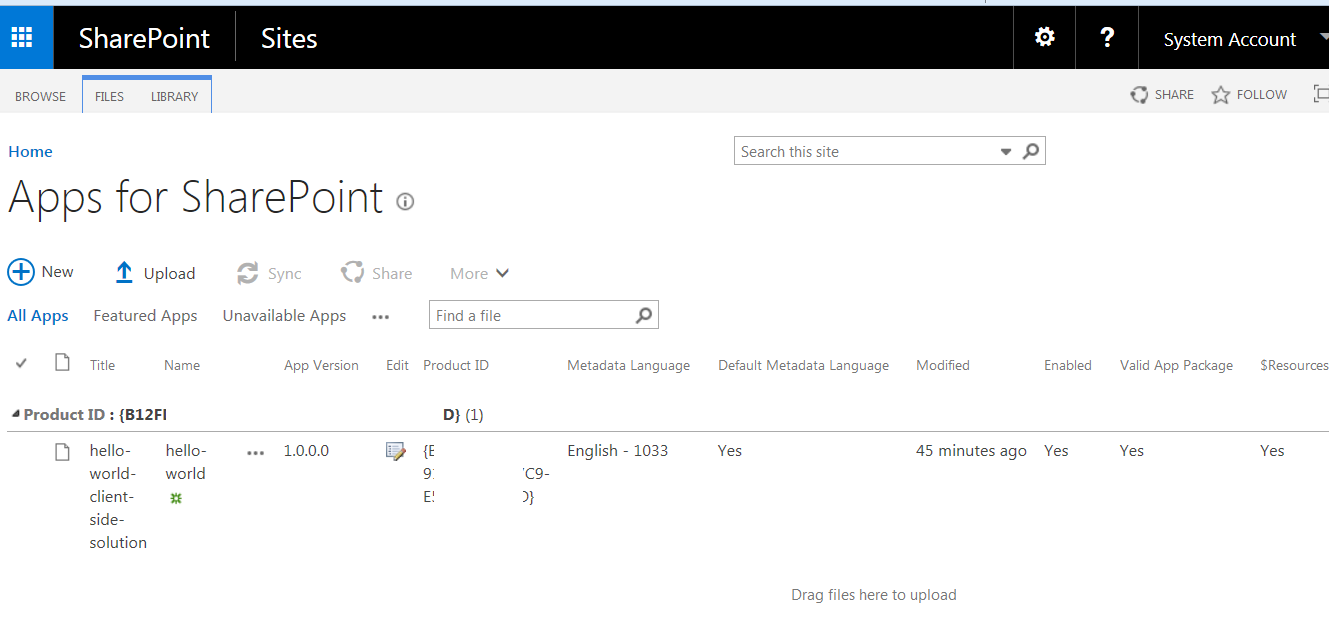
I have followed the SPFx tutorials to build the helloworld demo App and then uploaded to our On Prem SharePoint 2016 (with feature pack 2) app catalog. All the properties show success as seen on screenshot below. The problem is that the app is not visible on that site or subsite in the "Apps you can add" section. I don't receive any on-screen errors either. Any help will be greatly appreciated as SPFx seems like the way to go.
 theunitygamedev
All 34 comments
How did you build and packaged your solution?
 Luksys5
on 20 Oct 2017
Luksys5
on 20 Oct 2017
Hi Luksys5 and thanks for helping out:)
I followed the tutorial found here:
To Package the solution I ran:
gulp package-solution
I then dragged the helloworld-webpart.sppkg file into our app catalog. You can see the attached screenshots of the app in the catalog, but not it showing up when I try to add it to pages. We got everything working in SharePoint online, but not on premise.


theunitygamedev
on 20 Oct 2017
Same problem here
 alinooshabadi
on 23 Oct 2017
alinooshabadi
on 23 Oct 2017
Which version of the SharePoint Framework generator are you using?
 waldekmastykarz
on 23 Oct 2017
waldekmastykarz
on 23 Oct 2017
3.10.10
alinooshabadi
on 23 Oct 2017
Could it be that you're looking at a different version? The latest version of the SharePoint Framework available at the moment is v1.3.2. You can check the version number of the SharePoint Framework generator used to scaffold the project in the .yo-rc.json file in the root project folder. Then, in package.json, you can see the version of the (at)microsoft dependencies that are a part of the SharePoint Framework.
waldekmastykarz
on 23 Oct 2017
yes, my mistake. running
npm -v @microsoft/generator-sharepoint
get yeoman version!
here is my package config
package.json
{
  "dependencies": {
    "@microsoft/sp-core-library": "~1.1.0",
    "@microsoft/sp-webpart-base": "~1.1.0",
    "@microsoft/sp-lodash-subset": "~1.1.0"
  },
  "devDependencies": {
    "@microsoft/sp-build-web": "~1.1.0",
    "@microsoft/sp-module-interfaces": "~1.1.0",
    "@microsoft/sp-webpart-workbench": "~1.1.0"
  }
}
yo-rc.json
{
  "@microsoft/generator-sharepoint": {
    "version": "1.3.2",
  }
}
This is my package.json:
{
  "name": "hello-world",
  "version": "0.0.1",
  "private": true,
  "engines": {
    "node": ">=0.10.0"
  },
  "scripts": {
    "build": "gulp bundle",
    "clean": "gulp clean",
    "test": "gulp test"
  },
  "dependencies": {
    "@microsoft/sp-core-library": "~1.1.0",
    "@microsoft/sp-webpart-base": "~1.1.0",
    "@microsoft/sp-lodash-subset": "~1.1.0",
    "@types/webpack-env": ">=1.12.1 <1.14.0"
  },
  "devDependencies": {
    "@microsoft/sp-build-web": "~1.1.0",
    "@microsoft/sp-module-interfaces": "~1.1.0",
    "@microsoft/sp-webpart-workbench": "~1.1.0",
    "gulp": "~3.9.1",
    "@types/chai": ">=3.4.34 <3.6.0",
    "@types/mocha": ">=2.2.33 <2.6.0"
  }
}
yo-rc.json:
{
  "@microsoft/generator-sharepoint": {
    "version": "1.3.0",
    "libraryName": "hello-world",
    "libraryId": "b12fd61f-91c4-4589-97c9-e536820f199d",
    "environment": "onprem"
  }
}
Same problem here. Has anyone succeed in deploying to OnPrem?
 BasChrille
on 27 Nov 2017
BasChrille
on 27 Nov 2017
I also have the same problem!
 stluislu
on 1 Dec 2017
stluislu
on 1 Dec 2017
Hello,
Check your SP logs. You will see:
An exception was thrown while retrieving Apps from Corporate Catalog. Microsoft.SharePoint.SPException: One or more field types are not installed properly. Go to the list settings page to delete these fields. ---> System.Runtime.InteropServices.COMException: One or more field types are not installed properly. Go to the list settings page to delete these fields.
This issue is similar to https://github.com/SharePoint/sp-dev-docs/issues/1016
And it is evident from the initial screenshots in this issue that language dependent fix is not applied.
Read https://blogs.technet.microsoft.com/stefan_gossner/2017/11/14/november-2017-cu-for-sharepoint-server-2016-is-available-for-download/
If you see the last column in the first screenshot of this issue, it is showing the resource labels. Actually the column name is "Deployed".
In short, install the language dependent update that comes with the CU, then delete the App Catalog, create the catalog again, upload the app, give rights on the app catalog to the user. And then finally you will see your app in "Add an app" section.
Bye
 nazishqassim
on 7 Dec 2017
nazishqassim
on 7 Dec 2017
I have similar issue, everything is set properly and column name is visible in the app catalog.
I am building webpart using generator v1.4.
I can add an app to site, but it is not available when I want to add the webpart to page from ribbon.
 panjkov
on 28 Dec 2017
panjkov
on 28 Dec 2017
Hi, I tried with generator 1.4 and web part did appear properly. Assuming you have selected the correct option when generating from yeoman "SharePoint 2016 onwards..including SharePoint Online".
Besides, the web part will appear in the "Other" rather than "Custom" web part category. Thanks
nazishqassim
on 29 Dec 2017
Yes I have everything set up properly.
I reported my issue here https://github.com/SharePoint/sp-dev-docs/issues/1188
From: Nazish notifications@github.com
Sent: Friday, December 29, 2017 6:49:21 AM
To: SharePoint/sp-dev-fx-webparts
Cc: Dragan Panjkov; Comment
Subject: Re: [SharePoint/sp-dev-fx-webparts] SharePoint2016 On Prem -SPFx HelloWorld App deployed to App Catalog but not appearing under "Apps You Can Add" (#331)
Hi, I tried with generator 1.4 and web part did appear properly. Assuming you have selected the correct option when generating from yeoman "SharePoint 2016 onwards..including SharePoint Online".
Besides, the web part will appear in the "Other" rather than "Custom" web part category. Thanks
—
You are receiving this because you commented.
Reply to this email directly, view it on GitHubhttps://github.com/SharePoint/sp-dev-fx-webparts/issues/331#issuecomment-354401141, or mute the threadhttps://github.com/notifications/unsubscribe-auth/AIAjSTwkCphjntyVv-vkLO7VtS5p0C6qks5tFH1hgaJpZM4P3tOe.
panjkov
on 29 Dec 2017
nazishqassim nailed it - was the exact solution for me
 beinguam
on 9 Jan 2018
beinguam
on 9 Jan 2018
I have the same problem.
Is there any solution or suggestion ?
 hjaouani
on 21 Mar 2018
hjaouani
on 21 Mar 2018
You can either follow the message above in which I explained about the actual error appearing in SP log. In that case, install language dependent cu and recreate app catalog. If that is not the issue then look at panjkov issue. Thanks
nazishqassim
on 22 Mar 2018
I just had the same problems on 2 out of 6 farms. I had to recreate the app catalog site collection and all is now working.
 Pieter-Veenstra
on 12 Apr 2018
Pieter-Veenstra
on 12 Apr 2018
I had a similar issue - App seems to be deployed in App Catalog site, but not available in other sites. I noticed, that even App is deployed in App Catalog, it still has a ribbon button "Deploy" enabled in the list. I clicked the Deploy button once again, and then everything worked as expected.
 sherbertas
on 8 May 2018
sherbertas
on 8 May 2018
+1
 smoothsen
on 8 Jun 2018
smoothsen
on 8 Jun 2018
@sherbertas please confirm whether you got deploy window with the checkbox which is highlighted below,
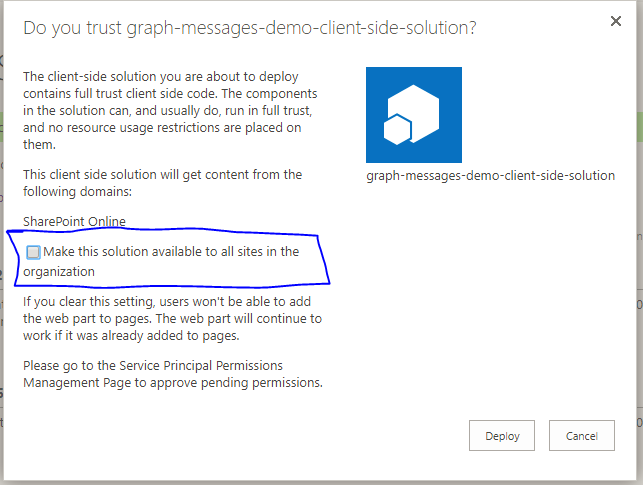
If you click on the checkbox the app will be deployed to all the sites in the tenant and you no need it install the app specifically you can start adding the webparts in the pages directly.
 JayakumarB
on 11 Jun 2018
JayakumarB
on 11 Jun 2018
I had this problem. I update my SharePoint environment with lastest cumulative update (including Language Packs) and done!
 marcelaopimenta
on 12 Jun 2018
marcelaopimenta
on 12 Jun 2018
I followed all the options and workarounds above yet not seeing the client side webpart. @marcelaopimenta can you please share link to cumulative updates?
 vmannenvc
on 21 Jun 2018
vmannenvc
on 21 Jun 2018
Here have all cumulatives update... Install the last.. JUN 2018
https://www.toddklindt.com/blog/Builds/SharePoint-2016-Builds.aspx
marcelaopimenta
on 21 Jun 2018
Thanks, was able to resolve the issue with latest updates. Additionally had to start services as outlined here to make it work. http://sharepointchick.com/archive/2012/07/29/setting-up-your-app-domain-for-sharepoint-2013.aspx
vmannenvc
on 22 Jun 2018
Hi All ,I am facing on-premise deployment issue. I have installed April 2018 feature pack(KB4018340 and related language packs) and created App catalog. The Client webpart deployed successfully in On Premise Appcatalog but webpart is not available in "Add an App" page.I am maintaining CDN artifacts in roo site collection root site.
Please help me on this issue.
vmannenvc - what are the services need to start?
 rajkrishnanet
on 31 Jul 2018
rajkrishnanet
on 31 Jul 2018
Hi all,
My installation environment is SharePoint19 and,
npm -v @microsoft/generator-sharepoint
6.5.0
As I see I steel need downgrade framework for correct use of web Parts especially: Modern Script Editor.
 katika666
on 23 Dec 2018
katika666
on 23 Dec 2018
@VesaJuvonen,
My Current Sharepoint version is SP2016 with DEC 2018 CU updated . I have developed the Sample webpart and Details in (https://github.com/SharePoint/sp-dev-docs/issues/3200)
I am also facing same issue not able to see the SPFX webpart in "Add App" SP2016 environment.
Kindly suggest
 kbkotresh
on 4 Jan 2019
kbkotresh
on 4 Jan 2019
@VesaJuvonen,
My Current Sharepoint version is SP2016 with DEC 2018 CU updated . I have developed the Sample webpart and Details in (SharePoint/sp-dev-docs#3200)I am also facing same issue not able to see the SPFX webpart in "Add App" SP2016 environment.
Kindly suggest
Environment : SharePoint 2016 On premise
I am able to resolve this issue .
- Apply Language Dependent Files October 2018 CU Updates.
2.Run Psconfig.exe- Delete the Existing App catalog and recreate new App catalog.
- Add app to app catalog
Thanks for supports
Best regards,
Kotresh
kbkotresh
on 10 Jan 2019
I have created a web part by selecting SP2019 and SPOnline as option. Web part is working fine in SP Online but same package is not working in SP 2019. SP 2019 is fresh installation and i haven't done any CU updates. This could be the problem? Also I have made includeClientSideAssets:true .
 ymihir
on 12 Jul 2019
ymihir
on 12 Jul 2019
I have created a web part by selecting SP2019 and SPOnline as option. Web part is working fine in SP Online but same package is not working in SP 2019. SP 2019 is fresh installation and i haven't done any CU updates. This could be the problem? Also I have made
includeClientSideAssets:true.
For SP2019 on Prem, you need to downgrade framework during deployment. download old version from repository.
katika666
on 12 Jul 2019
Hi All,
I am also facing same issue in SP2016 dev farm. The webpart is not visible after deploying.
I have installed July 2019 CU patch. The Yomen generated template version i am using is 1.8.2 and Node Version is 10.16.2.
Do I need to downgrade both Node and Yomen template?
 vasavidurgaprasad
on 12 Aug 2019
vasavidurgaprasad
on 12 Aug 2019
I have the same issue, anyone has a solution?
 emadhejazian
on 25 Aug 2019
emadhejazian
on 27 Aug 2019
emadhejazian
on 25 Aug 2019
emadhejazian
on 27 Aug 2019
Related issues
 ChristianSaldivar
·
3Comments
ChristianSaldivar
·
3Comments
 joshburns49
·
3Comments
joshburns49
·
3Comments
 acsaba31
·
4Comments
acsaba31
·
4Comments
 luismanez
·
5Comments
luismanez
·
5Comments
 parmira5
·
4Comments
parmira5
·
4Comments
Most helpful comment
Hello,
Check your SP logs. You will see:
An exception was thrown while retrieving Apps from Corporate Catalog. Microsoft.SharePoint.SPException: One or more field types are not installed properly. Go to the list settings page to delete these fields. ---> System.Runtime.InteropServices.COMException: One or more field types are not installed properly. Go to the list settings page to delete these fields.
This issue is similar to https://github.com/SharePoint/sp-dev-docs/issues/1016
And it is evident from the initial screenshots in this issue that language dependent fix is not applied.
Read https://blogs.technet.microsoft.com/stefan_gossner/2017/11/14/november-2017-cu-for-sharepoint-server-2016-is-available-for-download/
If you see the last column in the first screenshot of this issue, it is showing the resource labels. Actually the column name is "Deployed".
In short, install the language dependent update that comes with the CU, then delete the App Catalog, create the catalog again, upload the app, give rights on the app catalog to the user. And then finally you will see your app in "Add an app" section.
Bye