Sp-dev-fx-controls-react: SPFx 1.12 error with ListPicker and ListItemPicker
Category
[ ] Enhancement
[x] Bug
[ ] Question
Version
Please specify what version of the library you are using: v3 on SPFx 1.12
_If you are not using the latest release, please update and see if the issue is resolved before submitting an issue._
Expected / Desired Behavior
gulp serve builds the Web Part.
Observed Behavior
I am having issues with the ListPicker and ListItemPicker components. When I run gulp serve, I am getting the following errors:
Error - [webpack] 'dist':
./node_modules/@microsoft/decorators/lib-commonjs/index.js
Module not found: Error: Can't resolve './override' in 'C:\MyGit\React-PPP-PnP\node_modules\@microsoft\decorators\lib-commonjs'
If I run gulp build, Iam not getting any error.
PeoplePicker works fine.
Steps to Reproduce
Create a Web Part using the following configuration:
SPFx 1.12
Nodejs 10.24.0
TypeScript 3.7
Thanks!
 PathToSharePoint
All 36 comments
Thank you for reporting this issue. We will be triaging your incoming issue as soon as possible.
![msftbot[bot] picture](https://avatars.githubusercontent.com/in/26612?v=4&s=40) msftbot[bot]
on 24 Mar 2021
msftbot[bot]
on 24 Mar 2021
I have posted my code: https://github.com/PathToSharePoint/React-PPP-PnP
I suspect it's more an error on my end, as the repo sample works fine. But I can't put the finger on the issue, and the PeoplePicker next to it works fine.
PathToSharePoint
on 24 Mar 2021
I think with all the issues with SPFx 1.12 and the fact it's deprecated, it is probably the problem.
 sympmarc
on 24 Mar 2021
sympmarc
on 24 Mar 2021
@sympmarc The authors told me to log the issue anyway... I might be doing something wrong with the context, as the sample included in the v3 solution works fine on 1.12. Or maybe it's because I am working with function components instead of class components?
PathToSharePoint
on 24 Mar 2021
@PathToSharePoint - here is the branch for SPFx 1.12.1.
Currently it uses rc1 version.
I tested it with npm link and it works both in debug and release.
If you want to test it out - pull the branch locally and npm link it to you sample.
 AJIXuMuK
on 19 Apr 2021
AJIXuMuK
on 19 Apr 2021
I was able to move past the error message, but I stumbled on this:

I am using JSX for my components, maybe this is not a proper use case for this library?
PathToSharePoint
on 20 Apr 2021
Update: I was able to get past that message by applying a recipe I found on stackoverflow:
npm upgrade @types/react@latest
I can now build my Web Part and move to the next error:
Cannot find module './virtual'
PathToSharePoint
on 21 Apr 2021
I did a full reinstall with SPFx 1.12.1 RC3, and now I am back to the previous error message about JSX elements.
The issue might be with the way I handle npm link, so maybe I'll just wait for the final release to do a regular install. From what I've found in forums, this type of error happens when there are multiple versions of React or React-dom types in the solution. With SPFx I got "@types/react": "16.9.36" and "@types/react-dom": "16.9.8".
PathToSharePoint
on 25 Apr 2021
@PathToSharePoint - please try the latest beta version
AJIXuMuK
on 1 May 2021
Unfortunately this doesn't make any difference. I am still getting the error related to @microsoft/decorators. I don't have that issue when for example I use Fluent UI controls.
Would you have a working sample I could use as a reference, where the spfx-controls are used with JSX?
Just for the record, here is an excerpt of my code (the data-Property prop is used as an identifier by other parts of the code):
                <PeoplePicker
                    data-Property="pnpPeoplePicker"
                    context={wpContext}
                    titleText="PnP People Picker"
                    personSelectionLimit={3}
                    // groupName={"Team Site Owners"} // Leave this blank in case you want to filter from all users
                    showtooltip={true}
                    required={false}
                    disabled={false}
                    onChange={(items: any) => updateWPProperty("pnpPeoplePicker", items)}
                    showHiddenInUI={false}
                    principalTypes={[PrincipalType.User]}
                    resolveDelay={1000}
                />
Update: I was able to patch the issue by running npm i @microsoft/decorators. That's actually something I had tried when using npm link but it didn't seem to make any difference on the local install.
PathToSharePoint
on 3 May 2021
@PathToSharePoint are you still experiencing issues specific to the controls, or are the issues down to SPFx?
 joelfmrodrigues
on 7 May 2021
joelfmrodrigues
on 7 May 2021
@joelfmrodrigues Thanks for checking! The issue seems to be directly related to the controls library. I am using SPFx 1.12.1 to build my samples, and it works fine with other control libraries such as Fluent UI Northstar or mgt.
I use function components and JSX. If you have such a sample, I'll be happy to do a side by side comparison.
PathToSharePoint
on 7 May 2021
@PathToSharePoint what do you mean under "JSX"? Are you using JavaScript, not TypeScript? Or are you referencing to something else?
AJIXuMuK
on 16 May 2021
What I just meant is that I am using the JSX (JavaScript Extensions) language with React. I do use TypeScript too, and so my files have a tsx file extension, not ts. It probably doesn't matter, I am just trying to find any small difference that could impact my build.
I'll publish my sample this month. It works great, it's just that I had to run npm install @microsoft/decorators.
PathToSharePoint
on 16 May 2021
Speaking of small differences, I am also building the solutions on Nodejs v14, which is supported by SPFx 1.12.1. No idea if that matters either, and here too I'd be interested in testimonies from people who have successfully run such configuration.
PathToSharePoint
on 17 May 2021
Hi I am trying Nodejs v14.16, SPFx 1.12.1, @pnp/spfx-controls-react 3.1.0 and rushstack-3.9. I seem to have the same issue with the @microsoft/decorators . The problem occurs to me when I try to use ListView .
 DennisKuhn
on 20 May 2021
DennisKuhn
on 20 May 2021
My hack to fix it is in nodes_modules/@microsoft/decorators/lib-commonjs/index.js :
"use strict";
Object.defineProperty(exports, "__esModule", { value: true });
// var virtual_1 = require("./virtual");
var virtual_1 = require("../lib/virtual");
Object.defineProperty(exports, "virtual", { enumerable: true, get: function () { return virtual_1.virtual; } });
// var sealed_1 = require("./sealed");
var sealed_1 = require("../lib/sealed");
Object.defineProperty(exports, "sealed", { enumerable: true, get: function () { return sealed_1.sealed; } });
// var override_1 = require("./override");
var override_1 = require("../lib/override");
Object.defineProperty(exports, "override", { enumerable: true, get: function () { return override_1.override; } });
Does somebody have hints or tips how to solve this proper?
DennisKuhn
on 20 May 2021
A better hack seems to fix the package.json of node_modules/@microsoft/decorators to reference the es6 lib instead of commonjs:
"main": "lib/index.js",
instead of
"main": "lib-commonjs/index.js",
to make it last across updates, I've added a post-install script:
const fs = require('fs')
const pkg = require('./node_modules/@microsoft/decorators/package.json');
pkg.main = "lib/index.js"
fs.writeFileync('./node_modules/@microsoft/decorators/package.json', JSON.stringify(pkg,null,4))
Downgrading to @microsoft/decorators^1.11.0 from @microsoft/decorators^1.12.1 should fix it for this module:
unpkg.com/ @microsoft/decorators @ 1.11.0 /package.json
unpkg.com/ @microsoft/decorators @ 1.12.1 /package.json
unpkg.com/ @pnp/spfx-controls-react @ 3.1.0 /package.json
Would it make sense to make a pull request?
DennisKuhn
on 22 May 2021
@DennisKuhn, @PathToSharePoint
Hmmm... everything works for me.
Here is my sample.
It uses node 14.17.0, SPFx 1.12.1 and controls 3.1.0.
Please check it out.
AJIXuMuK
on 26 May 2021
@AJIXuMuK thanks a lot for the great reference. I've just pretty much the identical settings. I've added a ListView and the issue occurred.
DennisKuhn
on 26 May 2021
@DennisKuhn - I've added ListView to the sample.
gulp, gulp serve, gulp bundle work fine.
Could you please compare your project with my sample (or just share you project with me) to see what's the difference could be?
AJIXuMuK
on 26 May 2021
@AJIXuMuK Thanks for your swift reply. I am not sure what I do different. I've forked your example and added an empty ListView:
      <div className={ styles.node14 }>
        <ListView
        />
        <PeoplePicker...
Then when loading the webpart in the local workbench (gulp serve), I get:
[SPLoaderError.loadComponentError]:
Failed to load component "c45085ec-a6fe-4633-9d4f-a560b7ecc815" (Node14WebPart). Original error: Failed to load entry point from component "c45085ec-a6fe-4633-9d4f-a560b7ecc815" (Node14WebPart). Original error: Error loading https://component-id.invalid/c45085ec-a6fe-4633-9d4f-a560b7ecc815_0.0.1
    Cannot find module './virtual'

INNERERROR:
Failed to load entry point from component "c45085ec-a6fe-4633-9d4f-a560b7ecc815" (Node14WebPart). Original error: Error loading https://component-id.invalid/c45085ec-a6fe-4633-9d4f-a560b7ecc815_0.0.1
    Cannot find module './virtual'
CALLSTACK:
Error
    at SPLoaderError.SPError [as constructor] (https://localhost:4321/temp/workbench-packages/@microsoft_sp-webpart-workbench/local-workbench/sp-webpart-workbench-assembly_en-us.js:38476:23)
    at new SPLoaderError (https://localhost:4321/temp/workbench-packages/@microsoft_sp-webpart-workbench/local-workbench/sp-webpart-workbench-assembly_en-us.js:52330:28)
    at Function.ff4n.ErrorBuilder.buildErrorWithVerboseLog (https://localhost:4321/temp/workbench-packages/@microsoft_sp-webpart-workbench/local-workbench/sp-webpart-workbench-assembly_en-us.js:54879:21)
    at Function.ff4n.ErrorBuilder.buildLoadComponentError (https://localhost:4321/temp/workbench-packages/@microsoft_sp-webpart-workbench/local-workbench/sp-webpart-workbench-assembly_en-us.js:54748:21)
    at https://localhost:4321/temp/workbench-packages/@microsoft_sp-webpart-workbench/local-workbench/chunk.systemjs-component-loader_en-us.js:1025:75
This issue has been automatically marked as stale because it has marked as requiring author feedback but has not had any activity for 7 days. It will be closed if no further activity occurs within next 7 days of this comment. Thank you for your contributions to SharePoint Developer activities.
msftbot[bot]
on 2 Jun 2021
@AJIXuMuK After looking again and again, I finally found something that was behaving differently.
This is transpiling without error:
import { ListView, SelectionMode } from '@pnp/spfx-controls-react/lib/ListView';
This is ok with VS Code but transpiling is giving me the decorator error:
import { ListView, SelectionMode } from '@pnp/spfx-controls-react';
I am seeing the same issue with your sample.
PathToSharePoint
on 6 Jun 2021
@PathToSharePoint thank you for the info!
Probably I wouldn't fix it intentionally. In that case we will make deva use correct granular imports :)
AJIXuMuK
on 6 Jun 2021
I guess that's an author's choice, although it seems that the common practice for modules is to do the aggregation. It's unfortunate that VS Code doesn't catch the glitch.
Also I wonder why decorators would be involved in such import/export. Let me do some more testing to confirm my sample now works as advertised!
PathToSharePoint
on 6 Jun 2021
@PathToSharePoint it was mostly a joke from my side. But if you import just from @pnp/spfx-controls-react you will drastically increase the size of your web part, as you will include ALL the controls and all dependencies, like PnPJS.
AJIXuMuK
on 6 Jun 2021
We are experiencing similar, but with FilePicker component. See #847. SPFx 1.12.1 (NVM 1.1.7 > Node 14.17.0 > NPM 6.14.13 (PNPM 6.7.1) > SPFx 1.12.1 | Gulp 4.0.2 | yo 4.2.0).
Looks like by adding @microsoft/decorators 1.12.1 dependency to our package, we can resolve the issue and successfully build.
Looks like maybe others are as well? https://kodsnutten.se/sharepoint-framework-1-12-1-errors-solved/
 brianpmccullough
on 9 Jun 2021
brianpmccullough
on 9 Jun 2021
Please use granular imports. It is better from all points of view.
AJIXuMuK
on 9 Jun 2021
Confirmed we are using granular imports with sample project outlined above in this issue discussion.
Sample Project: https://github.com/AJIXuMuK/issues/tree/master/controls-node-14
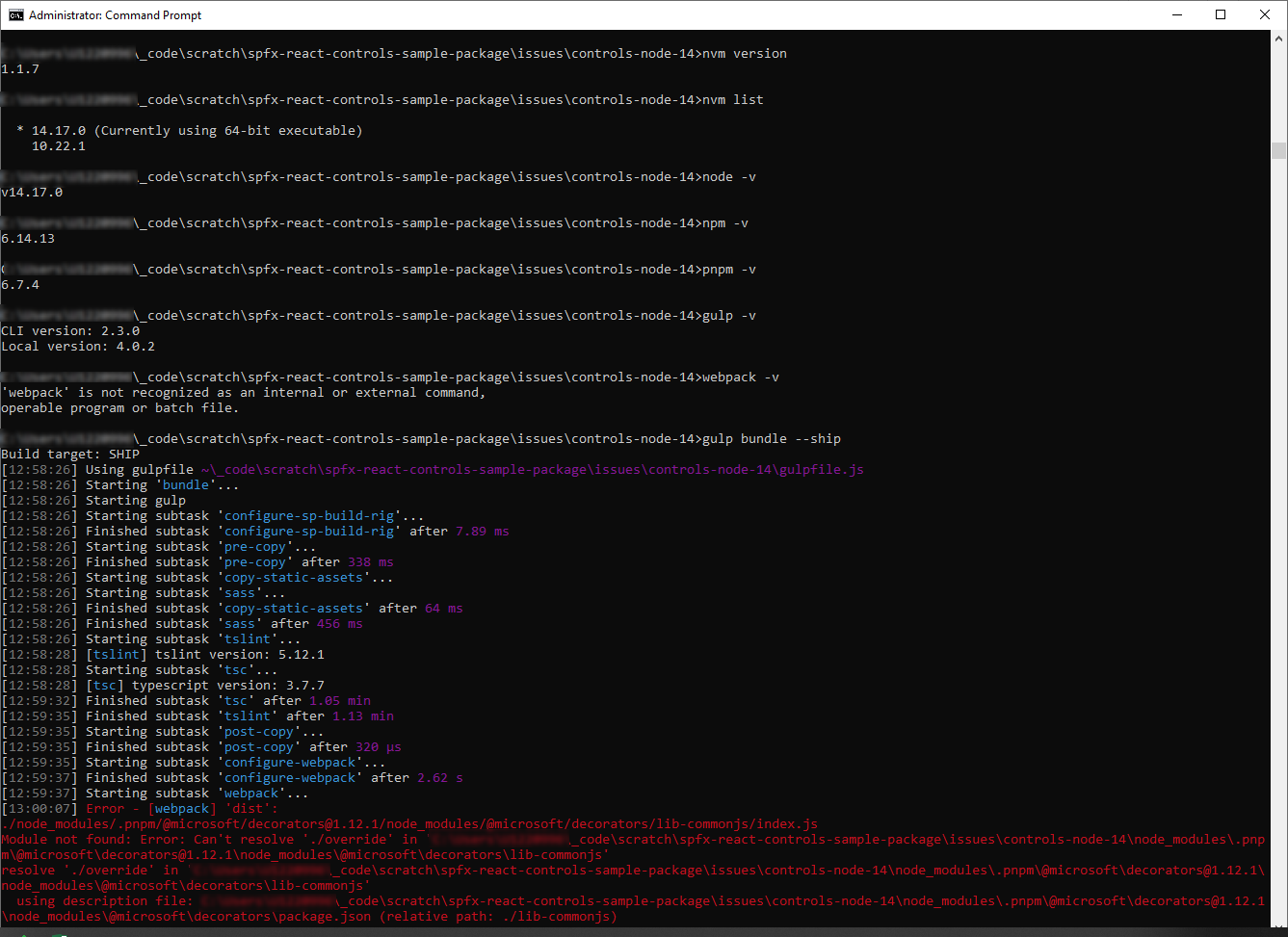
brianpmccullough
on 9 Jun 2021
@brianpmccullough I have removed the dependency to @microsoft/decorators completely.
Now it should be fine with any type of import.
Could you please test the beta version?
AJIXuMuK
on 10 Jun 2021
My team is reporting that the beta version is working now without throwing the bundle errors that we reported. Should we look for this in an upcoming release to the controls?
brianpmccullough
on 10 Jun 2021
Yes, the change will be included in the next release.
AJIXuMuK
on 10 Jun 2021
@AJIXuMuK any eta for public release of 3.2? Thanks again for your help/support/time on this one!
brianpmccullough
on 10 Jun 2021
@brianpmccullough - as soon as we fix #918 :)
AJIXuMuK
on 10 Jun 2021
Related issues
 thespooler
·
6Comments
thespooler
·
6Comments
 nviolero
·
4Comments
nviolero
·
4Comments
 Ofer-Gal
·
4Comments
Ofer-Gal
·
4Comments
 shrikantmane
·
3Comments
shrikantmane
·
3Comments
 enti333
·
7Comments
enti333
·
7Comments
Most helpful comment
@brianpmccullough - as soon as we fix #918 :)