Sp-dev-docs: Sample AuthenticationManager class code
I replaced tokenEndpoint with our endpoint values from Azure, tried both V1 and V2 endpoint URLs and I keep getting the following. Can someone help point me in the right direction to get it working?
Source=GCQueueToSharePoint
StackTrace:
at GCQueueToSharePoint.AuthenticationManager.<>c__DisplayClass8_0.
at Microsoft.SharePoint.Client.ClientRuntimeContext.OnExecutingWebRequest(WebRequestEventArgs args)
at Microsoft.SharePoint.Client.ClientRuntimeContext.FireExecutingWebRequestEvent(WebRequestEventArgs args)
at Microsoft.SharePoint.Client.ClientRequest.SetupServerQuery(ChunkStringBuilder sb)
at Microsoft.SharePoint.Client.ClientRequest.
This exception was originally thrown at this call stack:
[External Code]
GCQueueToSharePoint.AuthenticationManager.AcquireTokenAsync(System.Uri, string, string) in AuthenticationManager.cs
[External Code]
GCQueueToSharePoint.AuthenticationManager.EnsureAccessTokenAsync(System.Uri, string, string) in AuthenticationManager.cs
[External Code]
GCQueueToSharePoint.AuthenticationManager.GetContext.AnonymousMethod__0(object, Microsoft.SharePoint.Client.WebRequestEventArgs) in AuthenticationManager.cs
Inner Exception 1:
KeyNotFoundException: The given key was not present in the dictionary.
Document Details
⚠ Do not edit this section. It is required for docs.microsoft.com ➟ GitHub issue linking.
- ID: 80e62a9d-06d0-ebc3-2c99-ce459388182a
- Version Independent ID: 07d8b090-b18c-842d-ba1e-0f2b2a127ad3
- Content: Using CSOM for .NET Standard instead of CSOM for .NET Framework
- Content Source: docs/sp-add-ins/using-csom-for-dotnet-standard.md
- Product: sharepoint
- GitHub Login: @spdevdocs
- Microsoft Alias: spdevdocs
 DevOps801
All 7 comments
Thank you for reporting this issue. We will be triaging your incoming issue as soon as possible.
![msftbot[bot] picture](https://avatars2.githubusercontent.com/in/26612?v=4&s=40) msftbot[bot]
on 8 Dec 2020
msftbot[bot]
on 8 Dec 2020
@DevOps801,
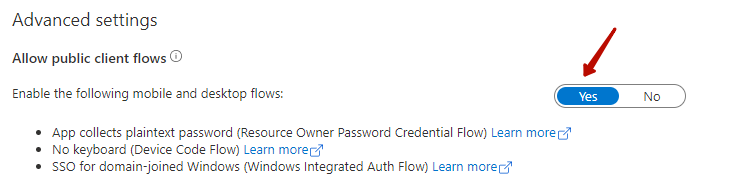
No need to change the endpoint. "common" is enough for multiple tenant app. Please take a reference of below demo, it works well on my SPO.
And below is my registered app:

Baker Kong
Microsoft SharePoint Community Support
 kongmengfei
on 9 Dec 2020
kongmengfei
on 9 Dec 2020
Thanks for the reply. I did a diff on your copy of AuthenticationManager.cs and mine.
- I changed the Token Endpoint URL back to original value
- In private static TimeSpan CalculateThreadSleep, I changed line 163 to match yours, My copy had the original declaration of var token versus System.IdentityModel.Tokens.Jwt.JwtSecurityToken token
- Locally debugged, still got same error.
- Decided to experiment using your example in program.cs. For the user login name, I changed it from single i.e. "myusername" to "[email protected]"
- Debugged, successfully got token, finally, thanks, but got an error, Exception caught: Could not load file or assembly 'System.IdentityModel.Tokens.Jwt, Version=6.8.0.0, Culture=neutral, PublicKeyToken=31bf3856ad364e35'. The system cannot find the file specified."
- Did a search in Github and found a workaround to try which was adding the line, <_FunctionsSkipCleanOutput>true to my project.csproj.user file.
- Debugged again and everything looks good.
How come your Azure screenshots look different than mine? Are those older? Essentially have my app already registered in Azure AD with full permissions for SharePoint, certificate generated and applied, etc.. Apparently it is working because I was able to get Title of my target SharePoint 365 web site. Thanks for your help. Can you point me to example code that adds a new item to a SharePoint list? After all this struggling to get to this point to authenticate, thanks to you I'm past stage one, But now, I'm having little faith in the MS documentation examples and might spend more time spinning my wheels just to do a simple "add new" which is all I need to do and nothing else. Do you have a working example I can learn and build from? Thanks in advance.
DevOps801
on 9 Dec 2020
As you have walked through the auth procedure, you can access SP data such as list item via CSOM just like what you did on .Net Framework.
By the way, I resolved 'System.IdentityModel.Tokens.Jwt.JwtSecurityToken' issue by adding System.IdentityModel.Tokens.Jwt package in nuget:

Baker Kong
Microsoft SharePoint Community Support
kongmengfei
on 10 Dec 2020
Thank you for the link reference. Btw, the Include for Tokens.Jwt is in my CSProj file. Also, it's my first time using CSOM. I'm sorry to keep bugging you but using the Create List Item in SharePoint Using CSOM example, I was able to Add New to my SharePoint list. Thank you so much for this start. HOWEVER, only two fields made it to my list in SharePoint 365. For all other fields, I kept getting this error: "[2020-12-10T20:37:53.194Z] Exception caught: Column '(see list of fields below in my code I've commented out)' does not exist. It may have been deleted by another user. /sites/blah/Lists/blahblah". As you can see in my debugging, I did a sanity check of listing each field to verify my strings match. What am I doing wrong?
` // 12-10-2020. Problem updating fields. Only Title and Make fields made it to list.
// Recurse fields collection in targetList to see what the actual field names are?
/*
FieldCollection oFieldCollection = targetList.Fields;
context.Load(oFieldCollection, oFields => oFields.Include(field => field.Title));
context.ExecuteQuery();
foreach (Field oField in oFieldCollection)
{
Console.WriteLine("Field Name- " + oField.Title);
}
*/
                ListItemCreationInformation oListItemCreationInformation = new ListItemCreationInformation();
                ListItem oItem = targetList.AddItem(oListItemCreationInformation);
                oItem["Title"] = wht.NameofPersonSubmittingForm;
                // oItem["Equipment Name Number"] = wht.EquipmentNameNumber;
                // oItem["GCA Blue Tag Number"] = wht.GCABlueTag;
                oItem["Make"] = wht.Make;
                // oItem["Model"] = wht.Model;
                // oItem["Serial Number"] = wht.SerialNumber;
                // oItem["Unit Number"] = wht.UnitNumber;
                // oItem["Station"] = wht.Station;
                // oItem["Description of Problem"] = wht.DescriptionofProblemListeachissueseperately;
                // oItem["Date and Time Submitted"] = wht.DateTimeSubmitted;
                // oItem["UniqueID"] = wht.UniqueID;

                oItem.Update();
                context.ExecuteQuery();`
Hi. So, I searched the web for the error message, "Column xxx does not exist" together with CSOM keyword and came across several articles. Found one that contained the fix and that was to swap the friendly display name of each field with the field's internal name. That solved my issue and I am able to proceed completing my code project. Thanks a lot for getting me past the first hurdle which was the most challenging, then pointing me in the directions I needed to go. Very much appreciated. Have a safe and Merry Christmas.
DevOps801
on 12 Dec 2020
Issues that have been closed & had no follow-up activity for at least 7 days are automatically locked. Please refer to our wiki for more details, including how to remediate this action if you feel this was done prematurely or in error: Issue List: Our approach to locked issues
msftbot[bot]
on 19 Dec 2020
Related issues
 waldekmastykarz
·
3Comments
waldekmastykarz
·
3Comments
waldekmastykarz
·
3Comments
waldekmastykarz
·
3Comments
 mikeparkie
·
3Comments
mikeparkie
·
3Comments
 jonthenerd
·
3Comments
jonthenerd
·
3Comments
 acksoft
·
3Comments
acksoft
·
3Comments