Sp-dev-docs: SPFx error only in (IE11 and Edge Legacy) with secured API in AAD
Category
- [x] Bug
Describe the bug
These days two SharePoint Framework web parts consuming secured (AAD) Azure Functions no longer work below error:
Error: InteractionRequiredAuthError: AADSTS65001: The user or administrator has not consented to use the application with ID '9048720e-7ab8-4afd-ad50-ac242166a0de' named 'SharePoint Online Client Extensibility Web Application Principal'. Send an interactive authorization request for this user and resource. Trace ID: a48fd8d1-a50c-4e07-af57-48aa35143b02 Correlation ID: 1989d409-ca07-4cf9-8bf1-419bfcb67c79 Timestamp: 2020-12-01 15:13:10Z
Everything works fine in Edge Chromium and Chrome
Steps to reproduce
1- Register an App in the AAD by giving sign-in and some Graph API application permission
2- Create an Azure Function that consumes an Azure Function for example that uses the app permission (AAD) for Graph API
3- Create an SPFx web part that consumes the Azure Function
Expected behavior
The SPFx web part should be able to consume secured API also in IE11 and Edge Legacy
Environment details (development & target environment)
DELETE THIS LINE BEFORE SUBMITTING - Complete the following (if ignored you'll be prompted for it before we can address your issue... save the time and provide it in your initial submission).
- Developer Environment: [Windows 10]
- Target Environment: [SharePoint Online]
- Framework: [Azure Function .NET Core v3.x | SPFx v.1.11.0 - Node.js v10]
- Browser(s): [IE v11 | Edge]
- Tooling: [VS Code | SPFx v1.10.0 | Visual Studio 2019]
- Additional details: The more context you can provide, the easier it is (and therefore quicker) to help.
Additional context
Is this related to this news?
https://techcommunity.microsoft.com/t5/microsoft-365-blog/microsoft-365-apps-say-farewell-to-internet-explorer-11-and/ba-p/1591666
 giuleon
All 29 comments
Thank you for reporting this issue. We will be triaging your incoming issue as soon as possible.
![msftbot[bot] picture](https://avatars2.githubusercontent.com/in/26612?v=4&s=40) msftbot[bot]
on 2 Dec 2020
msftbot[bot]
on 2 Dec 2020
@giuleon said:
Is this related to this news?
Somewhat... MSFT is dropping support for IE11 across M365 over the next year. Teams has already dropped support for it. It's recommended to use a modern browser like Chrome, FireFox, Safari or Edge. But... technically it's still supported.
 andrewconnell
on 2 Dec 2020
andrewconnell
on 2 Dec 2020
@giuleon Since Legacy Edge & IE have the concept of security zones... have you checked if the domain for the AzFunction is in the same zone as your tenant?
andrewconnell
on 4 Dec 2020
Thanks, @andrewconnell, yes it is in the same Tenant, unfortunately, it has stopped working for a few days.
IT department is configuring policy to switch to Edge Chromium but in the meantime, thousands of users are impacted because of Edge Legacy.
I hope this problem can be fixed at least until the switch to Edge Chromium is complete.
giuleon
on 7 Dec 2020
@giuleon Please see my last question about security zones...
andrewconnell
on 7 Dec 2020
@andrewconnell yes it is
giuleon
on 8 Dec 2020
Hi guys,
I had the same issue in IE 11 using third part secure api store in Azure App Service with app registration.
During the Fiddler logs investigation, I noticed that no popups has being shown in IFRAME dialog to the users (include this one):
https://login.microsoftonline.com/[TENANTID]/oauth2/v2.0/authorize?response_type=id_token&scope=openid+profile&client_id=[SharePoint Online Client Extensibility Web Application Principal APP
-ID]
SharePoint Online Client Extensibility Web Application Principal APP-ID:
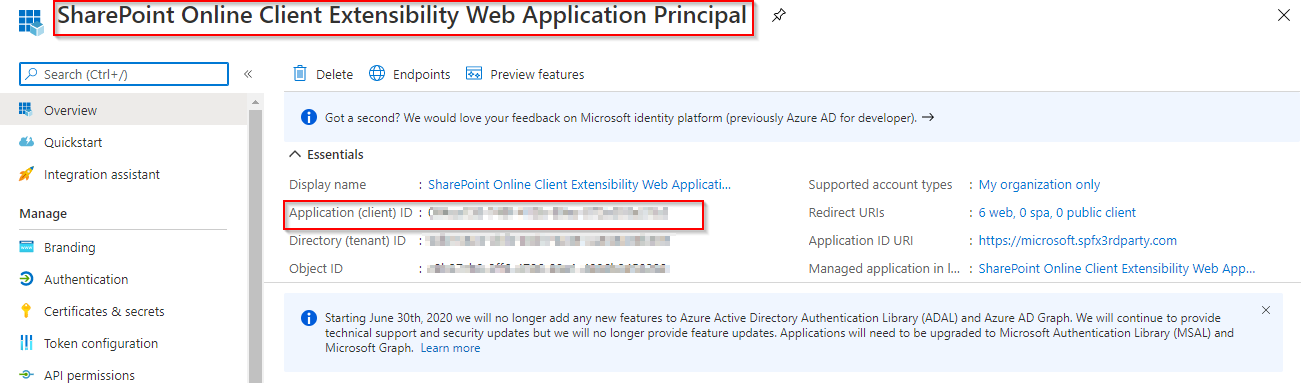
I found a simple workaround just open it (as page not a as popup) the authorization dialog box of the “SharePoint Online Client Extensibility Web Application Principal” magically comes out:
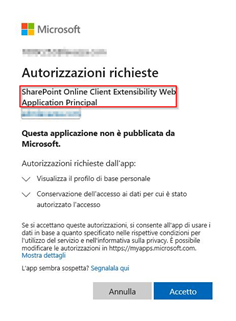
After this step all work fine as usual.
 ragu64
on 8 Dec 2020
ragu64
on 8 Dec 2020
cc @andrewconnell
Thanks, @ragu64 this workaround works, I have also opened a ticket to Microsoft which suggests following this workaround, as IE11 and Edge Legacy are no longer supported.
giuleon
on 11 Dec 2020
@giuleon said:
I have also opened a ticket to Microsoft which suggests following this workaround, as IE11 and Edge Legacy are no longer supported.
Uh... that's not correct... unless I'm missing something, the last public statement was that IE11 was supported through August 17, 2021: https://techcommunity.microsoft.com/t5/microsoft-365-blog/microsoft-365-apps-say-farewell-to-internet-explorer-11-and/ba-p/1591666
Teams dropped IE11 support at the end of NOV 2020...
Ping'd MSFT for clarification...
andrewconnell
on 11 Dec 2020
That's true @andrewconnell but I understood between the lines that they won't invest resources and time for this problem, which will vanish with the use of modern browsers.
I can forward my request to the product team but then, they will decide if proceed or not and I have bad experience with that.
The best thing probably is to migrate quickly from Edge Legacy to Chromium.
Thank you both for your help.
giuleon
on 11 Dec 2020
Confirmed with MSFT that IE11 is supported thru August 2021 as I linked above.
@giuleon said:
they won't invest resources and time for this problem, which will vanish with the use of modern browsers
Supported = should be fixed if there's a bug... so if there's a bug with IE11, that's something that should get bugged. But once past the August 2021 date, that's no longer the case.
andrewconnell
on 12 Dec 2020
@andrewconnell this is Microsoft's answer:

The facts do not match, for me, this is unacceptable, from my point of view this is just a reminder to tell you "come on go fast in order to switch".
Sure I can forward the bug but don't wait months.
giuleon
on 14 Dec 2020
@giuleon what is this a screenshot of? If it's a support ticket, can you share the ticket number?
andrewconnell
on 14 Dec 2020
@andrewconnell Case #:23118490
giuleon
on 14 Dec 2020
@giuleon what is this a screenshot of? Is that a response from MSFT support?
andrewconnell
on 14 Dec 2020
@andrewconnell Yes exactly
giuleon
on 14 Dec 2020
@ragu64 , that consent dialog (in Italiano :-) ) should show in every browser and it should show only if the permissions applied to that application principal were not admin consented... which would happen if you used a different way to register permissions than the API Management page from the SPO tenant admin.
so if:
- you declared end point and scopes in the SPFx solution
- and deployed the package in the app catalog
- and approved the scopes using the API management page in SPO tenant admin
that dialog should never appear ...
 lucabandMSFT
on 14 Dec 2020
lucabandMSFT
on 14 Dec 2020
@ragu64 and @giuleon
- Did we test this with other browsers and it was ONLY broken with IE or didn't work it other either?
- Did you confirm that the permissions were successfully approved in SharePoint tenant admin API management page?
Thanks for providing additional context. Of course comment from support related on fixing should never be provided to you. We'll follow up on that separately offline.
 VesaJuvonen
on 14 Dec 2020
VesaJuvonen
on 14 Dec 2020
@VesaJuvonen It has not been working on IE11 and Edge Legacy for a few days now.
The permissions were approved about a year ago.
giuleon
on 14 Dec 2020
@giuleon, grazie. Is the repro as simple as create an SPFx solution that requires access to any graph resource, approve it in the way I mentioned before and render that in IE 11?
I want to build a repro but I want to be sure I nail down the scenario.
lucabandMSFT
on 14 Dec 2020
@lucabandMSFT prego, yes exactly, we created an SPFx web part that consume a secured Azure Function and the permissions are approved in the SP admin center. It all worked on IE11 and Edge Legacy until a few days ago. Let me know if you need additional information.
giuleon
on 14 Dec 2020
ok.. thanks. let me give it a try.....
lucabandMSFT
on 14 Dec 2020
mmmh.. I'm really missing something here.
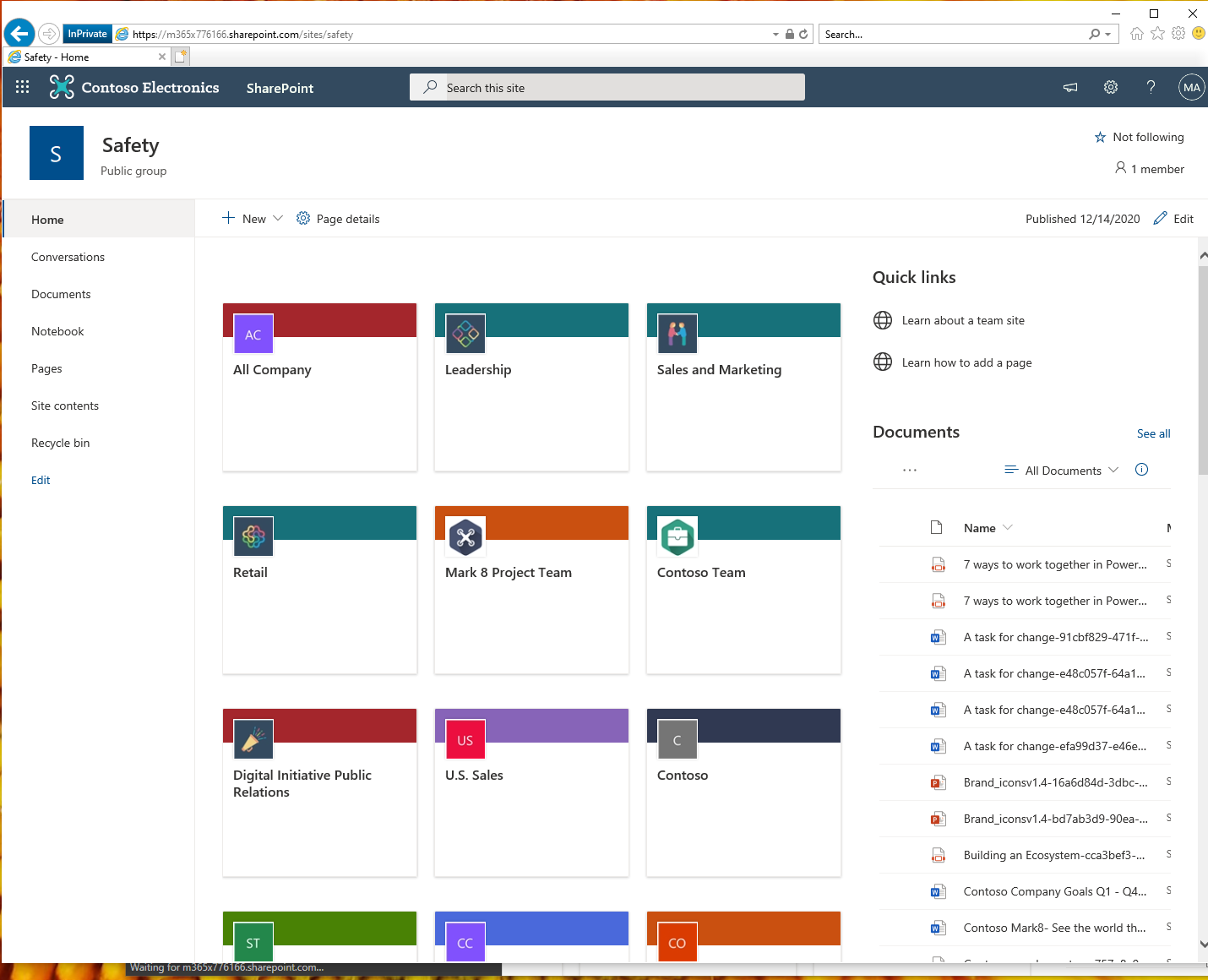
This is a test I just did in a production tenant using the React My Groups example from PnP that makes a Graph call to access the groups you joined. As you can see I'm using IE 11(in private browsing)
lucabandMSFT
on 14 Dec 2020
@lucabandMSFT We have solved this problem for all users (IE11 and Edge Legacy) by granting the admin consent tenant wide using this URL:
https://login.microsoftonline.com/[TENANTID]/oauth2/v2.0/authorize?response_type=id_token&scope=openid+profile&client_id=[SharePoint Online Client Extensibility Web Application Principal APP
-ID]

Thank you all for your commitment
giuleon
on 15 Dec 2020
@lucabandMSFT Graph API calls works in IE11 but if you create an Azure Function or App Service with OAUTH2/OPENIDC the issue comes out. Graph API seems not using "SharePoint Online Client Extensibility Web Application Principal" service to consume it instead third part API really do it. I think it's a IE 11 security behavior on an IFRAME.
It's a temporary workaround to helps IT department migration to a modern browser.
ragu64
on 15 Dec 2020
Just to follow up on this as this seems so off the normal behavior... so would need to understand few things on the setup still.
- As long as permissions are granted for the custom API in the tenant admin UX and you are using AadHttpClient provided by the SPFx context - there should not be any issues on the approval which was also tested in our side
So - this seems to indicate that something is different than for the basic scenario, so we would need more details on used code and how the Azure AD calls are performed if possible.
@giuleon - that URL seems to indicate that the needed permission is not granted - as otherwise SharePoint Online Client Extensibility Web Application Principal would be already consented for the call... which is again indicating that something is different than for the typical scenario... and would need to understand more details. Is this happening consistently with all tenants or only in one? - could be a hiccup in that one.
@ragu64 - Permission granting model is the same for Graph API or custom API calls... where both require that you accept permissions in the tenant admin UX. Third party APIs could be also approved there for the call. If you however use specifically some other model, then the iframe issues with IE11 could indeed cause challenges.
Can we get more detailed on the used code and approval process? - thanks.
VesaJuvonen
on 16 Dec 2020
@VesaJuvonen we didn't use a different model for the custom API. Third-party APIs has been approved for the call many months ago. Until a few weeks ago everything worked perfectly. For all internet browsers everything is working fine if they weren't the right permissions it wouldn't work for them I guess.
I reiterate that this is just a simple workaroud (not a best practice) for IE 11 users to give the IT departments collegues more time to migrate to Edge Chromium Browser.
Thank you
ragu64
on 17 Dec 2020
thx @ragu64 - we have seen some IE11 issues recently related on the iframe and this could be related to those as the symptoms are the same. This issue is related on security fix which we needed to apply also in SharePoint side, but in this case the page which is in the iframe is not owned by us... but my prediction is that root cause could be the same...
In SharePoint side we were forced to add specific security measures for some o the iframed pages, which then have issues on the IE11 side... I can't confirm this easily, but what seemed to happen here is that most likely the Azure AD hosted page used in the iFrame have been updated within past week with he same fix... which then impacts IE11.
This is currently a theory, but it would explain the experience you are seeing here.
VesaJuvonen
on 17 Dec 2020
Hi @VesaJuvonen just to answer you we had that problem only on the productive Tenant, at the beginning of the year we granted admin consent for two Apps registered in the AAD, all worked fine in every browser but about 25 days ago we got the error mentioned in Edge Legacy and IE11.
giuleon
on 22 Dec 2020
Related issues
 waldekmastykarz
·
3Comments
waldekmastykarz
·
3Comments
 mikeparkie
·
3Comments
waldekmastykarz
·
3Comments
mikeparkie
·
3Comments
waldekmastykarz
·
3Comments
 jonthenerd
·
3Comments
jonthenerd
·
3Comments
jonthenerd
·
3Comments
jonthenerd
·
3Comments
Most helpful comment
@lucabandMSFT We have solved this problem for all users (IE11 and Edge Legacy) by granting the admin consent tenant wide using this URL:
https://login.microsoftonline.com/[TENANTID]/oauth2/v2.0/authorize?response_type=id_token&scope=openid+profile&client_id=[SharePoint Online Client Extensibility Web Application Principal APP
-ID]
Thank you all for your commitment