Sp-dev-docs: themeProvider.tryGetTheme does not seem to work in FullPage mode (reopen)
Category
- [x] Question
- [ ] Typo
- [ ] Additional article idea
This is basically a duplicate of the issue that was closed because of inactivity. Now with a bit more details.
https://github.com/SharePoint/sp-dev-docs/issues/5075
The only missing in the original description was that the sample code is not working for app page web parts.
I.e. if a web part is placed as "single-page" web part, the provider returns "undefined" and then the callback is never called.
Important:
In the web part manifest, both supportsFullBleed and supportsThemeVariants should be set to "true". also, the
And the web part should be placed as single-page web part ("supportedHosts": ["SharePointWebPart", "SharePointFullPage"])
Expected or Desired Behavior
The tutorial on https://docs.microsoft.com/en-us/sharepoint/dev/spfx/web-parts/guidance/supporting-section-backgrounds does not work in my webpart.
I expect the provider to return theme in either case, i.e. even if supportsFullBleed is set to true and the web part is the only part on the page (i.e. hosted using "SharePointFullPage")
Observed Behavior
The tryGetTheme method returns undefined:
// If it exists, get the theme variant
this._themeVariant = this._themeProvider.tryGetTheme();
Secondly, the themeChangedEvent is never triggered (when changing the theme in the SharePoint user interface):
// Register a handler to be notified if the theme variant changes
this._themeProvider.themeChangedEvent.add(this, this._handleThemeChangedEvent);
If there is a particular reason for this behavior, and this is not a bug/typo, would be happy to hear it 😃
 nbelyh
All 14 comments
Thank you for reporting this issue. We will be triaging your incoming issue as soon as possible.
 msft-github-bot
on 25 Aug 2020
msft-github-bot
on 25 Aug 2020
@StfBauer you've done more with themes than me... do you have insight on this?
 andrewconnell
on 26 Aug 2020
andrewconnell
on 26 Aug 2020
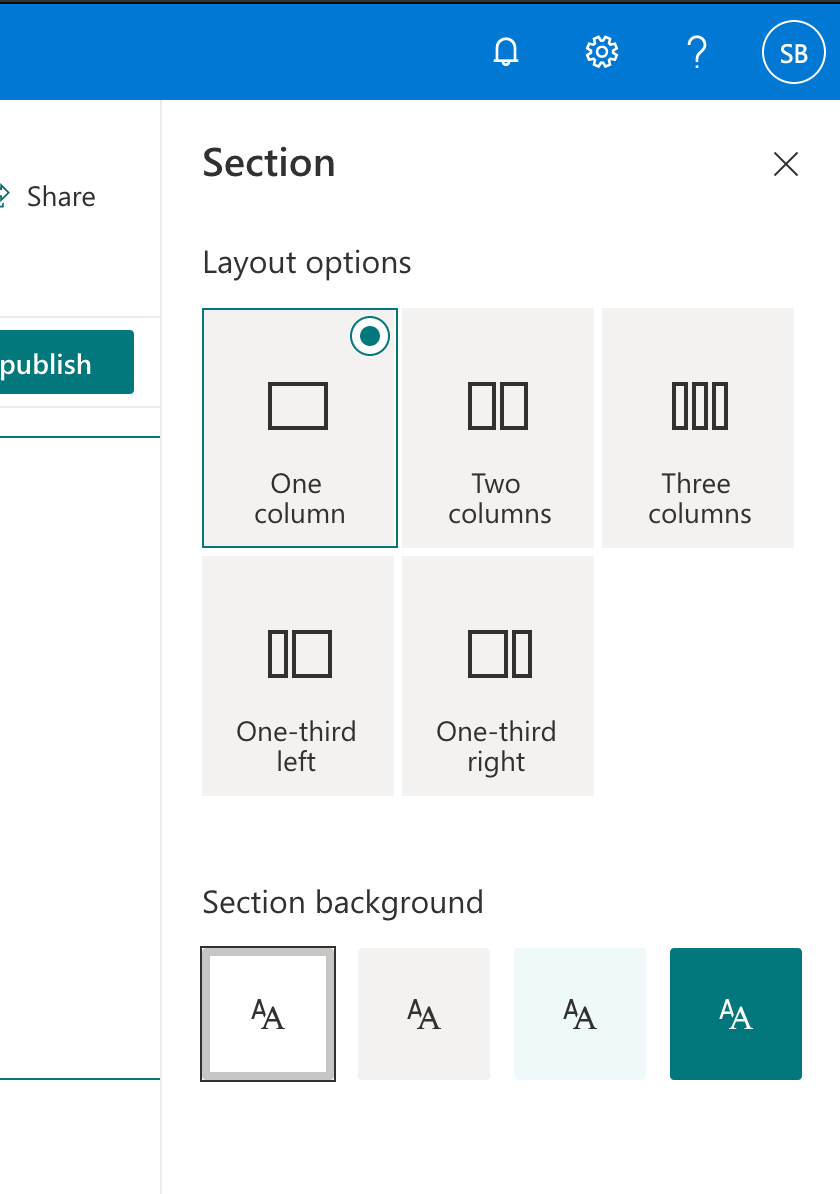
@nbelyh on the themeChangedEvent - Do you expect that it fires when you change the overall theme of the page.
Option 1:

Or when you change it on the section background:
 StfBauer
on 27 Aug 2020
StfBauer
on 27 Aug 2020
@StfBauer
I was expecting it to fire for overall theme change (1)... But actually in both cases would be good probably 😉
Maybe there is another way to monitor theme change? I'm thinking about monitoring window.__themeState__.theme maybe?
But this looks more like a workaround than a solution...
Unfortunately I actually need programmatic access, and can't use static theme classes (to set colors for an embedded third-party component)
nbelyh
on 27 Aug 2020
From my testing, it actually fires on both cases but the challenging part is that the whole documentation is not useful for development yet.
The whole code of the documentation only covers the fact that you can change specific colours of your web part when you do inline style and use CSS-In-JSS. Last option only a few bought in and most people don't use it because it is inefficient and comes with a performance hit. Inside Fluent UI this is also discussed if CSS in JS in useful in future.
The whole story missing on this documentation is the part of CSS/SASS only. For this, you don't need to use this JavaScript magic (None of the JavaScript in the documentation, maybe for some Fluent UI component but doubtable).
You have to assign the correct semantic slot in your CSS. At time commenting this documentation is highly missing. I did some testing yesterday and to apply semantic slots. To make the different color sections and theming now working on existing web parts you need to change your CSS. This needs to be considered also on future implementations.
Pre-Fluent UI Semantic slots the theming engine worked like this:
  .button {
    // Our button
    text-decoration: none;
    height: 32px;

    // Primary Button
    min-width: 80px;
    background-color: $ms-color-themePrimary;
    border-color: $ms-color-themePrimary;

    // Basic Button
    outline: transparent;
    position: relative;
    font-family: "Segoe UI WestEuropean","Segoe UI",-apple-system,BlinkMacSystemFont,Roboto,"Helvetica Neue",sans-serif;
    -webkit-font-smoothing: antialiased;
    font-size: $ms-font-size-m;
    font-weight: $ms-font-weight-regular;
    border-width: 0;
    text-align: center;
    cursor: pointer;
    display: inline-block;
    padding: 0 16px;

    .label {
      font-weight: $ms-font-weight-semibold;
      font-size: $ms-font-size-m;
      height: 32px;
      line-height: 32px;
      margin: 0 4px;
      vertical-align: top;
      display: inline-block;
    }
  }
And would have been translate into this css:
.themeColorTest_2b269fec .button_2b269fec {
  text-decoration: none;
  height: 32px;
  min-width: 80px;
  background-color: "[theme:themePrimary, default: #0078d4]";
  border-color: "[theme:themePrimary, default: #0078d4]";
  outline: transparent;
  position: relative;
  font-family: "Segoe UI WestEuropean", "Segoe UI", -apple-system, BlinkMacSystemFont, Roboto, "Helvetica Neue", sans-serif;
  -webkit-font-smoothing: antialiased;
  font-size: 14px;
  font-weight: 400;
  border-width: 0;
  text-align: center;
  cursor: pointer;
  display: inline-block;
  padding: 0 16px
}

.themeColorTest_2b269fec .button_2b269fec .label_2b269fec {
  font-weight: 600;
  font-size: 14px;
  height: 32px;
  line-height: 32px;
  margin: 0 4px;
  vertical-align: top;
  display: inline-block
}
The only way to achieve this now even with section support is manual.
  .button {
    // Our button
    text-decoration: none;
    height: 32px;

    // Primary Button
    min-width: 80px;
    background-color: "[theme:primaryButtonBackground]";
    color: "[theme:primaryButtonText]";
    border-color: "[theme:primaryButtonBorder]";

    // Basic Button
    outline: transparent;
    position: relative;
    font-family: "Segoe UI WestEuropean","Segoe UI",-apple-system,BlinkMacSystemFont,Roboto,"Helvetica Neue",sans-serif;
    -webkit-font-smoothing: antialiased;
    font-size: $ms-font-size-m;
    font-weight: $ms-font-weight-regular;
    border-width: 0;
    text-align: center;
    cursor: pointer;
    display: inline-block;
    padding: 0 16px;

    .label {
      font-weight: $ms-font-weight-semibold;
      font-size: $ms-font-size-m;
      height: 32px;
      line-height: 32px;
      margin: 0 4px;
      vertical-align: top;
      display: inline-block;
    }
  }
So you have to access for example the primaryButtonBackground directly via a theme slot:
.button {
    background-color: "[theme:primaryButtonBackground]";
}
The key here is the primaryButtonBackground sadly as far as I know there are no SASS variables define for that yet.
But here are the results of those adjustments:
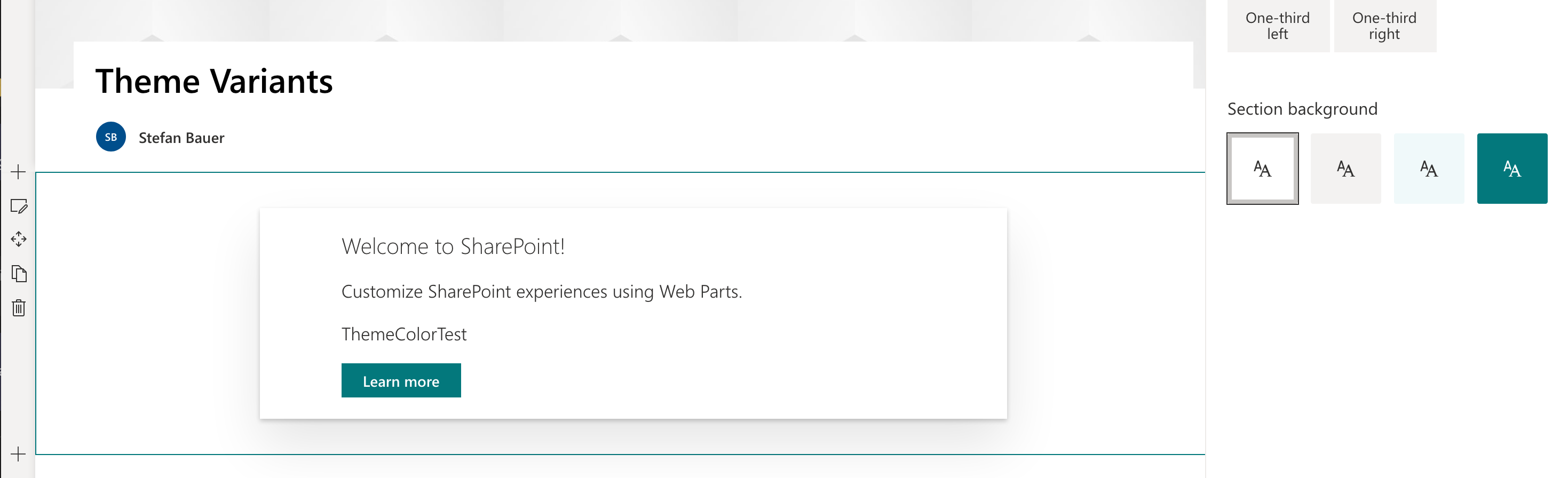

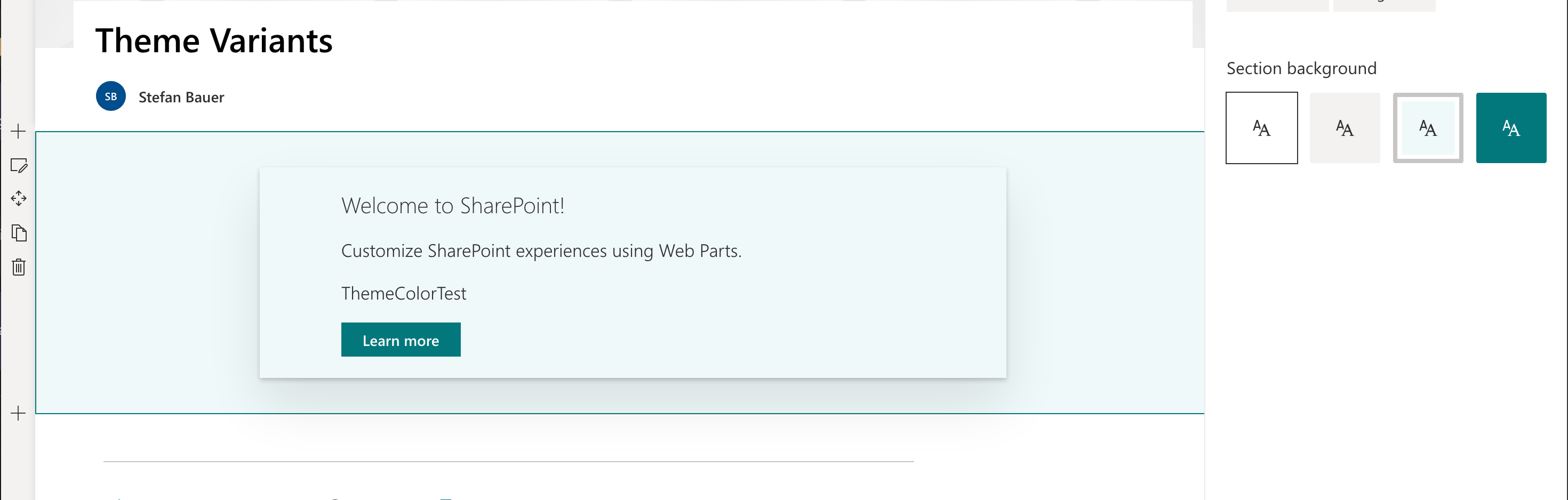
and a more funny result of:

Hope this helps you in your development. Sadly haven't tested it yet in a full bleed column but for basic web part zones it works.
So for webparts that actually used CSS you don't even need to add any JavaScript as I tested it. The only thing to set is supportsThemeVariants: true in the manifest.
The documentation you shared before covers I guess some small usage scenarious where all the CSS is written in JavaScript but neither for ReactJS or HTML web parts it offers a valid an valuable apporach. For Fluent UI which only provides some compontent that could be used throughout our daily development or going full in on a pre-subscribed CSS-In-JavaScript. The documented approach seems to fit perfectly.
I hope someone could review the documentation.
Thank you @nbelyh for sharing your question because it allowed me to dig deeper into that matter. Hope this helps.
StfBauer
on 27 Aug 2020
@StfBauer
Thank you so much for the detailed answer. However, my problem is exactly "full bleed" - please check the first line in issue description 😄. In "normal" scenario it works for me as well (the event fires in both cases). Please note that in "full bleed" there are no "variants", as far as I understand (?), so only "site" theme event could work (for me, it does not, like I reported). Maybe this is the problem (as soon as there are no "variants", the whole system of notifications goes down?)
I have a third-party library that allows to specify only COLORS, not css styles or anything like this. So I can't really use anything like [theme: ]... and so on. I basically just need pure colors, the current ones 😄. In principle window.__themeState__.theme does provide what I need. But it seems there is no event about change (in full bleed, yes)
nbelyh
on 27 Aug 2020
Full-Bleed top section or as pre-published on an application page of some sort?
Now that I have my sample project I can test all scenarious easily. ;)
So we are not talking about SharePointFullPage?
"supportedHosts": ["SharePointWebPart", "SharePointFullPage"],
We are talking about the full bleed section, right?
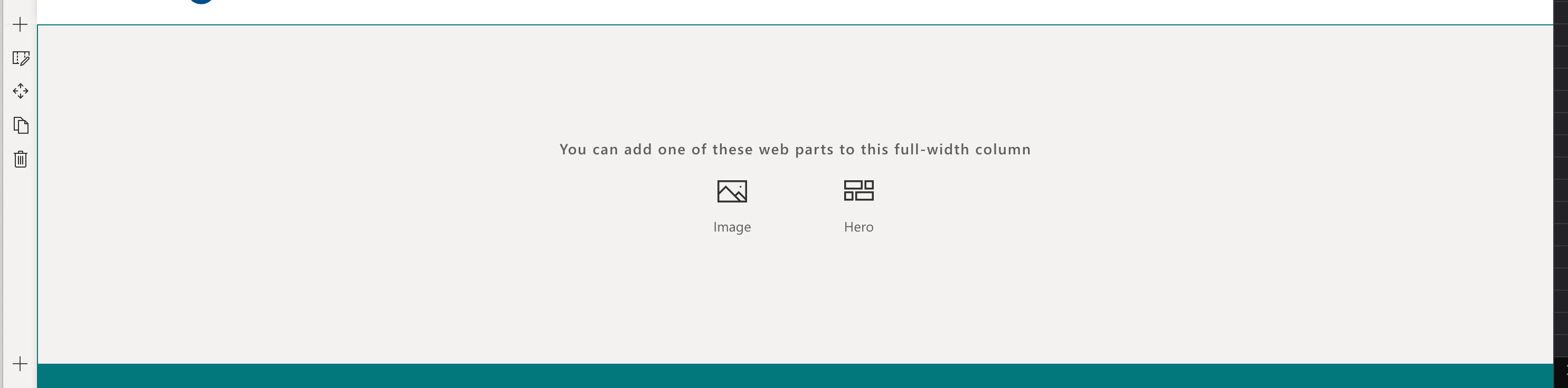
What do you need that is not in the window.__themeState__.theme - The same is in the variant styles and nothing else? ;)
StfBauer
on 27 Aug 2020
@StfBauer
Yes, I mean application page, sorry for confusion. I'm new to this so may be using wrong terms ☺️ One can create that from home, then "New", then "App". There are no variants available at all (and no settings in general).
https://docs.microsoft.com/en-us/sharepoint/dev/spfx/web-parts/single-part-app-pages
Looks like I mixed up full bleed and app page
I will update the description and attach an example for convenience.
nbelyh
on 27 Aug 2020
@StfBauer
=== UPDATE ===
I have created a sample project and put steps to reproduce the issue with theme below.
It has these settings in web part config:
  "supportedHosts": ["SharePointWebPart", "SharePointFullPage"],
  "supportsFullBleed": true,
  "supportsThemeVariants": true,
The example can be found here (it is a stock HelloWorld web part generated with yeoman with these specified settings)
https://github.com/nbelyh/spfx-theme-issue
The important changes are highlighted:
To reproduce:
- download the project and build:
npm install
gulp bundle --ship
gulp package-solution --ship
This should produce .spfx package.
create (modern) SharePoint team site (as single-page apps can't be tested with workbench)
Upload the built .spfx solution to the site app catalog, and deploy for this site.
Add the .spfx app for the site (open home page, click New > Apps, then select "from your organization" then app
uploaded (spfx-issue-client-side-solution)Go to site home page, click New > Page > App and select the upload app ("HelloWorld". This should produce a single-app page.
Save the page.
Open the Dev Tools console and check the messages. It should report what _tryGetTheme() returns. The result is expected to be not undefined. Now the log produces:
```
_themeProvider.tryGetTheme returned undefined
````- Try changing the theme and observe if there is message in the console about the event being called.
Please note that if you use the HelloWorld in a normal page, all events and tryGetTheme work as expected.
nbelyh
on 27 Aug 2020
Thank you for sharing your example and congratulations @nbelyh - Seems like you found your first but.
Just proceed this issue further, can you please file a new issue and use bug report you can directly embed the last comment you posted here, when you fill out your issue.
I can only explain this issue like this. The code customisations I guess originate from the fact that coloured section was not supported for a long time to get branded and styled properly. Not that we have this feature it is only supported on page types that actually have this kind of mechanism.
As a side effect regular pages fire the event only on pages that support coloured sections but in addition to it fires also on overall changes.
Since App Pages don't support coloured section the event receiver is also not exposed to those type of pages, which IMO should be. I guess it do not make sense to have this just on the sessions.
If you agree I guess we can close this issue here and proceed with the new issue if this works for you. Thank you for your valuable contribution.
StfBauer
on 27 Aug 2020
@StfBauer
Thank you for checking Stefan. Yes looks like this variant theming thing was not checked against this "single page" setup.
Will create bug then in the next couple of days, and link to this issue. Would be great if it is fixed 😃
Best, Nikolay.
nbelyh
on 28 Aug 2020
@StfBauer
Created a bug as dicussed.
nbelyh
on 29 Aug 2020
Going to close this as it's referenced in the bug you submitted @nbelyh
andrewconnell
on 31 Aug 2020
Issues that have been closed & had no follow-up activity for at least 7 days are automatically locked. Please refer to our wiki for more details, including how to remediate this action if you feel this was done prematurely or in error: Issue List: Our approach to locked issues
msft-github-bot
on 8 Sep 2020
Related issues
 nanddeepn
·
3Comments
nanddeepn
·
3Comments
 waldekmastykarz
·
3Comments
StfBauer
·
3Comments
waldekmastykarz
·
3Comments
StfBauer
·
3Comments
 jonthenerd
·
3Comments
jonthenerd
·
3Comments
 mikeparkie
·
3Comments
mikeparkie
·
3Comments