Sp-dev-docs: Do you really support Node 10.X?
I originally setup my development environment a year or two back. Recently I was having issues, so I uninstalled Node and reinstalled the latest 10.X version following your instructions. I also uninstalled/installed GULP, YO, and
@microsoft/generator-sharepoint
When I attempted to use GULP, I received the following error:
"Your dev environment is running NodeJS version v10.21.0 which does not meet the requirements for running this tool. This tool requires a version of NodeJS that matches >=8.9.4 <9.0.0".
I found this reference where a user has the same issue and the response explains how to install multiple versions of Node: https://sharepoint.stackexchange.com/questions/255951/nodejs-not-compatible
https://github.com/coreybutler/nvm-windows/releases
After switching to version 8.9.4, I am able to use GULP and build my projects. Is this happening because my project is built on an older version of the SharePoint Framework?
Document Details
⚠ Do not edit this section. It is required for docs.microsoft.com ➟ GitHub issue linking.
- ID: 5bee09a8-022e-1b5a-4aab-d6e7c6216808
- Version Independent ID: 49edce1e-f2be-e989-917f-c6b389363e2f
- Content: Set up your SharePoint Framework development environment
- Content Source: docs/spfx/set-up-your-development-environment.md
- Product: sharepoint
- Technology: sharepoint-framework
- GitHub Login: @spdevdocs
- Microsoft Alias: spdevdocs
 mkeysae2
All 6 comments
Thank you for reporting this issue. We will be triaging your incoming issue as soon as possible.
 msft-github-bot
on 15 Jul 2020
msft-github-bot
on 15 Jul 2020
Hi mkeysae2,
I am using V10.21.0 for SPFx web part development. It works well here.
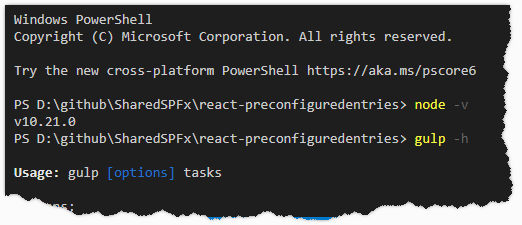
Based on the doc, v8.x.x is for SharePoint Server 2016 and v10.x.x is for SPO.
I attach the test demo here, you may have a look.
Baker Kong
Microsoft SharePoint Community Support
 kongmengfei
on 16 Jul 2020
kongmengfei
on 16 Jul 2020
Hi, yes this is because you are using an older version of SPFx. My recommendation would be to use the latest version of the SharePoint Framework. Also, if these are scenarios where you are working on different versions of SPFx, my recommendation would be to look into NVM so you can have different versions of node running on your machine.
 bcameron1231
on 16 Jul 2020
bcameron1231
on 16 Jul 2020
Thank you for the comments. It makes sense now that this issue is because we are using an older version of SPFx. I am running NVM so I can switch between versions.
mkeysae2
on 16 Jul 2020
Issues that have been closed & had no follow-up activity for at least 7 days are automatically locked. Please refer to our wiki for more details, including how to remediate this action if you feel this was done prematurely or in error: Issue List: Our approach to locked issues
msft-github-bot
on 23 Jul 2020
Issues that have been closed & had no follow-up activity for at least 7 days are automatically locked. Please refer to our wiki for more details, including how to remediate this action if you feel this was done prematurely or in error: Issue List: Our approach to locked issues
msft-github-bot
on 31 Jul 2020
Related issues
 acksoft
·
3Comments
acksoft
·
3Comments
 waldekmastykarz
·
3Comments
waldekmastykarz
·
3Comments
 nanddeepn
·
3Comments
nanddeepn
·
3Comments
 byrongits
·
3Comments
waldekmastykarz
·
3Comments
byrongits
·
3Comments
waldekmastykarz
·
3Comments