Sp-dev-docs: Public CDN Office 365 return error 406 NotAcceptable
Category
- [x] Bug
Describe the bug
Hello, since a few hours ago all requests to https://publiccdn.sharepointonline.com/ are returning error 406 (ErrorCode: 406001, ErrorMessage: "Auth header signature time is out of range", HttpStatus: "NotAcceptable")
We have a library configured as a public CDN, from which we load some style sheets and on the other hand, we have the webparts and extensions hosted in the CDN of the AppCatalog (/sites/AppCatalog/ClientSideAssets/AllItems.aspx)
Please can you confirm if it is a problem with the Office 365 CDN?
 sortegamartin
All 13 comments
Thank you for reporting this issue. We will be triaging your incoming issue as soon as possible.
 msft-github-bot
on 1 Jul 2020
msft-github-bot
on 1 Jul 2020
Same for me on a tenant without modification.
 PooLP
on 1 Jul 2020
PooLP
on 1 Jul 2020
same on our tenant, in our case most of the assets are constantly failing with 406 but some are served correctly
 dev-a11y
on 1 Jul 2020
dev-a11y
on 1 Jul 2020
Hello I have this kind of Issue,
can someone help please ?
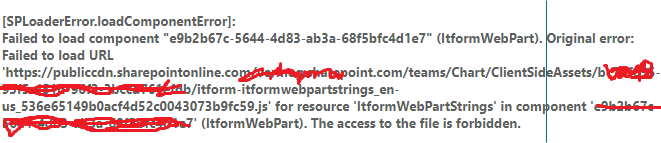
I have 403 access denied problem
 ElOmri
on 1 Jul 2020
ElOmri
on 1 Jul 2020
The same for us across 3 dev environments CDN is not returning assets.
 tomekpilat
on 1 Jul 2020
tomekpilat
on 1 Jul 2020
Same on our tenant.
 ujeenator
on 1 Jul 2020
ujeenator
on 1 Jul 2020
After I run this PowerShell script for my tenant, the problem was solved (It take effect after about 5 minutes):
Set-SPOTenant -PublicCdnEnabled $true
New-SPOPublicCdnOrigin -URL https://{my-tenant-name}.sharepoint.com/sites/appcatalog/ClientSideAssets
@ujeenator I'm getting permission denied for the second command so it's still broken for us.
tomekpilat
on 1 Jul 2020
The product team is aware of this now, and I am working with them to resolve this.
 westleyMS
on 1 Jul 2020
westleyMS
on 1 Jul 2020
@tomekpilat I was running it under global admin role
But for now all custom extensions and web-parts on my tenant are broken, and re-running the script don't help, so either it was coincidence, either CDN has broke even more
ujeenator
on 2 Jul 2020
Totally disabled CDN on my tenant:
$(Get-SPOTenant).PublicCdnOrigins
Remove-SPOPublicCdnOrigin -Identity <ids from prev command>
Set-SPOTenantCdnEnabled -CdnType Public -Enable $false
Set-SPOTenantCdnEnabled -CdnType Private -Enable $false
And re-deployed extensions and web-part from scratch, starting from AppCatalog
All .js files and other assets are loaded now directly from tenant, and it's not good for performance, but at least it works now
ujeenator
on 2 Jul 2020
The product team fixed a timestamp issue and now things should be working.
westleyMS
on 2 Jul 2020
Issues that have been closed & had no follow-up activity for at least 7 days are automatically locked. Please refer to our wiki for more details, including how to remediate this action if you feel this was done prematurely or in error: Issue List: Our approach to locked issues
msft-github-bot
on 10 Jul 2020
Related issues
 acksoft
·
3Comments
acksoft
·
3Comments
 bengtmoss
·
3Comments
bengtmoss
·
3Comments
 Ralms
·
3Comments
Ralms
·
3Comments
 ken-harris
·
3Comments
ken-harris
·
3Comments
 qrown
·
3Comments
qrown
·
3Comments
Most helpful comment
The product team fixed a timestamp issue and now things should be working.