Sp-dev-docs: Issue with defaultHoverField Row View Formatting
Category
- [x] Bug
Describe the bug
I am trying to create a custom entire row format view. Started from one of Kent's existing repo and have been able to modify it so it looks like the repo below:
ProductsResponsibilities Github Repo
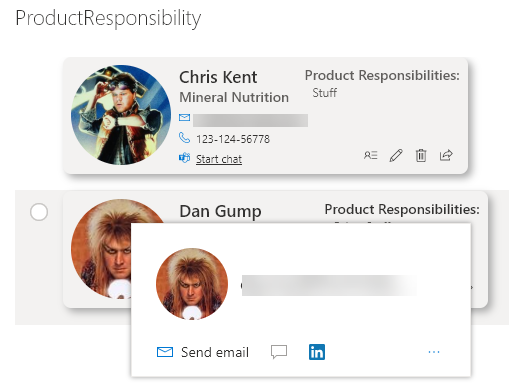
However, the first row I can see the hover mouse icon and see the profile hover but not the correct hover. Also, the hover does not work for the proceeding rows.
Steps to reproduce
- Go to the repo site above.
- Check out the example shown in the image inside the repo. When I click on the image, the hover works BUT it is showing me the wrong user.
- The repo has the required SharePoint columns (basic columns).
- To reproduce make sure to add actual users to the People column so we can reproduce the hover user issue.
Expected behavior
I need to be able to see the "User" assigned for that row when I click on the image icon.
Environment details (development & target environment)
- OS: Windows 10
- Target Environment: SharePoint Online
- Framework: N/A
- Browser(s): Chromium Edge [Version 83.0.478.37 (Official build) (64-bit)]
- Tooling: VS Code
- Additional details: None
Additional context
None
Thanks for your contribution! Sharing is caring.
 MedinaFab
All 14 comments
Thank you for reporting this issue. We will be triaging your incoming issue as soon as possible.
 msft-github-bot
on 28 May 2020
msft-github-bot
on 28 May 2020
Hi, thanks for the comment and providing the source to your issue! I have repro'd your problem and it looks like it is because the OOTB DefaultHoverCard is positioned as absolute, and the root row div "ms-List-cell" changes from position:relative to position:static when applying formatting.
Unfortunately, we have no control over the rendering of the root div "ms-List-cell" using JSON formatting and this is controlled from Microsoft.
I personally agree this is a bug.
 bcameron1231
on 28 May 2020
bcameron1231
on 28 May 2020
Hi, thanks for the comment and providing the source to your issue! I have repro'd your problem and it looks like it is because the OOTB DefaultHoverCard is positioned as absolute, and the root row div "ms-List-cell" changes from position:relative to position:static when applying formatting.
Unfortunately, we have no control over the rendering of the root div "ms-List-cell" using JSON formatting and this is controlled from Microsoft.
I personally agree this is a bug.
@bcameron1231 - Do you suggest an alternative? I do not mind if the DefaultHoverCard is in a different section as an icon link or in the user's display name. I tried in the display name and also experienced same issue.
MedinaFab
on 28 May 2020
The alternative would be to use tile layout instead... because those are positioned relative OOTB. The issue you have, is the default view items aren't positioned relative, so your absolute positioned children hover cards are overlapping onto each other.
You could switch to a Tiles layout and it would work for you. For more information on tile layout, you can go to the view formatting docs. https://docs.microsoft.com/en-us/sharepoint/dev/declarative-customization/view-formatting
I've attached a gist using your layout, but in a tile format. (some css work may be required for positioning). Maybe this will work for your use case.
https://gist.github.com/bcameron1231/23bf871d197c8802bb19d2d6d41c90d7
bcameron1231
on 29 May 2020
The alternative would be to use tile layout instead... because those are positioned relative OOTB. The issue you have, is the default view items aren't positioned relative, so your absolute positioned children hover cards are overlapping onto each other.
You could switch to a Tiles layout and it would work for you. For more information on tile layout, you can go to the view formatting docs. https://docs.microsoft.com/en-us/sharepoint/dev/declarative-customization/view-formatting
I've attached a gist using your layout, but in a tile format. (some css work may be required for positioning). Maybe this will work for your use case.
https://gist.github.com/bcameron1231/23bf871d197c8802bb19d2d6d41c90d7
Thanks @bcameron1231! The reason I am staying away from Tiles is I can't set these as default or render this as default on a page. Unless you know of a workaround? Do you know by when this feature will roll out?
MedinaFab
on 29 May 2020
I do not unfortunately, I wish I could be of more help!
bcameron1231
on 29 May 2020
@thechriskent Any thoughts on this thread?
bcameron1231
on 29 May 2020
I agree this looks like a bug. When "hideSelection": false things work as expected. So the work around until this bug is fixed is to enable row selection (which will cause other issues with width that will have to be accounted for).
 thechriskent
on 29 May 2020
thechriskent
on 29 May 2020
Thanks for reporting this @MedinaFab. Thanks @thechriskent @bcameron1231 for providing your inputs. We will take a look at this and provide a fix soon.
 shagra-ms
on 10 Jun 2020
shagra-ms
on 10 Jun 2020
Hi, I have a similar issue that I don't know if could be related. I'm using the class "ms-bgColor-themeLighter--hover" in a list view formatting that was correctly working and I have noticed this week that it is not being applied. I also have an "a" element with a link that does not work either anymore. In case it can help, I put here a minimum sample that can be tested in any list:
{
    "schema": "https://developer.microsoft.com/json-schemas/sp/view-formatting.schema.json",
    "tileProps": {
        "hideSelection": true,
        "width": "150",
        "height": "150",
        "formatter": {
            "elmType": "div",
            "style": {
                "padding": "8px",
                "border": "1px solid #ababab"
            },
            "attributes": {
                "class": "ms-bgColor-neutralLighterAlt ms-bgColor-themeLighter--hover"
            },
            "children": [{
                "elmType": "a",
                "attributes": {
                    "href": "https://www.google.es",
                    "target": "_blank"
                },
                "txtContent": "[$Title]"
            }]
        }
    }
}
And one last thing, changing "hideSelection" to false does not solve the problem in this case.
 AsunSanLo
on 9 Jul 2020
AsunSanLo
on 9 Jul 2020
@AsunSanLo I am unable to repro the issue stated by you. Also, it seems unrelated to the current issue related to defaultHoverField. Can you please report a separate issue and add more details, that can help us repro this locally?
shagra-ms
on 9 Jul 2020
Ok, I'll do it, thanks for the quick answer!
AsunSanLo
on 9 Jul 2020
@MedinaFab @thechriskent @bcameron1231 the issue has been fixed. Please let me know if you are still facing this issue. Thanks!
shagra-ms
on 5 Aug 2020
Issues that have been closed & had no follow-up activity for at least 7 days are automatically locked. Please refer to our wiki for more details, including how to remediate this action if you feel this was done prematurely or in error: Issue List: Our approach to locked issues
msft-github-bot
on 12 Aug 2020
Related issues
 Ralms
·
3Comments
Ralms
·
3Comments
 ken-harris
·
3Comments
ken-harris
·
3Comments
 bengtmoss
·
3Comments
bengtmoss
·
3Comments
 jonthenerd
·
3Comments
jonthenerd
·
3Comments
 patrick-rodgers
·
3Comments
patrick-rodgers
·
3Comments