Sp-dev-docs: Connect-SPOService : Could not Connect to Sharepoint Online
Category
- Connect-SPOService : Could not connect to Sharepoint online
Describe the bug
I am following the tutorial to Deploy the WebPart in Office 365 CDN (Host your client-side web part from Office 365 CDN (Hello World part 4)), As per Point 2, when i try to Run the Command, Connect-SPOService -Url https://contoso-admin.sharepoint.com, in the PowerShell
Steps to reproduce
- Open up the PowerShell
- Install the Module using command - Install-Module -Name Microsoft.Online.SharePoint.PowerShell
- Run the Command - Connect-SPOService -Url https://contoso-admin.sharepoint.com, got the below error.
- See error:
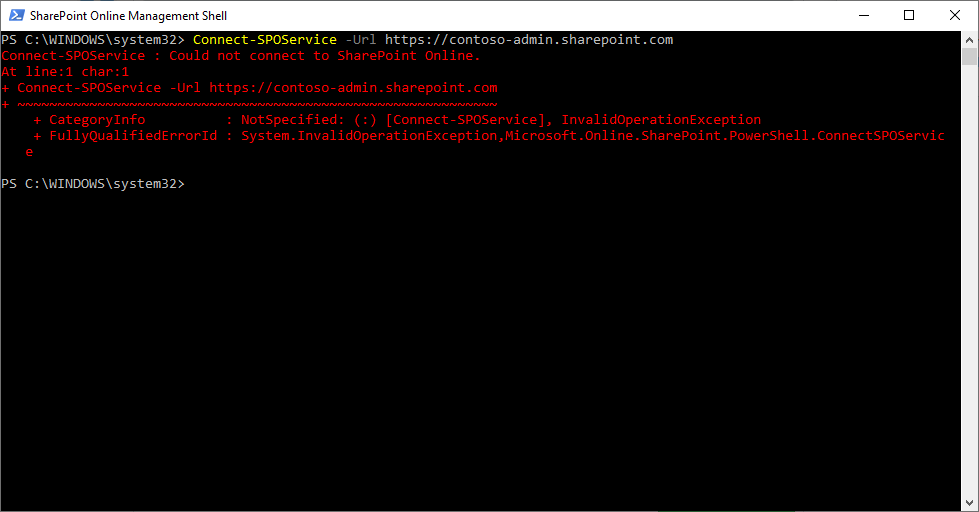
Connect-SPOService : Could not connect to SharePoint Online.
Expected behavior
It should Connect so that, we can run the next steps to Host the webpart.
Environment details (development & target environment)
Development Environment
- OS : Windows 10
- Target Enviroment : SharePoint Online
- Framework : Node.js v10
- Browser : Chrome v81
- Tooling : VS Code
Additional context
Thanks for your contribution! Sharing is caring.
 kboovaragan
All 15 comments
Thank you for reporting this issue. We will be triaging your incoming issue as soon as possible.
 msft-github-bot
on 30 Apr 2020
msft-github-bot
on 30 Apr 2020
Just for clarification, are you replacing the https://contoso-admin.sharepoint.com with your tenant URL? Contoso-admin is just for the sample. You will want to use the URL of your SharePoint Admin Center.
 bcameron1231
on 30 Apr 2020
bcameron1231
on 30 Apr 2020
Okay, I suspected it, but the instructions given in that page, never had
this info, so I was bit confused.
Let me try it again with my url and let you know, if I face any issues...
Thanks for the prompt response...
On Thu, Apr 30, 2020, 10:39 PM Beau Cameron notifications@github.com
wrote:
Just for clarification, are you replacing the https://contoso-admin.sharepoint.com
https://contoso-admin.sharepoint.com with your tenant URL?
Contoso-admin is just for the sample. You will want to use the URL of your
SharePoint Admin Center.—
You are receiving this because you authored the thread.
Reply to this email directly, view it on GitHub
https://github.com/SharePoint/sp-dev-docs/issues/5645#issuecomment-621984351,
or unsubscribe
https://github.com/notifications/unsubscribe-auth/ABR3AKBDH3M6U7UTRALSBK3RPGWDNANCNFSM4MVXWLEQ
.
kboovaragan
on 30 Apr 2020
Thanks Andrew, for the update.
Can you let me know the correct forum with URL, where i can get help for
the issues that i get when following the MS tutorial to setup Dev
environment? and create sharepoint webparts, i have few clarifications ,
issues, that i might need some support/help, to move forward in my learning.
Warm Regards,
Krishnasamy.
On Fri, May 1, 2020 at 2:05 AM Andrew Connell notifications@github.com
wrote:
Hi @kboovaragan https://github.com/kboovaragan this repo is for
developer-specific questions... this should be posted to TechCommunity...—
You are receiving this because you were mentioned.
Reply to this email directly, view it on GitHub
https://github.com/SharePoint/sp-dev-docs/issues/5645#issuecomment-622095686,
or unsubscribe
https://github.com/notifications/unsubscribe-auth/ABR3AKBFP2GOBTRFTXAUG2DRPHOIXANCNFSM4MVXWLEQ
.
kboovaragan
on 1 May 2020
@kboovaragan I removed my comment because I realized you were asking about the steps for a specific article in the docs... its fine here.
When you create a new issue, there's a link that points to the SharePoint TechCommunity.
 andrewconnell
on 1 May 2020
andrewconnell
on 1 May 2020
Contoso is a demo domain name, need to replace with yours.
The URL format will be like this:
 Jerry0527
on 4 May 2020
Jerry0527
on 4 May 2020
Thanks for your response, I had progressed further giving my url...
Still, in the last part, where we host in CDN, it failed... Not able to
make what was the issue.
I followed the steps as given in ms site...
After packaging my solution, when I drag and drop the package into my team
site content, it was not getting copied...rather it is getting downloaded
to my download folder...
Kindly help....
On Mon, May 4, 2020, 2:03 PM Jerry_zy _MSFT notifications@github.com
wrote:
Contoso is a demo domain name, need to replace with yours.
The URL format will be like this:
https://TenantName-admin.sharepoint.com
—
You are receiving this because you were mentioned.
Reply to this email directly, view it on GitHub
https://github.com/SharePoint/sp-dev-docs/issues/5645#issuecomment-623331442,
or unsubscribe
https://github.com/notifications/unsubscribe-auth/ABR3AKAJDHPR4NULFLKUMY3RPZ4VDANCNFSM4MVXWLEQ
.
kboovaragan
on 4 May 2020
@kboovaragan, you are uploading to the wrong place, should upload into SharePoint Online Admin Center App Catalog instead of Team Site Contents.
Jerry0527
on 4 May 2020
Thanks for prompt response...
Will check accordingly
On Mon, May 4, 2020, 2:43 PM Jerry_zy _MSFT notifications@github.com
wrote:
@kboovaragan https://github.com/kboovaragan, you are uploading to the
wrong place, should upload into SharePoint Online Admin Center App Catalog
instead of Team Site Contents.—
You are receiving this because you were mentioned.
Reply to this email directly, view it on GitHub
https://github.com/SharePoint/sp-dev-docs/issues/5645#issuecomment-623350575,
or unsubscribe
https://github.com/notifications/unsubscribe-auth/ABR3AKAI4GLSMDEPWSN43BLRP2BMVANCNFSM4MVXWLEQ
.
kboovaragan
on 4 May 2020
Hello,
Good day to you.
In continuation to my learning, i am trying the tutorial, as given in MS
site, when i tried to implement the DropDown List feature, i am getting
this error... I followed all the steps as given in the MS site... Kindly
help to overcome this issue.
[image: image.png]
Warm Regards,
Krishnasamy.
On Mon, May 4, 2020 at 2:48 PM Kicha krish137@gmail.com wrote:
Thanks for prompt response...
Will check accordinglyOn Mon, May 4, 2020, 2:43 PM Jerry_zy _MSFT notifications@github.com
wrote:@kboovaragan https://github.com/kboovaragan, you are uploading to the
wrong place, should upload into SharePoint Online Admin Center App Catalog
instead of Team Site Contents.—
You are receiving this because you were mentioned.
Reply to this email directly, view it on GitHub
https://github.com/SharePoint/sp-dev-docs/issues/5645#issuecomment-623350575,
or unsubscribe
https://github.com/notifications/unsubscribe-auth/ABR3AKAI4GLSMDEPWSN43BLRP2BMVANCNFSM4MVXWLEQ
.
kboovaragan
on 6 May 2020
Seems you are meeting the new issue ? Can't see the image.
You can create a new issue if you have the new problem.
For the question in this issue
"Connect-SPOService : Could not Connect to Sharepoint Online"
Have you resolved yet ?
Jerry0527
on 6 May 2020
Okay thanks, will check again and if I have issues, will create new issue.
Thanks for prompt response.
On Wed, May 6, 2020, 3:01 PM Jerry_zy _MSFT notifications@github.com
wrote:
Seems you are meeting the new issue ? Can't see the image.
You can create a new issue if you have the new problem.
For the question in this issue
"Connect-SPOService : Could not Connect to Sharepoint Online"
Have you resolved yet ?—
You are receiving this because you were mentioned.
Reply to this email directly, view it on GitHub
https://github.com/SharePoint/sp-dev-docs/issues/5645#issuecomment-624541397,
or unsubscribe
https://github.com/notifications/unsubscribe-auth/ABR3AKGDZE37XZGLL46NLQLRQEU7XANCNFSM4MVXWLEQ
.
kboovaragan
on 6 May 2020
You can close this issue, if the error has been resolved in your side.
Thanks
Jerry0527
on 6 May 2020
Okay, this issue can be closed....
On Wed, May 6, 2020, 3:05 PM Jerry_zy _MSFT notifications@github.com
wrote:
You can close this issue, if the error has been resolved in your side.
Thanks—
You are receiving this because you were mentioned.
Reply to this email directly, view it on GitHub
https://github.com/SharePoint/sp-dev-docs/issues/5645#issuecomment-624543016,
or unsubscribe
https://github.com/notifications/unsubscribe-auth/ABR3AKFBE3TQEJDOIU6UYPDRQEVNXANCNFSM4MVXWLEQ
.
kboovaragan
on 6 May 2020
Issues that have been closed & had no follow-up activity for at least 7 days are automatically locked. Please refer to our wiki for more details, including how to remediate this action if you feel this was done prematurely or in error: Issue List: Our approach to locked issues
msft-github-bot
on 13 May 2020
Related issues
 waldekmastykarz
·
3Comments
waldekmastykarz
·
3Comments
 Ralms
·
3Comments
Ralms
·
3Comments
 bengtmoss
·
3Comments
waldekmastykarz
·
3Comments
bengtmoss
·
3Comments
waldekmastykarz
·
3Comments
 thechriskent
·
3Comments
thechriskent
·
3Comments
Most helpful comment
@kboovaragan I removed my comment because I realized you were asking about the steps for a specific article in the docs... its fine here.
When you create a new issue, there's a link that points to the SharePoint TechCommunity.