Sp-dev-docs: Add Custom font to SPFX not working
I want include custom fonts (Pharma-regular Condensed ) to my SPFX
I changed gulpfile.js as to add additional rule:
build.configureWebpack.mergeConfig({
additionalConfiguration: (generatedConfiguration) => {
generatedConfiguration.module.rules.push(
{
test: /.(woff(2)?|ttf|eot|otf)?(\?v=\d+.\d+.\d+)?$/,
loader: 'file-loader?name=/fonts/[name].[ext]',
}
);
return generatedConfiguration;
}
I created module .scss contains font-face
@font-face {
font-family: 'PharmaCond';
src: url('/assets/fonts/Pharma-BoldCond.eot'),
url('/assets/fonts/Pharma-BoldCond.woff') format('woff') ,
url('/assets/fonts/Pharma-BoldCond.ttf') format('truetype');
font-style: normal;
font-weight: bold ;
font-weight: 400 ;
}
@font-face {
font-family: 'PharmaCond';
src: url('/assets/fonts/Pharma-RegularCond.eot'),
url('/assets/fonts/Pharma-RegularCond.woff') format('woff'),
url('/assets/fonts/Pharma-RegularCond.ttf') format('truetype');
font-weight: normal ;
font-style: normal;
}
when I run gulp bundle, I couldn't find file on dist folder
does anyone have idea what is the missing part ?
 EmadKhella
All 8 comments
Thank you for reporting this issue. We will be triaging your incoming issue as soon as possible.
 msft-github-bot
on 20 Apr 2020
msft-github-bot
on 20 Apr 2020
There are some missing parts:
- In order to get recognised by webpack, the font files need to be in the lib folder first. This could be accomplished by defining a copy-static-asset.json
- The path in your SCSS seem to point to the wrong location
- The webpack file loader needs to come after the webpack scss loader
The best way to load custom fonts is to reference them from a CDN and not bundle them in. Especially it is likely that you have more the one solution/webpart that references to those font files and it can drain the performance on your frontend dramatically.
 StfBauer
on 20 Apr 2020
StfBauer
on 20 Apr 2020
There are some missing parts:
- In order to get recognised by webpack, the font files need to be in the lib folder first. This could be accomplished by defining a copy-static-asset.json
- The path in your SCSS seem to point to the wrong location
- The webpack file loader needs to come after the webpack scss loader
The best way to load custom fonts is to reference them from a CDN and not bundle them in. Especially it is likely that you have more the one solution/webpart that references to those font files and it can drain the performance on your frontend dramatically.
I created copy-static-assets.json file and added extension of the files I need and it came in lib folder now

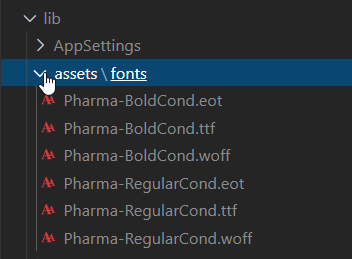
How can I point them in scss module ?

because it points to sharepoint server /assets/fonts

EmadKhella
on 22 Apr 2020
In your case, you still try to load the font from an absolute URL event if you do not explicitly include protocol and hostname. The slash always refers to the root of the website, where your fonts are not located.
In order to make this work, it needs to be relative like:
src: url("./assets/fonts/pharma-boldcond.eot")
This should then load via webpack the font relative to your output styles. So in your case when you really like to load it from within your bundle you have to configure it like this:
StfBauer
on 22 Apr 2020
In your case, you still try to load the font from an absolute URL event if you do not explicitly include protocol and hostname. The slash always refers to the root of the website, where your fonts are not located.
In order to make this work, it needs to be relative like:
src: url("./assets/fonts/pharma-boldcond.eot")This should then load via webpack the font relative to your output styles. So in your case when you really like to load it from within your bundle you have to configure it like this:
> Loading fonts with webpack
now on webpack it is loaded fonrs :

but still not reflected my form
I am working on workbench.aspx and it shows the links of fonts is localhost:4321

is that will be fixed when I deploy to Tenant ?
EmadKhella
on 22 Apr 2020
Hi all,
I reply to this post because I am struggling with a similar issue. I want to add a custom font ('Aktiv Grotesk') in my spfx project but in my workbench the font cannot be displayed.
Here are the steps I followed:
1- I copied woff and woff2 files in the same folder than my .scss module.
2- In the .scss module, I added the font-face as following:
`@import '~@microsoft/sp-office-ui-fabric-core/dist/sass/SPFabricCore.scss';
@font-face {
font-family: 'Aktiv Grotesk';
src: url('./AktivGrotesk_W_Rg.woff') format('woff'),
url('./AktivGrotesk_W_Rg.woff2') format('woff2')
}
.myComponent {
.row {
@include ms-Grid-row;
padding: 20px;
}
.column {
@include ms-Grid-col;
@include ms-sm12;
}
....`
3-I used the 'Aktiv Grotesk' font family in a office ui fabric component (Pivot). Please note that if I use a classic font-family like 'Comic sans MS' it works.
At this step my webpart should correctly display the font, right ?
Just to be sure, I followed current post and applied the following steps (but I guess these steps are only relevant for the build ?)
4- Added the following lines in the gulpfile.js
build.configureWebpack.mergeConfig({
additionalConfiguration: (generatedConfiguration) => {
generatedConfiguration.module.rules.push(
{
test: /.(woff(2)?|ttf|eot|svg)(\?v=\d+.\d+.\d+)?$/,
loader: 'file-loader?name=/fonts/[name].[ext]',
}
);
return generatedConfiguration;
}
})
5- I added the following lines in the copy-static-assets.json
{
"includeExtensions": [
"woff2","woff"
]
}
gulp serve show no error
I realy appreciate your help.
Cheers
David
 David74000
on 22 Apr 2020
David74000
on 22 Apr 2020
I wrote a blog post on how to deal with custom fonts in web pack. There are some things I recognised that it is crucial where you place your font files with my setup it worked without any problem.
StfBauer
on 5 May 2020
Closing this issue as "answered". If you encounter a similar issue(s), please open up a new issue. See our wiki for more details: Issue-List: Our approach to closed issues
msft-github-bot
on 22 May 2020
Related issues
 jonthenerd
·
3Comments
jonthenerd
·
3Comments
 waldekmastykarz
·
3Comments
waldekmastykarz
·
3Comments
 thechriskent
·
3Comments
thechriskent
·
3Comments
 bengtmoss
·
3Comments
bengtmoss
·
3Comments
 acksoft
·
3Comments
acksoft
·
3Comments
Most helpful comment
There are some missing parts:
The best way to load custom fonts is to reference them from a CDN and not bundle them in. Especially it is likely that you have more the one solution/webpart that references to those font files and it can drain the performance on your frontend dramatically.