Sp-dev-docs: "You can have each site owner do this on their behalf by using a wizard that can be launched from the user interface"
"You can have each site owner do this on their behalf by using a wizard that can be launched from the user interface"
Would be super helpful if you linked to the site describing this process. I am guessing it's this: https://docs.microsoft.com/en-us/sharepoint/dev/transform/modernize-connect-to-office365-group
Linked elsewhere, but this process does not work for any of the dozen SPO tenants I manage. Not one of them has the option to "connect to a new Office365 group" in the settings menu. What am I missing?
Document Details
⚠ Do not edit this section. It is required for docs.microsoft.com ➟ GitHub issue linking.
- ID: f5d89003-27e6-a443-e99b-5afd8f758b83
- Version Independent ID: 0ca22c7e-e6c0-0c66-3ce9-55a3f663d3c4
- Content: Modernize your classic SharePoint sites
- Content Source: docs/transform/modernize-classic-sites.md
- Product: sharepoint
- GitHub Login: @spdevdocs
- Microsoft Alias: spdevdocs
 kstario
All 8 comments
Thank you for reporting this issue. We will be triaging your incoming issue as soon as possible.
 msft-github-bot
on 17 Apr 2020
msft-github-bot
on 17 Apr 2020
Looks like a documentation bug due to the UX updating and the docs don't reflect it yet...
 andrewconnell
on 17 Apr 2020
andrewconnell
on 17 Apr 2020
To Confirm: Can you tell what kind of sites you are trying to use this feature on? This feature isn't available on publishing sites (using publishing or pages library) or sites using the following templates.
- BLANKINTERNET#0
- ENTERWIKI#0
- SRCHCEN#0
- SRCHCENTERLITE#0
- BICENTERSITE#0
- POINTPUBLISHINGHUB#0
- POINTPUBLISHINGTOPIC#0
This setting is available on all my tenants, for sites using the proper web templates
 bcameron1231
on 17 Apr 2020
bcameron1231
on 17 Apr 2020
Thanks for the reply! I may have found the core issue - the sites for which I lack the 365 group option are the "default site" and "default document library" that was created when tenant was created. Also, all are "classic experience" sites, and all are over 2 years old. I noticed they don't have the "
The URL is "
This is because I set the Library as the home page, using the classic experience editing gui.
I spun up a new tenant and notice that the default site is a Communications site. Even so, they do not have the "create Office365 Group" option either. So I guess the key takeaway is NEVER use the default site that is created when you spin up a new tenant, always make a new site so it has the "/sites/
Seems the cause of all this was using the default site that was created when the tenant was created years ago, as opposed to making a new site (thus giving the site the "/sites/ Any insight would be greatly appreciated!
kstario
on 18 Apr 2020
One other thing - my my site template ID is "STS#0"
kstario
on 18 Apr 2020
So some clarifications for you....
The root site cannot be connected to an Office 365 Group. You are correct that newer tenants have a communication site at the root. However, older tenants have option to swap out the root site with a communication site. if you want modern features on your root.
I spun up a new tenant and notice that the default site is a Communications site. Even so, they do not have the "create Office365 Group" option either.
Correct, Communication Sites cannot be connected to Office 365 Groups either.
Both of these scenarios are outlined in that link you sent in your post, you'll find this information in the "Important" section.
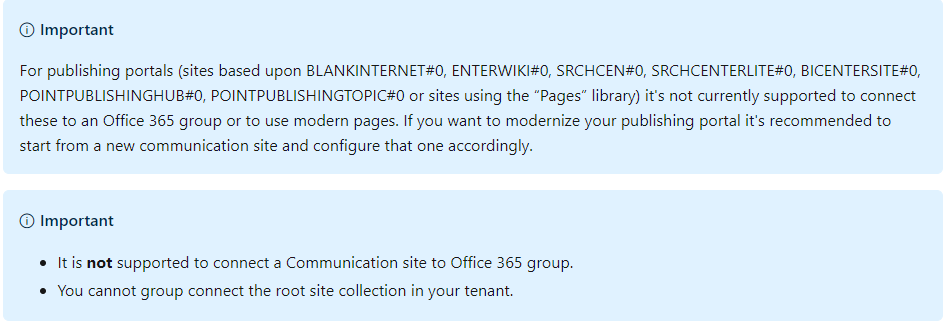
The sites that you can connect to Office 365 Groups will be sites proceeding the url "/sites/
Hope this helps.
bcameron1231
on 18 Apr 2020
Appreciate the help!
From: Beau Cameron notifications@github.com
Sent: Friday, April 17, 2020 5:18 PM
To: SharePoint/sp-dev-docs sp-dev-docs@noreply.github.com
Cc: kstario kylestone@outlook.com; Author author@noreply.github.com
Subject: Re: [SharePoint/sp-dev-docs] "You can have each site owner do this on their behalf by using a wizard that can be launched from the user interface" (#5589)
So some clarifications for you....
The root site cannot be connected to an Office 365 Group. You are correct that newer tenants have a communication site at the root. However, older tenants have option to swap out the root site with a communication site.https://docs.microsoft.com/en-us/sharepoint/modern-root-site if you want modern features on your root.
I spun up a new tenant and notice that the default site is a Communications site. Even so, they do not have the "create Office365 Group" option either.
Correct, Communication Sites cannot be connected to Office 365 Groups either.
Both of these scenarios are outlined in that link you sent in your post, you'll find this information in the "Important" section.
[image]https://user-images.githubusercontent.com/7944457/79620675-e4976700-80cd-11ea-95c6-7aa7db3daeda.png
The sites that you can connect to Office 365 Groups will be sites proceeding the url "/sites/ as long as they aren't using the web templates associated above.
Hope this helps.
—
You are receiving this because you authored the thread.
Reply to this email directly, view it on GitHubhttps://github.com/SharePoint/sp-dev-docs/issues/5589#issuecomment-615503518, or unsubscribehttps://github.com/notifications/unsubscribe-auth/ALIKTGO73TYW2D6FFKFLS5TRNDPTRANCNFSM4MKHY4WA.
kstario
on 18 Apr 2020
@andrewconnell #please-close 👍
bcameron1231
on 20 Apr 2020
Related issues
 StfBauer
·
3Comments
StfBauer
·
3Comments
 mikeparkie
·
3Comments
mikeparkie
·
3Comments
 jonthenerd
·
3Comments
jonthenerd
·
3Comments
jonthenerd
·
3Comments
jonthenerd
·
3Comments
 zerovectorspace
·
3Comments
zerovectorspace
·
3Comments
Most helpful comment
So some clarifications for you....
The root site cannot be connected to an Office 365 Group. You are correct that newer tenants have a communication site at the root. However, older tenants have option to swap out the root site with a communication site. if you want modern features on your root.
Correct, Communication Sites cannot be connected to Office 365 Groups either.
Both of these scenarios are outlined in that link you sent in your post, you'll find this information in the "Important" section.

The sites that you can connect to Office 365 Groups will be sites proceeding the url "/sites/" as long as they aren't using the web templates associated above.
Hope this helps.