Sp-dev-docs: Gulp serve after file changes not getting reflected
Category
- [x] Bug
Describe the bug
Not able to make file changes and test it in workbench
Steps to reproduce
1) Edit SCSS file of a react component
2) gulp serve as usual in sharepoint environment , using ?loadSPFX=true&debugManifestsFile=https://localhost:4321/temp/manifests.js appended to the page in SharePoint. (workbench.aspx works fine if we load up the webpart in there)
Also tried this ? debug=true&noredir=true&debugManifestsFile=https://localhost:4321/temp/manifests.js as suggested when we do a serve.
Expected behavior
Can see the changes in styles right away in the SharePoint page
Developer environment
- OS: Windows 10
- Framework: Node 10.15.3
- Browser(s): Chrome, Edge Chromium
- Tooling: VS Code, SPFx v1.10.0 (REACT component)
Just saw that the changes have no impact since today, was working fine before
Any help would be appreciated.
 rabwill
All 6 comments
Thank you for reporting this issue. We will be triaging your incoming issue as soon as possible.
 msft-github-bot
on 28 Feb 2020
msft-github-bot
on 28 Feb 2020
SCSS is unrelated to this. The issue is that when you debug with the query string you will be asked the first time:
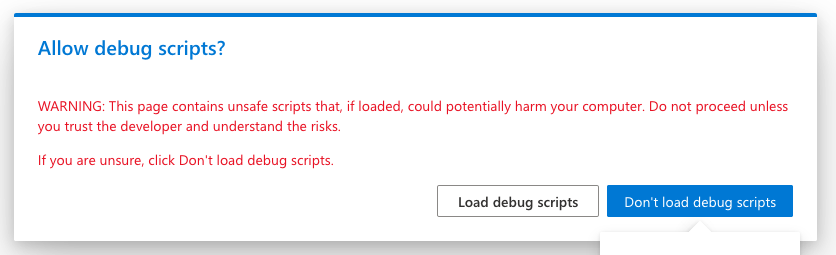
Then you accept and the first load everything is loading normally
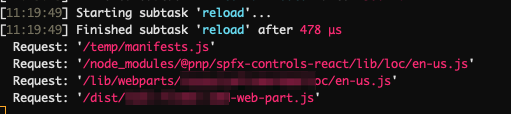
.
After you change something in your files the compilation kicks in as is should.
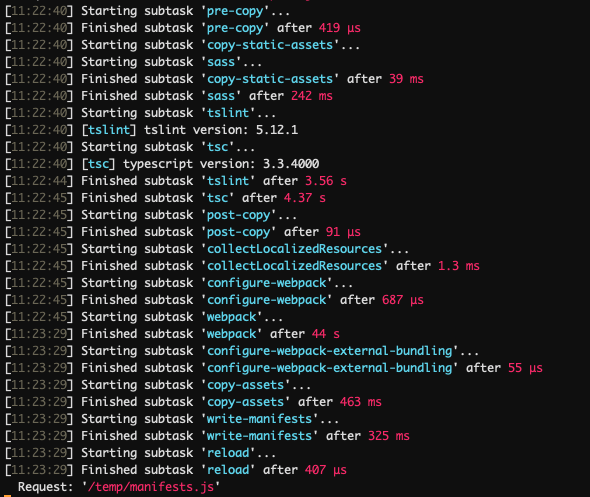
On the second load the popup does not show up anymore and only the manifest is loaded but not anything else.
The workaround is to open every time a new browser tab. This issue happens in Firefox too
Also, other people had the same issue too: https://twitter.com/jimmywim/status/1233328640580112384?s=20
 StfBauer
on 28 Feb 2020
StfBauer
on 28 Feb 2020
Yes @StfBauer noticed this in any changes as well and have updated the issue title. Previously the changes were reloaded in the same tab. Updated the browsers too, issue seen in edge as well
rabwill
on 28 Feb 2020
@rabwill There is an intermediate dirty fix to this.
When you add for development the following line of code:
// ⚠️ REMOVE THIS LINE WHEN SHIPPING ⚠️
sessionStorage.clear();
Then everything is back to normal and the web part loads as it always has been.
⚠️ THIS IS JUST A WORKAROUND - Do not try this at home ⚠️
StfBauer
on 28 Feb 2020
This is happening also on SPFx 1.9.1, clearing the sessionStorage works, thx @StfBauer.
It seems that something broke in SPO and not in SPFx.
 lemonpowah
on 28 Feb 2020
lemonpowah
on 28 Feb 2020
This is working now today . I am getting the prompts and changes reflected
Browser : MS edge (chromium)
rabwill
on 3 Mar 2020
Related issues
 mikeparkie
·
3Comments
mikeparkie
·
3Comments
 patrick-rodgers
·
3Comments
patrick-rodgers
·
3Comments
 karishmaTCS
·
3Comments
karishmaTCS
·
3Comments
 bengtmoss
·
3Comments
bengtmoss
·
3Comments
 jonthenerd
·
3Comments
jonthenerd
·
3Comments
Most helpful comment
@rabwill There is an intermediate dirty fix to this.
When you add for development the following line of code:
Then everything is back to normal and the web part loads as it always has been.
⚠️ THIS IS JUST A WORKAROUND - Do not try this at home ⚠️