Sp-dev-docs: Filtering in Office Fabric UI React
Hi Team,
I am using SPFX with React and using the Office fabric UI for design. As of now I am able to add drop down icon near to the column header in Detailslist by using ColumnActionsMode.hasDropdown.
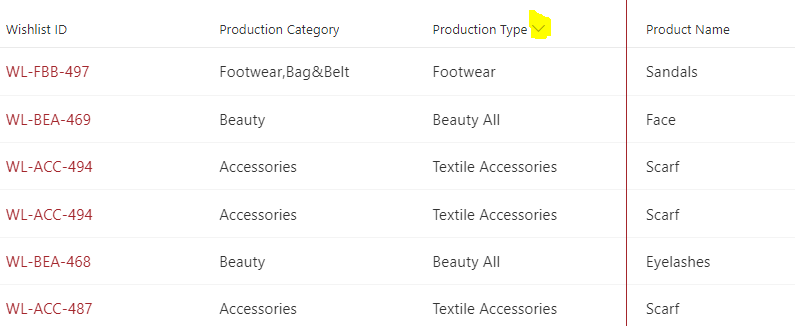
I want to show the drop down menu by clicking on the drop down icon as like below image
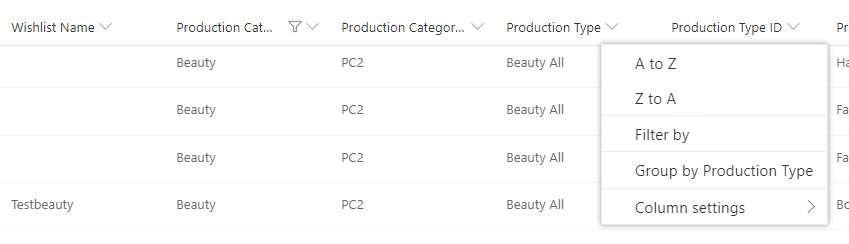
 sang1205
All 8 comments
Thank you for reporting this issue. We will be triaging your incoming issue as soon as possible.
 msft-github-bot
on 13 Feb 2020
msft-github-bot
on 13 Feb 2020
@sang1205 Can you please provide more information?
 KaushalKhamar
on 13 Feb 2020
KaushalKhamar
on 13 Feb 2020
Not clear if this is a question about SPFx (doesn't appear so) or Office UI Fabric React (appears so). If you're having an issue, please add details around your context.
If it's a question on how to do something, respectfully you need to provide a lot more "here's what I've tried" instead of a generic "someone help me do this."
 andrewconnell
on 13 Feb 2020
andrewconnell
on 13 Feb 2020
The more context details you can provide, the easier it is to help assist on issues. Any code you can provide and/or screenshots of the issue also help. The easier you can make it to reproduce the issue, the easier and quicker it is for someone to help you. Please refer to How to Create Good Issues, specifically How to Create Good Issues: Include context, in our wiki for more details.
msft-github-bot
on 13 Feb 2020
@sang1205 I was able to implement something like this by passing an IContextualMenu props object into the menuProps of a CommandBarItem in a CommandBar.
Though we don't use DetailsList, we made our own list component instead, but I'm sure it can be done with a column header like that.
It's a matter of putting the right props in the right place, once I figured that out I think I finally understand Fabric, after two years of using it...
Perhaps look at these props for DetailsList
- columns prop
- onColumnHeaderClick callback
- onColumnHeaderContextMenu callback
 ng-lboyle
on 13 Feb 2020
ng-lboyle
on 13 Feb 2020
@sang1205 Can you please provide more information?
I have updated my question . Please check and let me know if you can help
sang1205
on 15 Feb 2020
This question isn't so much about SharePoint dev / SPFx, it's more specific on how to use the Office UI Fabric React library. I suggest you please post your question to the OUIFR projects as they have more context and can likely provide a solution. Feel free to cross-link this issue.
andrewconnell
on 19 Feb 2020
Thank you for your submission. As explained in our wiki (Issue List: What doesn't belong in the issue list), this issue list is for SharePoint developer/development issues. All capability question/discussion questions, or topics related to SharePoint administration & end-user topics should be reported through the support user interface available in the tenant admin settings. You can also have a discussion and ask questions at the SharePoint TechCommunity forum. You can learn more about this in our wiki: type:invalid-not-dev-issue
msft-github-bot
on 19 Feb 2020
Related issues
 qrown
·
3Comments
qrown
·
3Comments
 acksoft
·
3Comments
acksoft
·
3Comments
 thechriskent
·
3Comments
thechriskent
·
3Comments
 christianbueschi
·
3Comments
christianbueschi
·
3Comments
 waldekmastykarz
·
3Comments
waldekmastykarz
·
3Comments
Most helpful comment
Not clear if this is a question about SPFx (doesn't appear so) or Office UI Fabric React (appears so). If you're having an issue, please add details around your context.
If it's a question on how to do something, respectfully you need to provide a lot more "here's what I've tried" instead of a generic "someone help me do this."