Sp-dev-docs: Site Design Create Content Type action gives an invalid type error
Category
- [ ] Question
- [ ] Typo
- [x] Bug
- [ ] Additional article idea
Expected or Desired Behaviour
The site design script should create a column: "To" and a content type with such column assigned
Observed Behaviour
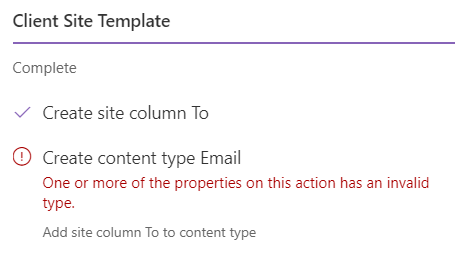
the column is correctly created but when it comes to the content type the following error is raised
Steps to Reproduce
i create a site-design through power shell, associating the below site-script and then i apply the site design through the UI.
Site Script code:
{
  "$schema": "schema.json",
  "actions": [
    {
      "verb": "createSiteColumn",
      "fieldType": "Text",
      "internalName": "EmailTo",
      "displayName": "To",
      "isRequired": false
    },
    {
      "verb": "createContentType",
      "name": "Email",
      "description": "Project Email",
      "parentName": "Item",
      "hidden": false,
      "subactions": [
        {
          "verb": "addSiteColumn",
          "internalName": "EmailTo"
        }
      ]
    }
  ],
  "bindata": {},
  "version": 1
}
i hope i'm not doing some obvious typo but it's a while i'm trying and i think everything is ok.
thanks a lot for your help.
 Sturez
All 8 comments
Thank you for reporting this issue. We will be triaging your incoming issue as soon as possible.
 msft-github-bot
on 22 Jan 2020
msft-github-bot
on 22 Jan 2020
Hello @Sturez, I could not reproduce this issue in a new Office 365 group. Are you applying the Site Design to a new or an existing site collection? If it is an existing one, can you try that in a new site collection?
 JarbasHorst
on 22 Jan 2020
JarbasHorst
on 22 Jan 2020
I confirm the script runs correctly on a brand new site collection. Actually the site-script's target is a sub-site of an existing site collection.
It's a while i'm not working in SharePoint, but as far as i remember each sub-site can have it's own content types, is this my error?
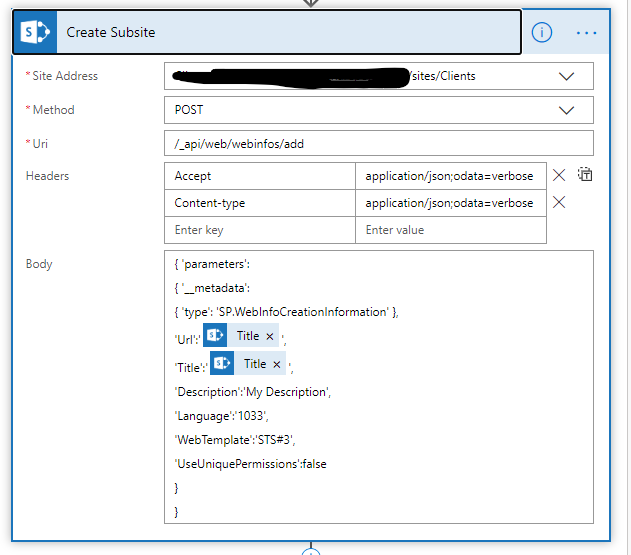
Here is how i create the subsite (through a flow) :
Sturez
on 22 Jan 2020
Hello @Sturez ,
after analyzing your case more carefully, I was able to identify two issues:
A sub site can have it's own content types and this is causing the first problem here. The properties parentName or parentId must point to a content type that exists in the parent. In your case, the parent is the sub site and it looks as if Site Design can't find any Item content type there. If you provide the content type ID rather than parentName or parentId you should be able to create a site content in a sub site.
It looks as if EmailTo is a reserved InternalName since createSiteColumn can't create a column with this internal name. Instead of creating EmailTo it creates EmailTo1. Changing the site column's internalName from EmailTo to Prefix_EmailTo fixed the problem.
I have changed and tested your Site Script in a new sub site under a new communication site. This is how it looks:
{
   "$schema":"schema.json",
   "actions":[
      {
         "verb":"createSiteColumn",
         "fieldType":"Text",
         "internalName":"Prefix_EmailTo",
         "displayName":"To",
         "isRequired":false
      },
      {
         "verb":"createContentType",
         "name":"Email",
         "description":"Project Email",
         "parentName":"Item",
         "hidden":false,
     "id":"0x0100A33D9AD9805788419BDAAC2CCB37509D",
         "subactions":[
            {
               "verb":"addSiteColumn",
               "internalName":"Prefix_EmailTo"
            }
         ]
      }
   ],
   "bindata":{

   },
   "version":1
}
In case of a sub site, parentName and parentId should also consider content types from the site collection. For me, this looks like a bug! Ping @andrewconnell
JarbasHorst
on 23 Jan 2020
I'm not knowledgeable on site designs/site scripts so will have to let someone else be the judge if it's a bug.
 andrewconnell
on 23 Jan 2020
andrewconnell
on 23 Jan 2020
Hi @JarbasHorst , thanks a lot for your prompt answer. i'll try the point one next week and i'll write here the outcome.
Regarding the point two, it's my mistake, i was trying with something like "ProjectEmailTo". in the meantime thanks a lot for your help, guys.
Sturez
on 24 Jan 2020
This issue has been automatically marked as stale because it has marked as requiring author feedback but has not had any activity for 7 days. It will be closed if no further activity occurs within the next 7 days of this comment. Please see our wiki for more information: Issue List Labels: Needs Author Feedback & Issue List: No response from the original issue author
msft-github-bot
on 31 Jan 2020
Closing issue due to no response from the original author. Please refer to our wiki for more details, including how to remediate this action if you feel this was done prematurely or in error: No response from the original issue author
msft-github-bot
on 7 Feb 2020
Related issues
 bengtmoss
·
3Comments
bengtmoss
·
3Comments
 Ralms
·
3Comments
Ralms
·
3Comments
 StfBauer
·
3Comments
StfBauer
·
3Comments
 karishmaTCS
·
3Comments
karishmaTCS
·
3Comments
 christianbueschi
·
3Comments
christianbueschi
·
3Comments
Most helpful comment
Hello @Sturez ,
after analyzing your case more carefully, I was able to identify two issues:
A sub site can have it's own content types and this is causing the first problem here. The properties parentName or parentId must point to a content type that exists in the parent. In your case, the parent is the sub site and it looks as if Site Design can't find any Item content type there. If you provide the content type ID rather than parentName or parentId you should be able to create a site content in a sub site.
It looks as if EmailTo is a reserved InternalName since createSiteColumn can't create a column with this internal name. Instead of creating EmailTo it creates EmailTo1. Changing the site column's internalName from EmailTo to Prefix_EmailTo fixed the problem.
I have changed and tested your Site Script in a new sub site under a new communication site. This is how it looks:
In case of a sub site, parentName and parentId should also consider content types from the site collection. For me, this looks like a bug! Ping @andrewconnell