Sp-dev-docs: Adding SPFx web part to teams gives a random error when not tenant-deployed
4912 ## Category
- [x] Bug
Expected or Desired Behavior
If the SPFx was not deployed tenant-wide either DO NOT show it in the teams app at all, or when a user try to add it show a friendly message saying the package must be deployed globally, using the "Make this solution available to all sites in the organization"
Observed Behavior
Users can try to add the SPFx as a tab to teams, but get redirected to an unclear error page saying the component ID is wrong.
Steps to Reproduce
Create and SPFx that allows tenant-wide deployment
Deploy it WITHOUT selecting "Make this solution available to all sites in the organization"
Sync it to teams
Switch to teams: try to add this app as a tab to teams >> see error page.
Comments
Sure, the documentation says this option is required, and that is fine. The bug I open here is strictly for asking to either not show apps that were not deployed globally in the teams app OR to show a friendly error message explaining how to make it work in the teams app, IE: "You must deploy this app globally before you add it to Teams"
 shaipetel
All 12 comments
Thank you for reporting this issue. We will be triaging your incoming issue as soon as possible.
 msft-github-bot
on 17 Dec 2019
msft-github-bot
on 17 Dec 2019
Referencing documentation, step 5:
https://docs.microsoft.com/en-us/sharepoint/dev/spfx/integrate-with-teams-introduction#deployment-options
shaipetel
on 17 Dec 2019
While I agree & it's a good suggestion, I'm not sure this is a bug because it is working as designed. From my POV, this is a change request to the UX... correct? If so, those goto User Voice as they aren't really bugs...
 andrewconnell
on 17 Dec 2019
andrewconnell
on 17 Dec 2019
Thank you for your submission. As your submission is an enhancement on existing feature or a feature request, we cannot process is through this channel. Please submit your feedback and suggestion using UserVoice at http://sharepoint.uservoice.com, so that we can take it into account in our future planning. Thank you for your input advance.
msft-github-bot
on 17 Dec 2019
@andrewconnell perhaps we disagree on the definition of bug vs. by design,
IMHO if you allow the user to click add -> SPFx webpart and they end up in a random error page that would be considered a bug.
In fact, I can't imagine a clearer scenario of a bug.
But, agree to disagree? ;)
shaipetel
on 18 Dec 2019
IMHO, bug = doesn't work as designed.
The docs you linked to state when you create the project to say to make it available for tenant wide deployment and when you deploy it, the docs explicitly state "Ensure that the Make this solution available to all sites in the organization option is selected, so that the web part can be used from the Microsoft Teams side.".
From my POV, if one doesn't follow the instructions, and it doesn't work, that's not a bug. That's by design. Like I said, could the UX be a bit clearer for the end user? Sure, but that's not a bug...
andrewconnell
on 18 Dec 2019
IMHO, bug = doesn't work as designed.
The docs you linked to state when you create the project to say to make it available for tenant wide deployment and when you deploy it, the docs explicitly state "_Ensure that the Make this solution available to all sites in the organization option is selected, so that the web part can be used from the Microsoft Teams side._".
From my POV, if you don't follow the instructions, and it doesn't work, that's not a bug. That's by design. Like I said, could the UX be a bit clearer for the end user? Sure, but that's not a bug...
Sorry, but where in the document does it say the users should be able to try to add the web part and they should be redirected to a strange error page?
The documentation says it is not supported, sure. But the bug is not about that - the bug is about the error page that is showing up. I'm sure that is not intentional OR by design.
shaipetel
on 18 Dec 2019
@shaipetel said (my emphasis):
Sorry, but where in the document does it say the users should be able to try to _add the web part_ and they should be redirected to a strange error page?
I didn't say that. Users aren't adding a _web part_, they are adding a _tab_ in Microsoft Teams.
I just copied the docs that say they have to select the box to deploy it to all sites in the org which is what the docs say. The one you linked to in your comment contains this in the deployment step:
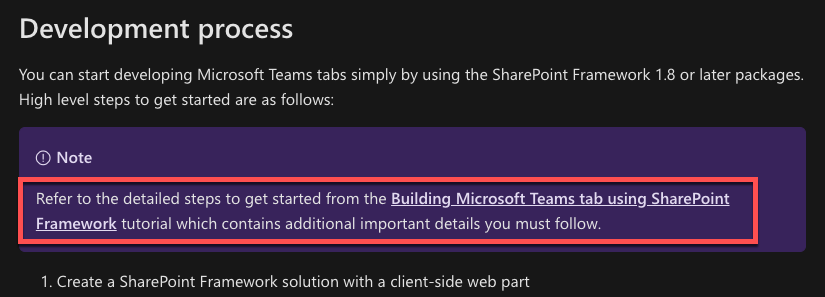
That page contains the text I quoted in my last reply.
andrewconnell
on 18 Dec 2019
True, but the user adding the Tab is not the developer, or the person who deploys the app.
Assuming someone else deployed your SPFx to be used on one specific site.
From my POV, of a Teams user - I open Teams, click to add a tab, see a "cool weather viewer" and selects it. Boom - error page.
Maybe its a Teams bug, maybe should not be reported here, IDK, but definitely a bug.
All the documents you are referencing aren't relevant to the user who just adds the tab.
The more these apps become popular, the more support tickets these users will open, rightly so, since they aren't appear to be doing anything wrong but are getting a random error page.
that said, feel free to keep it closed I've said what I had to say and its fine if you don't agree. I'm sure it will get fixed when other people keep reporting it I'm not about to make this a crusade of mine.
Thanks for the quick responses!
shaipetel
on 18 Dec 2019
NP... I'm just trying to stay by the "rules" of this repo's issue list. This is for SharePoint dev issues... from my POV, what you're describing is a UX experience change and that's, according to the convention, is a user voice submission.
If it was reported as a SharePoint UX issue, I would have tagged it "invalid:not-dev-issue" which would have automatically closed it with a comment to post it to Tech Community.

andrewconnell
on 18 Dec 2019
I love Elmo. You win ;)
shaipetel
on 18 Dec 2019
Issues that have been closed & had no follow-up activity for at least 7 days are automatically locked. Please refer to our wiki for more details, including how to remediate this action if you feel this was done prematurely or in error: Issue List: Our approach to locked issues
msft-github-bot
on 23 Jan 2020
Related issues
 thechriskent
·
3Comments
thechriskent
·
3Comments
 ken-harris
·
3Comments
ken-harris
·
3Comments
 waldekmastykarz
·
3Comments
waldekmastykarz
·
3Comments
 Ralms
·
3Comments
Ralms
·
3Comments
 patrick-rodgers
·
3Comments
patrick-rodgers
·
3Comments