Sp-dev-docs: Error - TypeError: this.log is not a function
When adding this.log to custom subtasks I'm getting the error listed in the title.
v1.9.1 of SPFx.
Document Details
⚠ Do not edit this section. It is required for docs.microsoft.com ➟ GitHub issue linking.
- ID: 61ea7187-d184-a7d7-bee8-eafffc5b2b47
- Version Independent ID: e34bb8a6-c90d-275d-57d9-840534ec46e4
- Content: Integrate gulp tasks in SharePoint Framework toolchain
- Content Source: docs/spfx/toolchain/integrate-gulp-tasks-in-build-pipeline.md
- Product: sharepoint
- Technology: sharepoint-framework
- GitHub Login: @spdevdocs
- Microsoft Alias: spdevdocs
 AJIXuMuK
All 6 comments
Thank you for reporting this issue. We will be triaging your incoming issue as soon as possible.
 msft-github-bot
on 5 Dec 2019
msft-github-bot
on 5 Dec 2019
Could you provide more details?
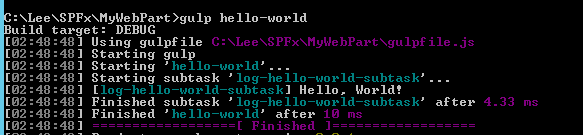
I did sample test in my local environment while can't reproduce.
`'use strict';
const gulp = require('gulp');
const build = require('@microsoft/sp-build-web');
build.addSuppression(
Warning - [sass] The local CSS class 'ms-Grid' is not camelCase and will not be type-safe.);
let helloWorldSubtask = build.subTask('log-hello-world-subtask', function(gulp, buildOptions, done) {
this.log('Hello, World!');
// use functions from gulp task here
done();
});
build.rig.addBuildTasks(helloWorldSubtask);
build.initialize(gulp);
`
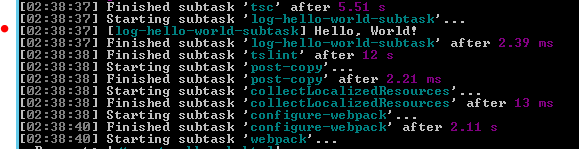
Or
const gulp = require('gulp');
const build = require('@microsoft/sp-build-web');
build.addSuppression(Warning - [sass] The local CSS class 'ms-Grid' is not camelCase and will not be type-safe.`);
let helloWorldSubtask = build.subTask('log-hello-world-subtask', function(gulp, buildOptions, done) {
this.log('Hello, World!');
// use functions from gulp task here
done();
});
//build.rig.addBuildTasks(helloWorldSubtask);
// Register the task with gulp command line
let helloWorldTask = build.task('hello-world', helloWorldSubtask);
build.initialize(gulp);`
Lee
Microsoft SharePoint Community Support
 OS-Lee
on 5 Dec 2019
OS-Lee
on 5 Dec 2019
Hi @OS-Lee,
Sorry, my bad in initial description. The project is on version 1.8.2.
The code:
'use strict';

const gulp = require('gulp');
const build = require('@microsoft/sp-build-web');

let updateVersionTask = build.subTask('update-version', (gulp, buildOptions, done) => {
    this.log('TEST');
    done();
});

build.rig.addPreBuildTask(updateVersionTask);

build.initialize(gulp);
Define the function as
let updateVersionTask = build.subTask('update-version', function(gulp, buildOptions, done){
    this.log('TEST');
    done();
});
will fix the error based on my testing.
Lee
Microsoft SharePoint Community Support
OS-Lee
on 6 Dec 2019
Yep, arrow function replaces the context! Thanks!
AJIXuMuK
on 9 Dec 2019
Issues that have been closed & had no follow-up activity for at least 7 days are automatically locked. Please refer to our wiki for more details, including how to remediate this action if you feel this was done prematurely or in error: Issue List: Our approach to locked issues
msft-github-bot
on 23 Jan 2020
Related issues
 bengtmoss
·
3Comments
bengtmoss
·
3Comments
 byrongits
·
3Comments
byrongits
·
3Comments
 mikeparkie
·
3Comments
mikeparkie
·
3Comments
 patrick-rodgers
·
3Comments
patrick-rodgers
·
3Comments
 nanddeepn
·
3Comments
nanddeepn
·
3Comments