Sp-dev-docs: null value for blank fields
Category
- [x] Question
- [ ] Typo
- [ ] Bug
- [ ] Additional article idea
Observed Behavior
When returning the values from a SharePoint list, blank text fields are null instead of empty strings. The downside is that I cannot compare against null (as in fieldValue !== null) without getting a tslint warning.
Steps to Reproduce
Get data from SharePoint list
  private _getListItemsData(): Promise<ISPItems> {
    return this.context.spHttpClient.get(this.context.pageContext.web.absoluteUrl + '/_api/web/lists(guid' + this.props.selectedKey + ')/items', SPHttpClient.configurations.v1)
      .then((response: SPHttpClientResponse) => {
        return response.json();
      });
  }
Iterating the results
    this._getListItemsData()
      .then((listItems: ISPItems) => {
        listItems.value.forEach(fe => {
          console.log(fe.Department) // always null when SharePoint field is blank
          }
        });
Comparing as below works but generates tslint warning (no-null-keyword: Use 'undefined' instead of 'null')
if (fe.Department !== null)
Comparing as below works but isn't recommended as it isn't type-safe
if (fe.Department != undefined)
Comparing as below does not work (since the value is null)
if (fe.Department !== undefined)
 BassemNKhalil
All 16 comments
Thank you for reporting this issue. We will be triaging your incoming issue as soon as possible.
 msft-github-bot
on 7 Nov 2019
msft-github-bot
on 7 Nov 2019
Actually, the returned odata for empty field will be null, if want to convert to empty string instead of null, could do a compare like this:
import * as React from 'react';
import styles from './ReactSpfx.module.scss';
import { IReactSpfxProps } from './IReactSpfxProps';
import { escape } from '@microsoft/sp-lodash-subset';
import { SPHttpClient,SPHttpClientResponse,ISPHttpClientOptions } from '@microsoft/sp-http';
import CKEditor from '@ckeditor/ckeditor5-react';
import ClassicEditor from '@ckeditor/ckeditor5-build-classic';
import * as $ from 'jquery';
import { SPComponentLoader } from '@microsoft/sp-loader';
import 'DataTables.net';
import {Environment,EnvironmentType} from '@microsoft/sp-core-library';


export interface ISPLists {
  value: ISPList[];
}

export interface ISPList {
  Title: string;
  Id: string;
  Department: string;
}


export default class ReactSpfx extends React.Component<IReactSpfxProps, IMsprocesseditState> {


  public render(): React.ReactElement<IReactSpfxProps> {
    SPComponentLoader.loadCss("https://cdn.datatables.net/1.10.19/css/jquery.dataTables.min.css");
    return (

              <table ref='table' className={styles.table}>
              </table>


    );
  }


  private _getListData(): Promise<ISPLists> {
    return this.props.context.spHttpClient.get(this.props.context.pageContext.web.absoluteUrl + `/_api/web/lists/getbyTitle('MyList')/items`, SPHttpClient.configurations.v1)
      .then((response: SPHttpClientResponse) => {
        return response.json();
      });
  }

  private _renderList(items: ISPList[]): void {
    let html: string = '';
    var jsonarr= items.map((item: ISPList) => {

      return [
          item.Id,
          item.Title,
          item.Department==null ? "": item.Department
      ];

    });

    $(this.refs.table).DataTable( {
      data: jsonarr,
      columns: [
          { title: "ID" },
          { title: "Title" },
          {title:"Department"}
      ]
     });
  }

  private _renderListAsync(): void {
    if (Environment.type == EnvironmentType.SharePoint || Environment.type == EnvironmentType.ClassicSharePoint) {
          this._getListData()
            .then((response) => {
              this._renderList(response.value);
            });
        }
  }
  public componentDidMount() {

      this._renderListAsync();
 }

}
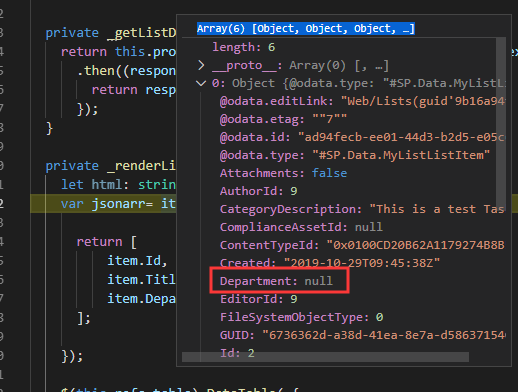
This is the Source Json Data from list, null for Department:
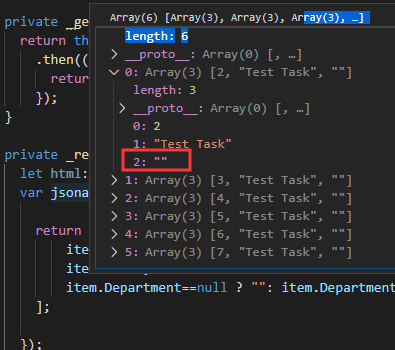
This is the coverted array data:
Jerry Zy
Microsoft SharePoint Community Support
 Jerry0527
on 7 Nov 2019
Jerry0527
on 7 Nov 2019
Hi @Jerry0527, thanks for the swift response.
If I’m reading this correctly, your suggestion wouldn’t be type safe since it’s using == not === and would still generate the same tslin warning I get (no-null-keyword: Use 'undefined' instead of 'null').
Did I miss something in your sample that would suppress the warning and/or ensure type safety?
Thanks,
Bass
BassemNKhalil
on 7 Nov 2019
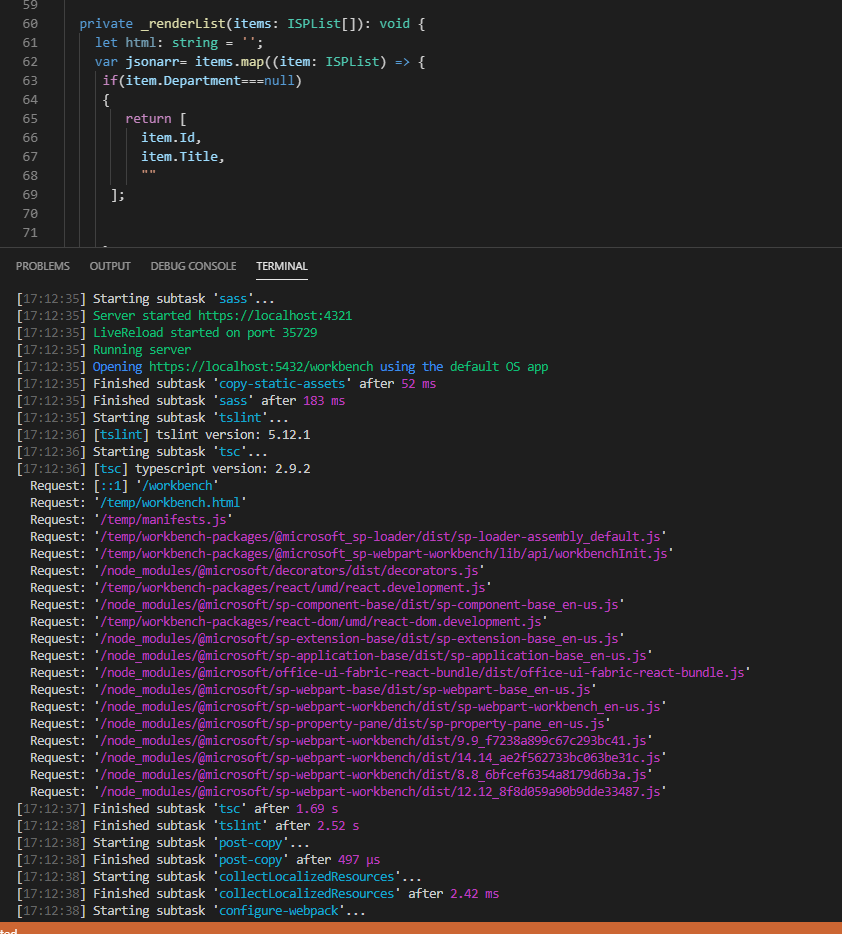
@BassemNKhalil , I didn't get same warning when using "===" to compare empty field with null, see the capture below:
Jerry Zy
Microsoft SharePoint Community Support
Jerry0527
on 8 Nov 2019
@Jerry0527 interesting 😀
I fear this is because I’m scaffolding the project targeting sp16 which uses older libraries as it relies on SPFx 1.1
Thnak you for your help - I’ll try and confirm if this is related to tslint version used with SPFx 1.1
BassemNKhalil
on 8 Nov 2019
This is less of an SPFx version thing, and more of a code governance issue.
Sounds like you are using no-null-keyword in your TSLint config. This purpose of this is to reduce complexity of your code and _force_ you to follow a standard of using undefined to check for empty.
So the first question you must ask.... Is this a standard you want for your organization or do you not care? If you do not care, feel free to remove it from your TSLint rules (from your tslint.json).
If it is a standard you want in your codebase.... then it can be fixed/achieved in many ways. The first and most simplistic way, would be to understand that null is a _falsy_ in JavaScript. Which means, it has an inherent boolean value (true/false).
This mean you don't technically have to check department == null. You could change your code to the following...
   return [
          item.Id,
          item.Title,
          item.Department ? item.Department: ""
      ];
There is an inherent downside to this approach however, in that... there are 6 falsy's in JavaScript and your code technically doesn't know whether the value is _false_, _0_, _''_, _null_, _undefined_ or _NaN_. In your use case it is likely fine.... but there are scenarios where your calling code requires knowing the true value.
 bcameron1231
on 8 Nov 2019
bcameron1231
on 8 Nov 2019
Hi @bcameron1231 and thanks for your response.
While I understand the warning message is caused by tslint configuration, I haven’t changed my tslint configuration from what is generated with SPFx hence why I believe it’s related to the version of SPFx as the warning shows on my end but not on @Jerry0527’s.
As to the falsy 6, I don’t think null is the correct representation. If a column exists but the value is empty why would that be null and not ‘’? And even if there’s a rationale behind that, how come the default settings in tslint stop us from using null comparison? It seems like either the web service needs to return ‘’ instead of null or the default config for tslint with SPFx needs to allow null usage (although that’s not recommended).
Let me know what you think.
Thanks,
Bassem
BassemNKhalil
on 10 Nov 2019
The web service returns null because the value is null... It's not an empty string. There's a difference between no value and an empty string.
I haven't seen a lint config with this turned on. What version of SPFx Generator are you using?
I personally think this is a non issue because the web service is working correctly, and the use of no-null-keyword is not required.
bcameron1231
on 10 Nov 2019
Hi @bcameron1231, I'm using the latest generator but targeting SP16 which seems to be the issue since targeting SPO does not show the same warning. Looking at the tsling.json config file I can see that it extends @microsoft/sp-tslint-rules/base-tslint.json so it seems like a change to the core libraries after 1.1 (the one used with SP16).
I think the best way forward is for me to override the null tslint rule in my tslint.json config to match the behaviour of later versions of the framework - any guidance on that is appreciated, putting the rule as true in the tslint.json config file does not seem to work.
I do understand your point on returning null. I was just expecting more coherence - either return null from web service and allow null checking (which seems to be the case in later releases) or return underfine\empty string and keep the rule to avoid null checking.
Thanks again for your help.
BassemNKhalil
on 10 Nov 2019
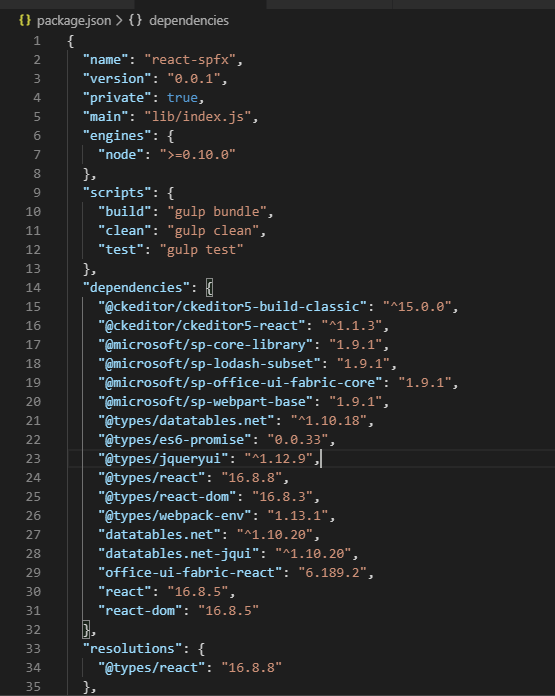
I used SPFX 1.9.1 which should be latest version currently:
And this is the tslint.json I am using:
{
  "extends": "@microsoft/sp-tslint-rules/base-tslint.json",
  "rules": {
    "class-name": false,
    "export-name": false,
    "forin": false,
    "label-position": false,
    "member-access": true,
    "no-arg": false,
    "no-console": false,
    "no-construct": false,
    "no-duplicate-variable": true,
    "no-eval": false,
    "no-function-expression": true,
    "no-internal-module": true,
    "no-shadowed-variable": true,
    "no-switch-case-fall-through": true,
    "no-unnecessary-semicolons": true,
    "no-unused-expression": true,
    "no-use-before-declare": true,
    "no-with-statement": true,
    "semicolon": true,
    "trailing-comma": false,
    "typedef": false,
    "typedef-whitespace": false,
    "use-named-parameter": true,
    "variable-name": false,
    "whitespace": false
  }
}
Jerry Zy
Microsoft SharePoint Community Support
Jerry0527
on 11 Nov 2019
Hi @Jerry0527, if I'm not mistaken the extract you've provide is targeting SharePoint online (given that it's using React 16) - my issue is generated using generator 1.9.1 but targeting SharePoint 2016 on-prem (which enforces 1.1 core libraries).
Cheers,
Bass
BassemNKhalil
on 12 Nov 2019
I'm using SPFx generator 1.9.1, targeting SharePoint 2016 on-premises.
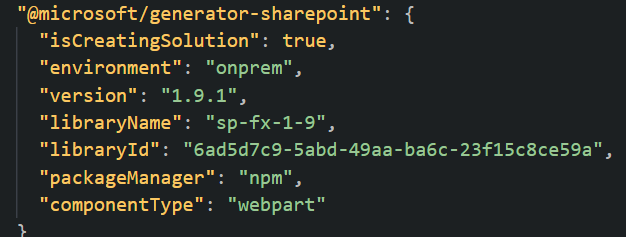
This is my tslint.json.
{
  "extends": "@microsoft/sp-tslint-rules/base-tslint.json",
  "rules": {
    "class-name": false,
    "export-name": false,
    "forin": false,
    "label-position": false,
    "member-access": true,
    "no-arg": false,
    "no-console": false,
    "no-construct": false,
    "no-duplicate-variable": true,
    "no-eval": false,
    "no-function-expression": true,
    "no-internal-module": true,
    "no-shadowed-variable": true,
    "no-switch-case-fall-through": true,
    "no-unnecessary-semicolons": true,
    "no-unused-expression": true,
    "no-use-before-declare": true,
    "no-with-statement": true,
    "semicolon": true,
    "trailing-comma": false,
    "typedef": false,
    "typedef-whitespace": false,
    "use-named-parameter": true,
    "variable-name": false,
    "whitespace": false
  }
}
My recommendation is to remove it from your solution, if you don't want it.
bcameron1231
on 12 Nov 2019
Hi, I've reproduced with a fresh env\webpart to rule out any custom configuration on my end:
Fresh install of Node v8.16.2 and NPM 6.4.1
Latest gulp, yo and generator
+-- @microsoft/[email protected]
+-- [email protected]
+-- [email protected]
`-- [email protected]
Created a new solution targeting SP16, my .yo-rc looks slightly different as it has a tag for the environment with onprem value, otherwise seems to be the same.
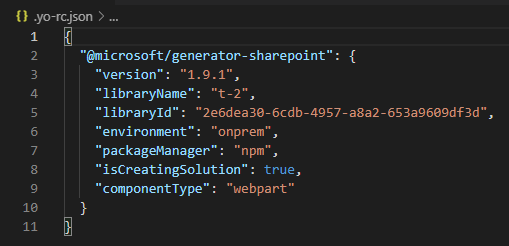
Using either a React webpart or a plain JavaScript one with no framework, I can see this warning

[09:49:01] Warning - tslint - src\webparts\test2\Test2WebPart.ts(29,31): error no-null-keyword: Use 'undefined' instead of 'null'
This is the line causing it

This is my tslint.json, generated by SPFx with no changes on my end

One side note, I'm happy to work around this by adding a rule to the tslint.json configuration. Adding "no-null-keyword": false to the end of the tslint.json does not make a difference and the warning is still shown.
Thanks,
Bass
BassemNKhalil
on 13 Nov 2019
Ah, so I am able to reproduce your issue. Looks as though it may be related to #4615 . The rules in this tslist config aren't actually working for the 2016 and 2019 projects. So we are unable to override it.
bcameron1231
on 13 Nov 2019
Closing issue as "answered". If you encounter similar issue(s), please open up a NEW issue. Thank you.
msft-github-bot
on 16 Nov 2019
Issues that have been closed & had no follow-up activity for at least 7 days are automatically locked. Please refer to our wiki for more details, including how to remediate this action if you feel this was done prematurely or in error: Issue List: Our approach to locked issues
msft-github-bot
on 23 Jan 2020
Related issues
 byrongits
·
3Comments
byrongits
·
3Comments
 qrown
·
3Comments
qrown
·
3Comments
 mikeparkie
·
3Comments
mikeparkie
·
3Comments
 Ralms
·
3Comments
Ralms
·
3Comments
 waldekmastykarz
·
3Comments
waldekmastykarz
·
3Comments