Sp-dev-docs: ListViewCommand: event.selectedRows not updating
Category
- [ ] Question
- [ ] Typo
- [x] Bug
- [ ] Additional article idea
Expected or Desired Behavior
Our ListViewCommand buttons are not working anymore. When selecting a specific item in a list and clicking our command button, at first there is no issue. When selecting another item in the list and then clicking the command button, event.selectedRows is still referring to the item that was selected initially. Only when I deselect an item before selecting another item, the selectedRows is showing the actual selected item. If I jump from Item 1 to Item 2 (without deselecting Item 1), selectedRows is not updated accordingly.
Observed Behavior
When selecting an item in the list, event.selectedRows should be updated accordingly.
Steps to Reproduce
- Create a new ListView command extension
- run gulp serve
- select an item in the list (i.e. Item 1)
- select another item in the list (i.e. Item 2)
- check event.selectedRows (it refers to Item 1)
See also this video repro: https://1drv.ms/v/s!AqmJ4PFCanuAnehX6Szz_7IS4Up1KQ
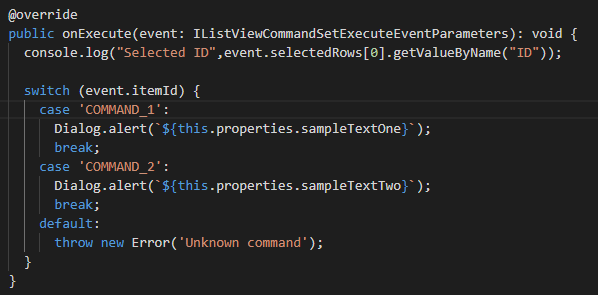
I'm logging the selected item ID from the onExecute method.
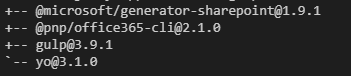
my versions:
 jordyvanbremen
All 39 comments
Thank you for reporting this issue. We will be triaging your incoming issue as soon as possible.
 msft-github-bot
on 16 Oct 2019
msft-github-bot
on 16 Oct 2019
Same problem here.
Tenant is set to targeted release.
 cwdata
on 16 Oct 2019
cwdata
on 16 Oct 2019
I didn't see this issue yesterday, but I raised the same problem just a couple of hours after this. Identical reproduction scenario
 jimmywim
on 17 Oct 2019
jimmywim
on 17 Oct 2019
Having the same issue here.
OnExecute triggers only when the number of selected items has changed.
So 1 item and selecting 2 will trigger.
But selecting 1 item and then directly selecting another then there is no trigger.
 richardpoyner
on 17 Oct 2019
richardpoyner
on 17 Oct 2019
Adding @patmill and @VesaJuvonen for increased visibility as this is a severe problem. Commands silently operating on the wrong list item shouldn't be an issue for too long.
cwdata
on 18 Oct 2019
I am also seeing the same issue.
Tenant in targeted release.
 patrikhellgren
on 20 Oct 2019
patrikhellgren
on 20 Oct 2019
Same here but only when clicking on the line itself...
When clicking on the chckmark, everything works fine...
Tenant in standard release...
If i click here in the line, it does not work :

If i click here, it works

 BraunJonathan
on 24 Oct 2019
BraunJonathan
on 24 Oct 2019
We are having the same issue - contents of event.selectedRows changes only if amount of selected rows in view changes.
Additionally tested with simple solution based on 1.9.1 and could reproduce this issue on both SR and TR rings.
 ltdu
on 24 Oct 2019
ltdu
on 24 Oct 2019
Thanks for the heads up. I reached out to the team, and they found the issue. They are working on a fix.
 patmill
on 25 Oct 2019
patmill
on 25 Oct 2019
Do we have an estimated timeline on the fix. I'm surprised a bug with this level of severity hasnt been addressed yet. We have users thinking they're executing a command on one item where in fact SharePoint is executing the command on a completely different item. It's basically wrecked havoc on our environment and there's now way to prevent it from happening.
 jhamoud
on 4 Nov 2019
jhamoud
on 4 Nov 2019
@jhamoud
Looks like events work correct if command is registered for both ContextMenu and CommandBar:
<CustomAction Location="ClientSideExtension.ListViewCommandSet"/>
 23W
on 5 Nov 2019
23W
on 5 Nov 2019
@23W
@jhamoud
Looks like events work correct if command is registered for both ContextMenu and CommandBar:<CustomAction Location="ClientSideExtension.ListViewCommandSet"/>
That's not the case in my environment at least - I already had it set up for both and I've had this same issue. I just double checked and it hasn't come good yet.
 jasonalex13
on 6 Nov 2019
jasonalex13
on 6 Nov 2019
Maybe there is other way how to detect right selection in list view, e.g. via DOM ?
How about such code?
import * as $ from 'jquery';

// optional filtering item by name
function filterItem(itemName: string) : boolean {
    return true;
}

// find the first selected item name in list view (in both view mode: records table and tiles)
export function getSelectedItemName(): string {
    let selectedItemName: string = '';

    const selectedRows = $("[role='grid'] .is-selected[role='row']:first");
    if (selectedRows.length > 0) {
        selectedRows.find('button.ms-Link')
                    .each(function () {
                        if (filterItem(this.innerText)) {
                            selectedItemName = this.innerText;
                            return false;
                        }
                    });
    }
    else {
        const selectedTiles = $("[role='list'] .ms-Tile--isSelected:first");
        if (selectedTiles.length > 0) {
            selectedTiles.find('.ms-Tile-nameplate [data-automationid="name"]')
                         .each(function () {
                             if (filterItem(this.innerText)) {
                                 selectedItemName = this.innerText;
                                 return false;
                             }
                         });
        }
    }

    return selectedItemName;
}
@patmill Do you have some info when this bug will be fixed?
23W
on 6 Nov 2019
Maybe there is other way how to detect right selection in list view, e.g. via DOM ?
How about such code?import * as $ from 'jquery'; // optional filtering item by name function filterItem(itemName: string) : boolean { return true; } // find the first selected item name in list view (in both view mode: records table and tiles) export function getSelectedItemName(): string { let selectedItemName: string = ''; const selectedRows = $("[role='grid'] .is-selected[role='row']:first"); if (selectedRows.length > 0) { selectedRows.find('button.ms-Link') .each(function () { if (filterItem(this.innerText)) { selectedItemName = this.innerText; return false; } }); } else { const selectedTiles = $("[role='list'] .ms-Tile--isSelected:first"); if (selectedTiles.length > 0) { selectedTiles.find('.ms-Tile-nameplate [data-automationid="name"]') .each(function () { if (filterItem(this.innerText)) { selectedItemName = this.innerText; return false; } }); } } return selectedItemName; }
done such things in the past and it was never a good idea. DOM might change and we have no control over that. For now I'm going to prompt the user with the selected file info when they trigger the extension and ask them to use radio buttons if selected item is wrong. Hoping that a fix will be rolled out soon.
 hamedy
on 7 Nov 2019
hamedy
on 7 Nov 2019
We are having the same issue. Is there an estimated timeline on the fix?
 matthong
on 7 Nov 2019
matthong
on 7 Nov 2019
Can we use JSOM to detect real selection in the list?
E.g. SP.ListOperation.Selection.getSelectedItems()
23W
on 10 Nov 2019
Sort of workaround:
To bypass this issue in a good manner we have created a field customizer containing our own dropdownmenu:

And then you can get the id using

 zaiby
on 11 Nov 2019
zaiby
on 11 Nov 2019
@zaiby
Could you please provide bit more information. Why dropdown menu? How can field customizer can help list view commands set, it's different extensions? By the way, looks like field customizer doesn't work in Tiled View mode, so u can't collect items ids in this mode view field customizer.
23W
on 11 Nov 2019
Sort of workaround:
To bypass this issue in a good manner we have created a field customizer containing our own dropdownmenu:
And then you can get the id using
nice try but you're gonna need to deal with another bug there. https://github.com/SharePoint/sp-dev-docs/issues/4656
hamedy
on 11 Nov 2019
Sort of workaround:
To bypass this issue in a good manner we have created a field customizer containing our own dropdownmenu:
And then you can get the id using
nice try but you're gonna need to deal with another bug there. #4656
Thanks for the heads up 😂
zaiby
on 11 Nov 2019
@zaiby
Could you please provide bit more information. Why dropdown menu? How can field customizer can help list view commands set, it's different extensions? By the way, looks like field customizer doesn't work in Tiled View mode, so u can't collect items ids in this mode view field customizer.
I can see that this may not work for everybody but the code was basically just copy paste to the new solution and then some code changes very few places. But that is what we have done as we have a go live in few days.
zaiby
on 11 Nov 2019
I'm not clear on why we're trying to hack around a bug that has the potential to create complete chaos. I dont think the dev team understand the magnitude of this. The bug is basically acting on another record than the one that the user has selected.
Think of GDPR - data privacy. If the user acts in a way that induces the bug (which is highly likely) we could end up deleting the wrong record. Reporting we deleted the right one (because sharepoint confirmed a record deletion) and incorrectly report to compliance about that fact.
Has anyone tried to go through MS Support on this? Is there another route to escalate the severity on this? Doesnt seem like Triage assigns a severity.
jhamoud
on 12 Nov 2019
@jhamoud
This bug's status was changed from "triage" to "to be reviewed" more than 20 days ago, so dev team admit that it's a bug but looks like they DO NOT THINK it's critical or severe issue!
From other side, internal SP client scripts work excellent, it means that correct solution exists. I've asked SPFx team to give as workaround for this issue (https://github.com/SharePoint/sp-dev-docs/issues/4878) but only ms-bot has visited this complain.
Do I have other way than try to find workaround by myself?
P.S.: not only event.selectedRows is broken, SPFx selection processing has broken completely: https://github.com/SharePoint/sp-dev-docs/issues/4828, https://github.com/SharePoint/sp-dev-docs/issues/4864!
P.P.S: By the way, I don't think it's a SPFx bug. Everything works fine month ago with latest SPFx version 1.9.1. And suddenly bug appears. So, I think it's bug in SP client side scripts that broke SPFx behavior.
23W
on 12 Nov 2019
@andrewconnell
Looks like I've found one bug place:
SP script listview-host-assembly_default methods refresh and execute.
Look at code:
return e.prototype.refresh = function (e) {
  if (!this._lastSelectedRows || this._lastSelectedRows.length !== e.length) {  // !< BUG PLACE
    this._lastSelectedRows = e.slice(0);
    var t = {
      selectedRows: e.map(function (e) {
        return e.accessor
      })
    };
    this._commandSet.onListViewUpdated(t),
    this._updateAdapter()
  }
},
e.prototype.execute = function () {
    var e = {
      commandId: this.commandId,
      itemId: this.commandId,
      selectedRows: (this._lastSelectedRows || [
      ]).map(function (e) {
        return e.accessor
      })
    };
    this._commandSet.onExecute(e)
},
So as you see onExecute() is called with selected rows collection from _lastSelectedRows. Member _lastSelectedRows is updated ONLY in refresh method before calling onListViewUpdated(). refresh method is called every time when selection has been changed.
But! refresh method skips all calls if _lastSelectedRows has the same count as argument! So even if new selection is different but has still the same selected items count it will be ignored!
I understand, you tries to eliminate redundant calls, but refresh method HAVE TO correctly compare stored _lastSelectedRows array and new selection array, not only by count but by values also.
23W
on 12 Nov 2019
The fix has been made by the owning team and will be rolling out with the next update. i'll updatre when we have exact dates for that.
patmill
on 12 Nov 2019
The fix has been made by the owning team and will be rolling out with the next update. i'll updatre when we have exact dates for that.
That's good news. Thanks!
matthong
on 12 Nov 2019
OK, the fix should start rolling tomorrow to a small slice of tenants, then should get to 100% by next Wed.
patmill
on 12 Nov 2019
The fix has been made by the owning team and will be rolling out with the next update. i'll updatre when we have exact dates for that.
It's excellent news. By the way, refresh method is not called at all when user clicks subfolder in list and browses it. Has it fixed also?
23W
on 12 Nov 2019
Could this other bug be related? https://github.com/SharePoint/sp-dev-fx-extensions/issues/267 (ListView Command Set: event.selectedRows returns wrong ID, when there is a pinned document in the library). Any hope it gets also solved by this rollout?
 oliverlp
on 15 Nov 2019
oliverlp
on 15 Nov 2019
Ok, it's now "next week Thursday" and the issue still persists. If the fix actually has been rolled out 100% on Wednesday it didn't fix it...
cwdata
on 21 Nov 2019
This bug is still outstanding.
Could you provide an update please.
 sukumarraju
on 22 Nov 2019
sukumarraju
on 22 Nov 2019
So unfortunately the fix for this issue is in the same build that contains the full fabric 7 rollout (see issues around css styling, etc.). We have backported the command set fix and will either release a patched build or an updated newer build shortly.
patmill
on 22 Nov 2019
Still having same issue - Any updates on this?
 EddieE79
on 24 Nov 2019
EddieE79
on 24 Nov 2019
Hi.
It started working again for me yesterday.
It has been a big big problem during all these weeks. It has been difficult to explain the situation for my clients. It has taken much more time than I could guess.
Curious to know how you have managed / best workarounds?
oliverlp
on 27 Nov 2019
The build that contains this fix is finally out.
patmill
on 28 Nov 2019
Can confirm that this is now fixed in our tenant as well.
cwdata
on 28 Nov 2019
thx @cwdata for confirming the roll out to your tenant. Closing this one as fixed for now based on that.
 VesaJuvonen
on 28 Nov 2019
VesaJuvonen
on 28 Nov 2019
Issues that have been closed & had no follow-up activity for at least 7 days are automatically locked. Please refer to our wiki for more details, including how to remediate this action if you feel this was done prematurely or in error: Issue List: Our approach to locked issues
msft-github-bot
on 23 Jan 2020
Related issues
 StfBauer
·
3Comments
StfBauer
·
3Comments
 karishmaTCS
·
3Comments
karishmaTCS
·
3Comments
 patrick-rodgers
·
3Comments
patrick-rodgers
·
3Comments
 christianbueschi
·
3Comments
christianbueschi
·
3Comments
 thechriskent
·
3Comments
thechriskent
·
3Comments
Most helpful comment
I'm not clear on why we're trying to hack around a bug that has the potential to create complete chaos. I dont think the dev team understand the magnitude of this. The bug is basically acting on another record than the one that the user has selected.
Think of GDPR - data privacy. If the user acts in a way that induces the bug (which is highly likely) we could end up deleting the wrong record. Reporting we deleted the right one (because sharepoint confirmed a record deletion) and incorrectly report to compliance about that fact.
Has anyone tried to go through MS Support on this? Is there another route to escalate the severity on this? Doesnt seem like Triage assigns a severity.