Sp-dev-docs: Command set extension in Picture Library - SPFx
Category
- [x] Question
- [ ] Typo
- [ ] Bug
- [ ] Additional article idea
I want to show a command extension on a commanBar Picture library but it is not giving results.
I understeand that i must configure the element.xml file ,RegistrationId and RegistrationType fields, but i can't find the way to make it work.
 Carolinavv
All 15 comments
Thank you for reporting this issue. We will be triaging your incoming issue as soon as possible.
 msft-github-bot
on 27 Sep 2019
msft-github-bot
on 27 Sep 2019
Can you share your elements.xml file with us?
 bcameron1231
on 27 Sep 2019
bcameron1231
on 27 Sep 2019
Title="MyExtension
RegistrationId="109"
RegistrationType="List"
Location="ClientSideExtension.ListViewCommandSet.CommandBar"
Carolinavv
on 27 Sep 2019
Can you provide a bit more information for us? SharePoint version/SPFx version and your deployment process?
bcameron1231
on 27 Sep 2019
I use spfx v1.7.0.
- To deploy the extension i do the solution package with
gulp bundle --ship
gulp package-solution --ship
and then i upload the file to my AppCatalog
- To deploy the extension i do the solution package with
Carolinavv
on 27 Sep 2019
So I assume this means SharePoint Online. And are you using tenant wide deployment or manually adding the apps to your site?
bcameron1231
on 27 Sep 2019
I'm adding manually the apps to my site
Carolinavv
on 29 Sep 2019
Have you tried upgrading the project to the latest version of SPFx (v1.9.1) to see if there is any change?
 andrewconnell
on 30 Sep 2019
andrewconnell
on 30 Sep 2019
When I test this in my environment(SPFx 1.8.2), I found the RegistrationId revert to default 100 in SPFx package, check the image below.
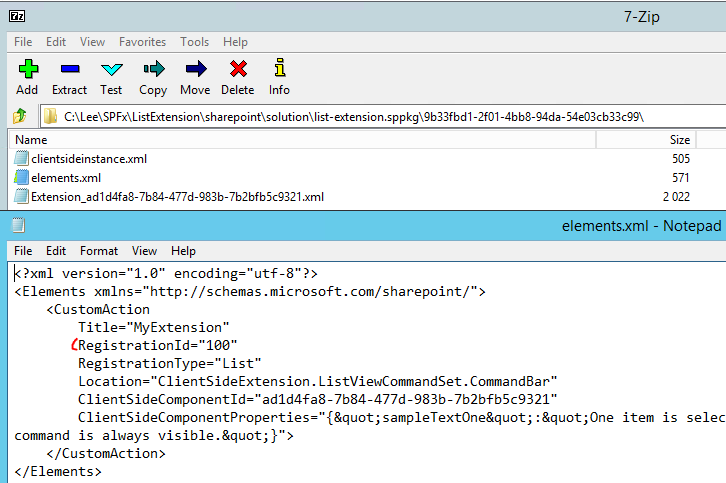
This cause extension doesn't apply to Picture library.
So I use 7-zip to edit the RegistrationId to 109 and redeploy the solution to tenant(uninstall the solution from target site, remove from recycle bin), re-add the app to target site, and it works now.

 OS-Lee
on 1 Oct 2019
OS-Lee
on 1 Oct 2019
When you shared the elements.xml file above, that's the one in the ./sharepoint/assets, correct?
You're saying when you built the project, the build process changed the registration ID?
andrewconnell
on 1 Oct 2019
Yes the above solution worked for me too. I did the same for the Site pages with Registration Id to 119.
Uninstall and Reinstall is also a crucial step. And dont forget to change the version of the app.
 Gowtham171996
on 1 Oct 2019
Gowtham171996
on 1 Oct 2019
@andrewconnell the RegistrationId of elements.xml in /sharepoint/assets is set to 109, when package the solution, the RegistrationId of elements.xml in package(.sppkg) and /sharepoint/solution/debug/featureid both set to 100.
OS-Lee
on 2 Oct 2019
@OS-Lee / @Carolinavv
Do you have a repro solution (link to public GH repo) you can share that shows this?
andrewconnell
on 2 Oct 2019
After I update ListTemplateId(ListTemplateId="109") of ClientSideInstance.xml to keep the same as elements.xml(RegistrationId="109") and package, the RegistrationId="109" set to correct value now.
OS-Lee
on 4 Oct 2019
Issues that have been closed & had no follow-up activity for at least 7 days are automatically locked. Please refer to our wiki for more details, including how to remediate this action if you feel this was done prematurely or in error: Issue List: Our approach to locked issues
msft-github-bot
on 23 Jan 2020
Related issues
 patrick-rodgers
·
3Comments
patrick-rodgers
·
3Comments
 ken-harris
·
3Comments
ken-harris
·
3Comments
 karishmaTCS
·
3Comments
karishmaTCS
·
3Comments
 acksoft
·
3Comments
acksoft
·
3Comments
 qrown
·
3Comments
qrown
·
3Comments