Sp-dev-docs: Cannot generate SPFx webpart in 1.9.1
- [x] Question
- [ ] Typo
- [x] Bug
- [ ] Additional article idea
Have installed spfx 1.9.1

but newly generated webpart is still on 1.8.2
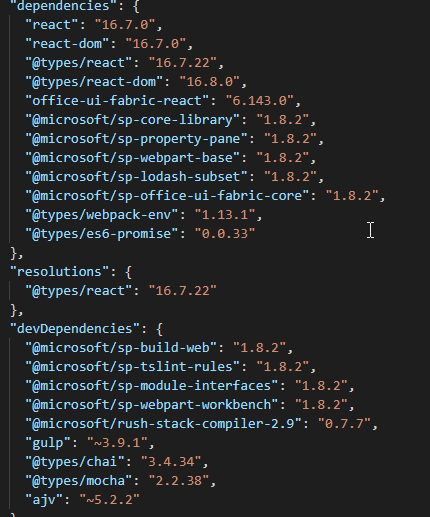
Any ideas why? Running Node 8.15
 Lagarto66
All 16 comments
Thank you for reporting this issue. We will be triaging your incoming issue as soon as possible.
 msft-github-bot
on 27 Sep 2019
msft-github-bot
on 27 Sep 2019
When you create your web part, are you doing it as part of a new solution or adding it to an existing solution?
 bcameron1231
on 27 Sep 2019
bcameron1231
on 27 Sep 2019
@bcameron1231 I scaffold a new solution
Lagarto66
on 27 Sep 2019
Hi @Lagarto66
It appears you have updated the Yeoman generator, this is only the tooling for generating new packages. For existing projects you need to replace all instances of 1.8.2 with 1.9.1 and re-run your package manager to update existing packages.
 CPritch
on 27 Sep 2019
CPritch
on 27 Sep 2019
This is not an existing project, I'm generating a new project using yo @microsoft/sharepoint --skip-install command. Such a bizarre thing. Has something changed since 1.8.2? I mean do I need to manually update a package in package.json to 1.9.1 even for a new solution?
Lagarto66
on 27 Sep 2019
When you scaffold a new web part though, are you doing it in an existing SPFx solution? (You can add multiple web parts to the same solution). Or are you creating an entirely new solution folder for your web part?
bcameron1231
on 27 Sep 2019
By new project I meant I'm creating a new folder, I'm not using existing solution, must have done it a thousand times since version 1.3. I'm running Node 8.15 and all other needed tools have been updated to the latest.
Lagarto66
on 27 Sep 2019
This is not an existing project, I'm generating a new project using yo @microsoft/sharepoint --skip-install command. Such a bizarre thing. Has something changed since 1.8.2? I mean do I need to manually update a package in package.json to 1.9.1 even for a new solution?
Sorry, I should've read that more carefully. Have you tried removing and adding the package again? What comes up with npm list -g @microsoft/generator-sharepoint?
We use the PnP generator but it just uses the same package as a dependency so doesn't really explain why it works for us. The PnP generator is @pnp/[email protected]
CPritch
on 27 Sep 2019
@CPritch no worries,

Bizzare
Will try to remove and add again but I'm pretty sure I've done it a few weeks ago, Just come back from a long holiday and noticed this.
Lagarto66
on 27 Sep 2019
Perhaps I should change the issue to a bug, not the question.
Removed generator, installed it again, even restarted PC. New folder and it does it again
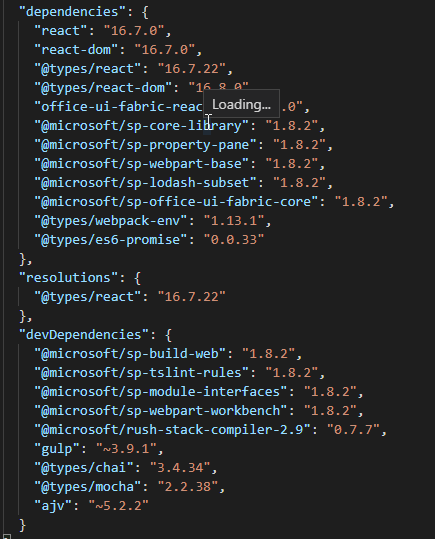
Weird. I'm off work soon, Will try on my home mac. If not will try PnP generator.
Lagarto66
on 27 Sep 2019
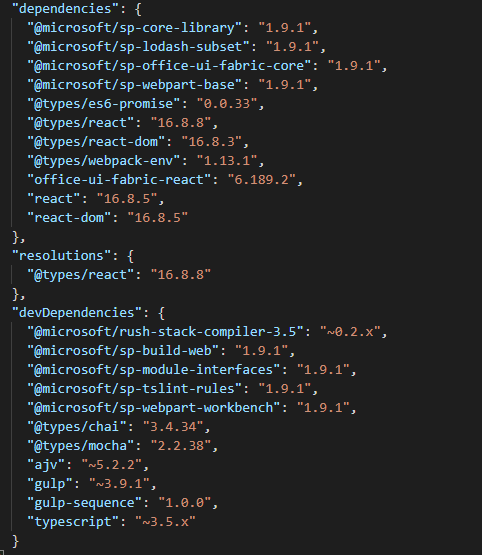
PnP generator did a job but I'm still not sure why MS generator failed. Perhaps it's time to change a provider :-P
Lagarto66
on 27 Sep 2019
_Let's keep it constructive..._
@Lagarto66 If you have the latest generator (v1.9.1) installed and you're seeing a weird behavior as you explain, it could be the result of having the .yo-rc file in the current directory path upstream from where you are creating the project.
Yeoman generators (all of them) look at the current folder & all folders in the hierarchy above it for the file .yo-rc. This contains name-value pairs from running a generator (each generator uses it differently).
In the case of the SPFx generator, it's used to store things like the target SP environment, what version of the generator was used and a few other things. When that file is found, it's used as the default for the project. It's also used when you run it a second time for the generator to decide "has the solution already been created, because if so, I can just prompt the user what component they want to add to the project."
So... if you create a project at c:\projects*, the create another at *c:\projects\newproject, the second will inherit the changes from the previous one.
_I suspect this is what @bcameron1231 was getting at with his questions..._
To see if this is your issue, look at the folder where you are creating the project and then go up the folder tree until you get to the root. If you found another .yo-rc file, that's likely the issue.
 andrewconnell
on 30 Sep 2019
andrewconnell
on 30 Sep 2019
@andrewconnell Thank you for the explanation, however, I think I need to clarify something. I use a different folder structure. I have a folder which I use for testing every single SPFx version. I usually test every single SPFx/generator version since version 1.3.
It is *c:/.../.../SPFxTest/testProject1
*c:/.../.../SPFxTest/testProject2 and so on
I do not put a new solution inside an existing solution, not for testing purposes. I hope that makes sense.
There might be 'in development' or other 'testing' projects ( with .yo-rc.json file) in the upstream path but I have never experienced 'locked/default version' with any previous SPFx/generators before.
Why PnP generator is able to deal with it in the same environment eg it's creating a project in the right version?
Lagarto66
on 30 Sep 2019
The issue I mention is that if you have a .yo-rc file anywhere in here: c:/.../.../SPFxTest/
But that might not be your issue... it's just something I mention to take a look at as it could be a reason as what you describe is a common scenario for what you're experiencing.
@Lagarto66 said:
Why PnP generator is able to deal with it in the same environment eg it's creating a project in the right version?
Can't speak to what the PnP generator does.
andrewconnell
on 30 Sep 2019
Closing issue as "answered". If you encounter similar issue(s), please open up a NEW issue. Thank you.
msft-github-bot
on 3 Oct 2019
Issues that have been closed & had no follow-up activity for at least 7 days are automatically locked. Please refer to our wiki for more details, including how to remediate this action if you feel this was done prematurely or in error: Issue List: Our approach to locked issues
msft-github-bot
on 23 Jan 2020
Related issues
 patrick-rodgers
·
3Comments
patrick-rodgers
·
3Comments
 waldekmastykarz
·
3Comments
waldekmastykarz
·
3Comments
 christianbueschi
·
3Comments
christianbueschi
·
3Comments
 byrongits
·
3Comments
byrongits
·
3Comments
 StfBauer
·
3Comments
StfBauer
·
3Comments
Most helpful comment
PnP generator did a job but I'm still not sure why MS generator failed. Perhaps it's time to change a provider :-P